

Your script worked fine yesterday. Today it throws 429 Too Many Requests on the third call, so you add a sleep(60) and try again — and now it throws on the second. Nothing in your code changed, nothing in your query changed, and the docs page you're staring at says a number that doesn't match what you're seeing. You just found out the hard way that "the rate limit" isn't one number, and that the fix you reached for made the real problem worse.
Twitter API rate limits are two separate systems wearing one name. There's a per-endpoint request limit that resets on a short rolling window, and a monthly consumption or spend cap that doesn't reset until the calendar flips. A 429 can mean either, and the fix for one makes the other worse.
Here's what each limit actually is, what the response headers tell you, what X charges per call in 2026, and how to build against all of it without hammering your account into X's automation filters. Every mechanism below is one you can verify against a live response header today.
On this page: the two limit systems · what a 429 hands you · per-endpoint buckets · retry storms · 2026 pricing · safe backoff · caching · FAQ
Twitter API rate limits: two systems, one name#
Twitter API rate limits split into two independent systems. A per-endpoint request limit caps how many calls you make inside a short rolling window and clears itself when the window rolls over. A monthly consumption cap limits how much you read, create, or spend across the calendar month, and waiting does nothing for it.
The first is a request rate limit: how many calls you can make to a given endpoint inside a rolling window. Hit it and you get a 429 that clears itself when the window rolls over — minutes, usually.
The second is a consumption cap: how many posts you can read or create in a calendar month, or how much you can spend. Hit that and no amount of waiting helps until the month resets or you top up. Same status code, completely different problem.
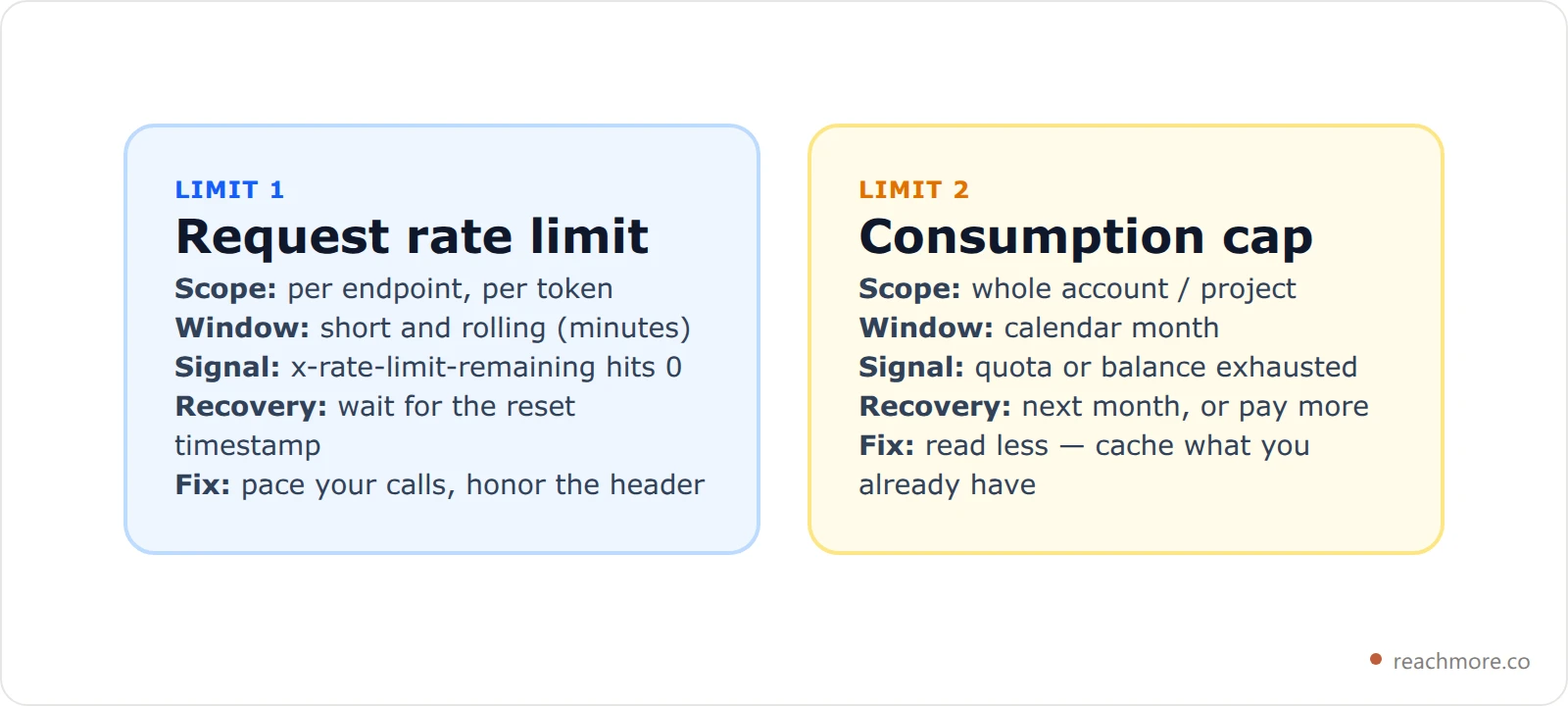
Most "my rate limit makes no sense" threads on the X developer community are someone debugging limit 1 while actually sitting on limit 2. Check which one you hit before you touch your retry logic.
What an X API 429 actually hands you#
An X API 429 always arrives with three headers describing the bucket you just touched: x-rate-limit-limit, x-rate-limit-remaining, and x-rate-limit-reset. The reset value is an absolute Unix timestamp in seconds, not a countdown — subtract the current time from it and you know precisely how long to wait.
Every X API v2 response carries the state of the bucket you just touched, whether or not the call succeeded:
x-rate-limit-limit— the bucket's ceiling for this windowx-rate-limit-remaining— calls left before you're cut offx-rate-limit-reset— a Unix timestamp in seconds for when the window rolls over
That last one is the important one, and it's the one most client libraries throw away. It isn't "seconds until reset" — it's an absolute time. Subtract Date.now() / 1000 from it and you know exactly how long to wait, to the second. No guessing, no exponential backoff blindly doubling into a wall.
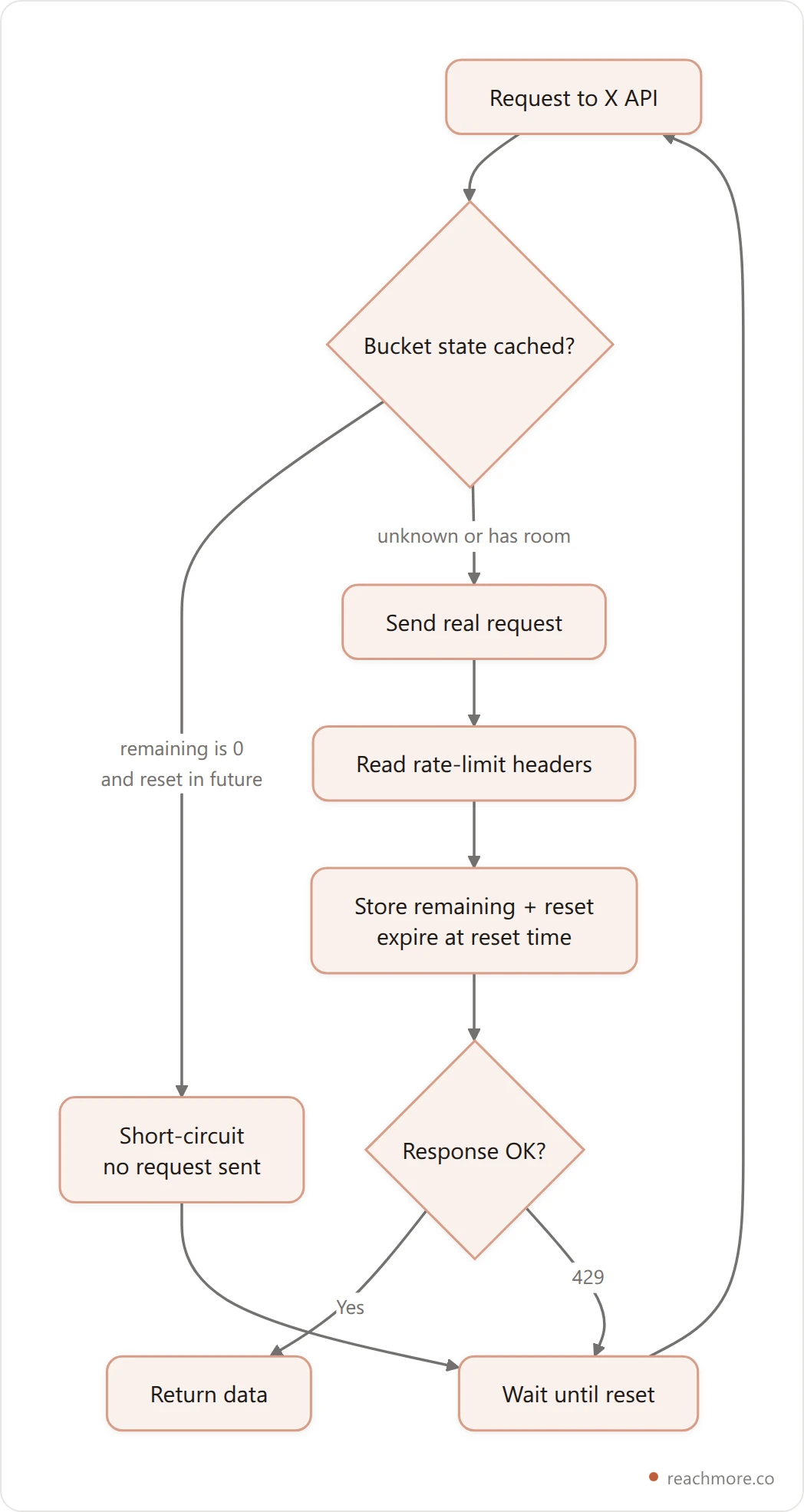
The practical rule: read those three headers on every response, not just on the 429. A successful call that comes back with remaining: 0 has already told you the next call will fail. Store that, and you never have to spend a real request finding out.
Rate limits are per endpoint, not per app#
This is the detail that makes rate limits look random. There is no single counter for "your app." Each endpoint route has its own bucket, and the bucket is keyed by route shape, not by the exact URL.
So GET /2/users/123/tweets and GET /2/users/456/tweets share a bucket — same route, different ID. But GET /2/users/123/tweets and POST /2/tweets do not share anything. Exhausting your timeline reads doesn't stop you from publishing.
The way to model this in code is a bucket key built from the method plus the path with numeric ID segments collapsed:
GET /2/users/123/tweets   →   "GET /2/users/:id/tweets"
GET /2/users/456/tweets   →   "GET /2/users/:id/tweets"
POST /2/tweets            →   "POST /2/tweets"
Track state per key, per access token. Two accounts running through the same app have entirely separate budgets, so a shared counter would either throttle one account for another's usage or miss the limit completely.
If you're building this in Python, the bucket-keying and retry code is written out in full here, alongside which errors are worth retrying and what each endpoint costs per call.
The cost of a retry storm isn't the retry#
Here's the part that catches people who've built against friendlier APIs: on X, a burst of 429s is not just wasted requests. It's a behavioral signal.
Repeated rate-limit violations are exactly the pattern X's automation detection looks for. A well-behaved integration hits a limit occasionally and backs off. A scraper hammers the same endpoint until something gives. From the outside, a naive retry loop looks identical to the second one — and the consequences land on the connected account, not just on your API key.
This is why "just retry until it works" is the wrong default here, and it's a live risk for anyone running automation on X. The safe pattern is the opposite: when you know a bucket is exhausted, don't send the request at all. A request you never made can't be counted against you.
That short-circuit is fiddly to get right, and getting it wrong costs you the account rather than the request. See how ReachMore does it out of the box.
Twitter API pricing in 2026: what each call costs#
Twitter API pricing now runs on pay-per-use for new developers, so every call has a price alongside the rate ceiling. Reads land in the tenth-of-a-cent to one-cent range, an ordinary post costs a cent and a half, and a post containing a link jumps to twenty cents — the single largest line item in most integrations.
X moved to pay-per-use as the default for new developers, so alongside the request-rate ceiling there's now a per-call price. The rates below were captured from the developer console pay-per-use table in June 2026 — X's pricing has changed repeatedly, so treat these as the shape of the model, not a permanent quote, and confirm current numbers in your own console.

Read that chart carefully, because the shape is the story. Reading your own post costs a tenth of a cent. Publishing a post that contains a link costs twenty cents — over a hundred times more than reading, and roughly thirteen times more than the same post without a URL.
That single line item reshapes how you should build. If you're posting links programmatically, link-bearing posts are the dominant cost in your entire integration, and everything else is rounding error. It's also a hard economic argument for the thing creators already know: links suppress reach on X anyway, and now they cost you at the API layer too.
Meanwhile, follower and following reads are priced at the expensive end — which quietly makes "scan my whole audience nightly" one of the worst-value things you can build.
The same arithmetic applies to search, and it points somewhere unexpected: the cheapest query you can run is the one you type into the app yourself, where X charges you nothing at all. The advanced search operators worth memorising do by hand what a metered endpoint would bill you for per result.
If you'd rather not maintain a cost model at all, ReachMore prices every action at what X charges and passes it through instead of averaging it into a subscription.
How to back off without stalling a scheduled post#
Safe backoff has three rules: retry only transient failures (429 and 5xx, never auth or duplicate errors), use a bounded fixed schedule such as 2, 10, then 30 minutes, and wait for X's reported reset timestamp whenever it lands later than your next scheduled attempt. Never retry faster than your own schedule.
If you're publishing on a schedule, a 429 puts you in a bind: retry too fast and you compound the problem, wait too long and the post misses its moment. A workable policy has three rules.
One: separate transient from terminal. A 429 or a 5xx is worth retrying. A 401 (auth), a duplicate-content rejection, or a 400 is not — it'll fail identically forever. A 403 is the ambiguous one: X returns it both for real permission loss and for routine per-request declines like restricted replies, so treating it as transient just papers over a real failure.
Two: use a fixed, gentle schedule. Something like 2 minutes, then 10, then 30, then give up. Bounded, so a broken post doesn't retry forever, and slow enough that the pacing itself reads as human.
Three: honor the reset, but never go faster than your schedule. If X's x-rate-limit-reset is later than your next scheduled retry, wait for the reset — retrying earlier is a guaranteed second 429. If it's earlier, still wait for your own schedule. The pacing is a safety choice, not just a 429 dodge.
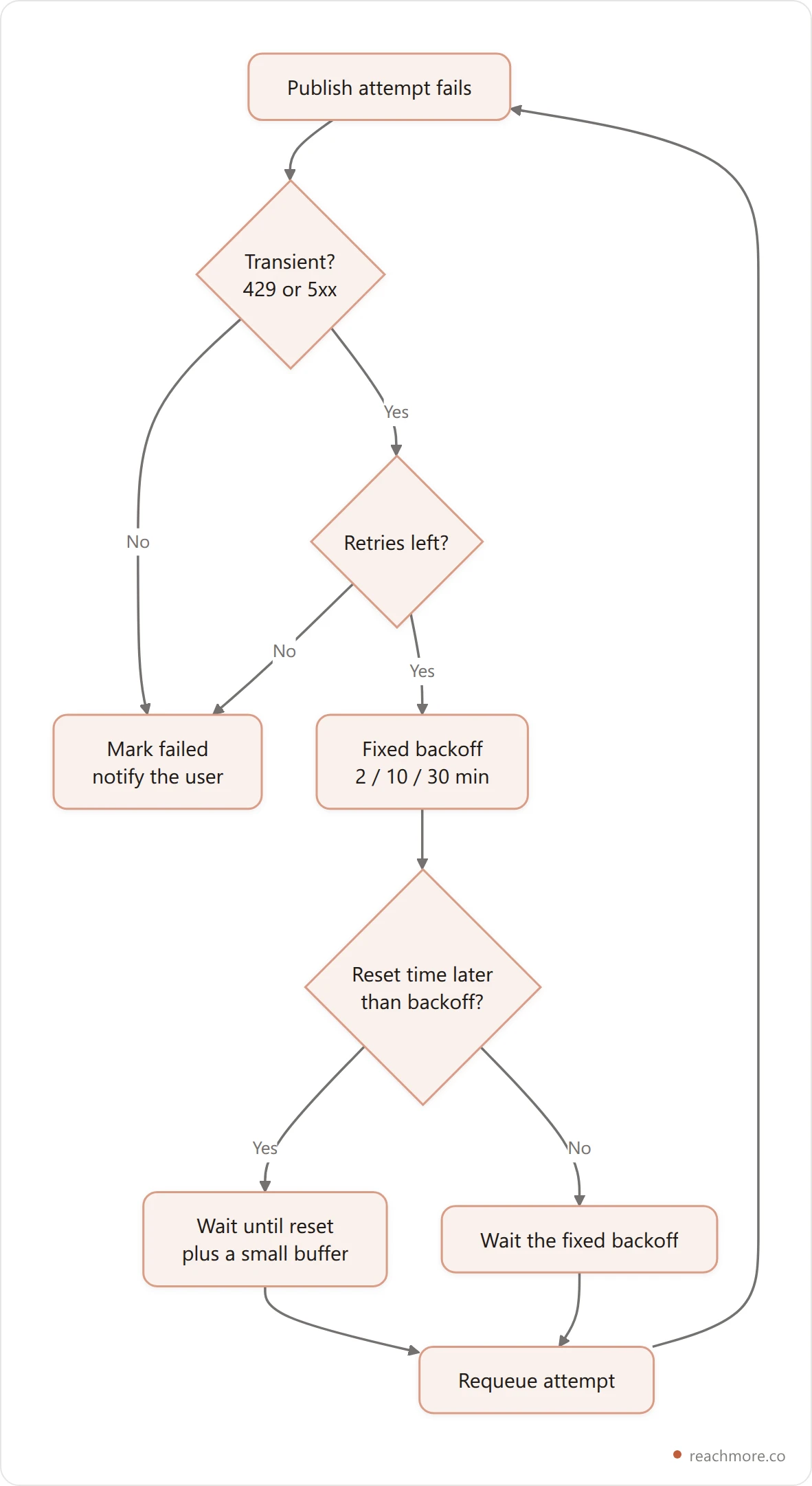
And when retries run out, fail loudly. A queued post that silently vanishes is worse than one that errors — the user planned around it going out.
Caching is the only real fix for read limits#
You can pace writes. You cannot pace your way out of a monthly read cap — the only lever is reading less. That means caching, and the useful insight is that engagement metrics have physics.
A post's numbers move hard in the first 48 hours, trail through day 7, and after that they're effectively static. So a refresh policy shouldn't be one flat TTL. It should stretch as the post ages, and stop entirely once the numbers can't meaningfully change:
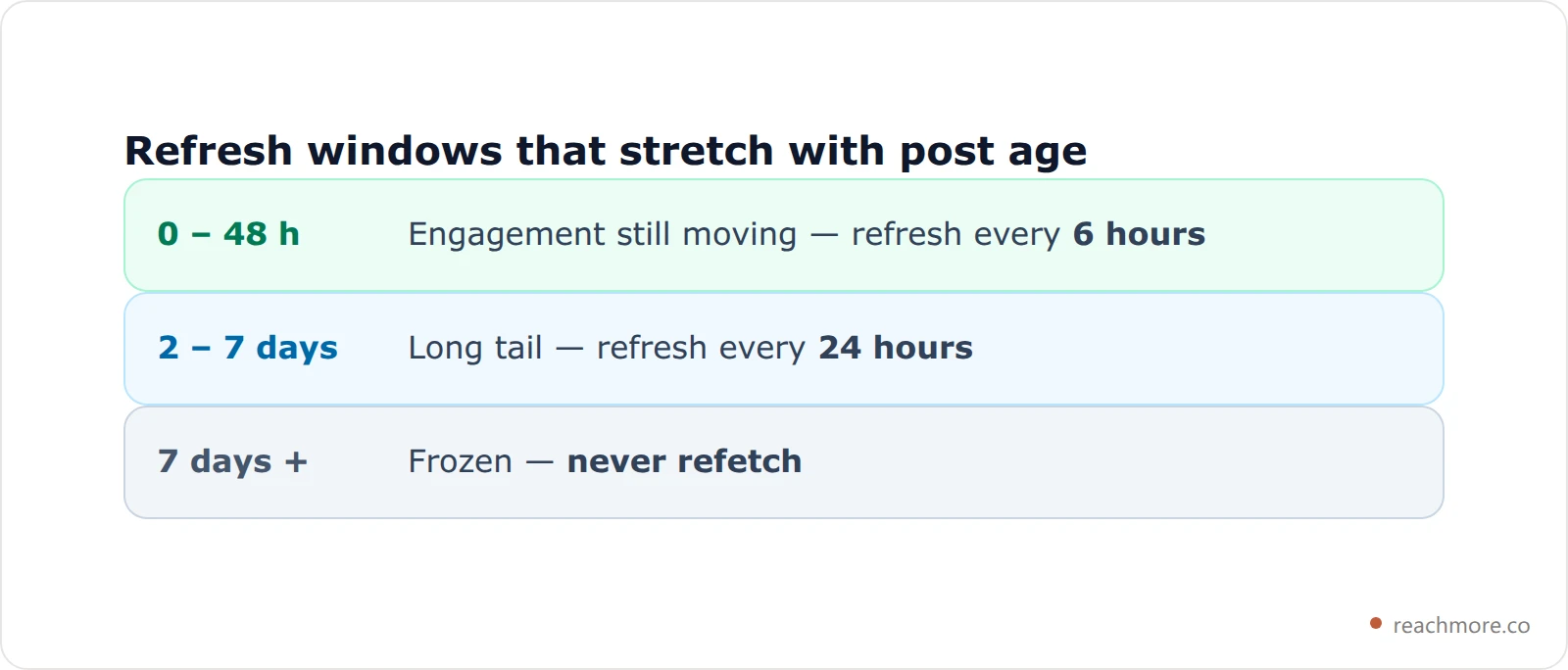
Two details make this work in practice. First, store selected fields, not raw API payloads — a cache that keeps everything grows without bound and you'll be paying for storage to avoid paying for reads. Second, give every row a scheduled death: a TTL tied to when the post was created, plus a per-account row cap, so the cache can't quietly become a database.
Done properly, a dashboard that a user refreshes ten times a day costs one read, not ten. That's the difference between fitting inside a read cap and blowing through it by the 12th.
The same arithmetic decides what a monitoring product can afford to watch — push, poll or search is really a question about how many reads a vendor is willing to pay for on your behalf.
This is also why the scheduling and publishing side of X tooling is a very different engineering problem from the analytics side: one is bounded by write pacing, the other by read economics.
What this looks like inside ReachMore#
ReachMore handles X API rate limits in one place: a single client captures the rate-limit headers on every response, stores bucket state per endpoint and token, and short-circuits any call to a bucket it already knows is exhausted. Scheduled posts retry on bounded backoff, and reads are served from a tiered cache.
ReachMore is built on exactly these constraints, and they're visible in the product rather than hidden behind it.
Every X call goes through a single client that captures the rate-limit headers on every response and stores the bucket state keyed by method, route shape, and token. Before any call, that state is checked: if the bucket is known-exhausted and hasn't reset, the request is short-circuited with a clear error instead of being sent. Redis being unavailable just means one extra real request — the tracking is best-effort and never blocks a call it isn't sure about.
Scheduled posts use the bounded 2/10/30-minute backoff described above, taking whichever is later — the fixed schedule or X's reported reset. Reads go through the tiered cache, so a fully cache-served read costs zero.
Pricing mirrors the same reality. ReachMore uses a credit wallet — one-time top-ups, no subscription, credits never expire, and you're only charged on success. The per-action prices track X's own cost structure directly: reading your own post is 1 credit, an AI draft is 2, publishing a post is 15, and publishing a post containing a link is 200. That last number isn't a markup; it's what a link-bearing post genuinely costs at the API layer, passed through instead of averaged into a monthly fee.
If you'd rather drive all of this from your own agent, ReachMore also ships a native MCP server, where the same limits, the same caching, and the same per-action prices apply to tool calls.
Build on X without fighting the API
Credit wallet, no subscription, charge-on-success only. Rate-limit handling, caching, and human-paced scheduling are built in.
Start with ReachMoreWhere rate limits meet the ToS#
One last thing worth separating clearly: rate limits are a technical ceiling. X's automation rules are a policy ceiling. Staying under the first does not put you inside the second.
You can be perfectly polite with your request pacing and still be running something X doesn't allow — bulk unsolicited DMs, automated follows, replies to strangers at scale. Those get accounts actioned regardless of how gracefully your client handles a 429. If you're weighing what's actually permitted, we've covered what X allows for bots and whether AI replies can get you banned in more depth. And if you're comparing vendors rather than building your own client, our four tests for what a Twitter growth tool can actually automate sort API-backed products from browser automation in about four minutes.
The engineering rule and the policy rule point the same direction anyway: send fewer, better-considered requests.
Frequently Asked Questions#
What does a 429 error from the Twitter API mean?#
It means you exceeded a limit — but not necessarily a rate limit. Check x-rate-limit-remaining and x-rate-limit-reset in the response headers. If reset is a few minutes out, you hit a per-endpoint request limit. If the headers look fine, you've likely exhausted a monthly consumption cap or your balance instead.
How long do X API rate limits last?#
Request rate limits reset on a rolling window, and the exact length varies by endpoint and access level — short windows of minutes on paid access, much longer windows on the most restricted tiers. Don't guess: x-rate-limit-reset gives you the exact Unix timestamp when your bucket refills.
Are rate limits shared across all endpoints?#
No. Each endpoint route has its own bucket, keyed by route shape, and buckets are tracked per access token. Exhausting timeline reads won't stop you from publishing, and one user's usage doesn't consume another's budget in the same app.
Does retrying a 429 risk my account?#
It can. Repeated rate-limit violations are a pattern X's automation detection watches for, and the consequences land on the connected account. Back off on a bounded schedule, honor the reset timestamp, and short-circuit calls to buckets you already know are exhausted.
What's the cheapest way to stay inside X API limits?#
Read less. Cache post metrics with refresh windows that stretch as posts age, freeze them once engagement stops moving, and avoid follower or following scans — those are priced at the expensive end. On the write side, the single biggest lever is avoiding programmatic posts that contain links.
Where are the official rate limit numbers?#
X publishes them in the developer documentation under API fundamentals and the general rate limits reference. Because the numbers shift with access-level changes, the developer community threads are often where the practical current behavior gets confirmed first.
Key takeaways#
Read the headers on every response, not just the failures. Key your bucket tracking by method plus route shape plus token. Never send a request to a bucket you know is empty. Retry on a bounded, gentle schedule and respect the reset timestamp. And cache aggressively, because reads are the limit you can't pace your way out of.
Handle those five things and the X API stops being unpredictable. It's a strict API, not a random one — and measuring what your account actually does gets a lot easier once you're not fighting it.
Try ReachMore free — pay only for what you actually publish
Where rate limits hit hardest: the scheduled queue#
Rate limits are an annoyance when you're posting by hand and a real failure mode when a queue is firing on your behalf. A scheduled post that hits a 429 has to be retried on a bounded backoff — and ideally at the reset time X itself reports, rather than blindly two minutes later into the same closed window. That interaction between limits and the publish queue is covered in schedule tweets: what happens between queue and post, along with the burst caps that keep a recovering queue from dumping a day of posts in one minute.
Enforcing these limits inside your own tooling is a separate problem from understanding them. What breaks in a social media scheduler API covers the daily-versus-burst split, minimum spacing between sends, and why rate caps have to be counted on success rather than on attempt.


