

Every post a scheduler sends through X's API has a price tag. X moved its API to pay-per-use billing, and a plain post costs the app that sends it about $0.015. A post with a link costs about $0.20. So when a tool calls itself a free Twitter scheduler, somebody is still paying that bill. The only question is who, and what they get in return.
The short answer: a free Twitter scheduler is either capped (a small free plan paid for by upgrades), bring-your-own-key (you pay X directly), a browser automation that skips the API (and takes on the risk), or X's own composer. Pick by how many posts you send, whether they carry links, and how much a missed post costs you.
This guide explains each model, shows the real per-post math, and tells you where each one breaks.
Why can't a Twitter scheduler be truly free?#
Because X bills the app for every write. Under pay-per-use pricing, each post an app publishes costs it money, and a post with a link costs far more. Any tool that lets you schedule tweets for free is covering that cost somewhere else, through caps, upgrades, your own API key, or by avoiding the API.
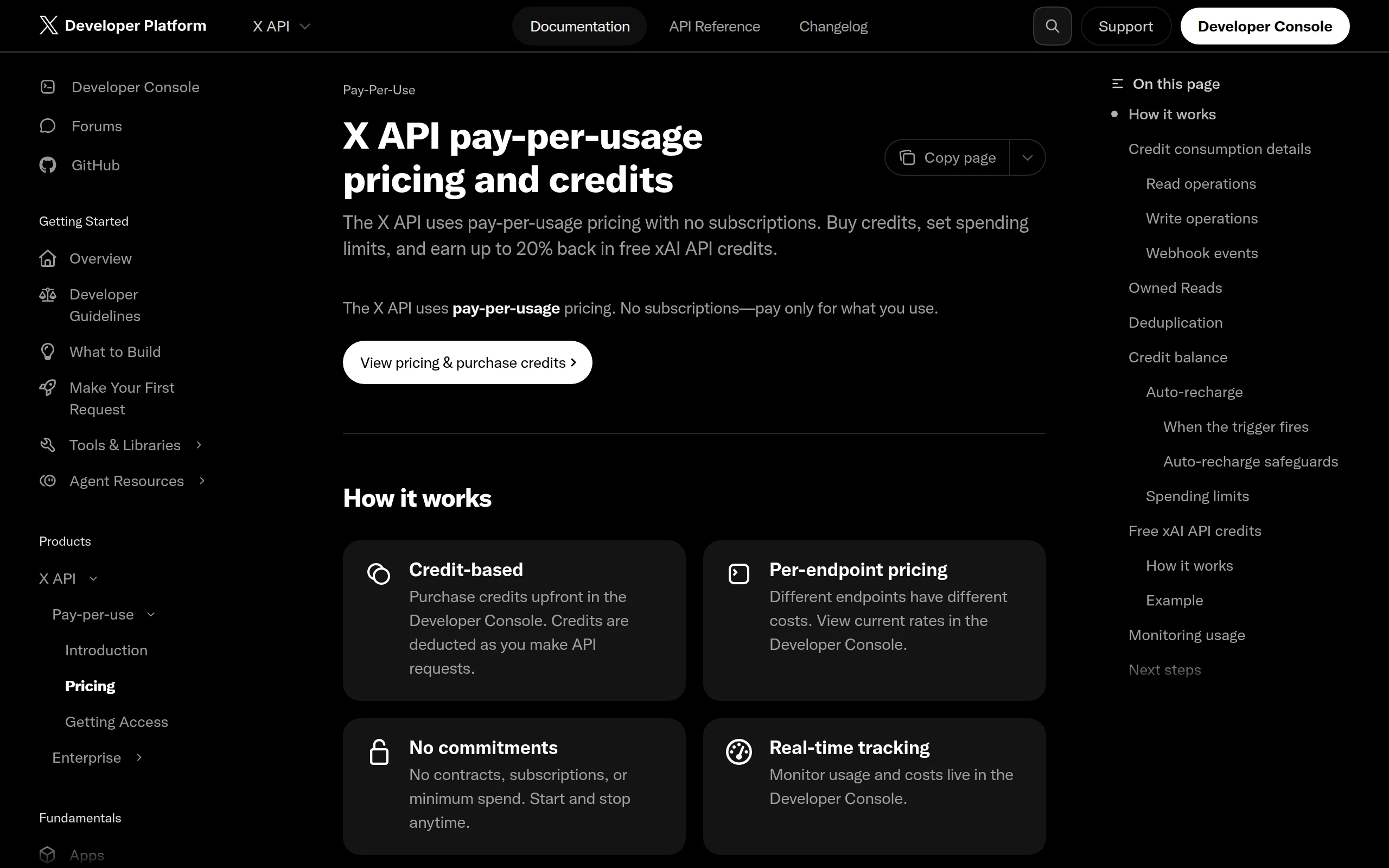
Publishing is billed, not free. The X API pricing page lists pay-per-use rates, and publishing is a write. A scheduler that sends 10,000 posts a month for its users is paying X for 10,000 posts, whether those users paid anything or not.
Here's what that looks like per action, using the rates ReachMore's pricing config recorded from X's developer console in June 2026. X changes these, so check the live page before you budget:
Action on X | What X charges the app |
|---|---|
Plain post (text, images, no URL) | ~$0.015 |
Reply to someone who mentioned you | ~$0.010 |
Any post or reply containing a URL | ~$0.20 |
Reading one of your own posts | ~$0.001 |
The line that matters most is the third one. A link makes a post roughly 13 times more expensive to send. That single fact explains most of the fine print on "free" plans. If you want the full backstory on how X got here, our breakdown of what replaced the X API free tier covers it.
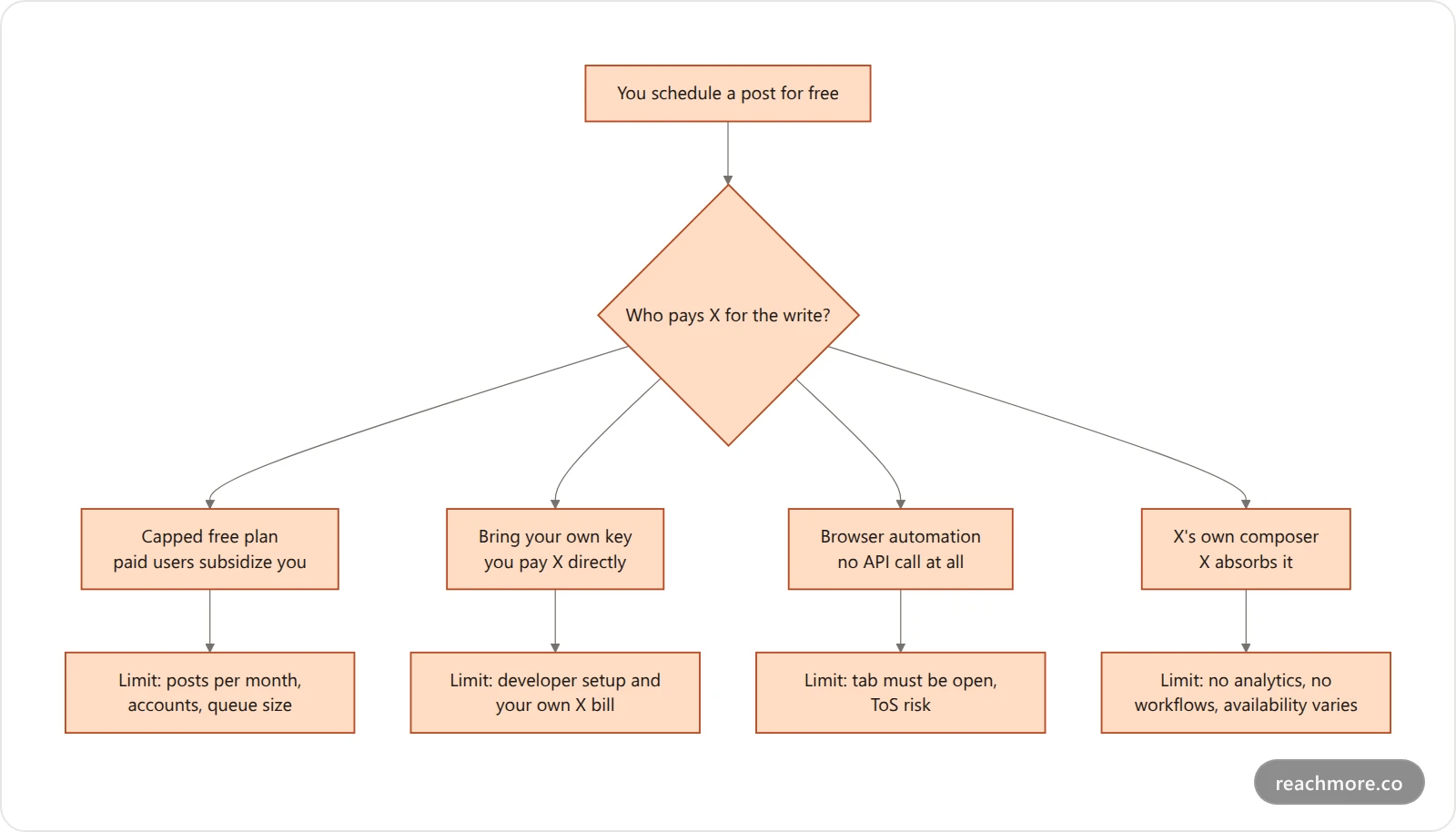
The 4 ways a "free" scheduler pays X#
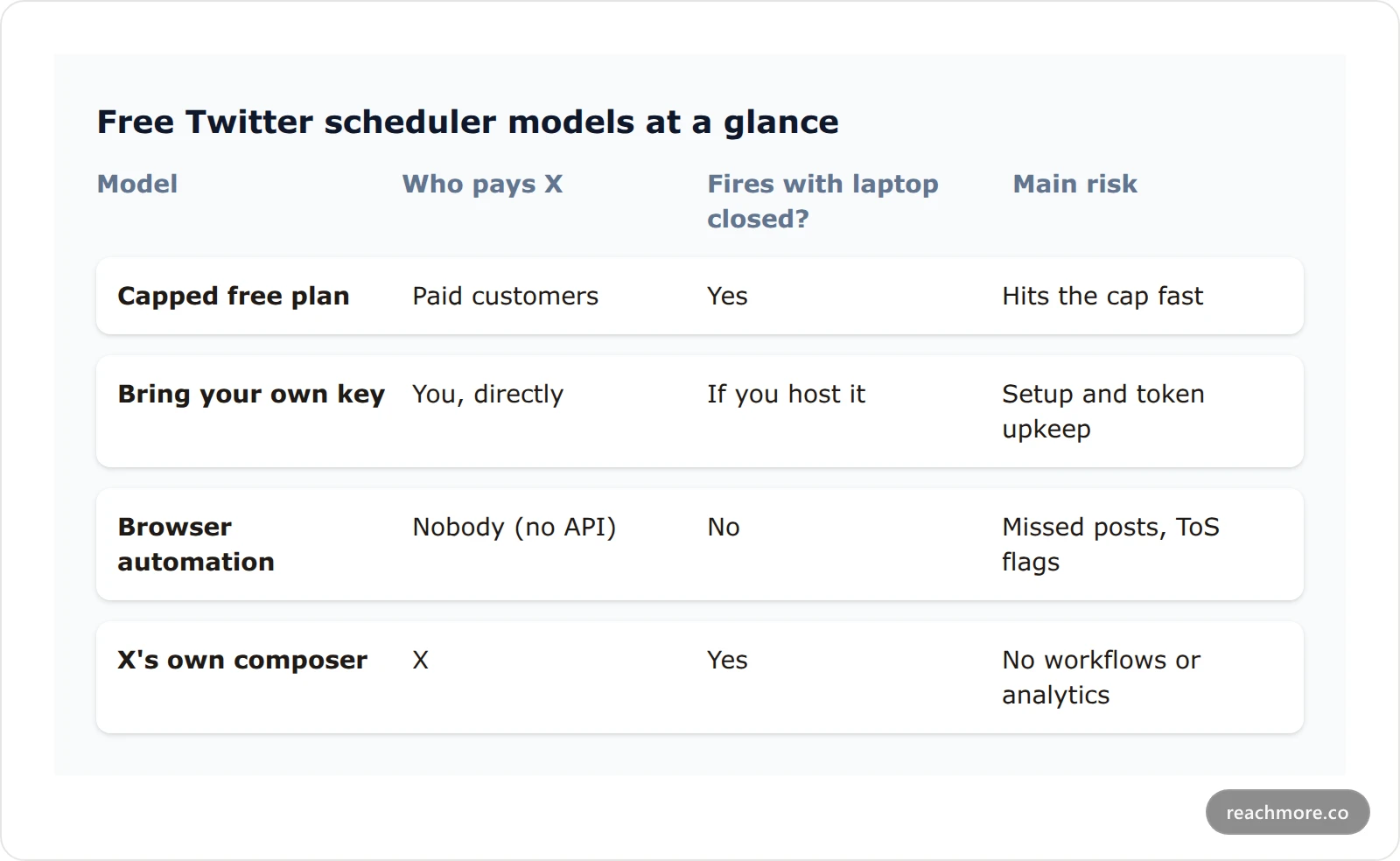
Every free option you'll find fits one of four models. The label on the landing page won't tell you which. The fine print will.
1. The capped free plan#
This is the most common model. Big schedulers such as Buffer run a free tier and pay the API bill out of their paid plans. You can see the shape of it on Buffer's pricing page: a free plan with limits on channels and queued posts, then paid tiers above it.
Caps are how the math works. If a free user could send unlimited link posts, each one costing the company about 20 cents, the free plan would be the most expensive thing the company sells. So you'll usually see limits on queued posts, connected accounts, or both.
Good for: a few posts a week on one account. Breaks when: you want a real queue, or a second account.
2. Bring your own API key#
Some open-source and indie tools ask you to paste in your own X developer credentials. The tool is free. X isn't. Every post goes out on your developer account and X bills you directly at the rates above.
This can be the cheapest option if you only post plain text. It's also the most work. You need a developer account, an app, the right OAuth scopes, and a way to handle expired tokens. Our guide to the Twitter API in Python walks through what that setup involves in 2026.
Good for: developers who'd rather own the pipeline. Breaks when: a token expires at 2 a.m. and nothing retries.
3. Browser automation (no API at all)#
The third model skips the API entirely. A browser extension or script types your post into X's web app at the scheduled time, as if you'd done it yourself. No API call, so no API bill.
The catch is twofold. First, it only works while your browser is open and logged in. Close the laptop and the post doesn't go. Second, it's exactly the kind of non-API automation that X's Developer Policy and automation rules are written around. Tools that drive the web UI look like a human to the page but not to X's abuse systems. We've covered the signals X watches for in Twitter bot detection.
Good for: occasional posts where a miss doesn't matter. Breaks when: you travel, sleep, or get flagged.
4. X's own composer#
X's web composer has offered a built-in schedule option. It's free, it's native, and there's no third party. Which accounts get it has shifted over time, so check your own composer for the calendar icon before you plan around it.
Good for: a handful of one-off posts. Breaks when: you want a calendar view, drafts across devices, analytics, or anything automated.
What does it actually cost to schedule 100 tweets?#
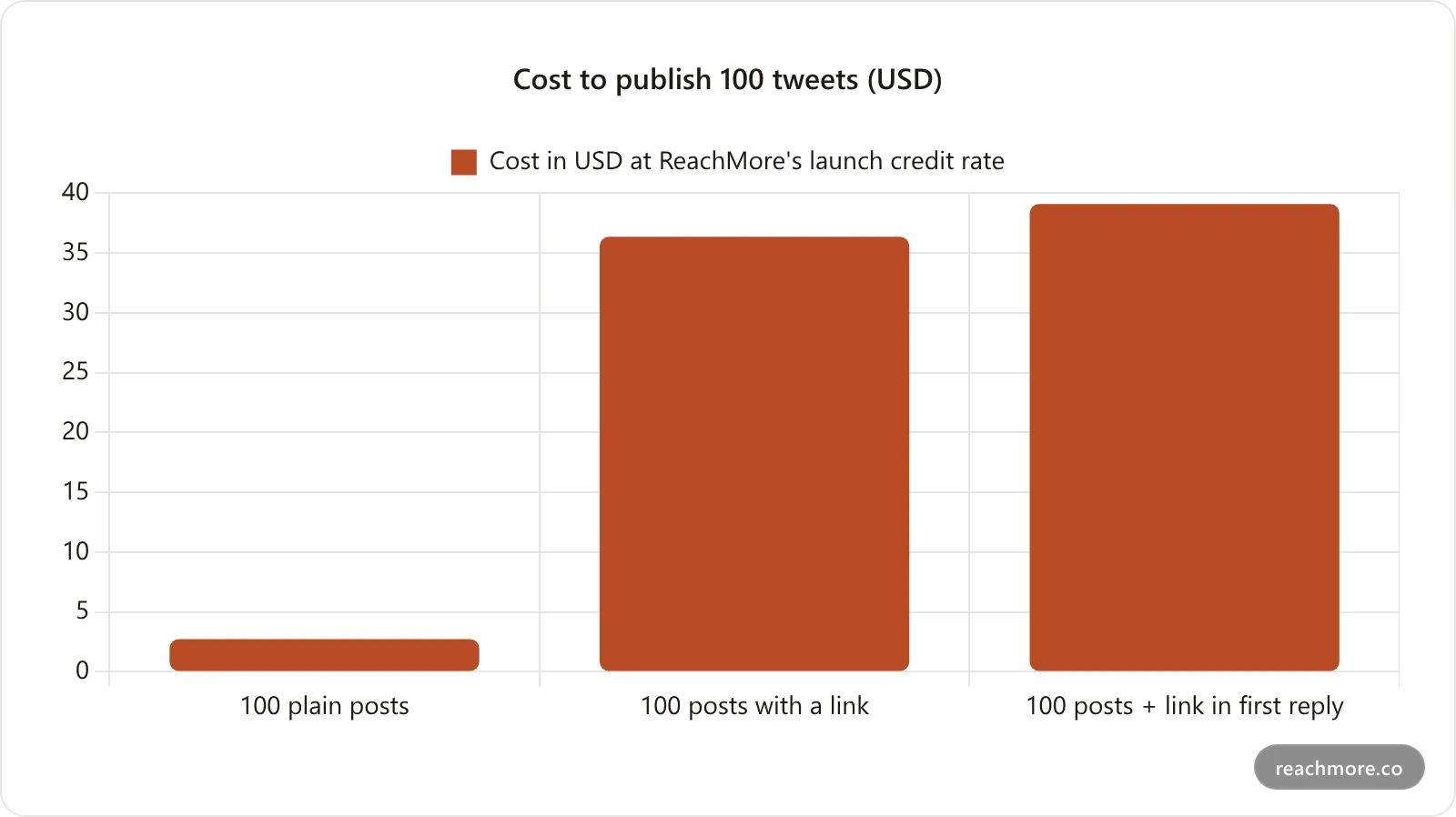
At ReachMore's launch credit rate, 100 plain posts cost about $2.73, 100 posts with a link about $36.36, and 100 posts with the link moved to the first reply about $39.09. Links, not post count, drive the bill.
Here's where "free" and "cheap" split apart. The chart below uses the X rates above and ReachMore's current launch credit price (about $0.0018 per credit, so roughly 550 credits per dollar) to show what 100 published posts cost in three shapes.
The numbers, worked out:
Plain post: 15 credits. 100 posts = 1,500 credits ≈ $2.73.
Post with a link: 200 credits. 100 posts = 20,000 credits ≈ $36.36.
Link moved to the first reply: 15 for the post + 200 for the reply = 215 credits. 100 pairs ≈ $39.09.
That last row surprises people. Moving a link into the first reply is a reach tactic, not a savings tactic. X bills any content with a URL at the link rate, reply or not, so the pair costs one plain post more than a single link post. We go deeper on the reach side of that trade in how to post links on X.
So if you mostly post text, a paid scheduler that bills per post can cost less per month than a coffee. If you post links daily, no free tier is going to carry you for long, and you should know that before you build a habit around one.
Top up $10 and schedule your first week of posts
How ReachMore handles scheduling (and billing)#
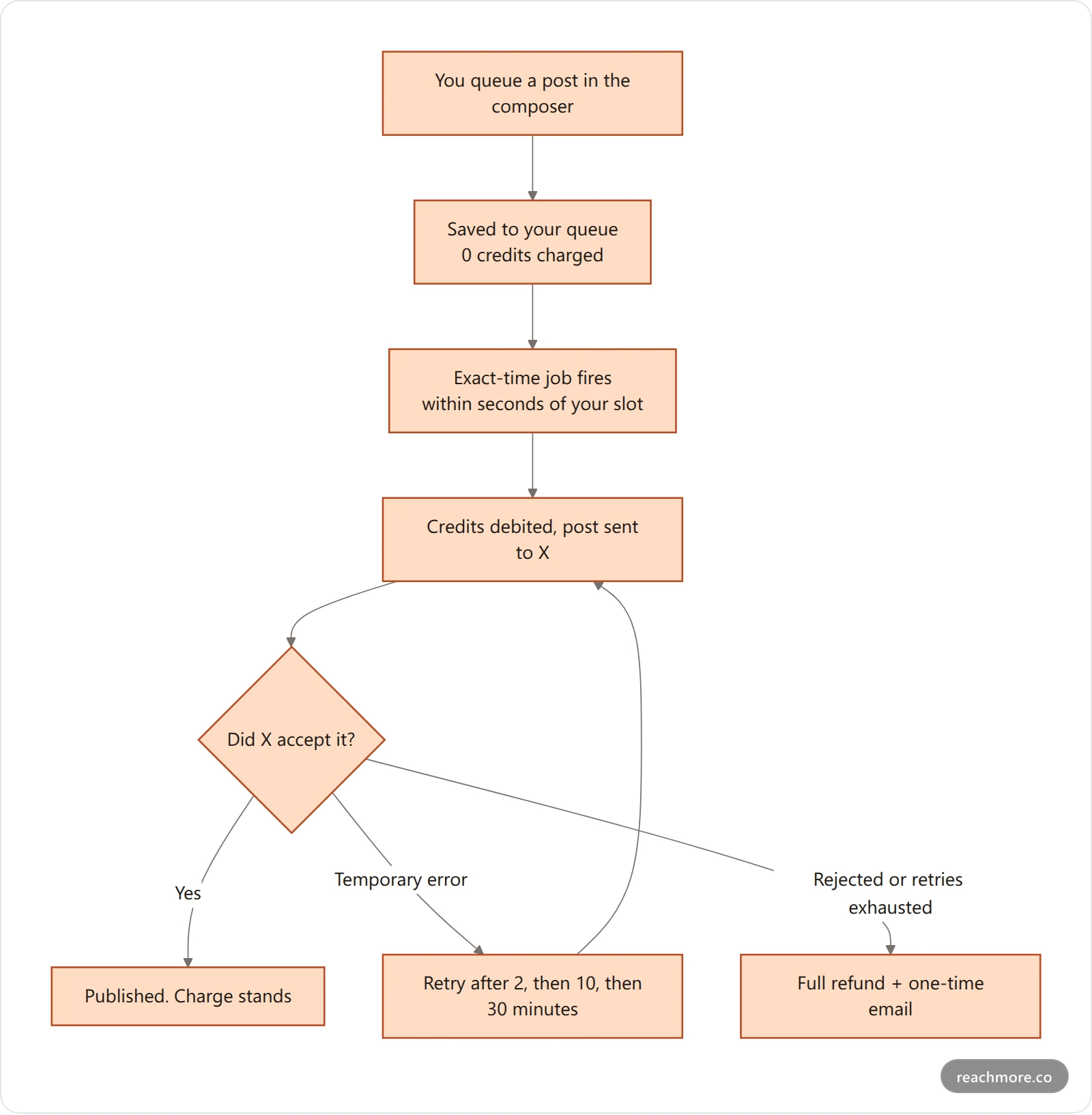
ReachMore is an X post scheduler that charges nothing to queue a post and bills credits only when the post publishes. If X rejects it, the credits come back in full. Temporary errors are retried three times before you're notified.
ReachMore is a web app, not a browser extension, and it doesn't have a free plan. It has a credit wallet instead. You top up once, credits never expire, and there's no subscription. Here's what happens to a scheduled post, step by step:
What that means in practice:
Scheduling is free. Queueing, moving, and cancelling a post costs nothing. Credits are only taken when the post actually goes out. Cancel it and you've spent zero.
Charge-on-success. If X rejects the post, you get the credits back in full.
Retries on temporary errors. A rate limit or an X hiccup doesn't kill the post. It's retried up to three times, at 2, 10, and 30 minutes. If it still fails, you get an email so a queued post never vanishes silently.
No double posts. Each scheduled post carries a unique key through the charge pipeline, so a worker restart can't publish it twice or bill it twice.
If you're curious what the full queue-to-post pipeline looks like under the hood, what happens between queue and post walks through it.
Which free Twitter scheduler model fits you?#
Light, text-only posting fits X's own composer or a capped free plan. Daily link posting needs a budget. Teams hit account limits first. Developers can bring their own key. If a missed post is costly, avoid browser automation entirely.
The details, by posting pattern:
Under 10 posts a week, one account, mostly text: X's own composer or a capped free plan will do. Don't overthink it.
Daily posting with links: the link tax dominates. Budget for it, and pick a tool that shows you the per-post cost before you hit send.
Multiple accounts or a team: free plans usually stop at the account limit first. Compare paid options on what a seat costs; our Buffer alternatives roundup does that for X-first creators.
You're a developer building your own pipeline: bring your own key, and read up on what breaks at scale with a scheduler API before you commit.
You can't afford a missed post: avoid browser automation. A post that needs your tab open isn't scheduled; it's delayed.
For a wider comparison of named tools, Blogging Wizard's roundup of tweet schedulers lists a dozen with their plans.
Red flags in a "free" scheduler's fine print#
Before you connect your X account to anything, look for these:
"Unlimited posts" with no visible business model. Someone is paying for the API, or the tool isn't using it. Find out which.
A browser extension that asks for your X password or session. An official integration uses X's OAuth screen. It never needs your password.
No mention of failed posts. What happens when X returns an error? If the answer is "nothing," you won't know a post didn't go out until someone asks.
Follow, unfollow, or mass-DM features bundled in. These are the automations X restricts most. A scheduler that offers them is putting your account on the line to sell a feature.
Links priced the same as plain posts on a free plan. Given X's rates, that's either a subsidy that won't last or a sign the tool isn't going through the API.
Schedule without the fine print
Queue posts for free, pay only when they publish, and get a refund if X rejects one. Credits never expire.
Key takeaways#
There's no free lunch on X's API. A plain post costs the sending app about $0.015 and a link post about $0.20.
"Free" schedulers pay that bill with caps, with your own API key, by skipping the API, or by being X itself.
Links are the budget killer. Moving a link to the first reply helps reach but costs slightly more, not less.
If a missed post matters, avoid anything that needs your browser open.
Pay-per-post with charge-on-success is often cheaper than a subscription for text-first accounts.
See what your posting schedule would cost on ReachMore
Frequently Asked Questions#
Is there a completely free Twitter scheduler?#
X's own web composer has offered free scheduling, and several tools have capped free plans. None is free without limits, because X bills apps for every post sent through its API. Expect caps on posts or accounts, or expect to supply and pay for your own API key.
Why do Twitter schedulers limit free plans so much?#
Because every scheduled post costs the scheduler money. Under X's pay-per-use API pricing, a plain post runs about $0.015 and a post with a link about $0.20. A free plan without caps would lose money on every active user, so limits on queue size and accounts keep it sustainable.
Are browser extension schedulers safe to use?#
They carry more risk than API-based tools. They post by driving X's web page in your logged-in browser, so they fail when the browser is closed. That kind of non-API automation is also what X's automation rules target, which can put your account at risk of being flagged.
Does ReachMore have a free plan?#
No. ReachMore uses a credit wallet with one-time top-ups and no subscription. Scheduling itself is free, and credits are only charged when a post actually publishes. A plain post is 15 credits, a post with a link is 200, and failed posts are refunded in full.
Does scheduling a tweet hurt its reach?#
There's no public evidence that X penalizes posts sent through its official API versus the app. What does affect reach is content: posts with external links tend to get less distribution, which is why some creators move the link into the first reply instead.
Can I schedule tweets with links for free?#
Only within a free plan's caps, or on X's own composer. Links are the most expensive content X bills for, about 13 times a plain post, so tools tend to restrict them first. If you post links daily, budget for them rather than relying on a free tier.


