

Two tools can both call themselves a Twitter monitoring tool, sit on the same pricing page, and still never show you the same thing. One sees every post in the world containing your brand name. The other sees only the posts that tagged your handle. That gap isn't a feature difference — it's an architecture difference, and nobody puts it on the comparison page.
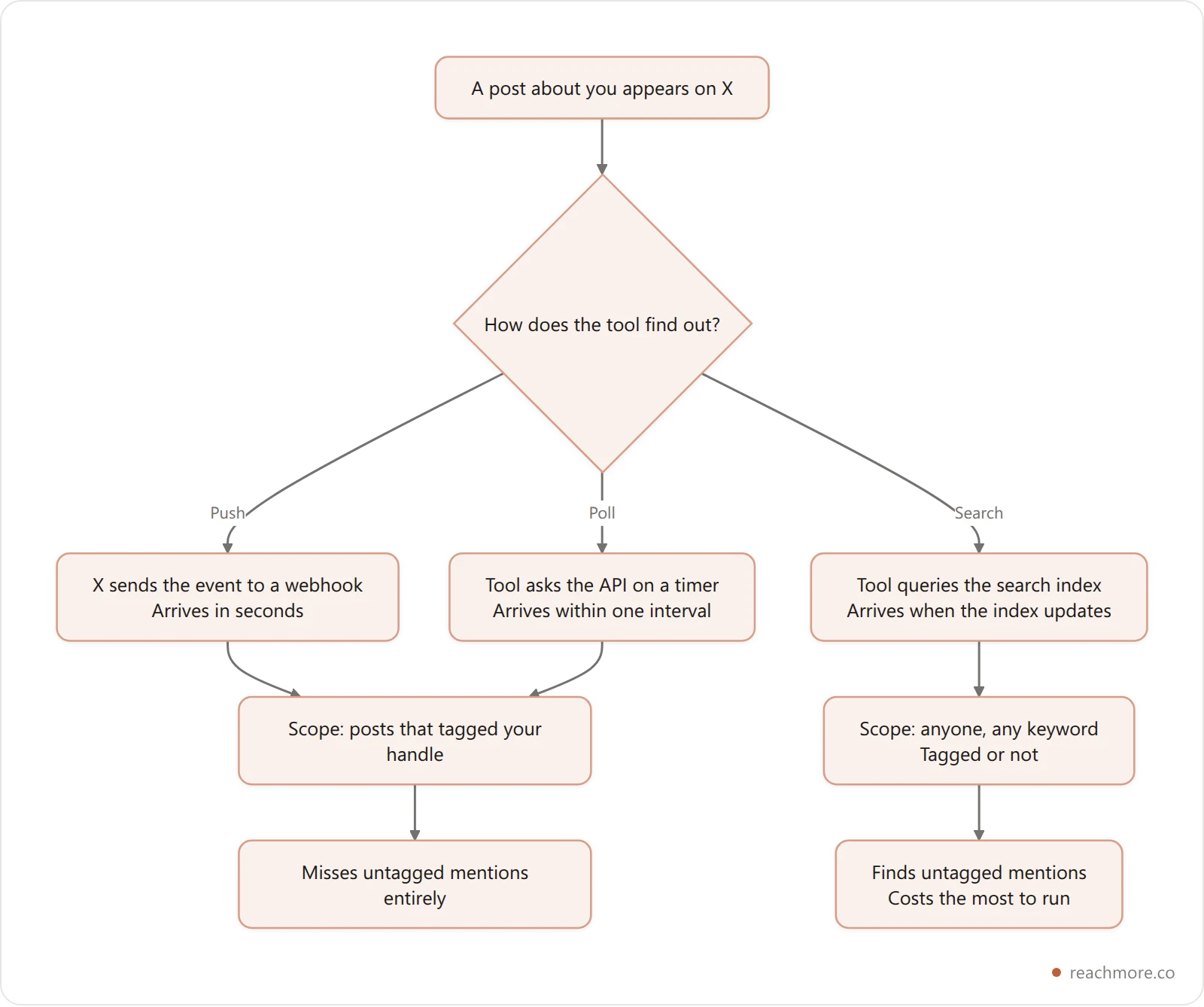
The short version: every Twitter monitoring tool watches X in one of three ways. It subscribes to push events, it polls an endpoint on a timer, or it queries the search index. Push is fastest and narrowest. Polling is cheap and predictable but can skip things. Search is the only one that finds strangers — and it's the most expensive by a distance.
Pick the wrong one and you don't get a worse dashboard. You get a blind spot you never find out about.
We build a mention watcher ourselves, so every number below about our own tool is measured from the production configuration as of September 2026 — a five-minute poll interval, a 25-item batch, and a 5-credit charge per mention read. Where a claim is about another vendor's internals, we say we're going on their public positioning rather than guessing.
The Three Ways a Tool Can Watch X#
Everything on the market resolves to one of these three, or a blend. This is the whole taxonomy:
Architecture | How it learns | Latency | Scope | Typical cost shape |
|---|---|---|---|---|
Push (webhooks) | X sends the event to your server | Seconds | Your account only | Pay per event you consume |
Poll (timer) | Tool asks the API every N minutes | Up to one interval | Your account only | Pay per item returned |
Search (index query) | Tool queries X's search endpoint | Index-dependent | Anyone, any keyword | Pay per query and per result |
The critical column is Scope, and it splits the market in half.
Push and poll both run against endpoints scoped to your account — your mentions, your DMs, your posts. They physically cannot see a post that talks about you without tagging you. Search is the only architecture that can, because it queries the index rather than your timeline.
So when a "brand monitoring" vendor and a "reply tool" vendor both show up for the same query, they are not competitors. They're answering different questions.
Polling: The Five-Minute Heartbeat#
Polling is the workhorse of X mention monitoring. A job wakes on a timer, asks X "anything new since the last thing I saw?", and goes back to sleep.
ReachMore's mention poller runs on a five-minute interval and asks for at most 25 mentions per cycle. That's 288 cycles a day, and a practical ceiling of roughly 7,200 mentions a day it can observe. For almost every account, that ceiling is irrelevant. For an account that just went viral, it is very relevant — more on that in a moment.
The cursor is the important part. Each request carries a since_id — the id of the newest thing the poller has already seen. X returns only what's newer. That single parameter is what makes polling affordable: you never read the same mention twice, so you never pay for it twice. A tool without a cursor re-reads its whole window every cycle and bills you for it.
If you've read what actually breaks in X's rate limits, this is the same discipline applied to money instead of quota.
What Polling Misses: The Cursor Jump#
Here's the failure mode nobody advertises.
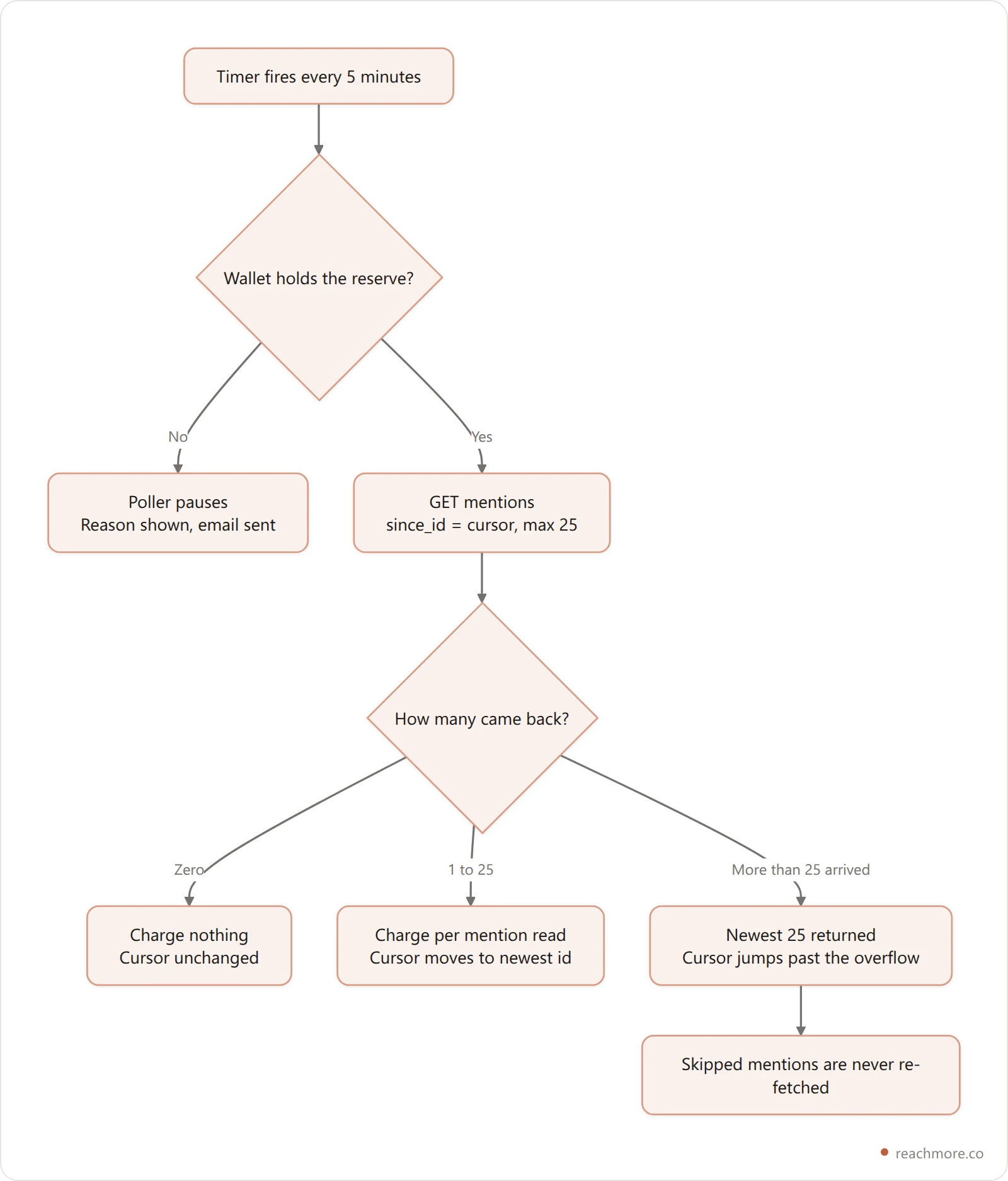
The mentions endpoint returns newest first. When a cycle asks for 25 and 60 mentions arrived in those five minutes, X hands back the newest 25. The poller then advances its cursor to the newest id it just saw — which is now ahead of the 35 it never received.
Those 35 mentions are gone. Not delayed. Gone. The next cycle asks for everything newer than the new cursor, and they're older than it.
This is a real ceiling on every polled monitoring tool, and it bites exactly when you most want the data: the hour a post takes off. A tool that polls a 25-item window every five minutes silently drops anything above 300 mentions an hour. It will not tell you it did.
Two honest mitigations exist: shorten the interval, or widen the batch. Both cost more per day, which is why most tools quietly pick a default and don't mention the trade-off. If your account regularly clears a few hundred mentions an hour, ask any vendor what their window is — the ones who know will tell you.
Want a mention queue you can actually audit? ReachMore runs on a credit wallet with no subscription — you can see exactly what every read cost.
Push: Webhooks and Who Pays for Silence#
Push inverts the relationship. Instead of your tool asking X, X tells your tool. On X that's the Account Activity API, and the mechanics are the standard webhook pattern: you register an endpoint, X posts events to it, your server acknowledges with a 200.
Push wins on latency — seconds instead of up to a full interval — and it wins on the economics of quiet accounts, but only if the tool is built carefully.
The subtlety is the acknowledgement. A webhook receiver has to return 200 fast or X retries. So a well-built receiver acks first and decides second: does this account actually have something consuming this event type — an enabled workflow, a toggled-on feature? If not, the event is dropped right there. Nothing is fetched. Nothing is charged.
That gate is the whole ballgame. A push tool without it pays to process every event for every connected account whether anyone asked for it or not, and that cost reaches you as a higher floor price.
Compare the two cost curves and the split is clean:
Polling costs you per item returned. A silent account costs nothing per cycle — but you must hold enough balance to cover a full batch before the poller is even allowed to run.
Push costs you per event you actually consume. A silent account costs nothing and reserves nothing.
The word doing the work in that first bullet is reserve.
The Reserve Nobody Mentions#
Before ReachMore's mention poller makes a single request, it checks whether the wallet can cover the worst case: a full batch of 25 mentions, at 5 credits each. That's 125 credits it has to see on hand — not spend, just see.
If the mentions come back empty, you're charged nothing at all. The reserve is a solvency check, not a fee.
The DM side is the same idea at four times the scale. The inbound DM poller also runs every five minutes, but its batch is 50 events and a DM event reads at 10 credits instead of 5. That's a 500-credit standing reserve to keep a DM inbox watched.
So the honest headline is this: watching a DM inbox requires four times the standing balance of watching your mentions, before a single message arrives. If you're weighing an inbox automation, what auto-DM on X actually costs covers that meter in full.
There's a small, funny consequence of the ordering, too. The poller charges for the batch, then filters out your own replies in your own threads. If you reply to yourself in a thread, you pay to read your own post back. It's 5 credits. It's also a precise illustration of the rule: the meter runs on the read, not on the usefulness.
What Watching Actually Costs#
Credit prices mirror X's own pay-per-use tiers, so the relative cost of each action is the same shape you'd get building it yourself:

Read that chart as a ratio, not a price list. Reading a mention costs half of replying to it. Which means for any account where you answer fewer than half your mentions — most accounts — monitoring is the larger line item, not engagement.
Check the per-action credit costs yourself — they're the same numbers charted above.
That inverts the usual instinct. People shop for a monitoring tool worrying about the cost of the replies. The replies are the cheap part. The standing cost of watching is what accumulates, because it runs 288 times a day whether anything happened or not.
Credits on ReachMore are a one-time top-up, they never expire, and the charge only lands on success — so an empty poll cycle is genuinely free. That's a different failure mode from a monthly seat you keep paying for during a quiet month.
Mention Watching Is Not Social Listening#
This is the distinction most buyers get wrong, so it's worth being blunt. Search-based social listening Twitter tools and mention watchers get sold side by side, and they solve different problems.
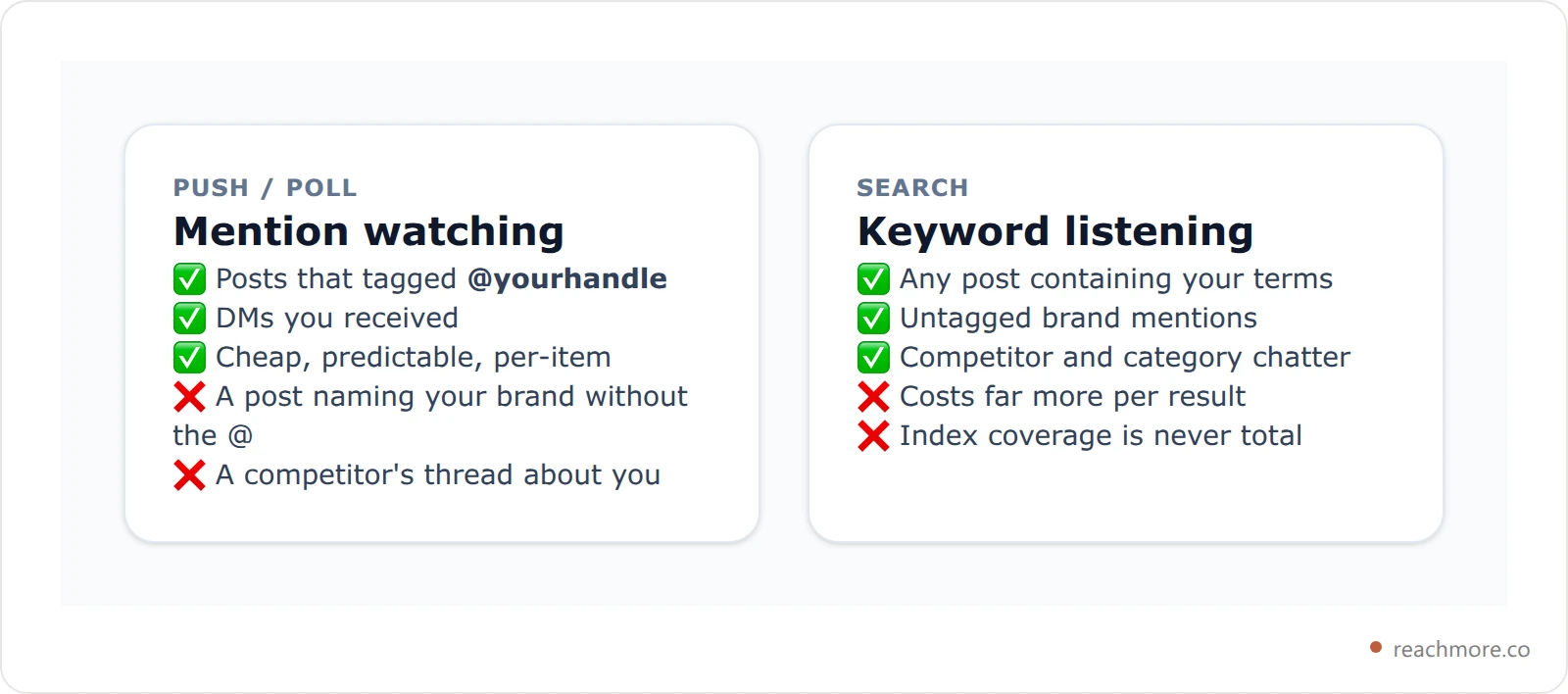
ReachMore watches mentions and inbound DMs. It does not run keyword searches across X, and it isn't a social listening product — its triggers are exactly two events: a mention, and a DM received. If your job is catching an angry customer who spelled your brand without the @, you need a listening tool, and no amount of mention polling will substitute.
The free, manual version of that job is a bookmarked search you run by hand each morning — the operators that make one worth saving are a short list, and they cost nothing to learn.
Saying so costs us a sale occasionally. It costs you a lot more to find out in month three.
Eight Twitter Monitoring Tools, Sorted by What They Watch#
Sorted by architecture rather than feature count, because architecture is what determines your blind spot. Pricing on all of these moves — check their own pages before you buy.
Tool | Built to watch | Best for |
|---|---|---|
Brand24 | Keyword listening across networks | Brand and crisis monitoring |
Meltwater | Enterprise listening and media | PR teams with a comms budget |
Sprout Social | Listening plus a unified inbox | Social teams wanting one seat |
Awario | Keyword listening, lean pricing | Small teams doing brand watch |
YouScan | Listening with image recognition | Consumer brands tracking visuals |
Syften | Keyword alerts across forums and X | Founders watching niche chatter |
Octolens | Keyword alerts aimed at lead-finding | B2B teams sourcing conversations |
ReachMore | Your mentions and inbound DMs | Answering the people who tagged you |
The first seven answer "who is talking about us?" ReachMore answers "who is waiting on us?" Both are real jobs. They are not the same job, and the second one is the one with a reply deadline attached.
If you want the wider field rather than the monitoring slice, nine Twitter marketing tools ranked by what you pay covers the same honesty test across categories.
From Alert to Reply Without a Bot Problem#
An alert you don't act on is a notification with extra steps. The part that matters is what the tool does in the ninety seconds after it spots something.
ReachMore's path is deliberately slow at one specific point. A mention arrives, an AI draft is generated against it, and the draft lands in a human approval queue with a pending status. It is never sent automatically. You read it, you edit it, you approve it — or you don't.
Two details make that queue behave:
Every queued item is keyed to the source post, so the same mention can never queue twice. Re-running the poller doesn't duplicate your work.
The queue only ever holds mention replies. It isn't a catch-all inbox pretending to be a workflow.
Put a human in the loop with ReachMore — you read every draft before X ever does.
That approval step is the difference between a reply tool and a bot, and X's automation rules care about the difference. If you want the compliance reasoning in full, what X actually allows for auto-reply walks the line properly. For the broader set of things that can and can't be automated against the X API, the nine workflows X's API actually allows is the map.
How to Pick, in Four Questions#
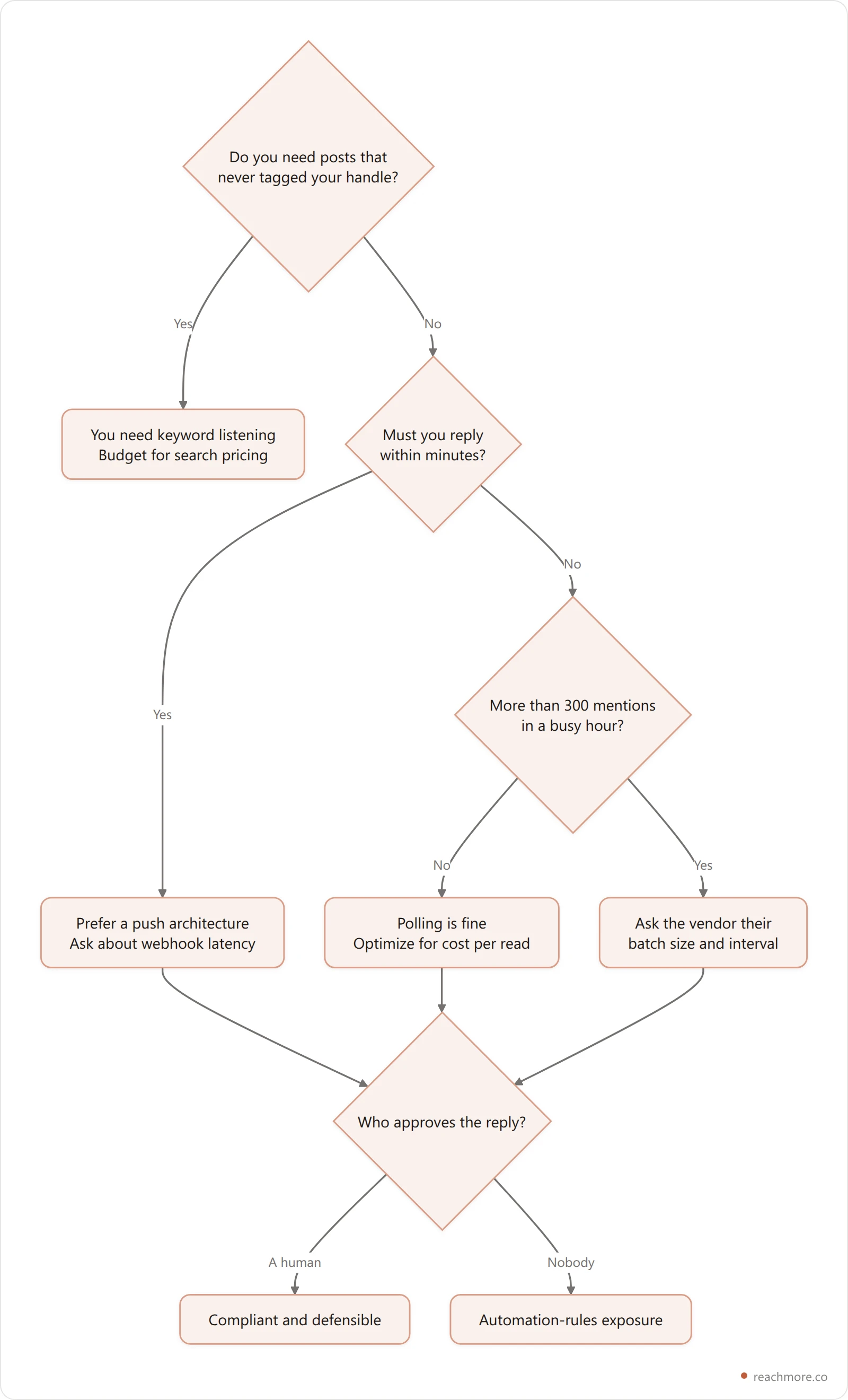
Four questions, in order:
Do you need untagged mentions? If yes, stop reading comparison tables of reply tools. You need search-based listening, and it will cost more.
How fast must you answer? Minutes means push. An hour means polling is fine and cheaper.
What's your worst hour? If a busy hour clears a few hundred mentions, ask every vendor for their batch size and poll interval in writing.
Who presses send? If the answer is "the tool," you've bought an automation-rules problem, not a monitoring tool.
Most teams who think they need listening actually need the fourth question answered well. The mentions that hurt you are almost always tagged — people want you to see them. What goes wrong isn't that you missed it. It's that you saw it eleven hours later.
See what your mentions actually cost
ReachMore watches your X mentions on a five-minute poller, drafts a reply with AI, and puts it in a human approval queue — never auto-sent. One-time credit top-ups, no subscription, and credits that never expire.
Start with ReachMoreFrequently Asked Questions#
What is a Twitter monitoring tool?#
It's software that watches X for activity you care about and alerts you. In practice it does one of three things: subscribes to push events for your account, polls an API endpoint on a timer, or queries the search index for keywords. Which one it uses determines what it can and can't see.
Can a Twitter monitoring tool see posts that don't tag me?#
Only if it's search-based. Push and poll architectures run against endpoints scoped to your own account, so a post naming your brand without the @ is invisible to them. Keyword listening tools query the search index instead, which is why they find untagged chatter — and why they cost more per result.
How fast do Twitter mention alerts arrive?#
Twitter mention alerts arrive at a speed set entirely by the architecture. With push webhooks, seconds. With polling, up to a full interval — ReachMore's mention poller runs every five minutes, so worst case is roughly five minutes plus processing. Search-based tools depend on how quickly X's index picks the post up, which is the least predictable of the three.
Why does monitoring cost money when nothing happens?#
Usually it doesn't. On a per-item meter, an empty poll cycle charges nothing. What it does require is a standing balance: ReachMore checks the wallet can cover a full batch — 25 mentions at 5 credits — before it polls at all. That's 125 credits held, not spent.
Can a monitoring tool reply to mentions for me?#
It can draft one. Whether it should send one without you is a different question — X's automation rules draw a firm line around unattended replies. ReachMore generates the draft and stops, holding it in a human approval queue until you approve it. For the reasoning, see our guide to X's automation rules.
Does polling ever lose mentions?#
Yes, and it's worth knowing. If more items arrive in one interval than the batch size allows, the endpoint returns the newest ones and the cursor advances past the rest — they're never re-fetched. At 25 per five minutes, that's a ceiling near 300 an hour. Below that you lose nothing; above it, you lose silently.
Is Twitter monitoring the same as Twitter analytics?#
No. Monitoring is about inbound events in near-real-time — who mentioned you, who messaged you. Analytics is about aggregate performance over a window — impressions, engagement rate, what worked. They read different endpoints and answer different questions; Twitter analytics tools ranked by what they see covers the other half.
Key Takeaways#
Every Twitter monitoring tool is push, poll, or search underneath, and that choice — not the feature list — sets your blind spot.
Push and poll only see posts that tagged your handle. Only search-based listening finds untagged brand mentions.
A 25-item batch polled every five minutes silently drops anything above roughly 300 mentions an hour, because the cursor jumps past the overflow.
Reading a mention costs 5 credits; replying costs 10. If you answer fewer than half your mentions, watching is the bigger line item.
A human approval step is what separates a compliant reply tool from an automation-rules problem.
The Short Answer#
Decide what you need to see before you compare dashboards. If you need untagged brand chatter, buy keyword listening and pay for it. If you need to answer the people who tagged you — quickly, in your own voice, without a bot sending things you didn't read — you need a mention watcher with a human in the loop, and the cheapest one is the one that only charges you when something actually arrives.
Ask every vendor three numbers: the poll interval, the batch size, and what an empty cycle costs. The ones who answer without hedging are the ones who know what they built. For the wider picture of what a tool can even see about your audience, what seven Twitter CRMs can actually see is the companion piece — and X's own rate limit documentation is the ceiling every one of them is working under.
The architecture is the product. Everything else is a dashboard.


