

Almost every Twitter API Python tutorial online was written against a tier system that no longer exists. They open with a free developer account, pip install tweepy, and a tweet that costs nothing to send. In 2026, one of those three steps is gone and another one bills you.
Python still talks to X the same way it always did: HTTP requests to the v2 API at api.x.com/2, signed with an OAuth token. What changed is the meter. Every call now has a price, so the difference between a working script and an expensive one is whether you cache your reads, read the rate-limit headers, and know which errors are worth retrying.
One naming note before the code: search for X API Python and you'll get the same material as Twitter API Python. The platform renamed itself; the endpoints didn't move.
This is the reference the tutorials skipped: which library to pick, which auth flow each endpoint needs, what every call costs, and the two mistakes that quietly multiply your bill.
Why most Twitter API Python tutorials are now wrong#
The tutorials aren't badly written. They're just dated, and they're dated in a way that isn't obvious until your script fails.
Three things broke them at once. Free developer signups stopped, so "create a free app and grab your keys" is no longer step one. Pay-per-use became the default account type, so there's no monthly bucket of tweets to burn through — there's a balance that goes down. And the older Basic and Pro tiers were wound down through 2026, which means code written against their rate-limit assumptions is tuned for a world that isn't there. We covered that transition in detail in our breakdown of what replaced the X API free tier.
The practical consequence for a Python developer is a change in what "a bug" means. On the old free tier, a runaway loop hit a 429 and stopped. On pay-per-use, a runaway loop keeps going and keeps charging. A while True that re-fetches the same user profile every second is now a slow leak from your wallet, not a rate-limit error in your logs.
So the shape of good X API code changed. Retry logic, caching, and cost awareness stopped being nice-to-haves for production and became the baseline for a weekend script.
Which Python library should you use in 2026#
Three libraries cover almost every Twitter API v2 Python project, and the right one depends on how much of the surface you need.
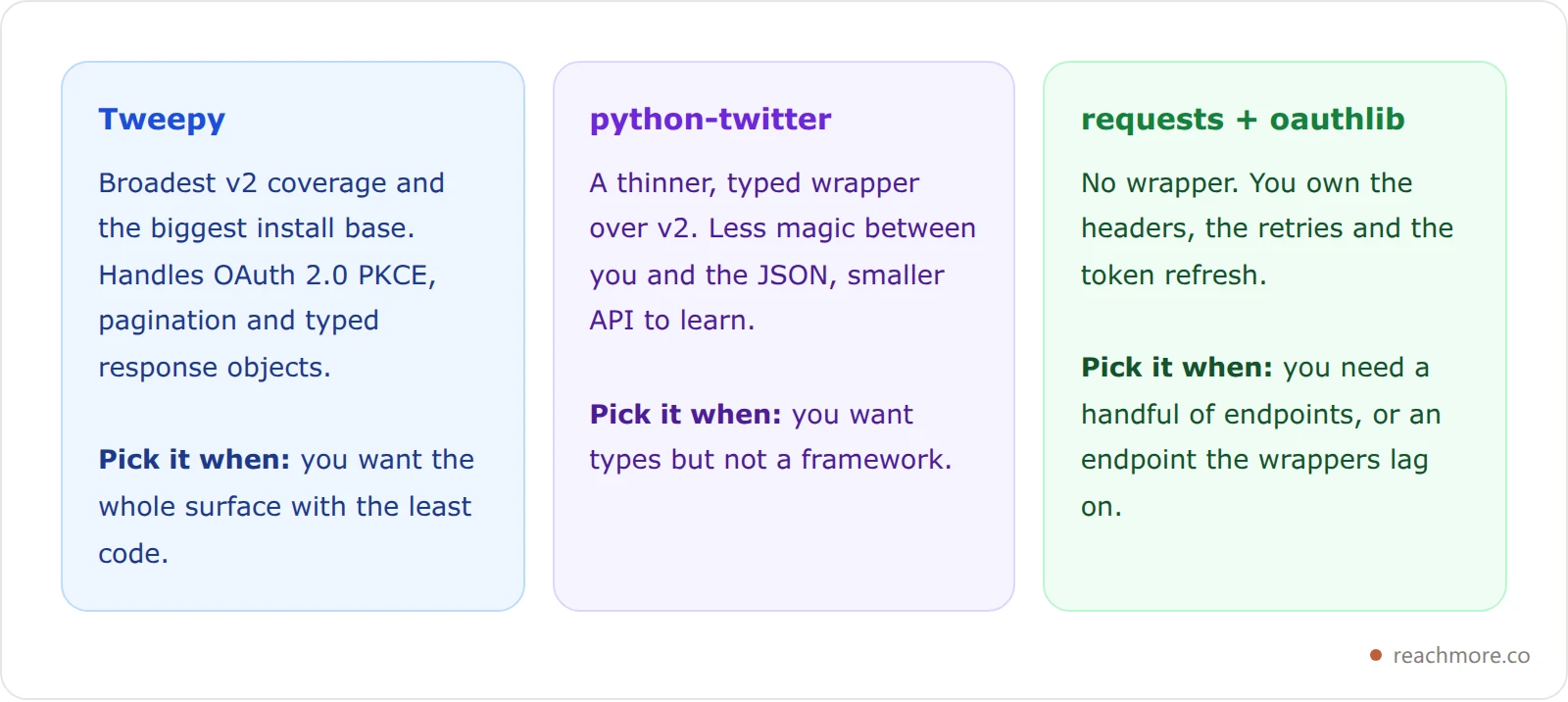
Tweepy is the default answer and a reasonable one. It covers most of v2, its source is active on GitHub, and it saves you the fiddly parts of the PKCE handshake. The sns-sdks python-twitter wrapper is the lighter option if you'd rather see the raw response shape, and its documentation is a decent endpoint reference on its own. X also maintains a list of tools and libraries it recognises.
Here's the argument for the third option that nobody makes. If your script only needs four or five endpoints, requests plus requests-oauthlib is often less code than learning a wrapper's abstractions — and it leaves you free when a wrapper lags behind a change. Media upload is the classic example: the v2 media endpoint has been available for a while, but SDKs have historically routed uploads through the legacy v1.1 path, so a direct call is sometimes the only way to use the newer one.
A wrapper is a convenience, not a requirement. The v2 API is plain JSON over HTTPS.
Authentication: three flows, and which endpoints need which#
This is where most Python scripts stall, because "get your API keys" is four different things depending on what you're doing.
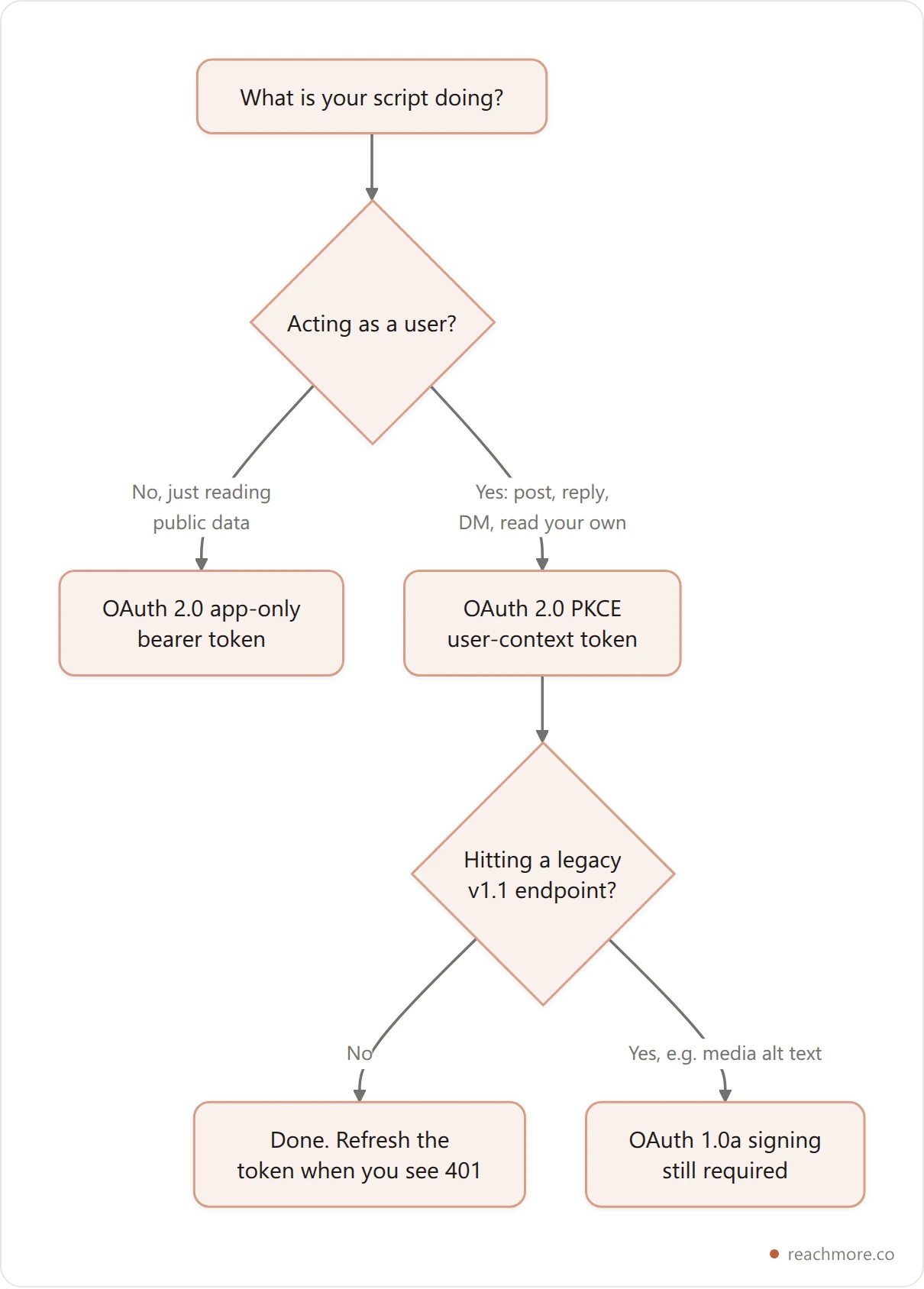
App-only bearer token. The simplest flow. You get a long-lived token for your app and read public data with it. It cannot post, reply, DM, or see anything private, because there's no user attached to it.
OAuth 2.0 with PKCE, user context. What you need for anything that acts as a person — publishing, replying, DMs, or reading your own timeline at the cheaper owned-resource rate. Access tokens are short-lived, so a script that runs for more than a couple of hours needs refresh handling. Treat a 401 as "refresh and retry once", not as a crash.
OAuth 1.0a. Still alive for the handful of legacy v1.1 endpoints that never moved, such as setting media alt text. If you thought OAuth 1.0a was retired, it isn't — it's just narrow now.
In Python the headers themselves are trivial once you have a token:
import requests

SCHEME, HOST = "https", "api.x.com"
API = f"{SCHEME}://{HOST}/2"   # the v2 REST base

def get(path, token, **params):
    r = requests.get(
        f"{API}{path}",
        headers={"Authorization": f"Bearer {token}"},
        params=params,
        timeout=30,
    )
    return r
That's a working Python X API client, minus the parts that keep it cheap and alive — which are the next three sections.
The endpoints you'll actually call, and what each one costs#
This is the table the tutorials can't give you, because most of them predate the meter. These are X's pay-per-use unit prices as captured from the developer console in mid-2026. Prices move, so treat them as the shape of the bill rather than a permanent quote.
What you're doing | Typical endpoint | Price per call |
|---|---|---|
Read your own posts or profile |
| $0.001 |
Read someone else's post |
| $0.005 |
Search recent posts |
| $0.005 per post returned |
Post counts |
| $0.005 |
Look up a user |
| $0.01 |
Read followers or following |
| $0.01 per user returned |
Read trends |
| $0.01 |
Read a DM event |
| $0.01 |
Create a post (no link) |
| $0.015 |
Reply to someone who mentioned you |
| $0.01 |
Any post or reply containing a URL |
| $0.20 |
Send a DM |
| $0.015 |
Like, repost, follow, mute, block |
| $0.015 |
Undo one of those |
| $0.01 |
Bookmark a post |
| $0.005 |
Delete or hide a post |
| $0.005 |
Set media alt text | v1.1 | $0.005 |

Two things jump out of that chart. Reading your own data is ten times cheaper than looking up a user — which is an argument for a cache, not for cleverness. And one bar is two orders of magnitude above the rest, which gets its own section below.
Want the platform side of the same story rather than the code side? Our guide to what actually breaks under X's rate limits covers the windows your script has to live inside.
Rate limits in Python: read the headers, don't guess#
Every X API response carries two headers worth more than any hard-coded time.sleep():
x-rate-limit-remaining— calls left in the current window for that endpointx-rate-limit-reset— when the window resets, as a Unix timestamp in seconds
Limits are per-endpoint, not per-account, so exhausting your mentions bucket says nothing about your posting bucket. The useful pattern is to record what each response tells you, keyed by method plus route shape, and check it before you spend another request.
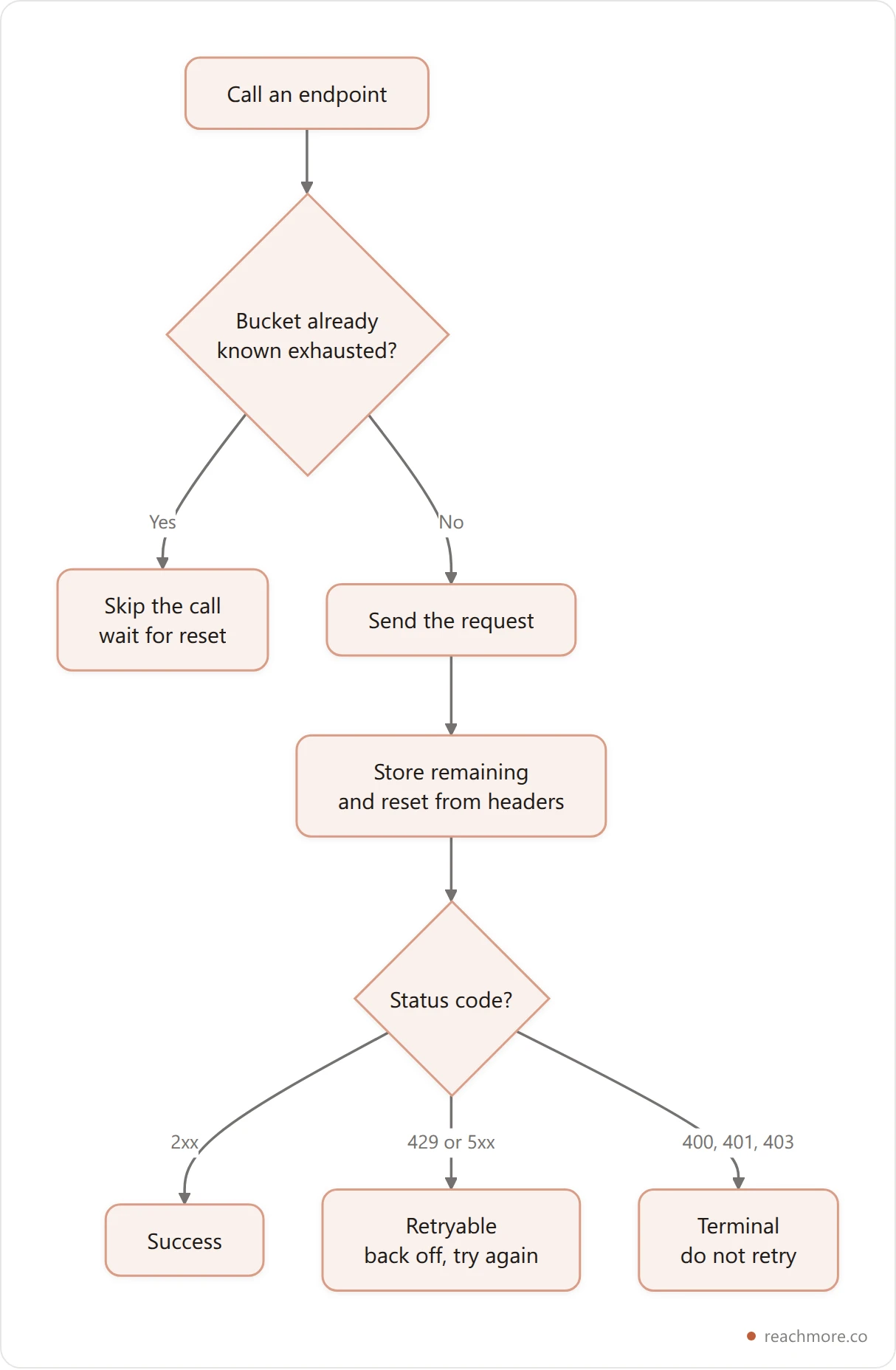
The bucket key matters. /users/123/tweets and /users/456/tweets share a rate-limit bucket because they're the same route; /users/123/tweets and /tweets/456 don't. Collapse the numeric ID segments and key on the shape:
import re, time

def bucket(method, path):
    shape = re.sub(r"/\d+(?=/|$)", "/:id", path.split("?")[0])
    return f"{method.upper()} {shape}"

limits = {}  # bucket -> (remaining, reset)

def call(method, path, token, **kw):
    key = bucket(method, path)
    remaining, reset = limits.get(key, (None, 0))
    if remaining == 0 and reset > time.time():
        raise RuntimeError(f"{key} exhausted until {reset}")

    r = requests.request(
        method, f"{API}{path}",
        headers={"Authorization": f"Bearer {token}"}, timeout=30, **kw
    )
    try:
        limits[key] = (
            int(r.headers["x-rate-limit-remaining"]),
            int(r.headers["x-rate-limit-reset"]),
        )
    except (KeyError, ValueError):
        pass
    return r
Why bother short-circuiting instead of just catching the 429? Because repeated 429s are one of the patterns platform abuse detection watches for. A script that politely stops asking looks different from one that keeps hammering a closed door, and the difference is a few lines of bookkeeping.
Pacing helps too. A minimum gap of a few seconds between outbound actions of the same kind costs you nothing on a script that runs all day, and keeps you clear of the short 15-minute windows where the real ceilings live. ReachMore applies the same idea on the hosted side — daily caps plus a per-15-minute burst cap and enforced spacing, deliberately set below X's own thresholds.
Which errors to retry, and which never to#
The single most common bug in homegrown X clients is a retry loop that retries the wrong things. Here's the split.
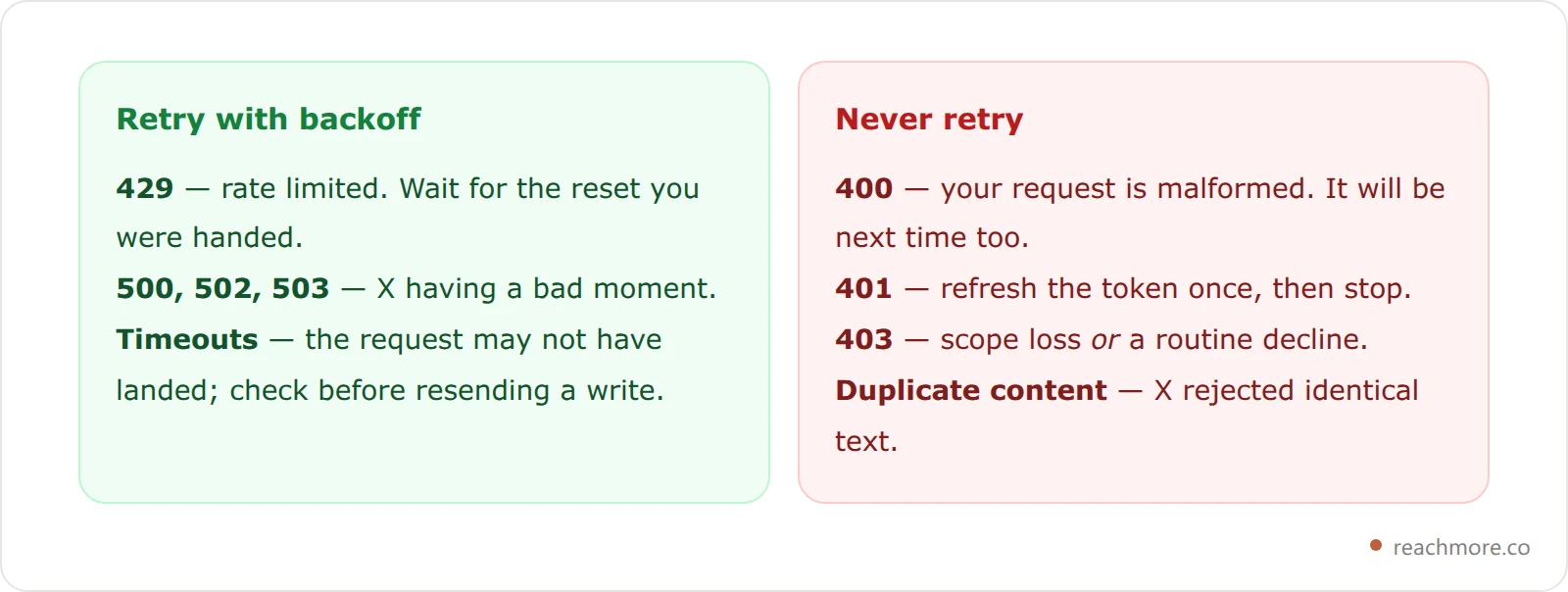
The 403 is the one that catches people. X returns it both for real permission loss and for routine per-request declines — duplicate content, a reply to a post that restricts replies, an action the post's author has blocked. Retrying either case fails identically, and treating a declined action as "transient" is how a script ends up silently swallowing a failure it should have surfaced. Classify it as terminal and log the detail field; that string is usually the actual reason.
Duplicate detection deserves its own note. X rejects identical post text, so any retry of a write needs a guard against sending the same thing twice. The safe pattern is an idempotency key of your own: a stable ID per intended action, checked before you send, so a retry after a network wobble resolves to "already sent" rather than a second post.
TRANSIENT = {429, 500, 502, 503, 504}

def send_with_retry(fn, attempts=3):
    delays = [2, 10, 30]  # seconds
    for i in range(attempts):
        r = fn()
        if r.status_code < 400:
            return r
        if r.status_code not in TRANSIENT or i == attempts - 1:
            r.raise_for_status()
        time.sleep(delays[min(i, len(delays) - 1)])
Three attempts with widening gaps, then give up and tell someone. A retry loop with no terminal state is how a script spends a weekend re-sending a request that was never going to work.
Cutting the bill: cache your own reads#
The cheapest call on the whole price list is a read of your own data, at a tenth of a cent. The second cheapest is the one you don't make.

A follower scan is the trap. At a cent per user returned, walking a 50,000-follower list costs around $500 in a single job — and it's the kind of thing a dashboard does on every page load unless you stop it. If you need audience numbers, sample a few hundred accounts and extrapolate rather than enumerating everyone.
For your own timeline, a read-through cache pays for itself immediately. One fetch pulls both new posts and current metrics for recent ones; store them, serve repeat requests locally, and only go back to X when a freshness marker expires. Post metrics move fastest in the first day or two and barely move after a week, so tier your refresh windows by post age instead of refetching everything on a fixed schedule. ReachMore runs exactly this shape — a read-through X data cache where a fully cache-served read costs zero credits, and you're charged only for the posts actually fetched from X.
The same discipline is why the polling interval matters more than it looks. Checking mentions every five minutes instead of every thirty seconds is a 10x difference in read volume for a delay nobody notices. Our piece on push versus poll versus search for monitoring walks through where each one makes sense.
Skip the client entirely → Open ReachMore — composer, scheduler, a mention-reply approval queue, and a native MCP server with 17 tools. Credit wallet, one-time top-ups, credits never expire, charged only when an action succeeds.
The URL trap: one link, thirteen times the price#
Look at the price table again. A plain post costs $0.015. A post containing a URL costs $0.20. That's roughly 13x for a post, and 20x for a reply, triggered by nothing more than a link appearing in the text.
This matters in Python specifically, because your code decides what goes in the body. If you're auto-appending a tracking link, a source URL, or a "read more" footer, you just moved every post your script sends into the expensive tier — and most people find out at the end of the month.
The mitigation people reach for is publishing the post clean and putting the link in a follow-up reply. That's genuinely worth doing, but be clear about what it buys: it takes the reach penalty off the post, since links suppress distribution in the feed as well. It does not save money. Each half is priced on its own text, so the clean body bills at $0.015 and the reply still carries the URL at $0.20 — the pair costs one plain post more than a single link post. Our guide to posting links on X without killing reach covers the distribution side.
The actual cost saving is upstream: don't send links your script didn't need to send. Detect a URL in the body before you publish and surface the price, so the decision is deliberate rather than discovered.
What Python can't do at any price#
Worth knowing before you architect around it, because no library and no budget changes it.
There is no endpoint that lets your script reply to a stranger's post. Creating a reply is permitted in the summoned case — a response to someone who mentioned or quoted you. A reply to an arbitrary post from someone who hasn't interacted with you has no API path at all. Paying more doesn't unlock it; the restriction applies at every access level.
So if you're planning a Python bot that replies to everyone posting about your keyword, that product can't be built on the documented API. Tools that appear to do it are driving the X web interface through a headless browser with a user's session, which breaks X's automation rules — and the enforcement lands on the account, not the vendor. We covered the boundary in what X actually allows for auto replies.
What you can build is substantial: scheduled publishing, a mentions inbox, your own analytics on your own cached data, list management, and anything reactive that starts with someone contacting you first. If you'd rather call a smaller surface than X's, ReachMore exposes its own MCP server with 17 tools, so an AI client can drive the account without you writing an HTTP client at all.
Building a scheduler on top of this? Read what breaks in a social media scheduler API at scale before you design the job runner — or just use ours.
Frequently Asked Questions#
Does Tweepy still work with the X API in 2026?#
Yes. Tweepy sends standard v2 requests, and those endpoints are unchanged. What broke isn't the library, it's the surrounding assumptions in old tutorials — free signups, monthly quotas, and Basic-tier rate limits. Point Tweepy at a pay-per-use account with a current OAuth 2.0 token and it works normally.
How much does the Twitter API cost from Python?#
It's per call, not per month. Reading your own data runs about $0.001, reading someone else's post $0.005, a user lookup $0.01, and publishing a post $0.015. Any post or reply containing a URL jumps to roughly $0.20. Prices shift, so check the developer console before budgeting a job.
Can I use the X API in Python without API keys?#
No. Every endpoint requires an OAuth token — an app-only bearer for public reads, or a user-context token for anything that acts as an account. Libraries advertising keyless access are scraping the web interface instead, which is against X's rules and breaks whenever the site markup changes.
Which OAuth flow do I need for posting?#
OAuth 2.0 with PKCE, in user context. App-only bearer tokens can read but never write, because no user is attached to them. A small number of legacy v1.1 endpoints, such as setting media alt text, still require OAuth 1.0a signing on top.
How do I handle rate limits properly in Python?#
Read x-rate-limit-remaining and x-rate-limit-reset off every response and store them per endpoint. Before a call, check whether that bucket is already exhausted and skip it if so. Retry only on 429 and 5xx, with widening delays — and never retry a 400, 401, or 403.
Can a Python script reply to any tweet automatically?#
No. Replies are only permitted when someone mentioned or quoted you first. There's no endpoint for replying to a stranger's post at any access level, so an "auto-reply to my niche" bot can't be built on the documented API.
Key takeaways#
The short version, if you're about to open an editor:
The library barely matters. Tweepy, python-twitter, or plain
requestsall send the same HTTP. Pick by how much surface you need.Auth is the real fork. App-only for public reads, OAuth 2.0 PKCE for anything that acts as you, OAuth 1.0a for the legacy stragglers.
Every call has a price. Own reads are a tenth of a cent, follower scans are a cent per user, and any content with a URL is $0.20.
Cache and classify. A read-through cache kills most of your bill; retrying only 429s and 5xx kills most of your bugs.
The old Twitter API Python tutorials assumed the platform would absorb sloppy code. It doesn't any more, and that's really the whole 2026 lesson: write X API code as if each request costs something, because now it does.
Sources:
Tweepy — official project site
tweepy/tweepy — source and release notes
sns-sdks/python-twitter — alternative Python wrapper
python-twitter documentation — endpoint reference
Tools & Libraries — X Developer Platform


