

Most people searching for a Publer alternative aren't unhappy with the calendar. They're unhappy that they're paying for ten networks while one of them, usually X, does most of the work. Or they're hitting the edge of what a scheduler can do once the job stops being "post this at 9am."
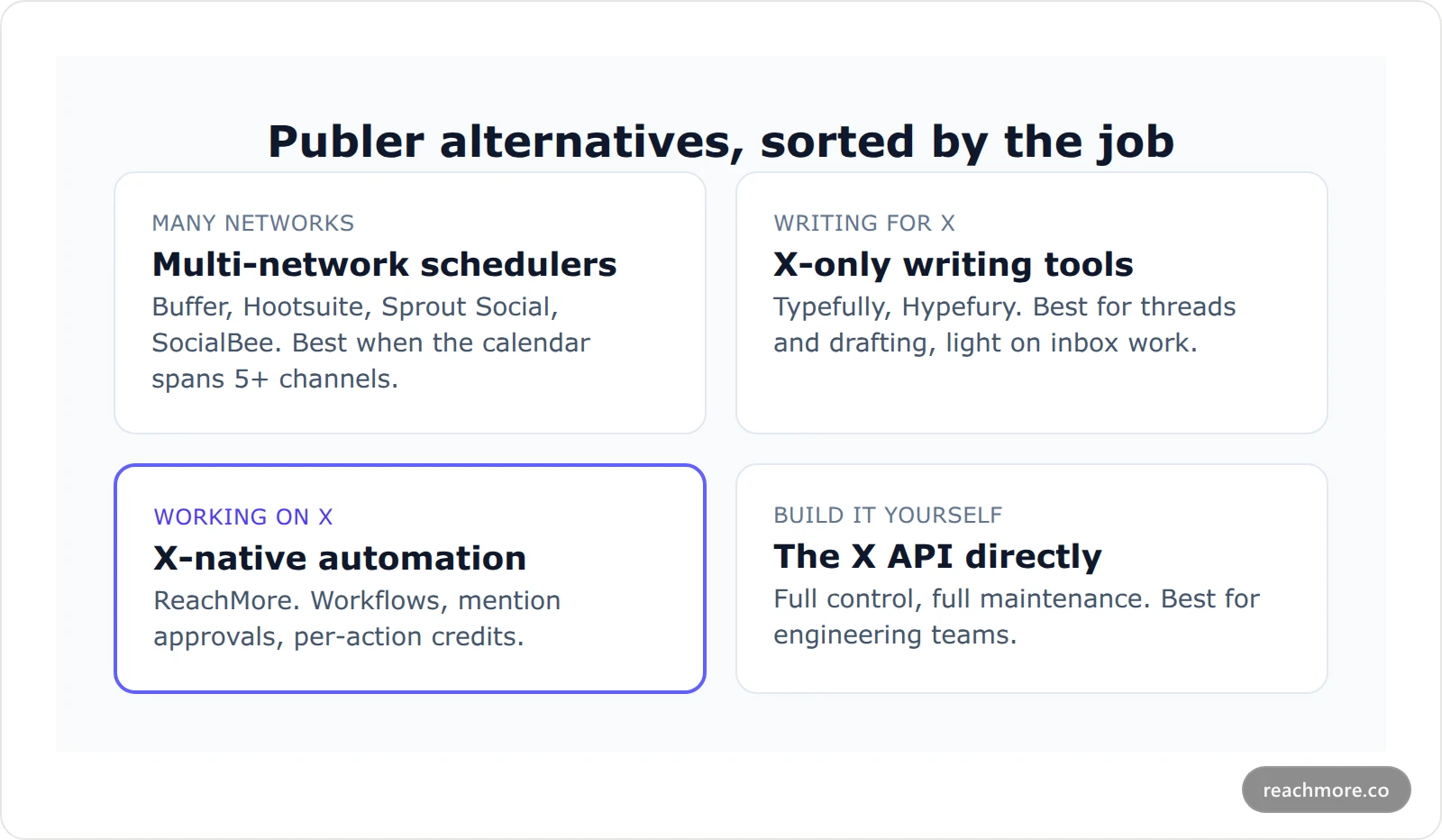
The short answer: the right Publer alternative depends on your workload, not on the number of network logos on the pricing page. If you post across many networks, pick another multi-network scheduler. If you mostly write for X, pick an X-only writing tool. If X is where you do the work, including replies, mentions, threads and automation, pick an X-native tool that bills per action.
Most lists of Publer alternatives rank ten schedulers by features. This guide sorts the options by job instead, explains what every X tool shares under the hood, and shows where each kind of tool runs out of road.
Publer alternative comparison: the short version#
Here's the whole field in one table. Details for each row follow below.
If your workload is… | Look at | Why it fits | Where it runs thin |
|---|---|---|---|
5+ networks, one team calendar | Buffer, Hootsuite, Sprout Social, SocialBee | Same multi-network model as Publer | X gets the same generic treatment |
Mostly long-form writing for X | Typefully, Hypefury | Editors built around threads | Few automation or inbox features |
X as the main channel, plus replies and mentions | ReachMore | X-native workflows, approval queue, pay per action | X only, no Instagram or LinkedIn |
Custom pipelines you own | The X API directly | Full control | You build and host everything |
What is Publer actually built for?#
Publer is a social media scheduler for teams that publish across many networks from one calendar. It's priced by connected accounts and seats, so it pays off when your week spans five or more channels. It's less suited to accounts where X replies and conversations do most of the work.
Publer is a multi-network social media scheduler. You connect Instagram, Facebook, LinkedIn, TikTok, X and more, then plan posts on one calendar. Its plans are priced by the number of social accounts and team seats you connect.
That model is great when your week really does span many channels. You write once, adjust per network, and stop logging into five apps. You can check the current tiers on Publer's plans page.
The trade-off is depth. A tool that treats ten networks the same way can't go deep on any one of them. That's fine for Instagram carousels. It matters more on X, where most of the growth happens in replies and conversations, not in the scheduled post itself.
Why X is where multi-network schedulers run thin#
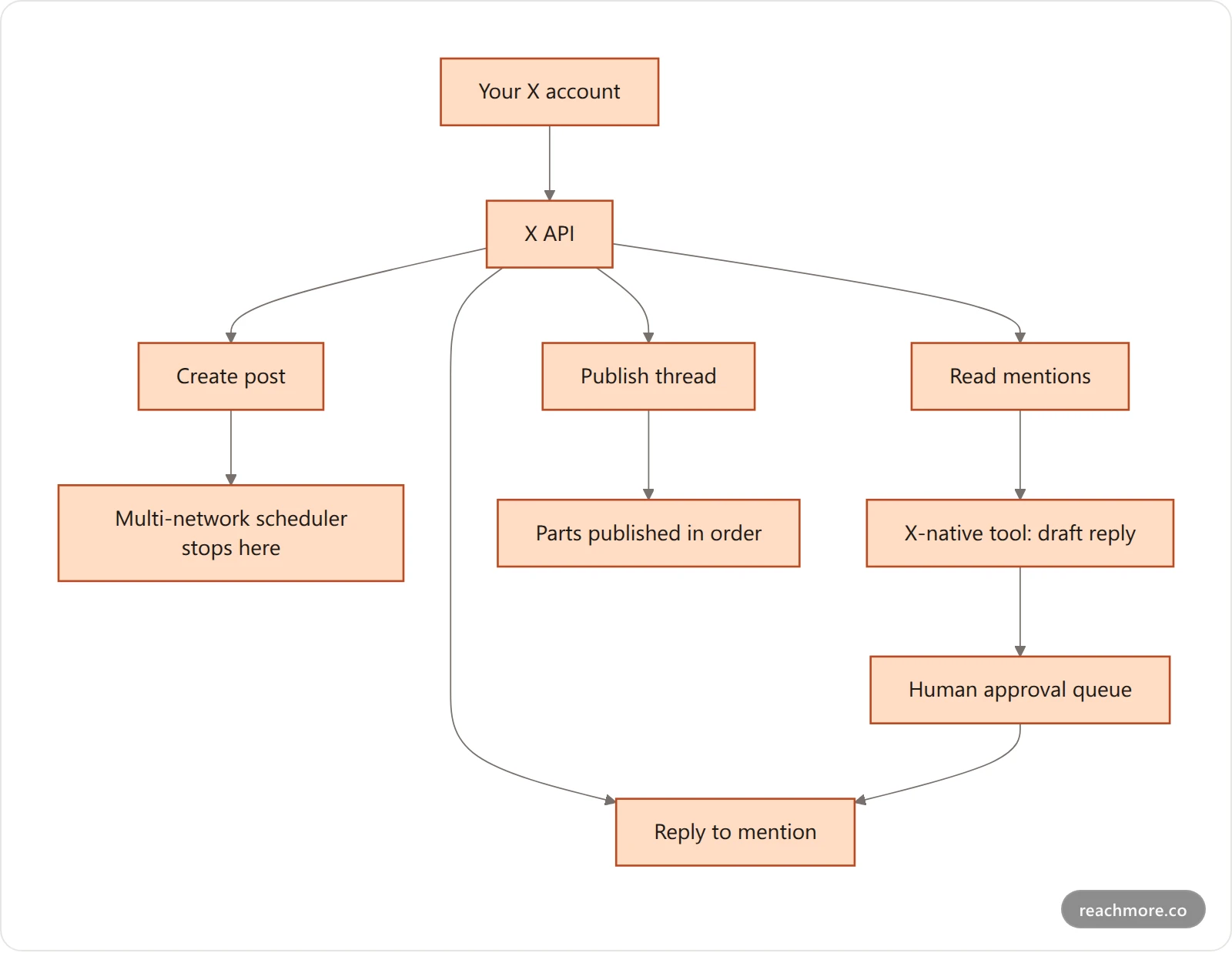
Multi-network schedulers mostly use one X endpoint: create a post. That covers the calendar, but not mentions, replies, thread ordering or rate-limit pacing. On X, those are where growth happens, so a tool built for ten networks leaves most of the X-specific work to you.
Every X tool, Publer included, is a client of the same X API. None of them has a private back door. So the real differences come down to which endpoints a tool chooses to use and how it bills you for them.
A multi-network scheduler mostly uses one endpoint: create a post. That covers the calendar. It doesn't cover the work that moves an X account:
Mentions. Someone asks you a question. A scheduler won't see it unless it polls your mentions.
Replies. Reply speed matters on X. Scheduled posts don't reply.
Threads. Splitting a long draft into numbered parts, in order, is its own job.
Rate limits. X meters actions per 15-minute window. A tool that fires a backlog at once can trip them.
We cover the posting path in detail in what happens between queue and post, and the per-window limits in Twitter API rate limits. The short version: a calendar is one small slice of what X lets a tool do.
The four kinds of Publer alternative#
1. Other multi-network schedulers#
Buffer, Hootsuite, Sprout Social and SocialBee all share Publer's shape: many networks, one calendar, priced by channels or seats. Switching between them is a sideways move. Do it for a better approval flow, better analytics or a better price, not for better X.
We've compared these in depth: Buffer alternatives, Hootsuite alternatives and what a Sprout Social seat really costs.
2. X-only writing tools#
Typefully and Hypefury focus on writing for X. Their editors are built around threads and drafts. If your pain with Publer is the editor, not the inbox, this is the cheapest fix.
They're lighter on the other side of the account: reading mentions, triaging replies and chaining steps into workflows.
3. X-native automation#
This is where ReachMore sits. It's a web app for X only. It handles the calendar, but it's built for the work around the post:
A composer and scheduler for single posts and threads.
A workflow builder with ready-made templates, like "Weekly thread, split automatically" and "Reply triage → approvals queue."
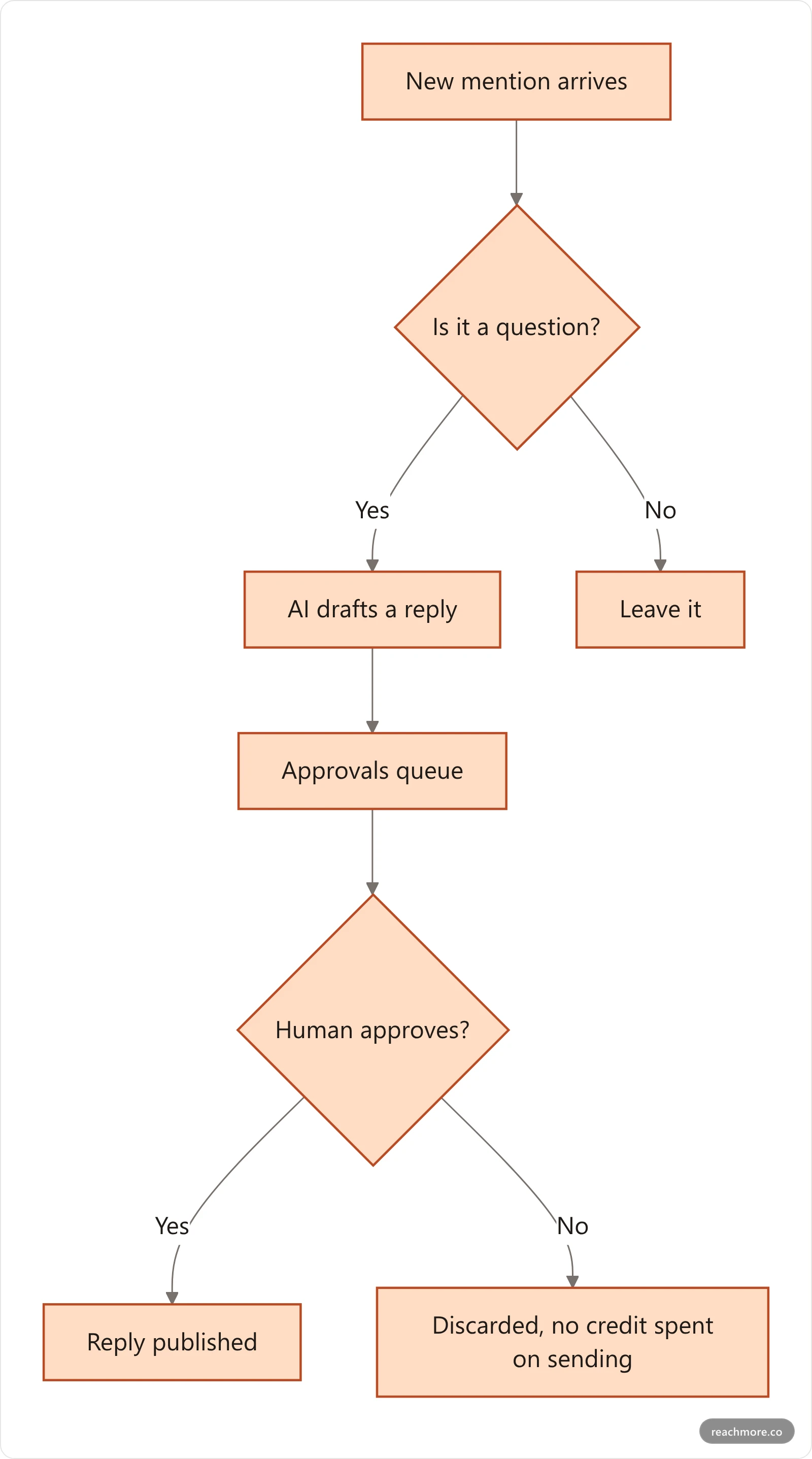
A mention-reply approval queue: AI drafts, a human approves before anything posts.
An inbound-only DM autoresponder that honours STOP opt-outs.
A native MCP server, so you can run the account from an AI assistant.
What it deliberately doesn't do: follow/unfollow automation, bulk DMs or replies to strangers. Those are the patterns that get accounts flagged, as we explain in Twitter bot detection.
4. The X API directly#
If you have engineers, you can build your own scheduler. You get full control and full maintenance: auth, retries, media upload, rate-limit handling and billing. Our X API free tier guide covers what access costs today.
What changes when you pay per action, not per month?#
With per-action billing you pay only for what actually happens on X, not for monthly capacity. A quiet month costs almost nothing, and a busy one scales with output. It favours X-focused or lighter schedules. Flat plans still win for teams posting links across many networks every day.
Publer and its multi-network peers charge a monthly fee for capacity: accounts, seats, posts. You pay the same in a quiet month as in a busy one.
ReachMore uses a credit wallet instead. You top up once, credits never expire, and you're only charged when an action succeeds. There's no subscription. Scheduling is free. Credits are taken when the post actually goes out.
These are the per-action prices, taken from the product's own pricing config:
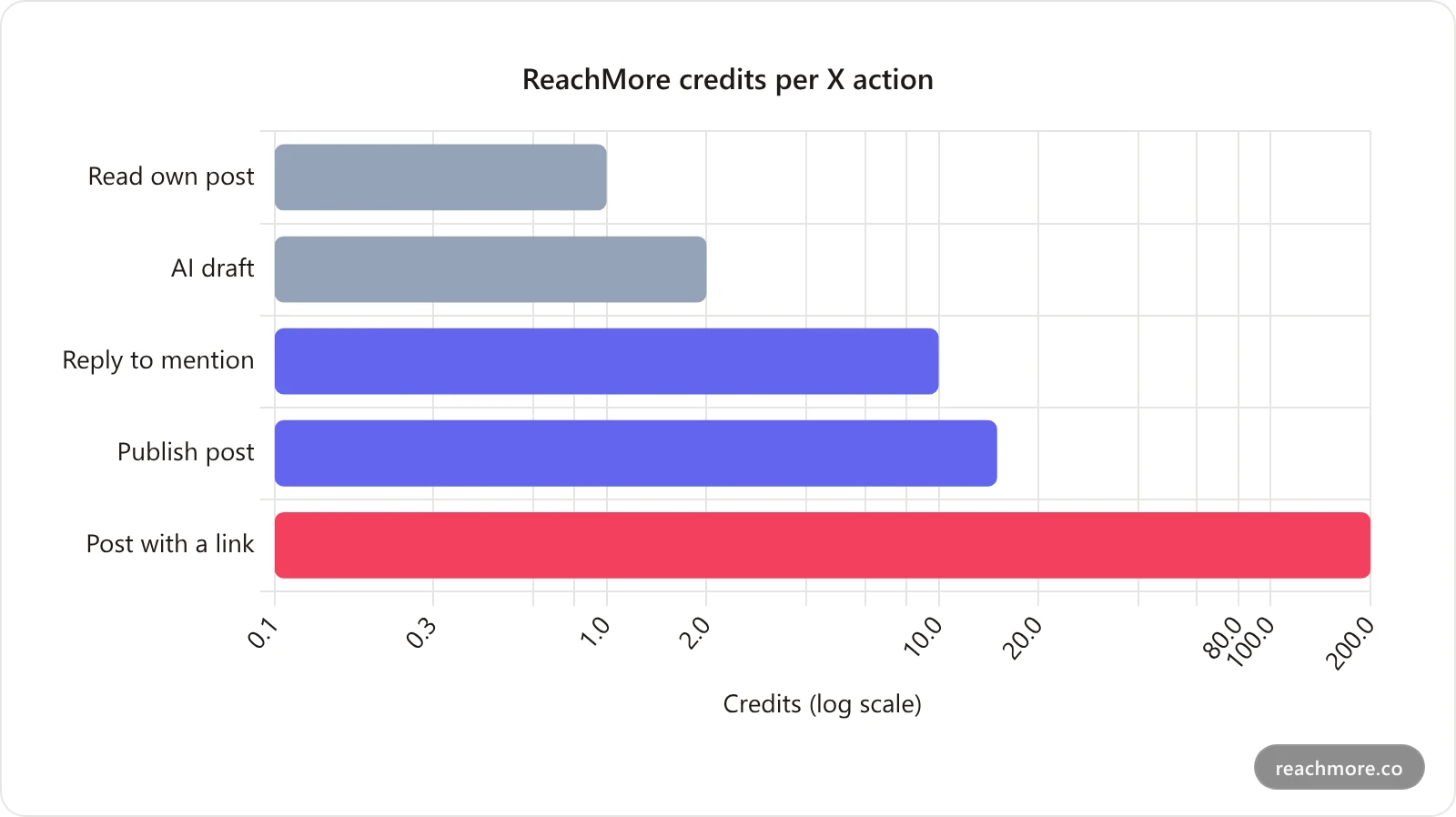
The outlier is the link. X charges far more to create a post that contains a URL, and the price passes straight through. That's worth knowing before you move a link-heavy Publer calendar anywhere. Put the link in a reply only when it earns it.
At the launch rate, a dollar buys roughly 550 credits. That puts a plain post near 3¢ and a mention reply under 2¢. Your exact rate shows at checkout.
See how the credit wallet works on ReachMore
Which model is cheaper depends on volume. A light X schedule costs very little per action. A team posting links across ten networks every day is better served by a flat plan.
How ReachMore handles the jobs Publer does on X#
ReachMore covers Publer's X jobs, scheduled posts, threads and recurring content, and adds the ones Publer leaves out: reading mentions, drafting replies and holding them for human approval. Everything runs under hard daily and 15-minute caps. Here's how each common job maps when X is the main channel.
Scheduled posts. Write in the composer, pick a time, done. Nothing is charged until the post is published.
Threads. Draft the long version, and the "split thread" step cuts it into numbered parts that publish in order. Our thread maker breakdown shows how the split works.
Recurring content. Templates like "Daily post at your best hour" and "Product tip of the day" chain an AI draft step into a publish step on a schedule.
Mentions. This is the job Publer doesn't really do. A workflow reads new mentions, checks whether each one is a question, drafts a reply, and sends it to the approvals queue.
Guardrails. Every account has hard caps: 50 posts, 50 replies and 50 DMs per UTC day, with burst limits per 15-minute window and at least 5 seconds between actions of the same kind. They sit well under X's own limits on purpose.
AI assistants. The native MCP server exposes the account as tools any Model Context Protocol client can call. Setup is in our Twitter MCP server guide.
Run X from one place, pay only for what posts
Scheduling is free. Credits are charged only when an action succeeds, and they never expire.
When should you stay on Publer?#
Stay on Publer if X is a minor channel and most of your work is scheduled posts across Instagram, LinkedIn, TikTok or Facebook. A breadth tool is the right tool for breadth. Switch only when X becomes the channel where you reply, triage mentions and automate.
Don't switch just to switch. Stay on Publer, or move to another multi-network scheduler, if:
You publish to Instagram, LinkedIn, TikTok or Facebook every week, and X is a minor channel.
Your team relies on a shared calendar and approvals across many brands.
Your X activity is almost entirely scheduled posts, not replies.
Real users ask the same thing in threads like this Reddit request for a multi-account tool. The answers split the same way: breadth tools for breadth, specialist tools for depth.
A mixed setup works too. Keep a multi-network scheduler for the other channels and run X in an X-native tool. That's often cheaper than paying for a higher tier just to get more X features. Our Twitter management tool guide walks through that split.
Key takeaways#
Every X tool uses the same X API. The difference is which endpoints it uses and how it bills.
Pick a multi-network scheduler if you post across 5+ networks. Pick an X-only writer if the editor is your pain.
Pick X-native automation if X is where you work: mentions, replies, threads and workflows.
Per-action billing favours lighter or X-focused schedules. Watch link posts, which cost far more on X.
ReachMore is X-only, bills per successful action, and keeps a human in the loop for replies.
Frequently Asked Questions#
What is the best Publer alternative for X?#
If X is your main channel, an X-native tool is the best Publer alternative, because it covers mentions, replies and threads, not only the calendar. ReachMore does this with workflows and a human approval queue. If you also post heavily elsewhere, keep a multi-network scheduler alongside it.
Is there a free Publer alternative?#
Most schedulers have a limited free tier, and ReachMore doesn't charge for scheduling itself. Credits are only taken when an action, like publishing a post, actually succeeds. Truly free, unlimited X posting doesn't exist anywhere, because X itself charges tools for API access.
Does ReachMore support Instagram or LinkedIn?#
No. ReachMore is built only for X. That focus is why it can go deeper on mentions, threads and reply workflows. If you need Instagram, LinkedIn or TikTok, pair it with a multi-network scheduler, or stay with Publer for those channels.
Why do posts with links cost more?#
X charges API clients much more to create a post that contains a URL than a plain post. ReachMore passes that cost through as 200 credits instead of 15. Any tool on the X API pays it somewhere, whether it shows up in credits or inside a monthly plan price.
Can a Publer alternative auto-reply to mentions safely?#
Yes, if a human stays in the loop. ReachMore drafts replies to mentions and holds them in an approvals queue until you approve them. It never replies to strangers who didn't mention you, and it runs under daily and 15-minute caps set below X's own limits.


