

Most people meet advanced search the slow way: they scroll a profile for ten minutes looking for a post they know exists, then give up. One line — from:username keyword until:2026-01-01 — would have found it in under a second.
Twitter advanced search is a set of text operators you type directly into X's search box. They filter by author, date, engagement count, media type, language, and conversation. The form at x.com/search-advanced just writes those operators for you. Learn the ten that matter and you never need the form again — and you can bookmark any search as a URL.
This is a reference, not a tour. The table of twitter search operators comes first, the traps come after, and the last section covers the part nobody mentions: which of these searches you can actually put on a schedule, and which ones stay manual forever.
What's below: the full operator table · where to type it · date operators and the UTC trap · engagement thresholds · media and reply filters · conversation operators · what stopped working · what can be automated · seven searches worth saving · FAQ.
The Operator Table#
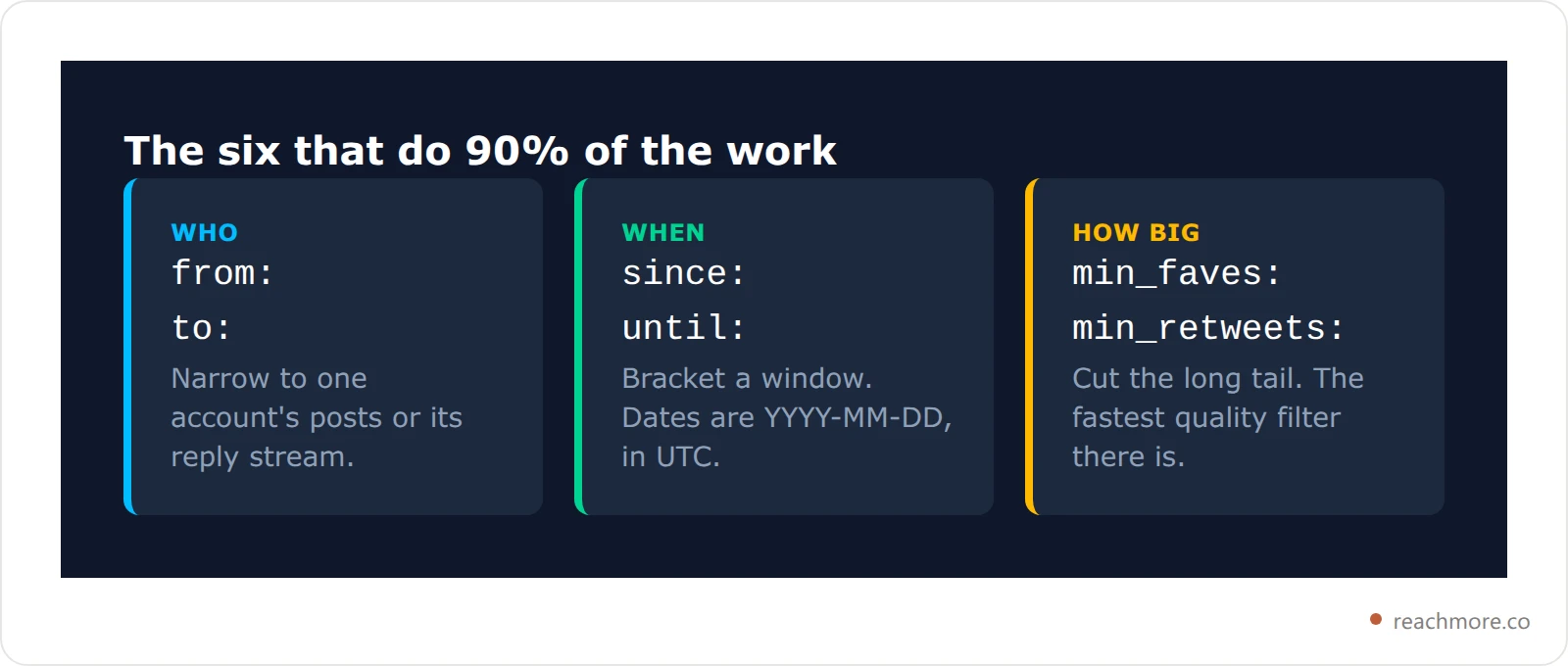
Everything below works in the search box on web and mobile. Operators combine freely — stack as many as you like, separated by spaces, and they're ANDed together by default.
Operator | What it does | Example |
|---|---|---|
| Posts authored by an account |
|
| Replies directed at an account |
|
| Posts mentioning an account |
|
| On or after a date (YYYY-MM-DD) |
|
| Before a date (YYYY-MM-DD) |
|
| At least N likes |
|
| At least N reposts |
|
| At least N replies |
|
| Has any image or video |
|
| Contains a URL |
|
| Is a reply |
|
| Written in a language |
|
| Words in this exact order |
|
| Either term (must be capitalised) |
|
| Excludes the term that follows |
|
| Links to a specific domain |
|
Where to Type It#
You have three entry points for x advanced search, and they produce identical results: the search box on web or mobile, the form at x.com/search-advanced, and the raw search URL. The form only assembles operator strings on your behalf, so typing the operators directly is always equivalent — and once you know them, considerably faster.
The search box on web or mobile accepts operators directly. Type the whole string, press enter, then switch to the "Latest" tab — the default "Top" tab re-ranks by engagement and will hide results your operators legitimately matched.
The advanced search form at x.com/search-advanced is a set of labelled fields that assembles the operator string for you. It's useful exactly once: fill it in, look at what lands in the search box, and learn the syntax from the output.
The URL is the one worth knowing. Every search is addressable as x.com/search?q=<your+query>&f=live, where f=live forces the Latest tab. That makes any search bookmarkable, shareable, and pinnable as a browser tab — which is as close to a "saved search" as X's own interface gets. X's own help page on advanced search documents the form fields if you want the official list.
Date Operators and the Timezone Trap#
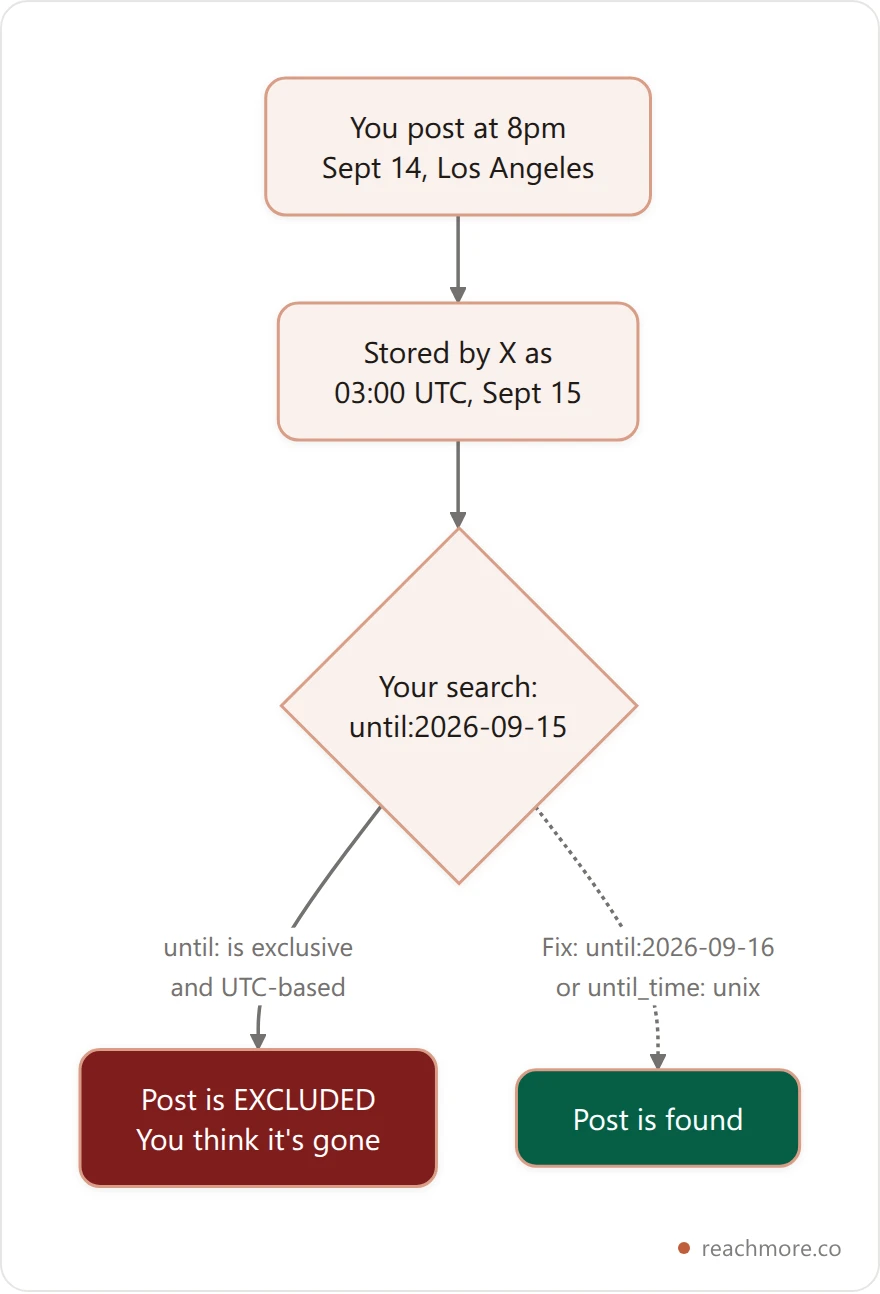
To search Twitter by date, since: and until: take dates in YYYY-MM-DD form. since: is inclusive; until: is exclusive. So since:2026-03-01 until:2026-04-01 returns all of March and nothing from April.
Here's the trap that costs people an hour: those dates are evaluated in UTC, not your local timezone. If you're in Los Angeles searching for something you posted "yesterday evening," the post may carry the next day's UTC date. A search for until:2026-09-15 will silently exclude it.
Two fixes. Either widen the window by a day on each side and accept some noise, or use the precise form: since_time: and until_time: accept Unix timestamps in seconds, which sidesteps date boundaries entirely. since_time:1767225600 is unambiguous in a way since:2026-01-01 is not.
Engagement Filters Are the Real Power Tool#
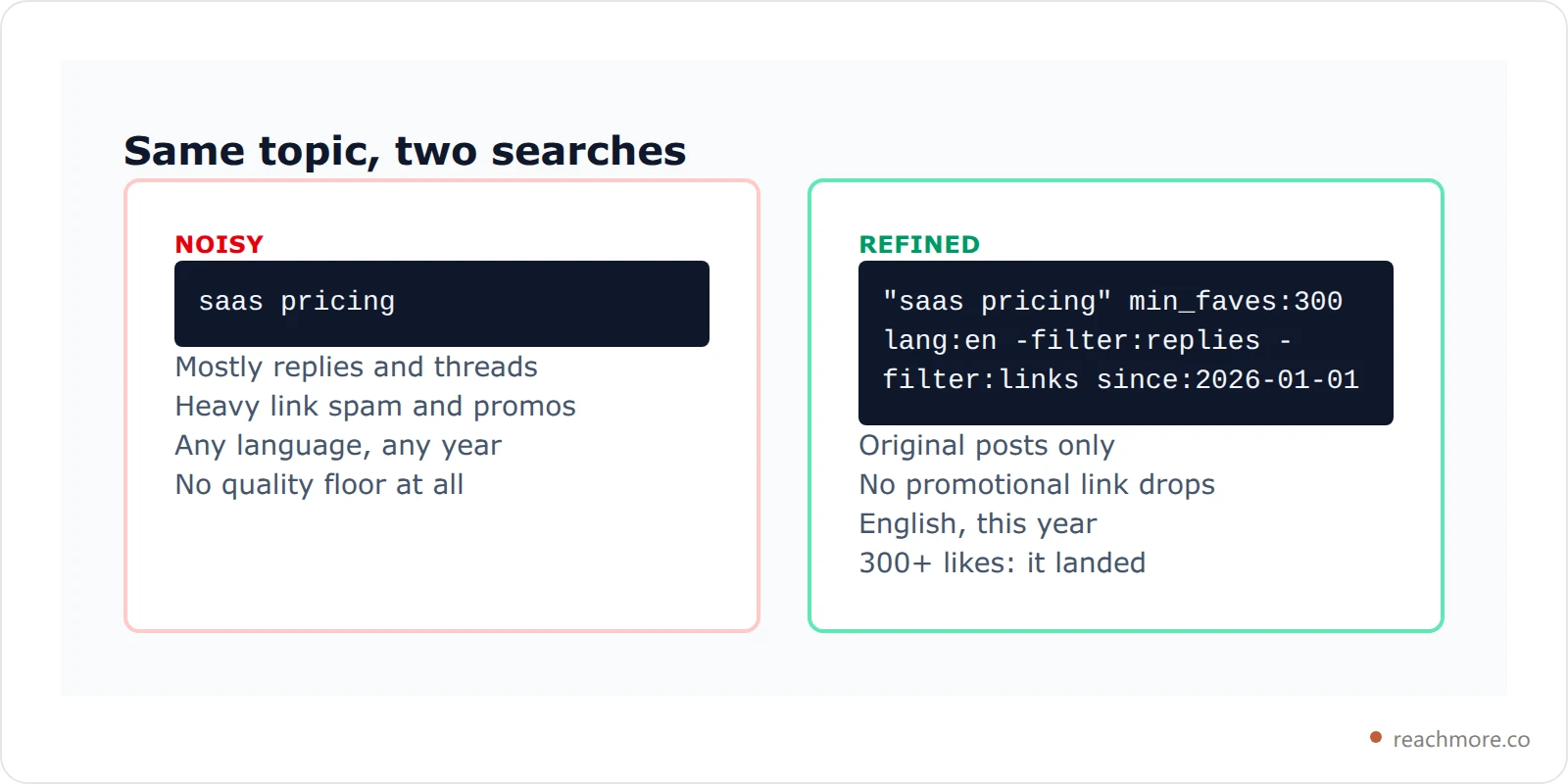
min_faves:, min_retweets: and min_replies: are the operators that turn search from a lookup into research. A bare keyword search on any busy term returns mostly noise. Add min_faves:500 and you're looking at the posts that actually landed.
This is how you reverse-engineer what works in a niche without guessing. "product launch" min_faves:1000 lang:en since:2026-06-01 -filter:replies gives you six months of high-performing original posts on one topic. Read thirty of them and you'll have a better sense of the format than any listicle provides — including this site's own writeup on what the X algorithm actually limits.
One caveat worth internalising: these thresholds filter on current counts, not counts at the time of posting. A post that took two years to accumulate 1,000 likes matches the same filter as one that did it in an hour. Pair engagement filters with a tight date window if recency matters.
Once you've found the posts worth answering, the bottleneck moves to writing the replies. See how ReachMore drafts and queues them.
Media, Links, and Reply Filters#
These twitter search filters are boolean switches, and every one of them can be negated with a leading minus.
filter:media— has an image or video attached.filter:imagesandfilter:videosnarrow further.filter:links— contains a URL. Negating it (-filter:links) is the fastest way to strip promotional spam out of a keyword search.filter:replies— is a reply to something.-filter:repliesrestricts to original posts, which is usually what you want when researching formats.filter:quote— is a quote post.filter:verified— author has a verified badge.
The combination -filter:replies -filter:links is worth memorising. It leaves you with original, self-contained posts — no reply threads, no link drops — which is the cleanest possible signal for how people write when they're not promoting anything.
Finding Conversations, Not Just Posts#
Three operators work on the conversation graph rather than post text.
to:username returns replies addressed to that account — the inbound conversation, not the account's own posts. It's the closest thing to reading someone's mentions from the outside, and it's how you find the questions an audience keeps asking a given person.
@username is broader: any post mentioning the handle, whether reply or not.
conversation_id: takes a post's numeric ID and returns every reply in that thread. Grab the ID from the end of any post URL. This is the operator that turns a viral thread into a readable dataset — useful when you want every response to one announcement rather than a sample.
Combining them gets specific fast. to:stripe min_replies:5 since:2026-08-01 surfaces the inbound questions that started real discussions, which is a genuinely good source of content ideas. If you're building a reply habit around that, the mechanics are covered in our X reply strategy guide.
Operators That Quietly Stopped Working#
Search syntax rots. Several operators still circulating in older guides no longer do anything, and X doesn't error on an unknown operator — it treats it as a literal search term, which silently wrecks your results.
Currently unreliable or gone: near: and within: (geocoded search was effectively deprecated for most accounts), source: (client filtering, e.g. source:tweetdeck), and filter:safe. The :) and :( sentiment operators are inconsistent enough that you shouldn't build anything on them.
The test is simple. Run your query, then run it again with the suspect operator removed. If the result count barely moves, that operator isn't filtering anything — it's being matched as text.
Why You Can't Automate Your Best Search#
Here's the part that catches people out, and it's structural rather than a missing feature in some tool.
Everything above runs against X's consumer search index — the one behind the search box in the app. The API exposes search through separate endpoints with their own access requirements, and access to them is gated well above the tier most independent tools and developers operate on. That gap is why almost no affordable X tool offers "monitor this search and alert me."
You can see the shape of it in how tools are priced. ReachMore's own pricing table, captured from X's pay-per-use console, carries a per-read price for posts, users, DM events, lists, spaces, trends and counts — reading one of your own posts is the cheapest action on the board, at a single credit. There is no line item for a search read, because a search-backed feed isn't something that tier buys.

So what can be automated is the mirror image of what you'd expect. Anything anchored to your own account — your posts, your mentions, your DMs — is cheap and pollable. Anything that requires sweeping the public firehose is not. We broke this down properly in push vs poll vs search, and the underlying ceilings are in X's API rate limits; X's own API documentation is the authority on what each tier includes.
ReachMore works on the cheap side of that line deliberately. Its MCP server exposes a search_posts tool, but it searches the posts already cached for your account — a substring match over local data, free, because it never calls X at all. That's an honest description of the tradeoff rather than a limitation we'd rather not mention: a search over your own archive is something a tool can give you for nothing, and a search over everyone else's isn't.
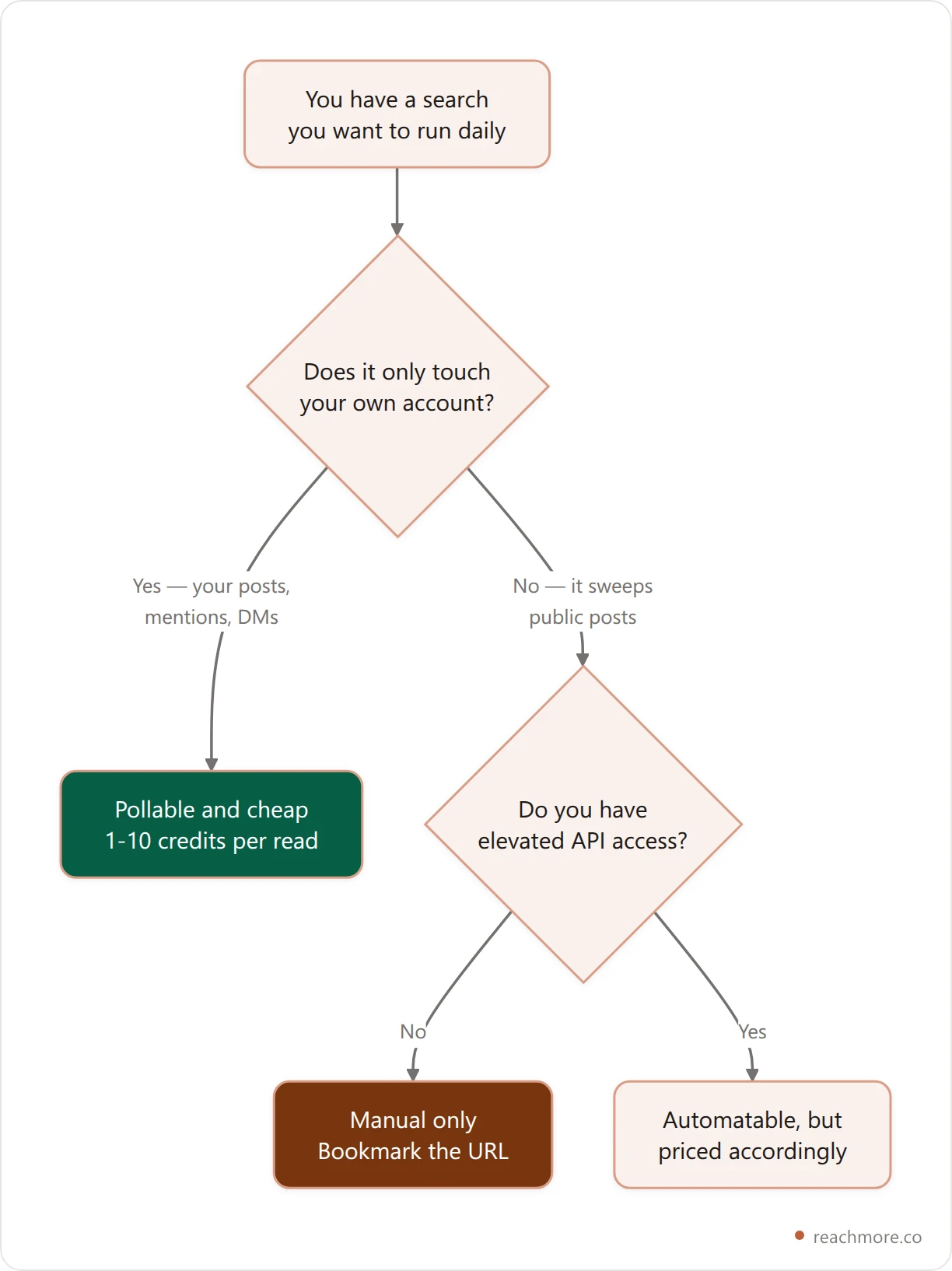
If your workflow is "check this bookmarked search each morning, reply to two things," that's a perfectly good system and it costs nothing. The automation you actually want sits downstream — drafting, scheduling, and approving what you send back. That part is solved. Start with a ReachMore credit wallet and the reading stays manual while the writing gets fast.
Seven Searches Worth Bookmarking#
Swap the placeholders and save each as a browser bookmark.
Your own greatest hits —
from:you min_faves:100 -filter:replies. What actually worked, ranked by what landed.Your forgotten post —
from:you "half-remembered phrase". Beats scrolling every time.Unanswered questions in your niche —
"your topic" ? min_replies:0 -filter:links since:2026-09-01.Competitor inbound —
to:competitor min_replies:3. The questions their audience keeps asking.Format research —
"your topic" min_faves:500 -filter:replies -filter:links lang:en.Who's sharing your site —
url:yourdomain.com -from:you.Thread teardown —
conversation_id:1234567890on any thread worth studying.
Number six is the one people miss. It surfaces every mention of your domain that never tagged your handle, which is usually most of them.
If turning those searches into a daily reply habit is the goal, our discovery workflow for finding posts to reply to picks up exactly where this reference ends — and ReachMore handles the drafting and approval queue.
Key Takeaways#
The search box accepts operators directly — the advanced search form just writes them for you, and every search is a bookmarkable URL with
&f=live.since:anduntil:run on UTC dates, not local time. Widen by a day, or usesince_time:/until_time:with Unix seconds.Engagement filters (
min_faves:,min_retweets:) are the highest-leverage operators; pair them with a date window because they match current counts, not counts at posting time.Unknown operators don't error — they're matched as plain text, which silently corrupts results. Test by removing the suspect operator.
Searches over your own account are cheap to automate; searches over the public firehose need API access most tools don't have. Bookmark those and run them by hand.
Frequently Asked Questions#
Can I use advanced search without an X account?#
Not reliably. X has required login for most search results since 2023, and logged-out access is inconsistent across regions and devices. Third-party mirrors come and go, and they generally can't apply engagement filters because they don't have the counts. Assume you need to be signed in.
How far back does Twitter advanced search go?#
The consumer search index reaches back to 2006 in principle, and since:/until: will accept those dates. In practice, results from more than a few years ago get patchy and inconsistently ranked — old posts from small accounts are frequently missing. For anything historical and complete, the search box is not a research-grade tool.
Why does my search return nothing when I know the post exists?#
Three usual causes, in order of likelihood. You're on the "Top" tab, which re-ranks and hides matches — switch to "Latest." Your date bounds are cutting it off due to the UTC offset described above. Or you've included an operator X no longer supports, so it's being searched as literal text.
Do search operators work in the mobile app?#
Yes. The full operator syntax works identically in the iOS and Android search boxes. The advanced search form is web-only, but since the form only generates operator strings, you lose nothing by typing them directly on mobile.
Can I get alerts when a search gets new results?#
Not from X itself, and not from most third-party tools, for the access reasons covered above. The practical workaround is a pinned browser tab on the &f=live URL checked on a schedule you keep. Automated alerting on arbitrary public searches is an enterprise-priced capability, not a consumer one.
Does searching a lot hurt my account?#
Normal manual searching, no. Scripted scraping of the search interface is a different matter — it violates X's automation rules and is exactly the behaviour that gets accounts rate-limited or suspended. The operators are supported; hammering them with a headless browser is not.
What's the difference between to: and @?#
to:username returns only posts that are replies directed at that account. @username returns any post mentioning the handle, including quotes, standalone mentions, and replies. Use to: for the inbound conversation, @ for full mention volume.
Putting It to Work#
Advanced search is the highest-return thirty minutes you can spend on X. The operators haven't changed much in years, they work on every surface, and they cost nothing. The only thing to be clear-eyed about is which searches can be put on autopilot — and for most people, the honest answer is that the reading stays manual while the composing and scheduling gets automated.
Stop retyping the same searches
Bookmark your searches, then let ReachMore handle what comes next — drafting, scheduling, and a human approval queue for every reply that goes out. Credits are a one-time top-up and never expire.
Try ReachMore

