

Search "twitter mcp server" and you'll get a dozen GitHub repos that wrap three endpoints, hardcode your API keys in a JSON config, and break the week X changes a rate limit. Almost none of them tell you what a call actually costs you — which matters, because since X moved to pay-per-use billing, every post your agent sends is a real charge against a real meter.
A Twitter MCP server is a Model Context Protocol server that exposes X (Twitter) actions — posting, scheduling, analytics, reply approvals — as tools your AI agent can call directly. Instead of you clicking through a dashboard, Claude or Cursor calls create_post or get_best_post_times itself, using credentials you scope and revoke. The good ones meter spend per call and refuse the actions that get accounts banned.
This post explains how one works end to end: the transport, the auth model, the tool surface, what each action costs, and the guardrails that separate a useful agent integration from a suspension waiting to happen.
What a Twitter MCP server actually is#
A Twitter MCP server is a service that describes X actions in a standard format so any AI client can call them. It answers three questions — who are you, what can you do, and please do this — and translates the answers into real posts, schedules, and analytics reads on your account.
The Model Context Protocol is an open standard Anthropic released in late 2024 for connecting AI models to external systems. The pitch is simple: instead of every app building a bespoke plugin for every model, tools describe themselves once in a standard shape, and any MCP-speaking client can use them.
An MCP server is just a service that answers three questions: who are you (initialize), what can you do (tools/list), and please do this (tools/call). A Twitter MCP server answers those questions with X actions.
The distinction that trips people up: MCP is not an X feature. X publishes its own API, and in June 2026 X shipped an MCP server of its own to make the platform easier for AI tools to consume. But a raw API wrapper and a server that operates your account are different products, and the difference is mostly what happens around the API call — auth, billing, approval queues, and refusing to do the illegal thing.
The three kinds of X MCP servers (and which you need)#
Most of what ranks for this query falls into three buckets. Pick by what you actually want the agent to do.
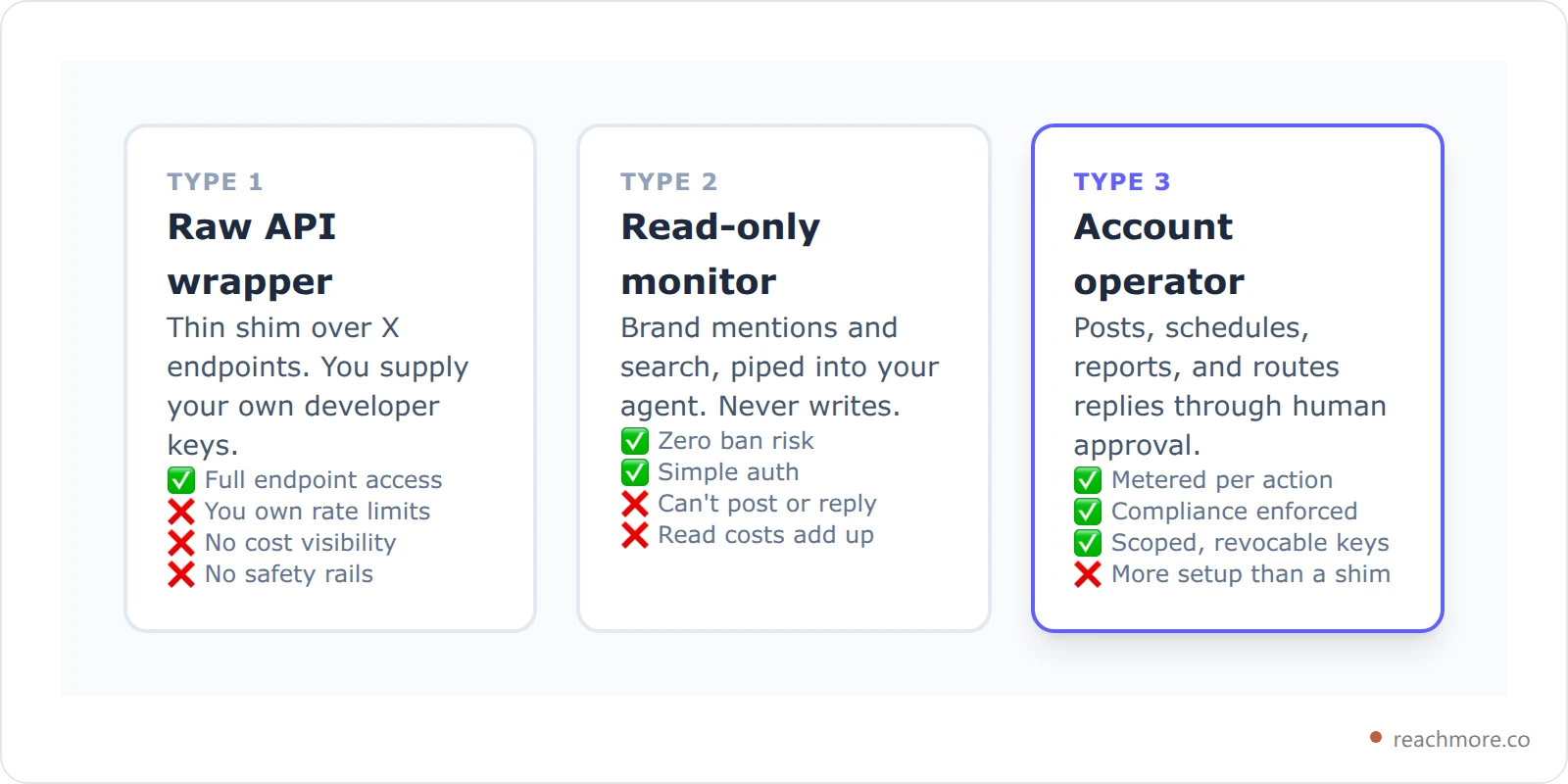
Type 1 is fine if you're a developer who wants the endpoints and accepts the babysitting. Type 3 is what you want if an agent is going to touch your real account on a schedule. ReachMore ships a Type 3 server, and the rest of this post uses it as the worked example because we can show you exactly what's under it.
The tool surface: 17 tools across six categories#
A useful X MCP server isn't measured in endpoint count — it's measured in whether the agent can complete a task without dropping back to you. ReachMore's registry exposes 17 tools in six groups.
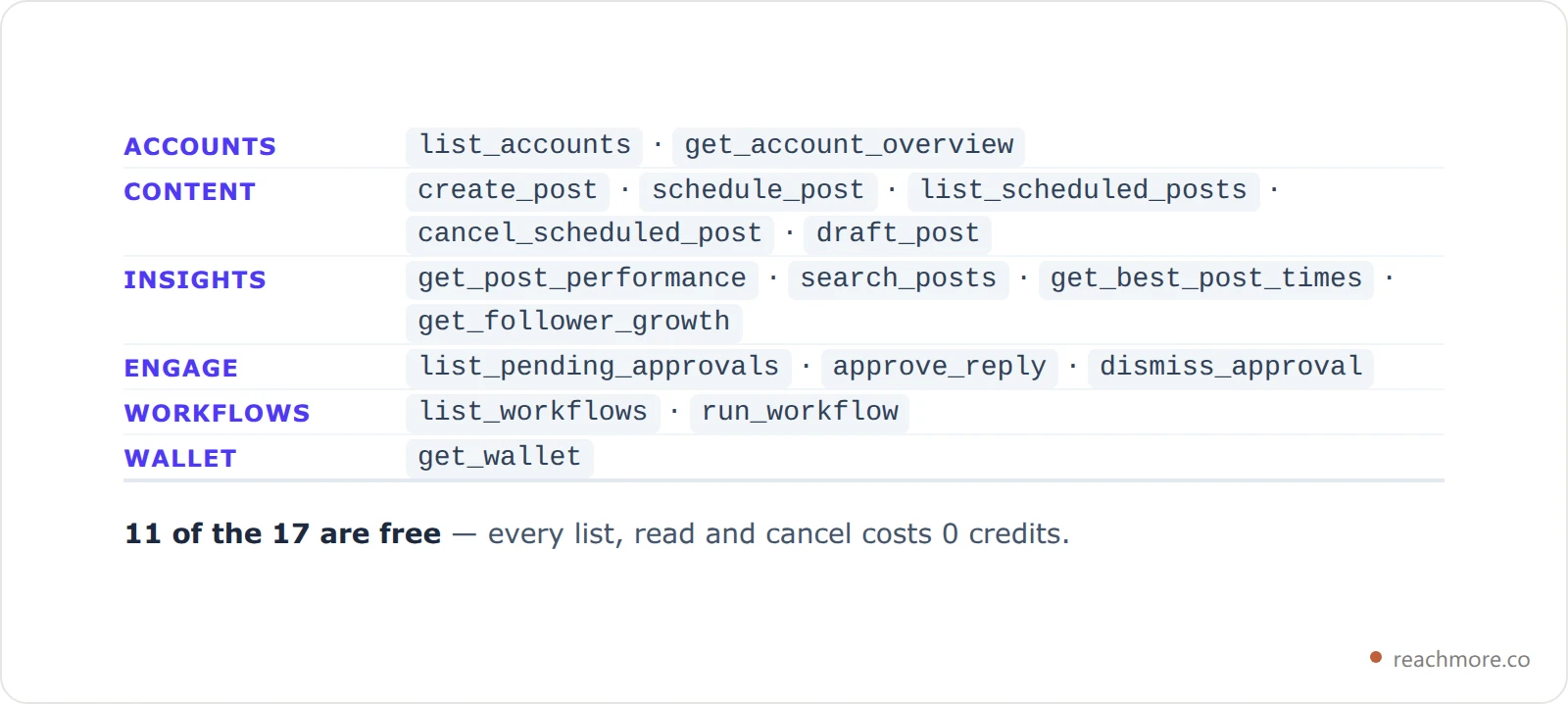
Eleven of the seventeen cost nothing to call. That's deliberate: an agent that has to pay to look around will guess instead, and a guessing agent posts the wrong thing. Reads are cheap so the write is correct.
Give each agent its own key
Free read tools for your research agent, scheduling for your publishing agent, and nothing more. Scope it once, revoke it any time.
Explore the MCP toolsEach tool also declares the four MCP behavior hints explicitly — readOnlyHint, destructiveHint, idempotentHint, openWorldHint — rather than letting them default. That matters more than it sounds: the protocol's defaults are the unsafe ones, so an omitted hint tells your client a read-only tool might be destructive. Setting all four means a well-behaved client can warn you before create_post fires but stay quiet for get_wallet.
How the connection actually works#
Every call is one HTTP request carrying a JSON-RPC message. The server checks your key, confirms the tool is allowed on it, applies rate limits, reserves the credits, then calls X — refunding in full if X fails. The result comes back with your new balance attached.
The transport is deliberately boring: JSON-RPC 2.0 over a single POST /api/mcp. It's stateless — there's no SSE stream to hold open, so a GET gets told to use POST instead. That makes it survivable behind ordinary serverless infrastructure, which is where most of these servers fall over.
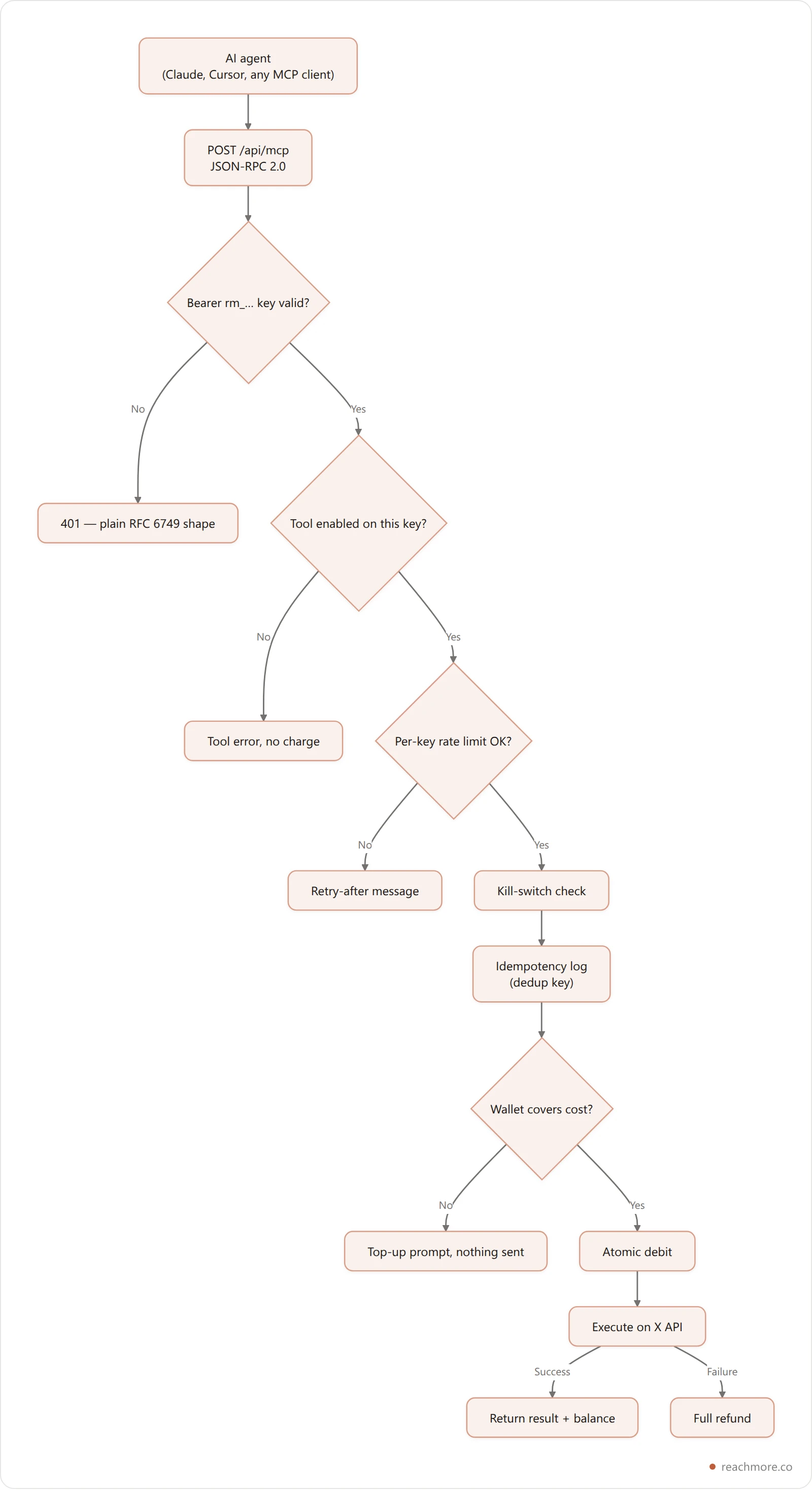
Two details in that chain are worth stealing for your own integrations.
The debit happens before the execute, not after. The obvious order — check balance, do the thing, charge — has a race: two concurrent calls both pass the balance check, both execute, and only one debit lands. Reserving atomically up front closes it, and a failed X call refunds in full. You never pay for a post that didn't go out, and you can't double-spend a wallet by firing two agents at once.
Idempotency is a first-class argument. create_post takes an idempotency_key, so an agent that retries on a timeout doesn't double-post. Omit it and identical text on the same account is deduplicated for the rest of the UTC day anyway. Agents retry — plan for it, or your feed shows it.
What each action costs#
Reads cost 1 credit, an AI draft costs 2, a reply to a mention costs 10, and publishing a post costs 15 — or 200 if the text contains a link, because X bills link posts at a far higher rate. Scheduling is free until the post actually publishes.
This is the part the GitHub wrappers leave out. X bills pay-per-use, so an agent with write access is spending money on your behalf. ReachMore's credits mirror X's own price tiers, which keeps the numbers honest — actions that cost X the same cost you the same.

Look at that last bar. A post containing a URL costs 200 credits against 15 for one without, because X bills link-bearing content at a dramatically higher rate. That single fact should change how you prompt your agent — and it's why the tool descriptions themselves tell the model to avoid links unless asked. The cheapest guardrail is a well-written tool description, since the model reads it before every call.
Scheduling is free; you're charged when the post actually publishes, and a cancelled post costs nothing. Performance reports serve free from a 24-hour cache and only cost credits when you force a rebuild — roughly 101 credits to pull 100 posts fresh. Failed requests are neither counted against your rate limit nor charged.
There's no subscription. Credits are one-time top-ups that don't expire, which is the right shape for agent traffic: usage is spiky, and paying a monthly fee for a month your agent sat idle is how people churn. If you're weighing that against the subscription tools, our comparison of X automation tools covers the trade-offs across the category.
See the full per-action credit table
The guardrails that keep your account alive#
Here's the uncomfortable truth about most Twitter MCP servers: they'll happily let your agent do things that get you suspended. X's automation rules are specific about bulk follows, unsolicited replies, and cold DMs.
The defense that works isn't a warning in the README — it's not shipping the action. ReachMore has no follow, unfollow, bulk-DM, or keyword-reply tool. Not disabled: absent. An agent cannot call a tool that doesn't exist, no matter how the user prompts it, and no jailbreak reaches an endpoint that was never written.
Two categories survive that cut, both narrowed to solicited contact:
Replies only to people who @mention or quote you. Someone summoned you; answering isn't spam. Stranger replies aren't available.
DMs only to people who DM'd you first, with a STOP opt-out. Inbound-only, never outbound-cold.
Even those route through a human. AI-drafted mention replies land in an approval queue — list_pending_approvals shows the mention and the draft, and nothing is sent until approve_reply runs. Your agent can prepare a day of responses and still leave the send button with you. If you want the reasoning behind keeping a human in that loop, we wrote it up in our guide to AI replies that don't sound like a bot.
There's also a platform-wide kill switch that halts all outbound instantly — the thing you want to exist at 2am when an automation misbehaves.
Connecting it to Claude, Cursor, or any MCP client#
Setup is an API key and a URL. You create keys in the ReachMore dashboard under Connections; each one is a rm_-prefixed token you pass as a normal bearer credential:
Authorization: Bearer rm_…There's no OAuth dance to implement — invalid credentials get a plain 401. Each key carries its own settings:
Setting | Default | Ceiling |
|---|---|---|
Requests per minute | 30 | 60 |
Requests per day | 500 | 5,000 |
Enabled tools | All 17 | Per-key allow-list |
Active keys per user | — | 10 |
The per-key tool allow-list is the feature to actually use. Give your research agent a key with only the free read tools and it cannot post, regardless of what it decides to do. Give your publishing agent a separate key with schedule_post but not create_post, and everything it queues is cancellable before it goes out. Ten keys is enough to give every agent exactly the surface it needs and nothing more — and revoking one doesn't disturb the others.
The server negotiates protocol version 2025-06-18 and also speaks 2025-03-26, echoing back whichever your client asks for, so older MCP clients keep working.
Create an API key and connect your agent
Twitter MCP server vs. calling the X API directly#
If you're a developer, you might reasonably ask why not just give the agent the X API and a fetch tool.
Direct X API | Account-operating MCP server | |
|---|---|---|
Auth | You store and refresh OAuth tokens | Scoped key, revoke per agent |
Cost visibility | Read the billing console later | Balance returned on every call |
Retry safety | You build idempotency | Dedup keys built in |
Compliance | Your responsibility | Unsafe actions don't exist |
Read costs | Pay X every time | Cached, tiered by post age |
Agent ergonomics | Model reads API docs | Tool descriptions state cost + args |
That cache row compounds faster than people expect. Engagement stabilizes with age — nearly all movement happens in the first 48 hours, a tail runs through day seven, then the numbers are static. So refresh windows stretch as posts age: six hours under two days, 24 hours through day seven, then frozen. You pay X once for a number that can no longer change, and every later read is free. For an agent checking analytics each morning, that's the difference between a real monthly bill and a rounding error.
Worth knowing before you wire an agent to a live account: the same Twitter API rate limits that govern a normal client govern MCP tool calls too — per-endpoint buckets, a 429 that carries its own reset timestamp, and per-call pricing.
If you're comparing this with a no-code workflow tool, see how the n8n Twitter node handles the same jobs — and where you end up building triggers, dedupe and approvals yourself.
Frequently Asked Questions#
What is a Twitter MCP server?#
It's a Model Context Protocol server that exposes X (Twitter) actions as tools an AI agent can call. Your agent asks it what tools exist, then calls them — posting, scheduling, pulling analytics — instead of you working a dashboard. The protocol is an open standard, so any MCP client can connect.
Can Claude post to X for me?#
Yes, if you connect an MCP server that exposes a posting tool and give it a key with that tool enabled. Claude calls create_post or schedule_post and the server handles X's API, billing, and rate limits. You control the scope: a key without write tools can only read.
Is using an MCP server against X's rules?#
Automation itself is allowed — X publishes an API and its own MCP server. What's prohibited is bulk following, unsolicited replies, and cold DMs. Pick a server that doesn't implement those actions at all, rather than one that leaves them available and trusts your prompt.
How much does it cost to run an agent on X?#
It depends on what it does. Reads and list calls are typically free or one credit; publishing a post is 15 credits, and 200 if the text contains a URL, because X bills link posts far higher. Scheduling is free until the post actually publishes.
What happens if my agent retries a failed post?#
Nothing bad, if the server implements idempotency. Pass a stable idempotency_key and a retry returns the original result rather than posting twice. ReachMore also deduplicates identical text on the same account for the rest of the UTC day as a fallback.
Do I still need the ReachMore dashboard?#
No, for day-to-day operation — the MCP tools cover posting, scheduling, insights, approvals, and workflows. You do need it for buying credits, which deliberately can't happen over MCP, and for the visual scheduling and timing views if you prefer to plan visually.
The short version#
A Twitter MCP server is worth having when an agent is going to touch your real account repeatedly. The ones worth using share four traits: they meter spend per call and tell you the balance, they make retries safe by default, they scope credentials per agent rather than handing over one master key, and they simply don't implement the actions that get accounts suspended.
Everything else is a wrapper — and wrappers are cheap to write, which is exactly why there are so many of them ranking for this query.


