

Most people who search for a Buffer alternative aren't unhappy with Buffer. They're unhappy with the bill. You connected six channels during a growth push, you now post to one of them, and the invoice never noticed.
The short answer: pick your replacement by billing model first, feature list second. Per-channel subscriptions punish anyone who consolidated onto one platform. Flat plans work if you post daily. Usage-based wallets work if your volume swings. Self-hosted tools trade money for maintenance. Everything else is a detail.
This comparison is deliberately light on dollar figures and heavy on structure, because vendor prices change faster than any blog post does. What doesn't change is how each tool charges you, what it actually controls on X, and what breaks the day you migrate.
The 7 Buffer Alternatives at a Glance#
Tool | How it bills | Best for | X depth | Runs on your own server? |
|---|---|---|---|---|
ReachMore | Credit wallet, pay per action | X-only creators and founders | Deep — X is the only platform | No (hosted) |
Typefully | Subscription | Thread writers and drafters | Deep — X-first by design | No (hosted) |
Hypefury | Subscription | Creators recycling evergreen posts | Deep — X-first by design | No (hosted) |
Publer | Subscription, priced per connected account | Multi-platform posting on a budget | Moderate — one of many networks | No (hosted) |
Postiz | Open source; self-host free or pay for hosted | Developers who want the source | Moderate — one of many networks | Yes |
Mixpost | Self-hosted, paid license for the Pro edition | Agencies avoiding per-seat pricing | Moderate — one of many networks | Yes |
Metricool | Subscription | Reporting-first teams | Moderate, analytics-led | No (hosted) |
Read that table as a shape, not a scoreboard. A per-account subscription is excellent value at six accounts and terrible value at one. A credit wallet is cheap for a founder who posts four times a week and expensive for an agency pushing 40 posts a day. The winner depends entirely on your volume curve.
Why People Actually Leave Buffer#
Three reasons show up over and over: per-channel billing that outlives the channels you actually use, generalist tools that flatten how X behaves, and no programmatic access for scripts or agents. Price is the trigger; the other two decide where you land.
Here's each in turn.
1. Per-channel billing outlives the channels. Scheduling tools that price by connected account assume your account count only goes up. In practice, creators consolidate — most of the people who kept one network kept X — and the pricing model never rewards that.
2. Generalist tools flatten platform-specific behavior. A cross-posting composer treats X like a text box with a character limit. It doesn't know that a post carrying a link behaves differently from one without, that reply timing decides reply reach, or that thread structure is its own craft. If X is your main platform, that flattening costs you more than the subscription does.
3. No programmatic control. The moment you want an agent, a script, or a cron job to draft and queue posts, most hosted schedulers hand you a UI and nothing else. That's the wall that pushes technical users toward open-source tools or an API-first product.
If you're weighing a wider set of X tools rather than schedulers specifically, our tested ranking of Twitter automation tools covers the category with the same skepticism. And if you landed here because X Pro put your old deck behind a paywall, the TweetDeck alternative comparison is the closer match — it ranks several of these same tools by what they can actually rebuild of TweetDeck's columns. And if it was a per-seat Hootsuite bill that sent you looking, our Hootsuite alternatives comparison runs the same billing-model analysis for that switch.
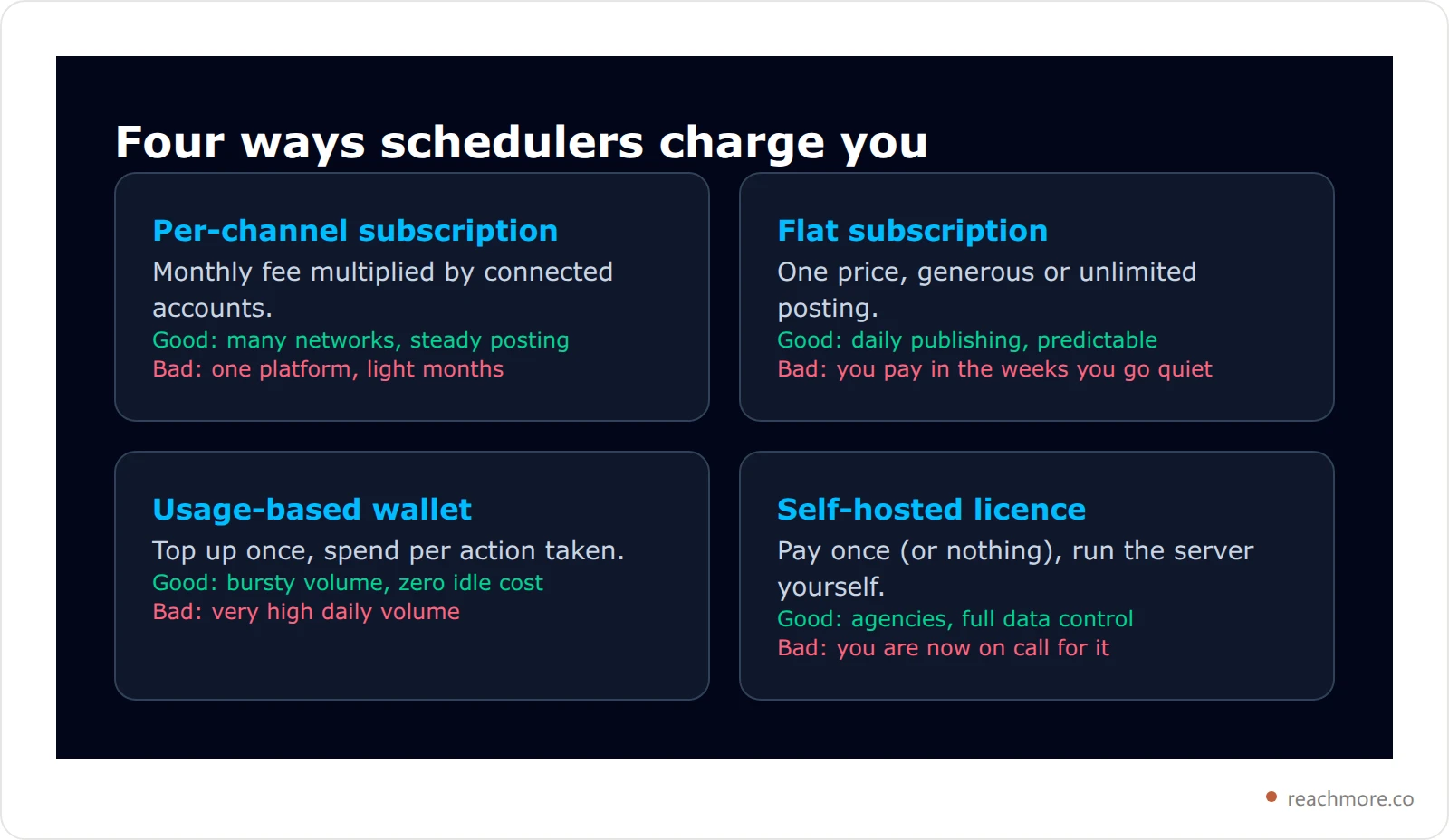
The rest of this guide walks the seven tools, then covers the two things comparison posts almost never mention: what X itself charges behind the scenes, and what actually breaks on migration day.
The 7 Alternatives, One by One#
Prices move, so treat each vendor's own pricing page as the source of truth. What follows is the part that stays true: who each tool is built for and where it stops.
1. ReachMore — pay per action, X only#
ReachMore is a web app built for one platform. Instead of a monthly plan, it runs a credit wallet: you top up once (packs start at $1), credits never expire, and you're charged only when an action succeeds. Idle weeks cost nothing, which is the whole point for anyone whose posting comes in bursts.
The per-action prices are published rather than bundled — reading one of your own posts costs 1 credit, an AI draft costs 2, replying to a mention costs 10, publishing a post costs 15, and publishing a post that contains a link costs 200. That last number isn't a markup; it mirrors what X charges for a write containing a URL, which we'll unpack below. Scheduling itself is free until the post actually publishes.
Feature-wise it covers a composer and scheduler, a workflow builder, an inbound-only DM autoresponder with STOP opt-out, a mention-reply queue where a human approves every reply, and insights. There's also a native MCP server, so Claude or any other MCP client can drive the account directly — we documented that in how the Twitter MCP server works.
The catch: it's X and nothing else. If you need LinkedIn and Instagram in the same calendar, this is the wrong tool.
Best for: founders, indie hackers, and creators who consolidated onto X and post in bursts. Try it with a $1 top-up
2. Typefully — the writing tool that happens to schedule#
Typefully earned its audience on drafting, not on calendars. Thread composition, previews that match how a post actually renders, and a clean queue. If your bottleneck is writing rather than logistics, that focus is worth the subscription.
The catch: it's a subscription, so quiet months cost the same as busy ones.
Best for: thread writers who draft daily.
3. Hypefury — recycling and growth loops#
Hypefury leans into the growth mechanics of X: recycling evergreen posts, auto-retweeting your own hits, and turning a back catalogue into a queue. As a twitter growth tool it does things a general scheduler doesn't try to do — though it's worth checking any such feature against what a growth tool can actually automate on X before you rely on it.
The catch: automation that republishes on your behalf needs a human eye, or your timeline starts to read like a loop.
Best for: creators with a library worth recycling.
4. Publer — the closest like-for-like swap#
Publer is the most direct structural replacement: multi-platform, a free tier, and per-account pricing. If you genuinely run six networks, the math often lands in your favour versus other multi-platform suites.
The catch: you're back in per-account billing, which is what sent most people looking in the first place.
Best for: teams that really do post everywhere.
5. Postiz — open source, self-host or hosted#
Postiz publishes its source on GitHub. Run it yourself and the software cost is zero; pay for the hosted version and it behaves like any other SaaS. For developers who want to read the code that touches their tokens, that's a real difference.
The catch: self-hosting means you own the upgrades, the database, and the 2am outage.
Best for: developers who want the source and the control.
6. Mixpost — self-hosted, licence not seats#
Mixpost is a self-hosted publishing app whose Pro edition sells as a licence rather than a per-seat subscription. Agencies managing many client accounts often find the license-plus-server model cheaper than paying per connected profile forever.
The catch: same as Postiz — you're the ops team now.
Best for: agencies with server skills and lots of accounts.
7. Metricool — reporting first#
Metricool starts from analytics and adds publishing, which is the inverse of most schedulers. If your job includes sending a monthly report to someone, that inversion saves real time.
The catch: the analytics depth is broad rather than deep on any one platform. For X specifically, our guide to the metrics that predict growth covers what a generalist dashboard tends to miss.
Best for: consultants and small teams who report to a client.
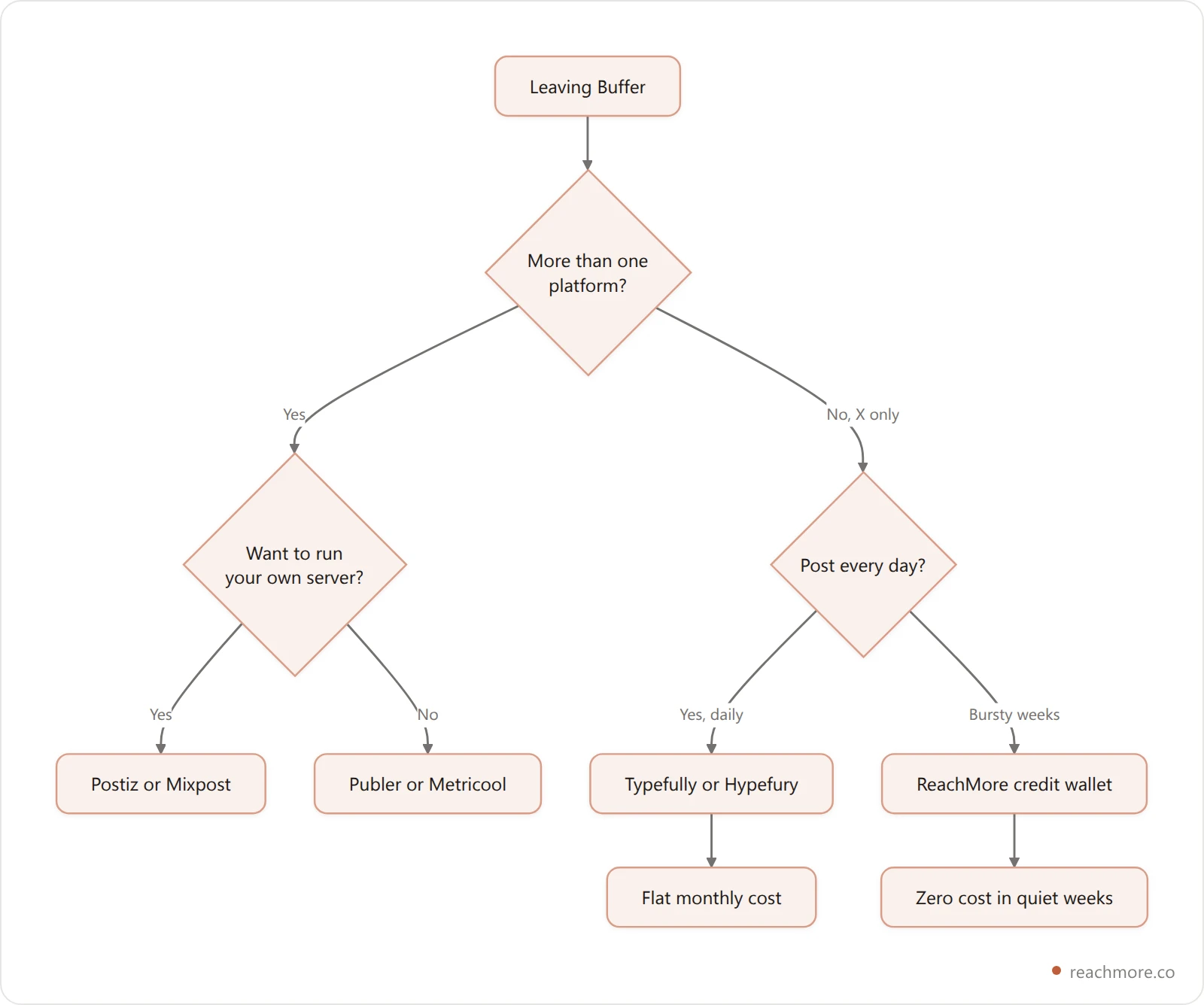
Whatever you pick, the migration itself is where the surprises live — and the biggest one is that X now charges for the actions your scheduler takes.
The X-Specific Cost Nobody Prices In#
Here's the part that changed the economics of every X scheduler: X's API is metered. Posting through any third-party tool means somebody is paying per write, and the price is not uniform. A plain post costs one amount. A post containing a URL costs dramatically more — on the order of a 13x difference in ReachMore's published credit prices, which mirror X's own pay-per-use tiers.

Subscription tools absorb that cost inside the plan fee, which sounds friendlier until you notice what it forces them to do: cap your posting, throttle link posts, or price the plan for the heaviest user in the cohort. Usage-based tools show you the meter instead. Neither is dishonest — but only one of them tells you that dropping a link into a scheduled post is the single most expensive thing you can automate.
It's also a nudge in the right direction. Links suppress reach on X for reasons that have nothing to do with billing, and we've written up how to post links without killing reach. The cheap version and the high-reach version happen to be the same version. If you want to see the meter before you commit, top up $1 and watch what each action costs.
For the underlying rules, X's own developer documentation is the primary source, and Buffer's pricing page is the fair comparison point for what a per-channel plan costs today.
What Actually Breaks When You Migrate#
Switching schedulers is not a data export. Four things reliably break: your scheduled queue stays behind in the old tool, analytics history doesn't transfer, thread drafts lose their formatting, and X needs a fresh OAuth grant. Budget an hour of re-queuing and one week of overlap.
In detail:
Your queue doesn't come with you. Scheduled posts live in the old tool's database. Most exports give you a CSV of text, not a re-created calendar. Budget an hour to re-queue anything already scheduled, and don't cancel the old subscription until the new queue has published successfully at least once.
Analytics history stays behind. Engagement numbers you saw in Buffer were computed from X data the tool fetched and stored. A new tool starts from zero history — it can read your recent posts from X, but not the year of charts you were used to.
Draft formatting doesn't survive. Thread drafts, especially ones with numbering or custom separators, tend to arrive as one wall of text. Re-check every thread before its first scheduled run.
Reconnecting X is a fresh OAuth grant. You'll authorize the new app, and any tool that acts on your behalf inherits only the permissions you approve. Check the scopes; a scheduler that asks for follow/unfollow permission it doesn't need is telling you something about its roadmap.
The safest migration order is: connect the new tool, re-queue one week, run both for that week, then cancel. It costs a few extra days of overlap and removes every failure mode above.
How to Choose in 10 Minutes#
Answer three questions honestly: how many platforms you'll still post to in six months, whether your volume is steady or bursty, and whether code will ever need to touch this. One platform plus bursty output points to a wallet; daily publishing across many networks points to a flat plan.
Here's why each question decides it.
How many platforms will you still post to in six months? Not how many you're connected to today. If the answer is one, every per-account price is dead weight and X-native depth beats breadth.
How steady is your volume? Daily publishers get the most out of flat subscriptions. Anyone whose output swings between launch weeks and quiet months is buying idle time, and that's exactly the case a credit wallet solves.
Will code ever need to touch this? If the answer is yes — a script, a cron job, an agent — filter immediately to tools with an API or an MCP server. Retrofitting programmatic access onto a UI-only product is impossible, and it's the constraint that most often forces a second migration a year later.
Whatever you choose, keep the timing discipline you already had. The tool doesn't decide reach; posting into a live audience does, which is why best-time-to-post data survives every migration. And if you're still deciding whether to schedule at all, we tested what scheduling does to reach on X.
Stop paying for the weeks you don't post
ReachMore runs on a credit wallet — top up once, spend per action, and pay nothing in quiet weeks. Credits never expire and you're only charged when an action succeeds.
See what each action costsKey Takeaways#
Choose on billing model first: per-channel plans punish anyone who consolidated, flat plans suit daily publishers, wallets suit bursty output, and self-hosting trades money for maintenance.
If X is your only platform, X-native depth beats multi-platform breadth every time.
Posts containing links are the most expensive automated action on X — roughly 13x a plain post — and they're the ones that suppress reach anyway.
Filter for an API or MCP server now if code will ever touch your posting; retrofitting programmatic access is impossible.
Migrate by running both tools in parallel for one week, then cancel the old one.
If X is the platform you kept, see what ReachMore charges per action before committing to another monthly plan.
Buffer is one of the nine tools in Twitter marketing tools ranked by what you pay, which sorts the field by pricing model rather than feature count and puts X's own per-action API costs next to each option.
Weighing Publer instead of Buffer? Our Publer alternative guide sorts the options by workload rather than by network count.
Not ready to pay for any of these? Read what you trade away with a free Twitter scheduler before you commit to one.
Frequently Asked Questions#
Is there a free Buffer alternative?#
Yes, in two forms. Publer and several hosted tools run limited free tiers with a capped number of scheduled posts. Postiz is open source, so self-hosting it costs nothing but server time. "Free" here means you pay in either features or maintenance — pick which one you'd rather spend.
Which Buffer alternative is best for X only?#
An X-native tool, because generalist schedulers flatten platform behavior. Typefully and Hypefury are strong subscription options for daily publishers. ReachMore fits creators with uneven output, since its credit wallet charges per action rather than per month and scheduling is free until a post actually publishes.
Can I schedule tweets without a paid tool?#
X's own composer lets you schedule posts natively from the web app at no extra cost. It has no queue logic, no drafts worth the name, and no analytics — which is precisely the gap third-party tools fill. For occasional scheduling, native is genuinely enough.
Does x automation risk your account?#
Automation that mimics human behavior at inhuman scale does — mass follows, cold DMs, and replies to strangers are the actions that draw enforcement. Scheduling your own posts and replying to people who contacted you first are within X's rules. Tools that refuse to build the risky features are making a deliberate compliance choice. Our four tests for any Twitter growth tool tell you which side a vendor is on before you connect your account.
How do I move my scheduled queue to a new tool?#
Export what you can, then re-create the calendar by hand in the new tool. Run both tools in parallel for one week, confirm the new one published on time, and only then cancel the old subscription. There is no reliable one-click queue migration between social schedulers.


