

TweetDeck's columns updated themselves. You watched a mention land, a saved search fire, and a list scroll past — side by side, no refresh, no tab switching. Then it moved behind X Premium, got renamed X Pro, and the free multi-column workflow that a decade of power users had built their whole day around stopped existing.
No TweetDeck alternative in 2026 rebuilds live streaming columns, because the public X API doesn't hand out a stream to build them from. Every honest alternative polls on a schedule instead. Your real choice is how often it polls, what it does between polls, and whether it reads your account through the API or by scraping the browser.
That distinction decides everything else — cost, reliability, and whether your account is at risk. Here are seven options, what each one actually replaces, and the columns you should stop trying to rebuild.
What's on this page
The seven TweetDeck alternatives at a glance
What X Pro took away when TweetDeck went paid
Why nothing rebuilds live columns
The two camps every alternative falls into
Rebuilding your columns with what 2026 allows
What an X workflow actually costs now
How to choose in five minutes
The 7 TweetDeck alternatives at a glance#
Tool | Closest to | Rebuilds live columns | How it reads X | Best for |
|---|---|---|---|---|
X Pro | TweetDeck itself | Yes — it is TweetDeck | First-party, internal | Anyone already paying for Premium |
OldTweetDeck | The 2022 UI | Partially | Browser DOM | Nostalgia, at your own risk |
Hypefury | Scheduling column | No | Official API | Solo creators who batch posts |
Typefully | Compose + drafts | No | Official API | Thread writers who care about drafting |
Buffer | Queue column | No | Official API | Multi-platform teams |
Postiz | Self-hosted deck | No | Official API | Developers who want to own the stack |
ReachMore | Mentions column | No — polls every 5 min | Official API | X-only accounts handling inbound |
Two things jump out of that table. First, only one entry rebuilds live columns, and it's TweetDeck wearing a new name. Second, everything else is solving a different problem and hoping you don't notice — which is why so many "TweetDeck replacement" roundups leave you disappointed after the trial.
What TweetDeck actually was, and what X Pro took away#
TweetDeck was a real-time monitor that happened to schedule, not a scheduler that happened to show columns. X Pro kept the interface and moved it behind Premium, which means searching for an X Pro alternative and searching for a TweetDeck alternative are now the same search — with the same answer.
TweetDeck was never a scheduling tool that happened to show columns. It was a real-time monitor that happened to let you schedule. The columns were the product: Home, Mentions, Notifications, Messages, a saved search, a list, and a user's activity — each one a live socket into the firehose, updating without you touching anything.
When X folded it into Premium as X Pro, three things changed at once:
It stopped being free. The multi-column view now requires an active subscription.
It stopped being extensible. The old TweetDeck had a documented account structure that third-party clients could imitate. X Pro doesn't.
Its data path got walled off. The internal endpoints TweetDeck used were never public. Nothing outside X can call them.
That third point is the one that matters and the one nobody writes about. Every article promising a free TweetDeck clone is quietly assuming the columns can be rebuilt on the public API. They can't.
Why nothing rebuilds live columns#
A live column needs X to push events to your client the moment they happen. The public API offers the opposite: your tool asks on a timer and pays for each item returned. That single swap — push for pull — is why every alternative approximates the columns instead of recreating them.
A live column is a push relationship: X tells your client the moment something happens. What the public API offers most consumer tools is a pull relationship: your client asks, on a timer, and pays for each ask.
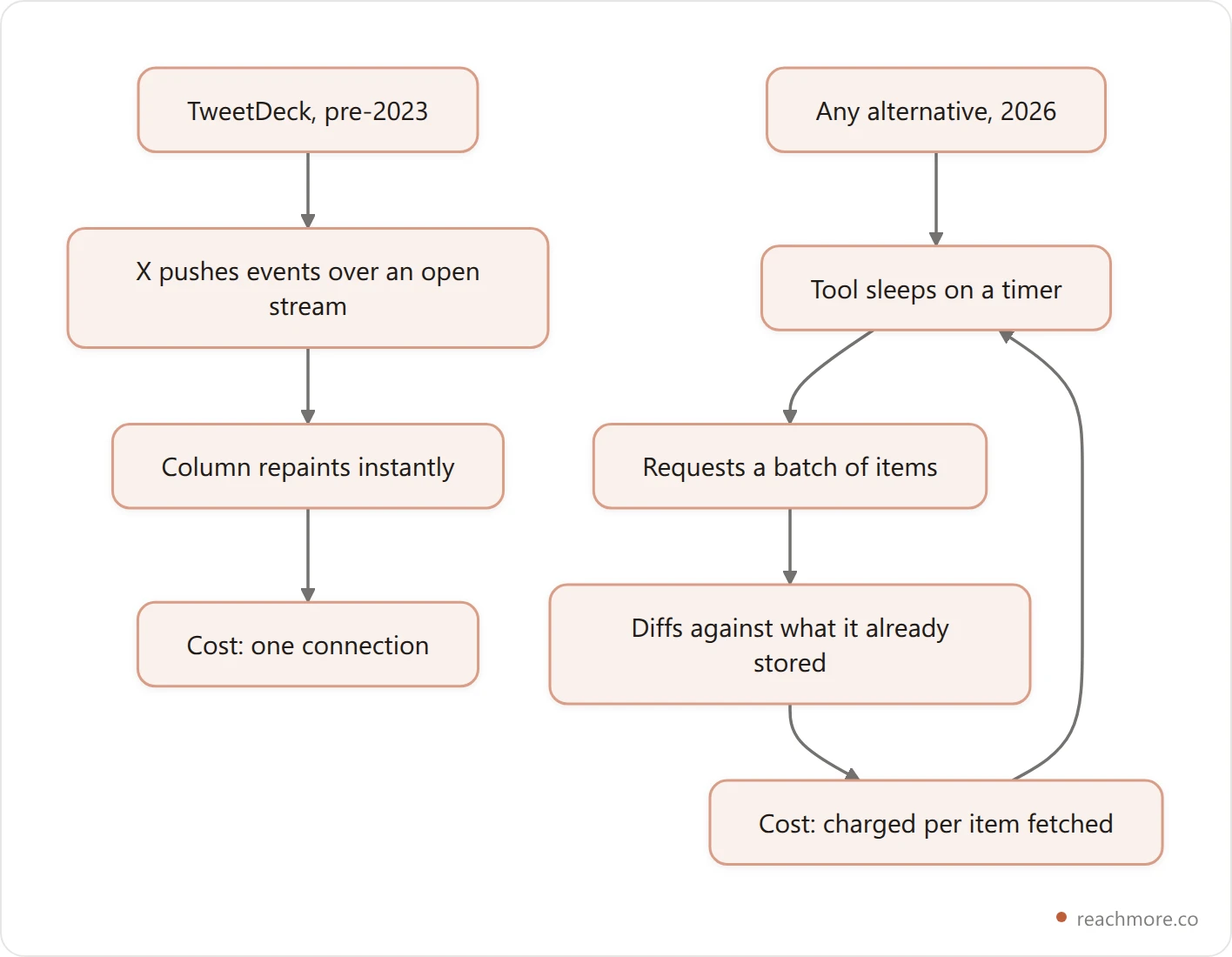
Once you see it as a loop instead of a stream, the design questions become obvious — and they're the questions to ask any tool you're evaluating:
How long is the sleep? A 5-minute poll feels near-live for mentions. A 30-minute poll doesn't.
How big is the batch? If a burst of 60 mentions arrives and the batch size is 25, something gets picked up on the next pass.
What happens on a retry? Without a dedup key, a retried batch can double-send replies. This is the single most common way automation embarrasses an account.
To make that concrete rather than abstract: ReachMore's mention poller runs every 5 minutes in batches of 25, and its DM poller runs every 5 minutes in batches of 50. Each mention carries a dedup key, so a retried batch cannot send the same reply twice. Those are the numbers behind "your Mentions column, roughly." No tool on the public API does better than "roughly," and any that claims real-time is either exaggerating or not using the API at all.
The two camps every alternative falls into#
Once you know the stream is gone, the market sorts itself cleanly into two groups.
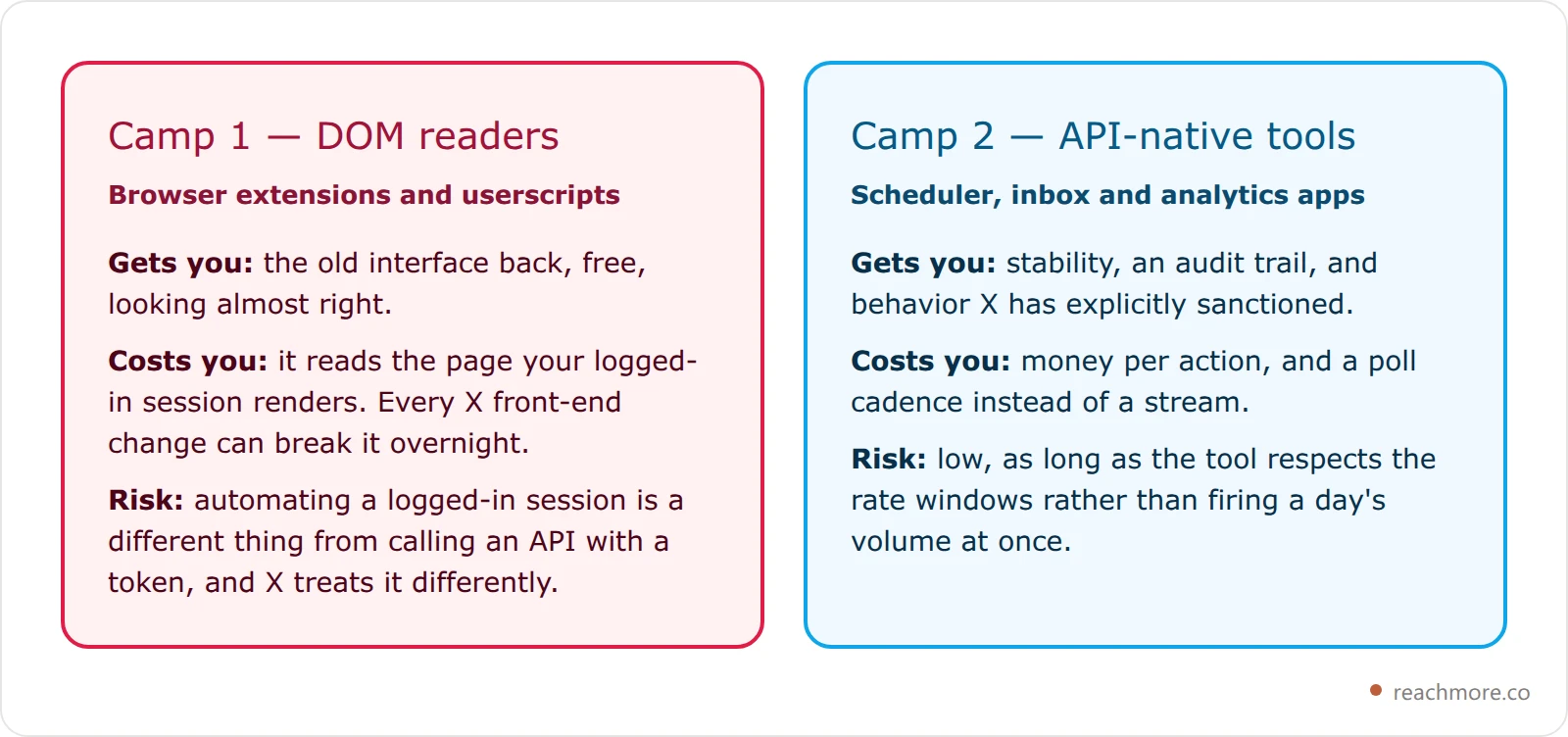
There's no third camp. If a tool claims live columns and API safety, one of those two claims is doing the heavy lifting.
The seven picks, and who each is for#
1. X Pro — the only true replacement. It is TweetDeck, still multi-column, still first-party. If you already pay for Premium you have it, and nothing on this list matches it for monitoring. The catch is that you're renting the thing you used to have.
2. OldTweetDeck — the nostalgia option. A browser extension that restores the pre-2023 interface. It works by intercepting what your session renders, which means it's free, it feels right, and it can break with any front-end deploy. Treat it as a UI preference, not infrastructure — and understand you're driving a logged-in session, not an API.
3. Hypefury — for creators who batch. Built around queuing and recycling posts rather than monitoring. It replaces TweetDeck's scheduling drawer, not its columns.
4. Typefully — for thread writers. The strongest drafting experience of the group. If what you missed about TweetDeck was writing in a calm place away from the timeline, this is closer to that than anything else here.
5. Buffer — for multi-platform teams. Fine if X is one of five networks you post to. If X is the only one that matters, you're paying for surface area you don't use — our Buffer alternatives breakdown and our Hootsuite alternatives comparison both go through that trade in detail.
6. Postiz — for developers. Open source and self-hostable, which means you supply your own API access and see exactly what's being called. The most honest option if you want to understand your costs rather than have them abstracted away.
7. ReachMore — for the mentions column specifically. A web app, X-only, built around the one thing X's API in 2026 actually permits: replies to people who @mentioned or quoted you. Drafted replies land in a human approval queue rather than going out automatically. It doesn't pretend to be a deck.
Pricing on all of these moves constantly, so check each vendor's current page before you commit. For a wider field including tools that didn't make this list, see our ranked automation tools comparison.
See how ReachMore handles the mentions column →
Rebuilding your columns with what 2026 allows#
Here's the practical exercise. Take the columns you actually used and map each to its modern equivalent. Most people discover they used three, not nine.

The two "no replacement exists" boxes are the honest part. If your workflow genuinely depended on watching the Home timeline move in real time, X Pro is your answer and the rest of this list is a compromise.
For the others, the replacements are good. Scheduling in particular is a solved problem — and better than TweetDeck's was, because modern schedulers handle the failure cases TweetDeck never did. Retries with backoff, duplicate guards, and a reconciliation pass for jobs that miss their window are all standard now; we walk through exactly what happens between queue and post in our scheduling mechanics guide.
What running an X workflow actually costs#
TweetDeck was free because X ran it. Every alternative pays X per call and passes that cost through. Reading your own post is the cheapest action on the board, publishing costs fifteen times that, and publishing anything containing a link costs roughly twenty times more again.
This is where TweetDeck refugees get the biggest shock. TweetDeck was free because X ran it. Everything else charges, because everything else pays X per call.
ReachMore prices actions in credits that mirror X's own pay-per-use tiers — one credit tracks a tenth of a cent of provider cost, so the numbers below are effectively X's price list rather than a markup on top of it:

Look at that last bar. A post containing a link costs 200 credits against 15 for the same post without one — because X charges roughly twenty times more for any content carrying a URL. That's not a tool's pricing decision, it's X's, and it reshapes how you should post. If you're dropping links casually the way you did on free TweetDeck, that habit now has a line item. Our guide to posting links on X covers the reach side of the same decision.
Two more cost facts worth knowing before you evaluate anything:
Scheduling is free until it fires. Queuing a post costs nothing; you're charged when it publishes, and only when publishing succeeds.
Metrics stop being re-fetched. Engagement moves in the first 48 hours, tails off through day 7, and is static after that. A well-built cache refreshes a young post every 6 hours, a week-old one every 24, and freezes it entirely after 7 days — so you never pay twice for numbers that can no longer change.
That last one is the difference between a tool that's cheap to run and one that quietly drains a balance. When you compare options, ask how their analytics refresh works; the answer tells you more than the pricing page does. Our analytics tools comparison ranks the field by what each one can actually see.
Not sure which half of TweetDeck you actually used?
If it was the mentions column, that's the half X's API still lets you automate — replies drafted on a five-minute poll and held in a human approval queue until you say go.
See how it worksThe limits that shape every tool on this list#
Whatever you pick, every Twitter automation tool on this list operates inside the same envelope, and knowing the numbers stops you from blaming the tool for X's own rules.
Conservative, well-under-the-line automation looks like 50 outbound actions per day per account for posts, replies and DMs; 15 per rolling 15-minute window; and a minimum 5 seconds between two actions of the same kind. Any tool that lets you fire a day's volume in one minute is going to trip X's own windows and look like spam at the app level.
The reply rule is stricter still, and it's the one that catches people migrating from the old ecosystem. Since February 2026, the API only permits summoned replies — someone @mentioned or quoted you. There is no endpoint for replying to a stranger. So when a tool advertises automatic replies to anyone in your niche, it is not using the API; it's driving a headless browser against your account, with everything that implies. We break the full limit table down in our X API rate limits guide.
Reply-heavy accounts feel these ceilings first, which matters because replies are the highest-leverage action on the platform — conversation depth is weighted far above passive engagement in X's ranking (SocialBee), and average engagement rates across account sizes sit under 1% (Sprout Social).
How to choose in five minutes#
If you used TweetDeck to watch, get X Pro. If you used it to schedule tweets, any modern scheduler already beats it. If your bottleneck is mentions arriving faster than you can answer them, get a mention queue. Most people need one of those three, not a whole deck.
Answer these in order and stop at your first yes:
Did you use TweetDeck mainly to watch? Get X Pro. Nothing else monitors.
Do you post to more networks than X? Buffer or a similar multi-platform queue.
Is drafting threads the part you care about? Typefully.
Do you want to own the infrastructure? Postiz, self-hosted.
Is your bottleneck people mentioning you faster than you can answer? A mention queue like ReachMore.
Do you want to run all of it from an AI assistant? An MCP server for X exposes these actions as tools an agent can call directly — 24 of them, wallet-gated rather than plan-gated.
Most people land on 1 or 5. The middle of the list is where you go when you've accepted that the deck isn't coming back and you're rebuilding the parts you actually used.
X Pro's bundled pricing is only one of three models on offer. Twitter marketing tools ranked by what you pay lines up nine tools by whether the bill actually moves with your usage — bundled, subscription or metered. If the tool you're leaving is a per-seat suite rather than X Pro, Sprout Social alternatives: what a seat really costs works the same math from the enterprise end.
Frequently Asked Questions#
Is there a free TweetDeck alternative in 2026?#
There are free options, but none of them are free and API-native. Browser extensions that restore the old interface cost nothing because they read the page your session already loaded. Anything calling X's API pays per call, so it charges you. Free and real-time are effectively mutually exclusive now.
Can any tool still show live streaming columns?#
Only X Pro, because it's first-party and uses internal endpoints no third party can reach. Everything else polls on a timer. A 5-minute mention poll is the closest realistic approximation, and it's genuinely fine for inbound work — just not the same thing.
Will using a TweetDeck alternative get my account restricted?#
API-native tools are sanctioned behavior and stay well inside X's limits when built conservatively. The risk sits with tools driving a logged-in browser session to do things the API won't allow, especially replying to strangers at volume. If a tool offers a feature the API has no endpoint for, ask how it works before connecting your account.
Why is posting a link so much more expensive?#
X charges roughly twenty times more for content containing a URL than for plain content, and that flows straight through to any tool built on the API. Worth knowing that link detection typically matches bare domains too, so a plain-text domain in your post can trip the higher tier without a clickable link anywhere in it.
What's the closest thing to TweetDeck's Mentions column?#
A mention poller with a human approval step. Something checks every few minutes, drafts a response, and holds it for you to approve, edit, or dismiss. You lose instant notification and gain a queue that doesn't require you to be watching — which, for most people, turns out to be the better trade.
Do I need X Premium to use these tools?#
Not for the third-party ones — they authenticate through the API, separately from your subscription. You need Premium only for X Pro itself, and for the reach and long-form features that come with it. The two are unrelated purchases.
The takeaway#
TweetDeck didn't get replaced. It got unbundled. The scheduling half is now better than it ever was, the mentions half is a five-minute poll with an approval queue, and the live-timeline half is gone from everything except the product that inherited the name.
Pick based on which half you actually used. If you're chasing a free clone of all three, you'll keep trying tools and keep being disappointed — not because they're bad, but because the thing they'd need to be built on isn't there anymore.
If your bottleneck is inbound — mentions and DMs arriving faster than you can answer them — that's the part worth automating first, and the part X's rules clearly allow. Try ReachMore free to start → Credits are a one-time top-up from $1, they never expire, and you're only charged when an action succeeds.


