

Why the Best Twitter Automation Tools Look Different in 2026#
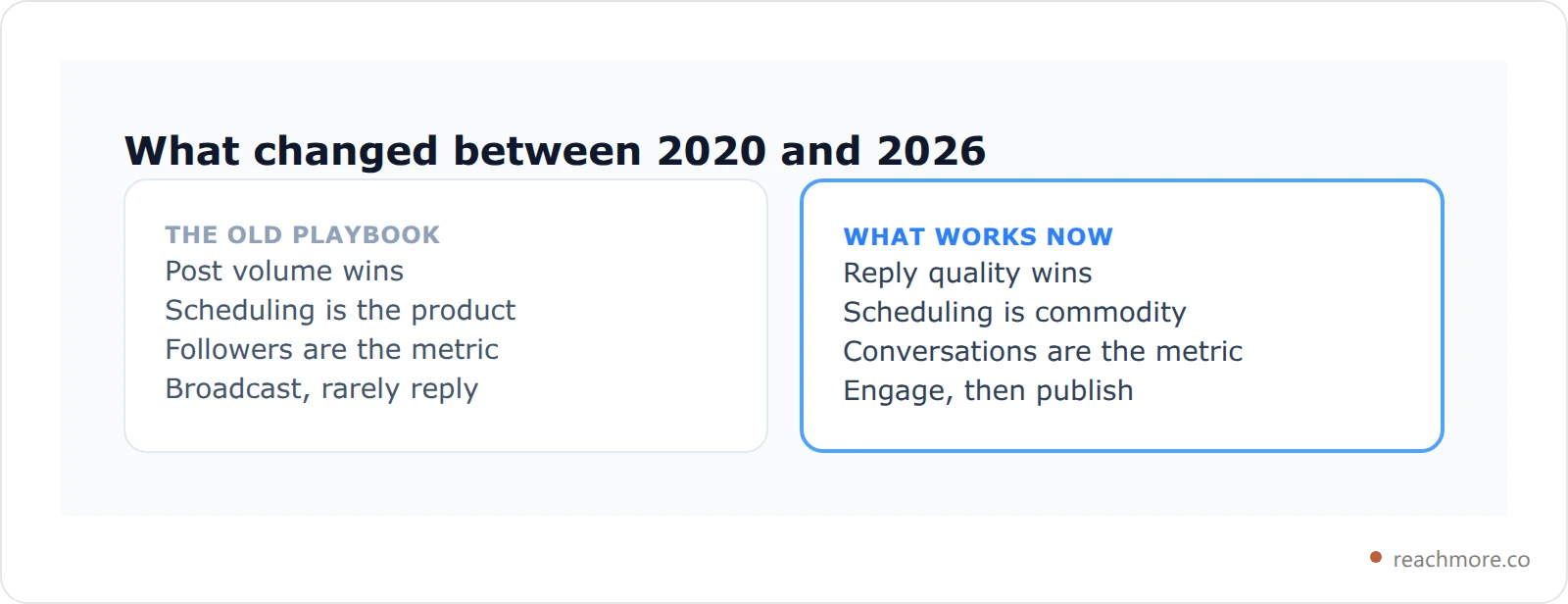
If you searched for the best Twitter automation tools 2026, you already know that the rules of growing on X have fundamentally changed. Raw posting frequency no longer wins — quality engagement does. The X algorithm now rewards replies, conversations, and authentic interactions far more than broadcast-style posting.
An account that posts 10 tweets a day and never responds to anyone is invisible. An account that posts 3 thoughtful threads and engages meaningfully with 50 posts per day? That account grows exponentially.
X (formerly Twitter) has become one of the most powerful platforms for building a personal brand, generating B2B leads, and driving real business growth. But this shift has made the best X automation tools in 2026 look very different from what dominated in 2020. Tools built purely around scheduling have become commoditized. The real differentiation now lives in AI-powered engagement — the ability to generate contextually relevant, on-brand replies at scale, without sounding robotic or getting your account flagged.
But not all automation is created equal. Some tools are outright dangerous: they violate X's Terms of Service, use fake engagement networks, or produce generic AI slop that kills your credibility. Choosing the wrong tool can get your account suspended or, worse, permanently destroy your audience's trust.
This guide compares six established X tools, from entry-level schedulers to AI engagement suites: what each one does well, where it falls short, who it's for, and roughly what it costs.
Whether you're a solo creator trying to grow from zero, a founder doing personal brand marketing, a social media manager running multiple accounts, or a growth team looking for scalable systems — this comparison will help you find the right tool for your situation.
Let's cut through the noise.
How to Choose the Best Twitter Automation Tools 2026: Evaluation Criteria#
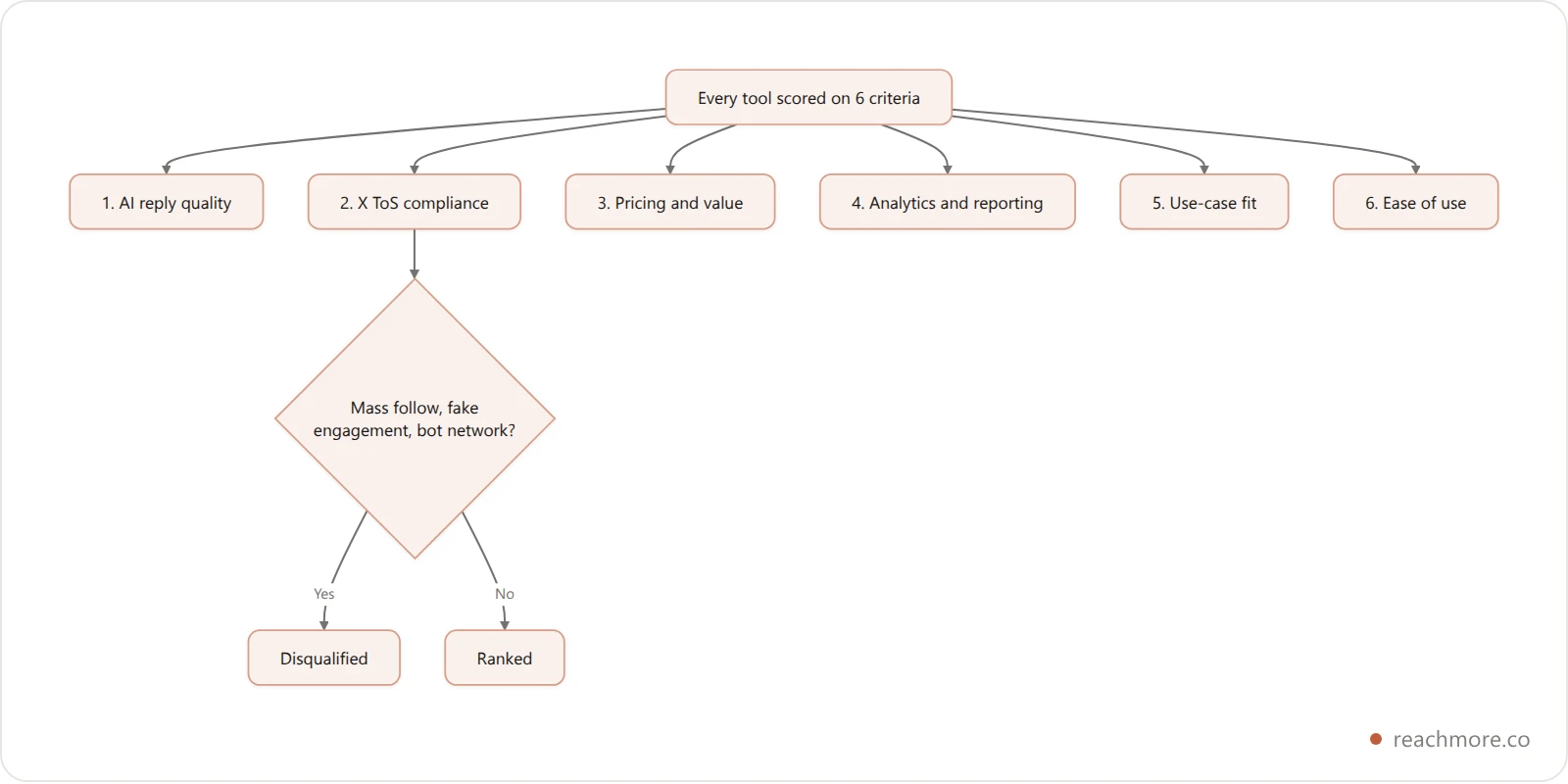
Before diving into the tools, here's the rubric behind the rankings. These aren't arbitrary — they reflect what actually determines ROI on X in 2026.
1. AI Reply Quality#
The single most important factor for 2026. Does the AI generate replies that are genuinely contextual, relevant, and on-brand? Or does it produce generic, spammy content that your followers can immediately identify as automated? We judged each tool on whether its drafts respond to the specific post in front of them, rather than to the topic in general.
2. X Terms of Service Compliance#
Getting this wrong means account suspension. We checked whether each tool operates within X's official API guidelines, avoids mass follow/unfollow schemes, and steers clear of fake engagement or bot networks. Any tool that offers "guaranteed followers" or "auto-like" at scale is an immediate disqualifier.
3. Pricing and Value#
What do you actually get per dollar? Compare each plan's feature set against what it costs. A $49/month tool that replaces three $20/month tools is good value. A $19/month tool with artificial feature gating is not.
4. Analytics and Reporting#
Can you tell what's working? The best tools surface actionable data: which posts got the most replies, which tones drove the most profile visits, follower growth attribution, and engagement rate trends.
5. Use-Case Fit#
No tool is best for everyone. A ghostwriter managing 15 accounts needs different features than a SaaS founder building a personal brand. We've been explicit about who each tool is actually designed for, so you can match the tool to your situation.
6. Ease of Use and Workflow Integration#
Does it fit naturally into how you actually work on X? The best tools are ones you'll use consistently — which means low friction, fast interfaces, and smart defaults.
Best Twitter Automation Tools 2026: Full Rankings#
Here are the six tools that earned a spot in this comparison, ranked by overall value for most users.
1. ReachMore — Best for AI-Powered Replies & Engagement#
Rating: ⭐⭐⭐⭐⭐ | Best-in-class for AI reply quality
ReachMore is the tool that most directly addresses where X growth actually happens in 2026: in the replies. While every other tool on this list approaches X from a scheduling-first or analytics-first perspective, ReachMore was built from the ground up around a single question — how do you engage with other posts in a way that's genuinely valuable, consistent with your voice, and scalable?
The answer is a web app that pairs a composer and scheduler with a native MCP server — so you can work in the dashboard, or hand the whole account to your own AI agent.
Inside ReachMore's Feature Set#
A native MCP server
ReachMore exposes 24 tools over the Model Context Protocol, so Claude, Cursor, or any MCP client can post, schedule, pull analytics, and clear your approval queue directly. Keys are scoped: each one carries its own tool allow-list and rate limits, so a research agent can be handed read-only access and nothing else. No other tool in this comparison ships one — we broke down how it works in our Twitter MCP server guide.
AI drafts in your own voice
ReachMore builds a voice profile from your posting history and applies it to every draft automatically. You can write from a topic or rewrite text you already have. Nothing publishes on its own.
A human approval queue for replies
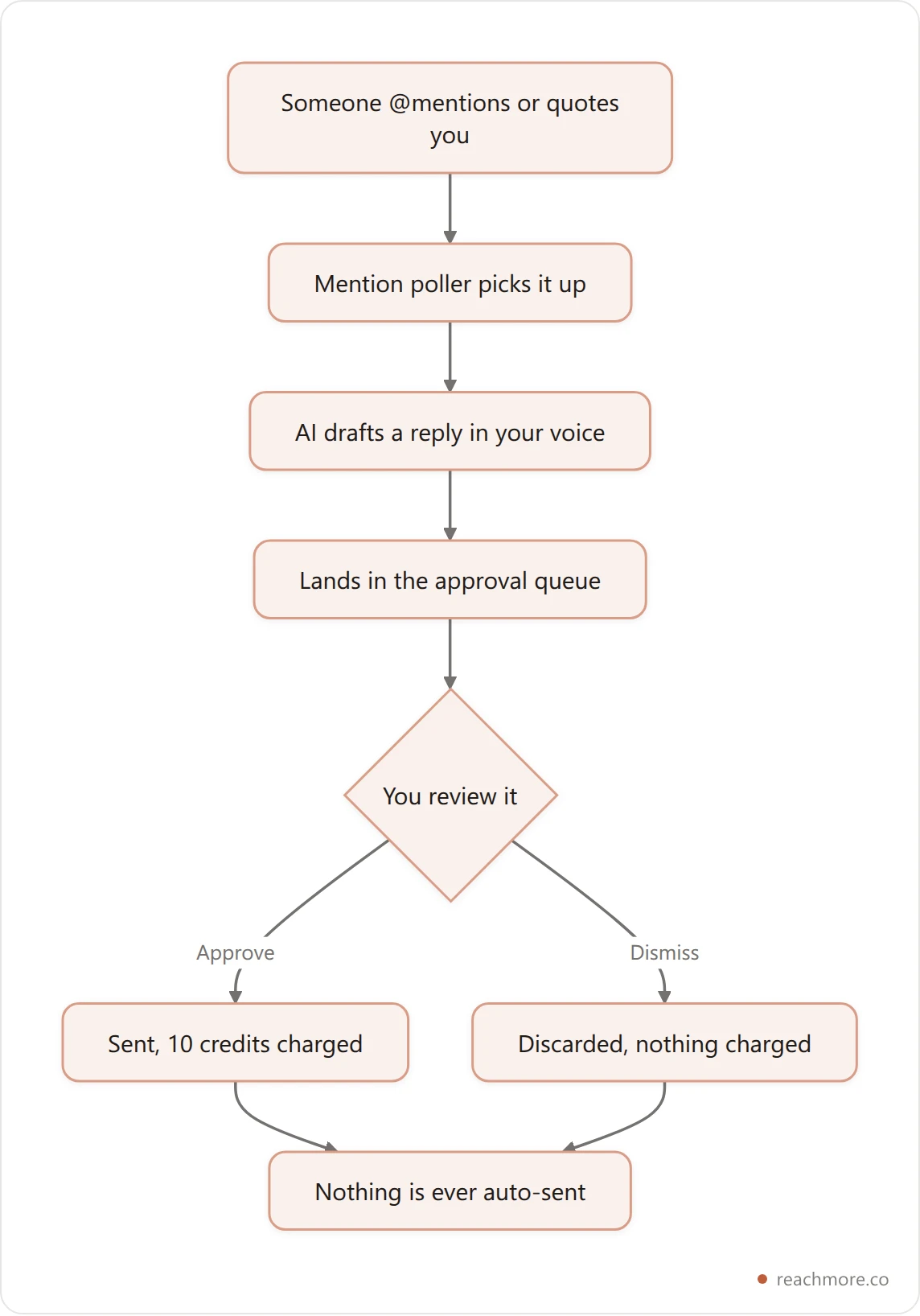
AI-drafted replies to people who @mention or quote you land in a queue. You approve or dismiss each one — ReachMore never auto-replies. That's a deliberate design decision, not a missing feature.
Workflow builder with a paced run queue
A visual canvas plus curated templates, with hard per-account caps (50 posts, 50 replies and 50 DMs per UTC day, 15-minute burst limits and a 5-second minimum gap) so automation stays human-paced instead of firing in bursts that trip X's spam filters.
Insights served from a cache
Follower growth, a best-time-to-post heatmap, and consistency streaks. Post metrics are cached with windows that stretch as posts age — six hours under two days, 24 hours through day seven, then frozen — so repeat views cost you nothing.
Compliance enforced in code
There is no follow, unfollow, bulk-DM, or stranger-reply feature. Not disabled — absent. DMs are inbound-only with a STOP opt-out. You can't use ReachMore to do the things that get X accounts suspended, because those actions were never built.
ReachMore Pricing#
ReachMore has no subscription. You top up a credit wallet once, the credits don't expire, and each action costs what it costs — the prices mirror X's own pay-per-use tiers.
Action | Credits |
|---|---|
Read one of your own posts | 1 |
AI draft (without publishing) | 2 |
Reply to a mention | 10 |
Publish a post | 15 |
Publish a post containing a link | 200 |
Schedule a post | Free until it publishes |
That link row isn't a typo — X bills link-bearing content at a far higher rate, and ReachMore passes the real cost through instead of hiding it in a plan. Charges land only on success, and a failed call is refunded in full.
ReachMore Verdict#
If you believe (correctly) that replies drive X growth in 2026, ReachMore is the most direct tool for that job — and the only one here you can hand to an AI agent. Among the best Twitter automation tools 2026 has to offer, it leads on AI reply quality and it's the only one with honest per-action cost visibility. Because it's pay-as-you-go, trying it costs roughly what the actions you take cost.
2. Hypefury — Best for Scheduling & Thread Creation#
Rating: ⭐⭐⭐⭐ | Pricing: ~$19–$49/month
Hypefury has been around since 2019 and has built a loyal following among creators and marketers who treat X as a content publishing channel. If ReachMore is the engagement specialist, Hypefury is the editorial calendar — a robust scheduling and content planning suite that helps you plan, write, and distribute posts at scale.
Hypefury Strengths#
Thread Builder Hypefury's thread editor is one of the most polished in the market. You can draft long-form threads with a clean writing interface, preview how they'll look on X, and schedule them for optimal posting times. For creators whose primary format is the thread — educational content, opinion essays, narrative storytelling — this is genuinely best-in-class.
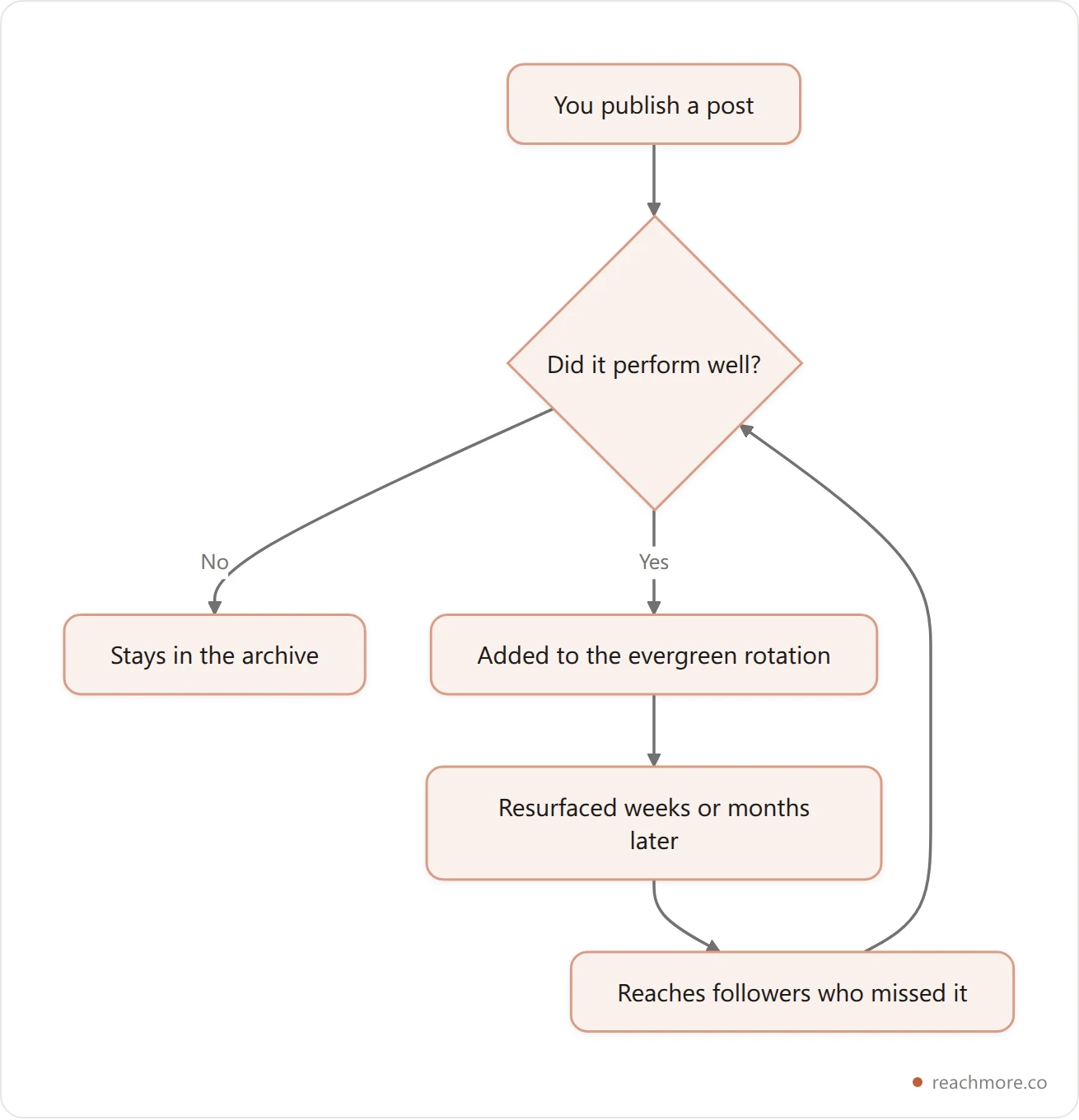
Evergreen Recycling Hypefury's standout scheduling feature is its ability to automatically requeue your best-performing posts. You write a great tweet, it performs well, and Hypefury automatically adds it to a rotation that surfaces it again weeks or months later to a fresh audience. For accounts with a content library of proven material, this creates significant leverage.
Auto-Retweet and Auto-Plug Two features that walk close to the line of aggressive automation but stay within X's rules: Auto-Retweet lets you retweet your own posts at a scheduled time (useful for reaching time-zone audiences), and Auto-Plug automatically adds a call-to-action to your posts once they hit a certain engagement threshold.
Inspiration Feed A curated feed of high-performing posts from accounts you follow, designed to spark ideas. It's a useful feature but feels secondary to the core scheduling functionality.
Hypefury Limitations#
Hypefury's AI capabilities are noticeably weaker than ReachMore's. Its reply suggestions are relatively generic and don't demonstrate the contextual depth that actually makes AI replies feel authentic. If engagement is your primary growth lever, Hypefury's AI is not going to cut it.
Hypefury Pricing#
Standard: ~$19/month
Creator: ~$49/month
14-day free trial available
Best For#
Content creators, newsletter writers, and personal brand builders whose primary format is threads and scheduled posts, and who are already handling engagement manually or using a dedicated engagement tool like ReachMore alongside Hypefury.
3. TweetHunter — Best for Lead Gen & CRM#
Rating: ⭐⭐⭐⭐ | Pricing: ~$49–$99/month
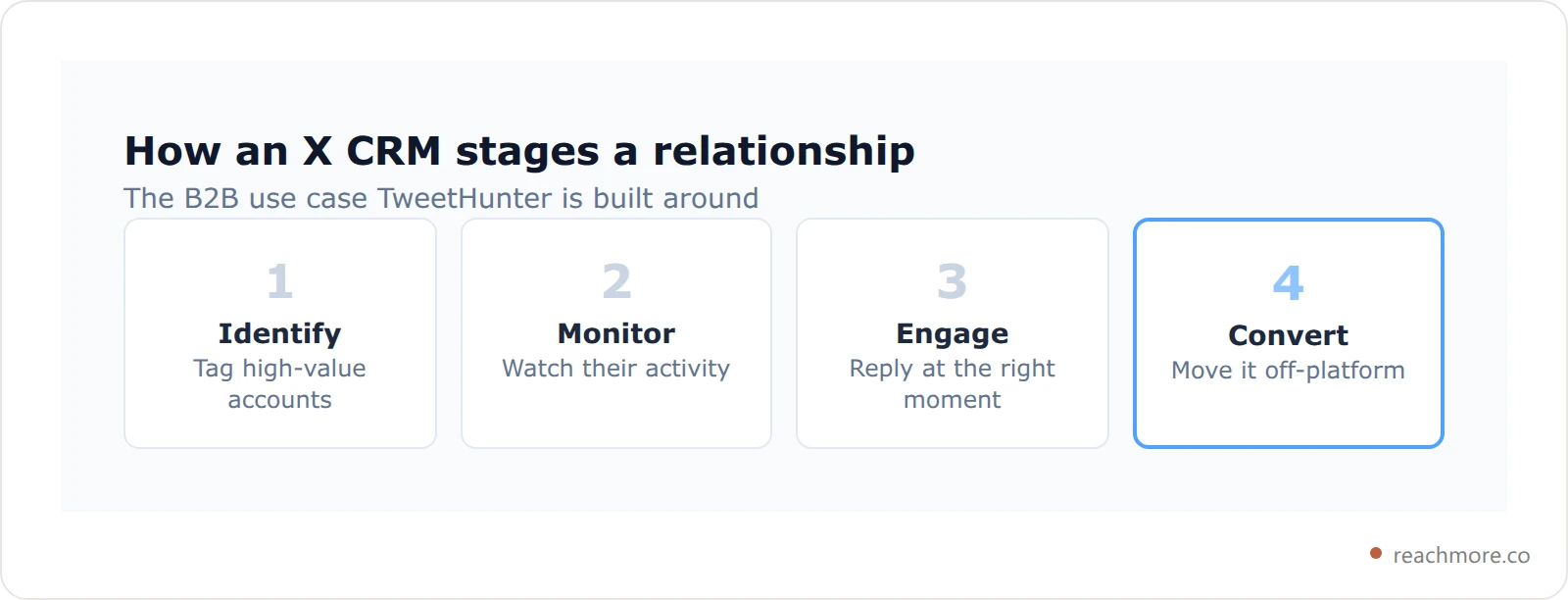
TweetHunter is the most sophisticated tool in this comparison when it comes to using X as a B2B lead generation and relationship management platform. It was built for a specific use case — identifying high-value accounts, building relationships at scale, and converting X connections into business outcomes — and it executes that use case better than anything else on the market.
TweetHunter Strengths#
X CRM TweetHunter's built-in CRM lets you tag, organize, and track relationships with specific accounts on X. You can flag someone as a potential customer, a strategic partner, a media contact, or any custom category, and then monitor their activity to identify the right moment to engage. For B2B sales teams using X for social selling, this is genuinely powerful.
AI Tweet Generation TweetHunter's AI can generate tweet ideas and drafts based on your niche, past content, and a library of high-performing tweets from top creators. The quality is above average for standalone tweet creation, though it doesn't match ReachMore's reply contextuality.
Tweet Inspiration Library A searchable database of millions of high-performing tweets, filterable by topic, follower count, and engagement rate. Excellent for ideation and understanding what content resonates in your niche.
Auto-DM Campaigns Controversial but effective when used carefully: TweetHunter lets you set up automated DM sequences triggered by specific actions (new followers, post engagement). These need to be used with restraint — aggressive auto-DM campaigns can damage relationships and violate X's ToS — but for a welcome message or lead magnet delivery, they can add real business value.
TweetHunter Limitations#
The price point — $49/month for the base plan, $99/month for full CRM access — makes TweetHunter one of the most expensive tools in this comparison. For individual creators or early-stage founders, that ROI calculation is difficult to justify unless you're explicitly using X for sales prospecting.
The AI reply quality is also considerably weaker than ReachMore's. TweetHunter's AI is optimized for content creation rather than contextual engagement — fundamentally different AI tasks.
TweetHunter Pricing#
Starter: ~$49/month
Team: ~$99/month
7-day free trial
Best For#
B2B founders, sales teams, and growth marketers who are using X explicitly as a pipeline generation channel and need CRM functionality built into their X workflow.
4. Typefully — Best for Thread Writing & Analytics#
Rating: ⭐⭐⭐⭐ | Pricing: Free + ~$12.50/month
Typefully has carved out a distinctive position in the X tools market by doing two things exceptionally well: providing the cleanest, most distraction-free writing experience for threads, and delivering analytics that are genuinely useful for content strategy decisions.
Typefully Strengths#
Writing Experience Typefully's editor is, bar none, the most enjoyable interface for writing long-form X content. It strips away everything but the words — no sidebar distractions, no feature bloat, just a clean canvas for drafting threads. The character count is intuitive, splitting is smooth, and the real-time preview is accurate.
Analytics Where Typefully genuinely earns its spot in this comparison is data. Its analytics dashboard shows not just how individual posts performed, but patterns across your content — which topics resonate, what formats drive the most engagement, and how your follower growth correlates with content activity. The best-time-to-post recommendations are based on your specific audience data, not generic industry averages. We put it head-to-head with six other options in our ranked guide to Twitter analytics tools.
Collaboration For teams and ghostwriters, Typefully supports collaborative drafting — multiple team members can contribute to a drafts queue, and a manager or client can approve before publishing. This workflow is much cleaner than passing Google Docs back and forth.
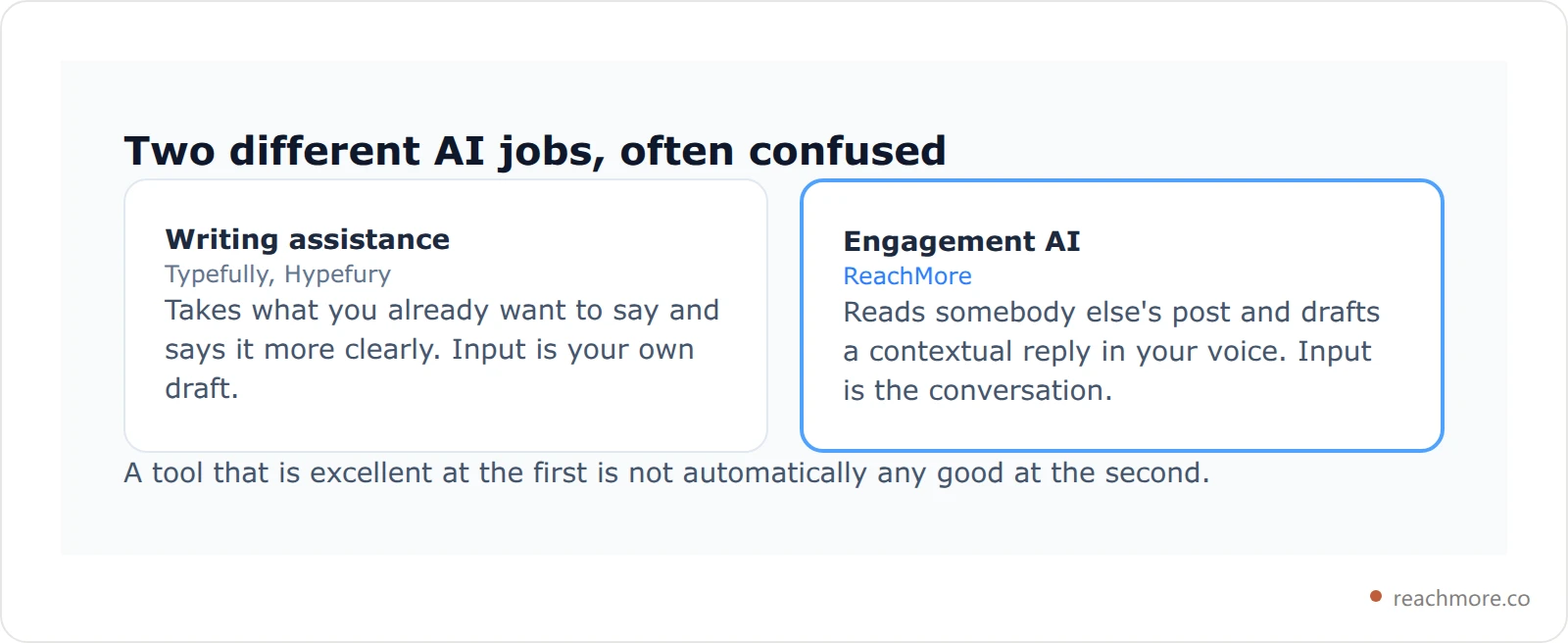
AI Writing Assistance Typefully's AI helps with continuing threads, suggesting follow-up tweets, and polishing drafts. It's writing-assistance AI rather than engagement AI — good at helping you say what you already want to say more clearly, not great at generating contextual replies to other people's content.
Typefully Limitations#
Typefully is a scheduling and writing tool. It has essentially no engagement features. If your growth strategy depends on reply-driven visibility — and in 2026, it should — Typefully alone won't get you there. It's best used as a complement to an engagement-focused tool like ReachMore, not a replacement.
Typefully Pricing#
Free: Basic scheduling, limited analytics
Typefully Pro: ~$12.50/month (billed annually)
Creator and Team plans available at higher tiers
Best For#
Thoughtful creators and writers who prioritize content quality and strategic data, and who complement their Typefully workflow with a dedicated engagement tool.
5. Circleboom — Best for Audience Management#
Rating: ⭐⭐⭐ | Pricing: ~$9–$35/month
Circleboom takes a different angle from most X tools: instead of focusing on content production or engagement, it specializes in audience management — giving you tools to understand, clean, and optimize your follower graph. Think of it as the maintenance tool you need alongside your growth tools.
Circleboom Strengths#
Follower Analysis Circleboom provides detailed breakdowns of your followers — who's active, who's a bot, who's a spam account, who's been inactive for 6+ months, and who's in your target demographic. This data is genuinely valuable for understanding the quality of your audience and identifying cleanup opportunities.
Bulk Unfollow and Whitelist If you've built up a bloated following list of irrelevant accounts, Circleboom offers bulk unfollow with a whitelist so you don't drop the accounts you meant to keep. One important 2026 caveat: programmatic follow and unfollow moved to Enterprise-only API access in April 2026, so check what any unfollow feature is actually doing underneath before running it at volume — and keep it to genuine list cleanup, never follow-churn growth.
Content Scheduling Circleboom includes basic content scheduling across multiple social platforms, not just X. If you're managing a brand presence across X, Instagram, Facebook, and LinkedIn simultaneously, Circleboom's cross-platform scheduling can consolidate your workflow.
Circleboom Limitations#
Circleboom's AI capabilities are minimal. There's no meaningful AI reply generation, no engagement automation, and no content AI beyond basic suggestions. It's also not primarily designed for individual creators — it targets social media managers and small marketing teams.
Circleboom Pricing#
Mini: ~$9/month
Basic: ~$17/month
Professional: ~$35/month
Best For#
Social media managers who need to maintain audience quality across multiple X accounts, or creators who have accumulated a messy follower graph and need systematic cleanup tools.
6. Buffer — Best Budget Scheduling#
Rating: ⭐⭐⭐ | Pricing: Free + $6/month per channel
Buffer is the old reliable of social media scheduling. In 2026, it's not the most exciting tool in this list, but for a specific use case — affordable multi-platform scheduling with zero learning curve — it remains hard to beat.
Buffer Strengths#
Simplicity and Reliability Buffer does what it says on the tin: you write posts, you schedule them, they go out. The interface is intuitive enough that any team member can pick it up without training. There are no complex workflows, no steep learning curves, and no surprise feature changes that break your existing setup.
Multi-Platform Support Buffer's strongest value proposition is breadth: it supports X, Instagram, Facebook, LinkedIn, Pinterest, TikTok, and several other platforms from a single dashboard. For small businesses or creators who need to maintain a basic presence across multiple channels without paying for separate tools for each one, Buffer's per-channel pricing model can be genuinely cost-effective.
Publishing Queue Buffer's queue system is clean and intuitive. You add posts to a queue, set your preferred posting times for each day of the week, and Buffer automatically fills in the schedule. It's not as sophisticated as Hypefury's evergreen recycling, but it works reliably.
Buffer Limitations#
Buffer has essentially no AI capabilities relevant to X growth in 2026. No AI reply generation, no engagement automation, no audience intelligence. It's a pure scheduling tool, and as scheduling has become commoditized, Buffer's value proposition has narrowed. Buffer also doesn't support any X-specific engagement features — no thread optimization, no CRM, no audience management. If X is a primary channel for your growth strategy, Buffer alone is insufficient. The same holds for other multi-network schedulers; our Publer alternative guide sorts them by the workload each is built for.
Buffer Pricing#
Free: 3 channels, 10 posts per channel
Essentials: $6/month per channel
Team and Agency plans at higher price points
Best For#
Small businesses and individual creators who need simple, reliable scheduling across multiple social platforms and aren't yet investing in AI-powered engagement.
Best Twitter Automation Tools 2026: Side-by-Side Comparison#
Here's how all six tools stack up across the key evaluation criteria. Use this as a quick-reference guide to find the right fit for your situation. Competitor prices are approximate list prices, so check each vendor's pricing page before you buy.
Tool | Primary Use | AI Replies | Scheduling | Audience Mgmt | Pricing | Rating |
|---|---|---|---|---|---|---|
ReachMore | AI engagement + MCP for agents | ⭐⭐⭐⭐⭐ Best-in-class | ✅ Composer + scheduler | ✅ Approval queue | Pay-per-action credits | ⭐⭐⭐⭐⭐ |
Hypefury | Scheduling & threads | ⭐⭐ Basic | ⭐⭐⭐⭐⭐ Excellent | ❌ None | $19–$49/mo | ⭐⭐⭐⭐ |
TweetHunter | Lead gen & CRM | ⭐⭐⭐ Moderate | ⭐⭐⭐⭐ Good | ⭐⭐⭐ CRM-focused | $49–$99/mo | ⭐⭐⭐⭐ |
Typefully | Thread writing | ⭐ Minimal | ⭐⭐⭐⭐ Good | ❌ None | Free–$12.50/mo | ⭐⭐⭐⭐ |
Circleboom | Audience management | ❌ None | ⭐⭐⭐ Basic | ⭐⭐⭐⭐⭐ Excellent | $9–$35/mo | ⭐⭐⭐ |
Buffer | Multi-platform scheduling | ❌ None | ⭐⭐⭐⭐ Good | ❌ None | $6/mo/channel | ⭐⭐⭐ |

The two most important columns are AI Replies and your specific growth strategy. If you're trying to grow through engagement — and you should be, given how X's algorithm works in 2026 — the AI Reply column essentially makes the decision for you. When evaluating the best Twitter automation tools 2026 has available, this table shows exactly where each tool wins and loses.
Which X Automation Tool Is Right for Your Use Case?#
Rather than giving a one-size-fits-all recommendation, here's how to match each tool to your specific situation:
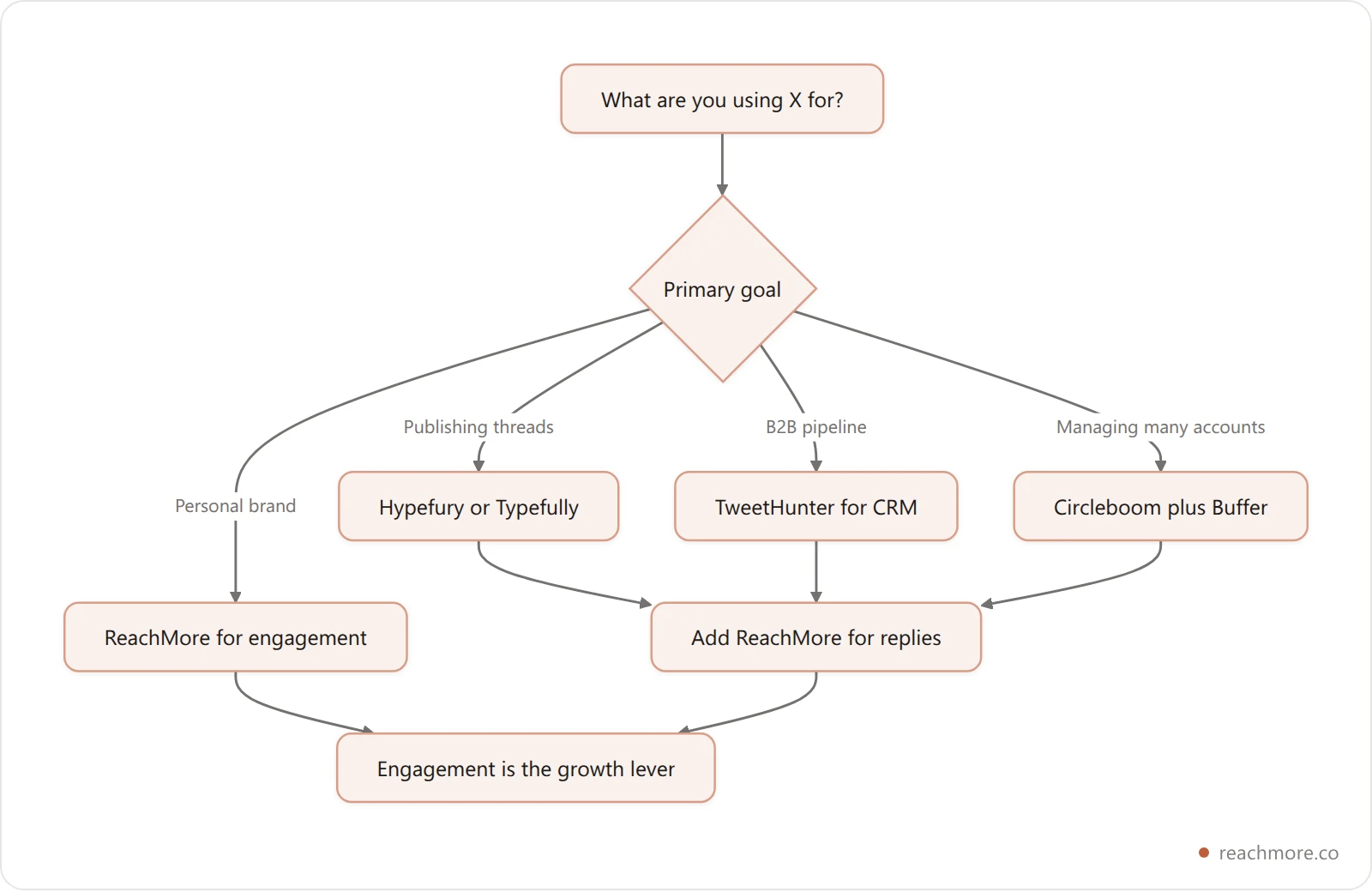
You're a solo creator or founder building a personal brand: Start with ReachMore. Because it bills per action rather than monthly, you can systematize reply-driven growth for the cost of what you actually do. Pair it with Typefully's free plan for thread drafting if you're a heavy thread poster.
You're a content creator whose primary format is threads: Use Hypefury for scheduling and thread creation. Layer in ReachMore for the engagement side. The two tools are genuinely complementary: Hypefury's flat fee covers publishing, and ReachMore's credits cover only the engagement you actually do.
You're in B2B and treating X as a sales pipeline: TweetHunter is worth the investment. The CRM functionality pays for itself if you close even one deal per quarter that originated on X. Still complement it with ReachMore for the actual engagement work.
You're a social media manager running multiple brand accounts: Circleboom for audience management across accounts, Buffer or Hypefury for multi-platform scheduling, and ReachMore for any accounts where engagement-led growth is a priority.
You're just starting out with minimal spend: Use Buffer's free plan to get comfortable with scheduling. Add a small ReachMore top-up to see what AI-powered engagement actually feels like — with no subscription, you're only out the credits you spend. Then make your investment decision based on which lever is moving your numbers.
X Automation Tools to Avoid in 2026#
Not every tool that markets itself as one of the best Twitter automation tools 2026 deserves your money or your account's safety. Here are the categories to steer clear of entirely.
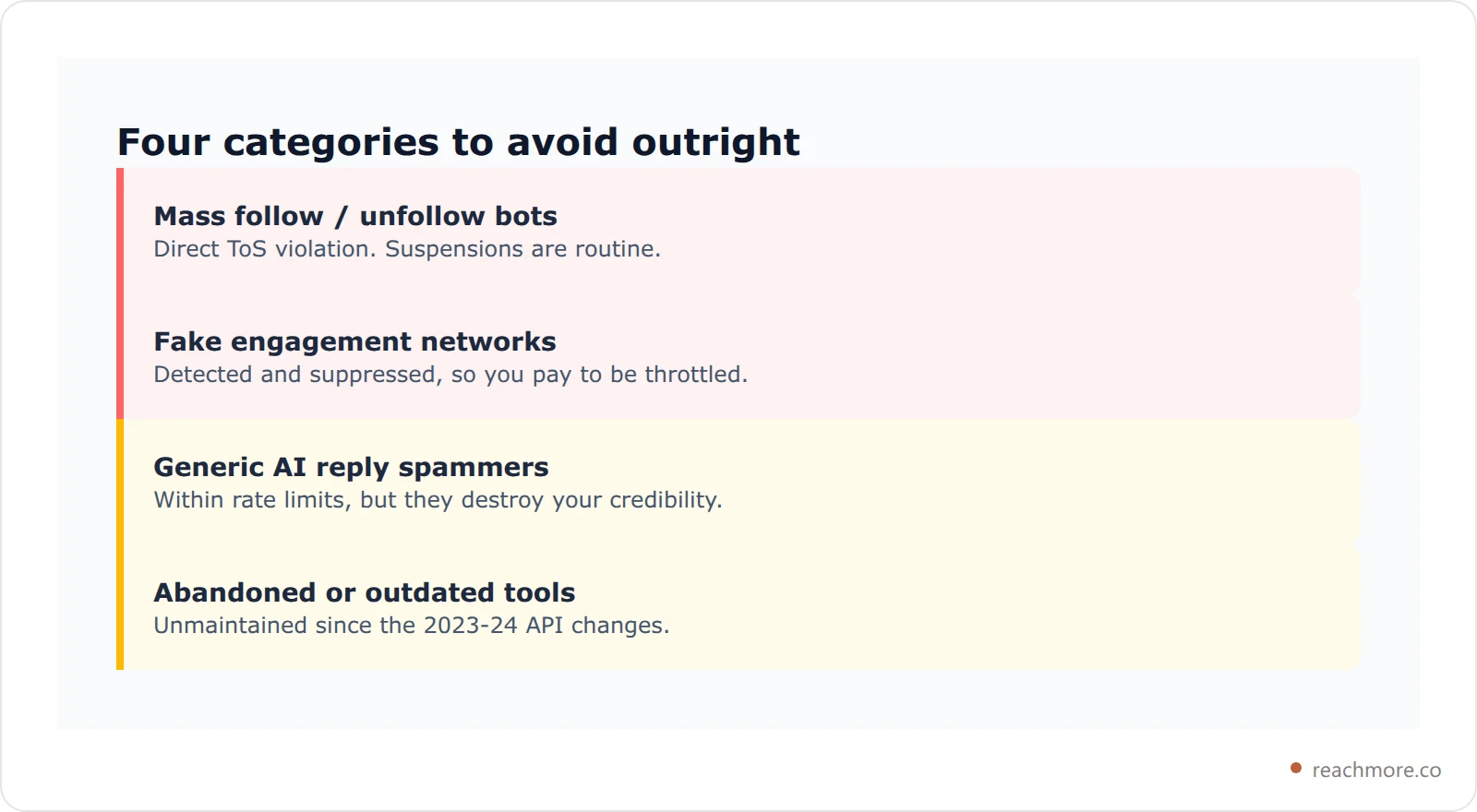
Mass Follow / Unfollow Bots Tools that automate mass following of accounts in the hope of getting follow-backs are a direct violation of X's Terms of Service and have been heavily cracked down on since 2023. Accounts using these tools routinely get suspended, and even temporary suspensions can permanently damage your account's algorithmic standing.
Fake Engagement Networks Services that offer to boost your likes, retweets, and replies with fake accounts are not just ToS violations — they're actively counterproductive. X's algorithm has become sophisticated at detecting inauthentic engagement signals and responds by suppressing the accounts receiving them.
Generic AI Reply Spammers A subtler threat, but equally damaging to your reputation: tools that generate high volumes of generic, templated AI replies ("Great point!" "Well said!" "I completely agree!") applied indiscriminately across your feed. Even if these stay within X's rate limits technically, they destroy your credibility with the actual human beings you're trying to build relationships with.
Abandoned or Outdated Tools Several tools that were popular in 2021–2022 have been abandoned by their developers or simply stopped keeping up with X's API changes. Tools that haven't updated their integrations since X's API changes in 2023 and 2024 are unreliable at best and dangerous to your account at worst.
The common thread: any tool that promises growth through quantity rather than quality is a red flag in 2026.
Frequently Asked Questions#
What is the best Twitter automation tool in 2026?#
For AI-powered engagement — the most important growth lever on X in 2026 — ReachMore is the clear leader, and the only one exposing an MCP server so an AI agent can run the account directly. It bills per action rather than monthly. For scheduling and thread creation, Hypefury and Typefully are excellent. For B2B lead generation and CRM, TweetHunter is the most purpose-built solution.
Are X automation tools safe to use?#
Tools that work through X's official API and avoid mass follow/unfollow or fake engagement are safe. The six above all use official integrations rather than bot networks — but "compliant tool" and "compliant usage" are not the same thing. An auto-DM sequence or a bulk unfollow run can still breach the rules depending on how you drive it, so read each feature before you switch it on. The ones to avoid outright are those promising follower guarantees.
How much should I spend on X growth tools?#
For most solo creators and founders, a small ReachMore credit top-up plus free or low-cost scheduling (Typefully free plan) is the highest-ROI starting point — publishing a post costs 15 credits, so a modest balance lasts a while. Only scale up to TweetHunter or Hypefury premium plans once you have a clear use case that justifies the additional spend.
Which Twitter automation tools use the official X API?#
All six ranked here integrate through X's official API rather than scripted browser sessions, which is the line that matters for account safety. What differs is how much of the resulting cost you can see: ReachMore bills per action at X's own rates, while the subscription tools average API cost into a flat monthly fee.
Can I use multiple tools together?#
Absolutely. The most effective X growth stacks in 2026 typically combine ReachMore for engagement with a scheduling tool like Hypefury or Typefully for content publishing. These tools serve complementary functions and don't overlap in meaningful ways.
Can an AI agent run my X account for me?#
Yes — ReachMore ships a native MCP server, so Claude, Cursor, or any MCP client can call its tools with a scoped API key. You choose which tools each key can reach, so an agent can be limited to read-only analytics, or to scheduling you can still cancel before anything goes out.
What's the difference between growth tools and scheduling tools?#
Scheduling tools (Buffer, Typefully, Hypefury) help you publish content at the right time. Twitter growth tools like ReachMore go further — they help you engage with other accounts through AI-powered replies, which is the primary driver of algorithmic reach in 2026. For serious growth, you need both.
Key takeaways#
X in 2026 rewards creators and brands who can consistently show up with quality — quality content and quality engagement. The best Twitter automation tools aren't those that help you spam the platform; they're the ones that help you be more genuinely, consistently present.
Two conclusions stand out. First, AI reply quality has become the dominant differentiator — every tool here offers scheduling, but far fewer offer AI engagement good enough to use without embarrassing yourself. Second, agent access is the new frontier: an MCP server means your growth workflow can run from Claude or Cursor instead of a browser tab, and right now exactly one tool in this comparison has one.
The right stack for most creators: ReachMore for engagement + Typefully or Hypefury for publishing. That covers every major growth lever the platform rewards in 2026, and because ReachMore's half is pay-per-action, a quiet month costs you nothing.
Looking specifically for browser extensions? See our dedicated Best Browser Extensions for X Twitter in 2026 guide ranking 15 Chrome extensions across AI engagement, scheduling, analytics, and UI customization.
Want to drive X from your own AI agent instead of a dashboard? Our Twitter MCP server guide covers the tools, auth model, and per-action costs in detail.
Comparing on price rather than features? Our field-wide listicle Twitter marketing tools ranked by what you pay sorts nine tools by pricing model and shows the X API price list all of them buy from.
Measuring rather than automating? Our ranked guide to Twitter analytics tools compares 7 tools on what each can actually see — including why no tool can show you a competitor's impressions.