


Every "Sprout Social alternatives" roundup ranks tools by feature checkboxes. Almost none of them mention the thing that actually decides your invoice: a seat license is a fixed monthly floor. You pay it in the month you publish 400 posts and in the month you publish none.
The short answer: the best Sprout Social alternative for an X-first team usually isn't a cheaper suite — it's a different billing model. Seat pricing earns its keep when several people manage several networks every day. If you run one or two X accounts, a per-channel or per-action tool bills you for what you actually send, and typically lands an order of magnitude lower.
This piece compares the alternatives on how they charge, not on how many checkmarks they have.
Sprout Social alternatives at a glance#
Tool | Networks | How it bills | Best for |
|---|---|---|---|
Sprout Social | Multi-network suite | Per seat, per month | Multi-network teams with several publishers |
Hootsuite | Multi-network suite | Per seat, per month | Agencies managing client portfolios |
Buffer | Multi-network | Per channel, per month (free tier) | Simple scheduling across a few profiles |
Zoho Social | Multi-network | Per brand, per month | Teams already inside the Zoho ecosystem |
Publer | Multi-network | Per social account, per month | Volume scheduling on a budget |
Typefully | X-first | Flat subscription | Writers who draft threads in one place |
Hypefury | X-first | Flat subscription | Creators running evergreen recycling |
ReachMore | X only | Per action, prepaid credits, no subscription | X-first teams with uneven posting volume |
The column that matters is the third one. Everything above except ReachMore charges you on a calendar, not on a workload. That is a reasonable trade when the calendar is full. It is a bad trade when it isn't.
If you're specifically comparing the big suites against each other, we've already broken down Hootsuite alternatives for X-first teams and Buffer alternatives for X creators.
What you're actually buying with a seat license#
A seat is not a feature — it's a license for one human to log in. Sprout Social pricing, like every suite's, bundles three separate things into that single monthly number: network breadth, team collaboration, and enterprise reporting. You pay for all three whether or not you use any of them.
Here's what each one actually covers:
Network breadth. Connectors for Instagram, LinkedIn, Facebook, TikTok, Pinterest and more. You pay for all of them whether you publish to one or seven.
Collaboration. Approval chains, shared inboxes, role permissions, audit trails. Genuinely valuable at five publishers. Dead weight at one.
Enterprise reporting. Listening, share-of-voice, competitor benchmarking. Often gated to higher tiers or sold as add-ons.
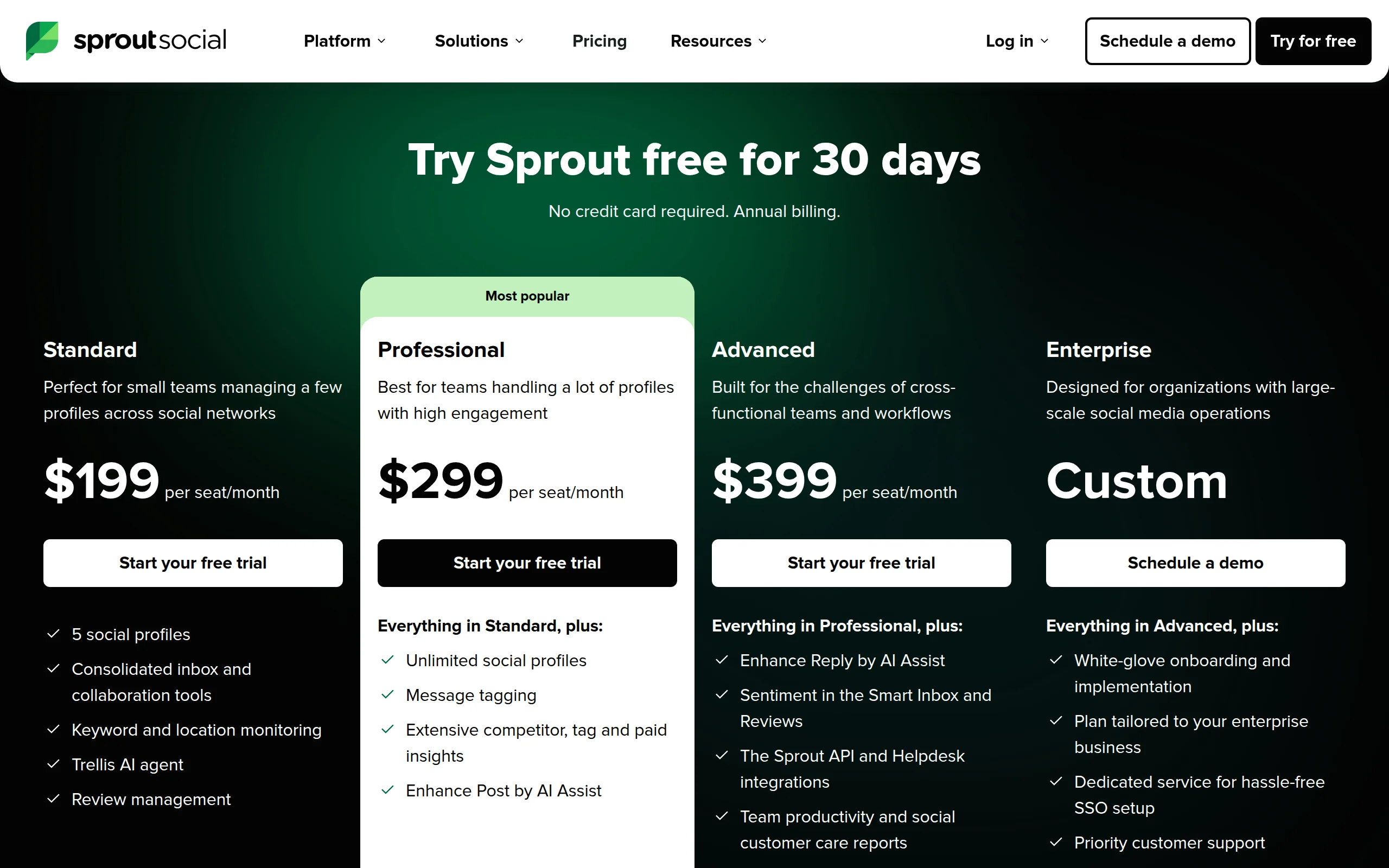
The two lines worth reading on any suite pricing page are the seat minimum and the cost of an additional user. A headline price with a three-seat minimum is really three times the headline price. That's the arithmetic that sends X-first teams looking for alternatives in the first place.
The two billing models, side by side#
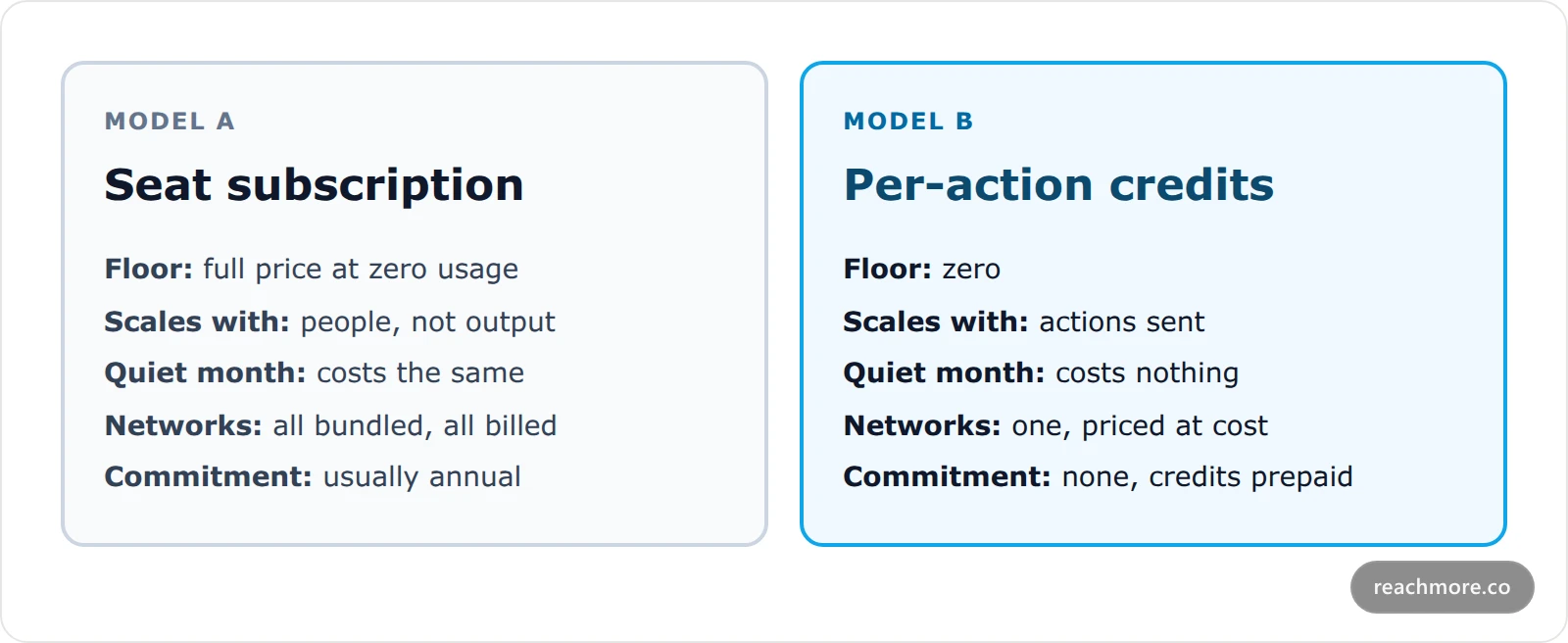
The seat model wins on predictability: finance knows the number twelve months out. The per-action model wins on honesty: you never fund capacity you didn't use. Which one is cheaper depends entirely on volume — so let's price the volume.
What an X-only workload actually costs per action#
Here's where an X-only tool can be specific in a way a suite can't. Every action on X has a published pay-per-use price, so a tool built only on X can pass those through at cost and charge on the margin instead of the seat.
These are ReachMore's per-action credit prices, taken straight from its pricing config:
Action | Credits |
|---|---|
Read your own post or metrics | 1 |
AI draft (no publish) | 2 |
Read a post / analytics / bookmark | 5 |
Reply to someone who mentioned you | 10 |
Read a user, a DM, or trends | 10 |
Publish a post | 15 |
Send a DM (to someone who DM'd you first) | 15 |
Like, repost, or quote a post | 15 |
Publish anything containing a link | 200 |
Schedule a post | 0 — charged at publish |
Two of those rows do real work in a budget.
Scheduling is free. Queueing costs nothing; credits come out when the post actually goes out. A cancelled post costs nothing, which is not true of a seat you paid for in January. If you want the mechanics of what happens between queue and send, we covered how scheduling actually works.
Links cost 13x a plain post. That 200-credit line isn't a markup — X charges roughly forty times more for content containing a URL than for a plain post, and the price is passed through. It reshapes how you plan a week: the link is the expensive object, not the post. Budget accordingly.
Worked example: what a month actually costs#
Credits map to provider cost at roughly a tenth of a cent each, and sell at the founding rate of about $0.0018 per credit — so roughly 550 credits per dollar. Here are four realistic X workloads run through the table above.
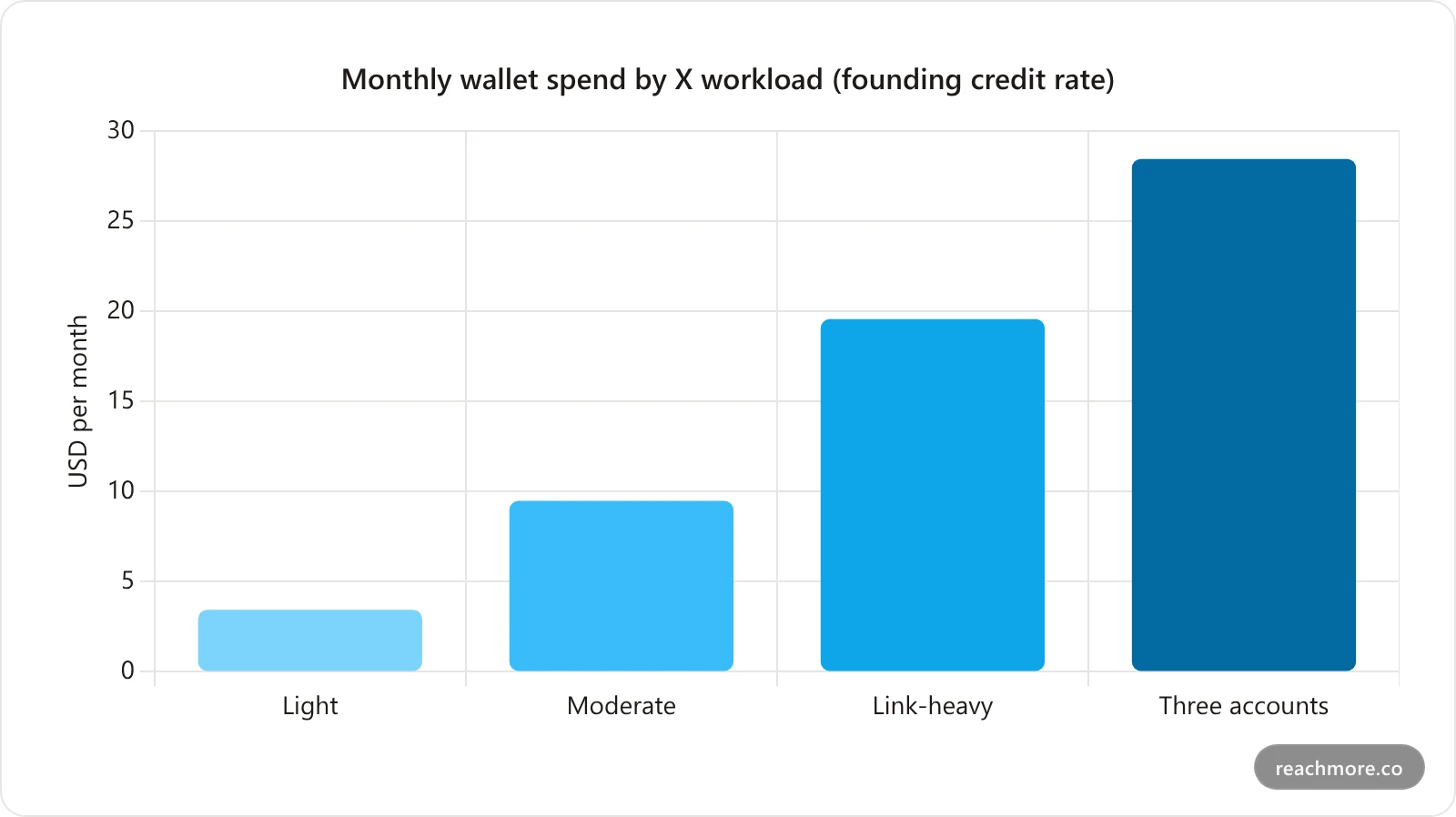
Light — 1 post, 3 replies, a few drafts and reads daily: about 1,890 credits, near $3.44.
Moderate — 2 posts, 10 mention-replies, 12 AI drafts, routine reads: about 5,220 credits, near $9.49.
Link-heavy — same as moderate but one daily post carries a link: about 10,770 credits, near $19.58. The single link roughly doubles the bill.
Three accounts — a moderate workload run across three handles: about 15,660 credits, near $28.47.
These are arithmetic from the published per-action table, not a quote. Your real number moves with how often you publish links and how much you read.
Price your own X month
Run your actual weekly posting and reply volume through the per-action table instead of guessing at a seat count.
See how credits workThe break-even question, answered properly#
The honest framing isn't "which tool is cheapest." It's: at what volume does a seat license start being the better deal?
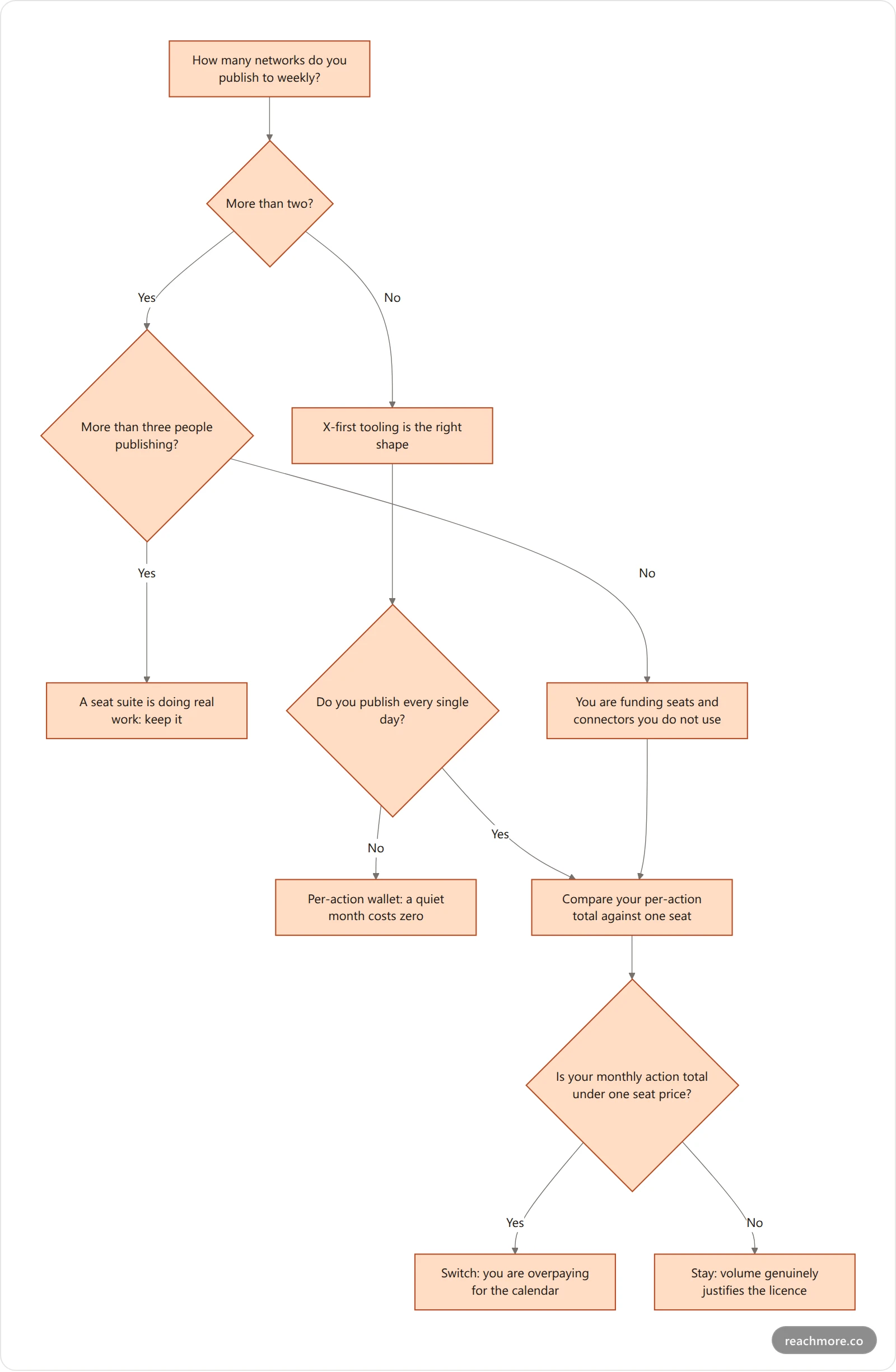
Work it in that order and the answer is usually obvious within one branch. A five-person team publishing to six networks daily should keep its suite — that's what suites are for. A founder and a contractor running two X accounts are, in almost every case, paying a seat price for a job that costs single-digit dollars in actions.
The failure mode to avoid is switching for the discount and then discovering the replacement can't do something you relied on. If that flowchart pointed you toward per-action credits, check the live per-action prices against a month of your own volume before you commit to anything. Which brings us to the honest part.
What none of the X-only alternatives replace#
A Sprout Social alternative that only speaks X is not a like-for-like swap. You give up four things: other networks, web-wide social listening, multi-stage approval routing for large teams, and a unified cross-network inbox. If any one of those is load-bearing for your team, keep the suite or budget for a second tool alongside.
In detail:
Other networks. If LinkedIn or Instagram are part of the job, an X-only tool is a second tool, not a replacement. Two tools can still be cheaper than one suite — but count both.
Social listening at scale. Brand monitoring across the open web is a data-licensing product. No per-action X tool matches it.
Formal approval chains for large teams. Multi-stage routing with role permissions is suite territory.
Unified inbox across networks. X-only means X-only.
There's also a hard platform limit that applies to every tool in this comparison, not just the cheap ones. X's API meters requests and caps write volume, and its published rate limits bind whatever you're paying. ReachMore enforces its own caps underneath those — 50 posts, replies and DMs per account per UTC day, a maximum of 15 posts or replies in any 15-minute window (12 for DMs), and a minimum five seconds between two actions of the same kind. If a vendor implies unlimited automated posting, they're describing something the API won't allow. We went deeper on this in what actually breaks at X's rate limits.
Some categories of automation don't exist in ReachMore at all, by design: no follow/unfollow, no cold DMs to strangers, no replies to people who never mentioned you. Replies go to accounts that summoned you, DMs only to people who messaged first (with a STOP opt-out), and mention-replies land in a queue a human approves before anything sends.
How to migrate without losing your queue#
Switching tools breaks in predictable places. Work in this order:
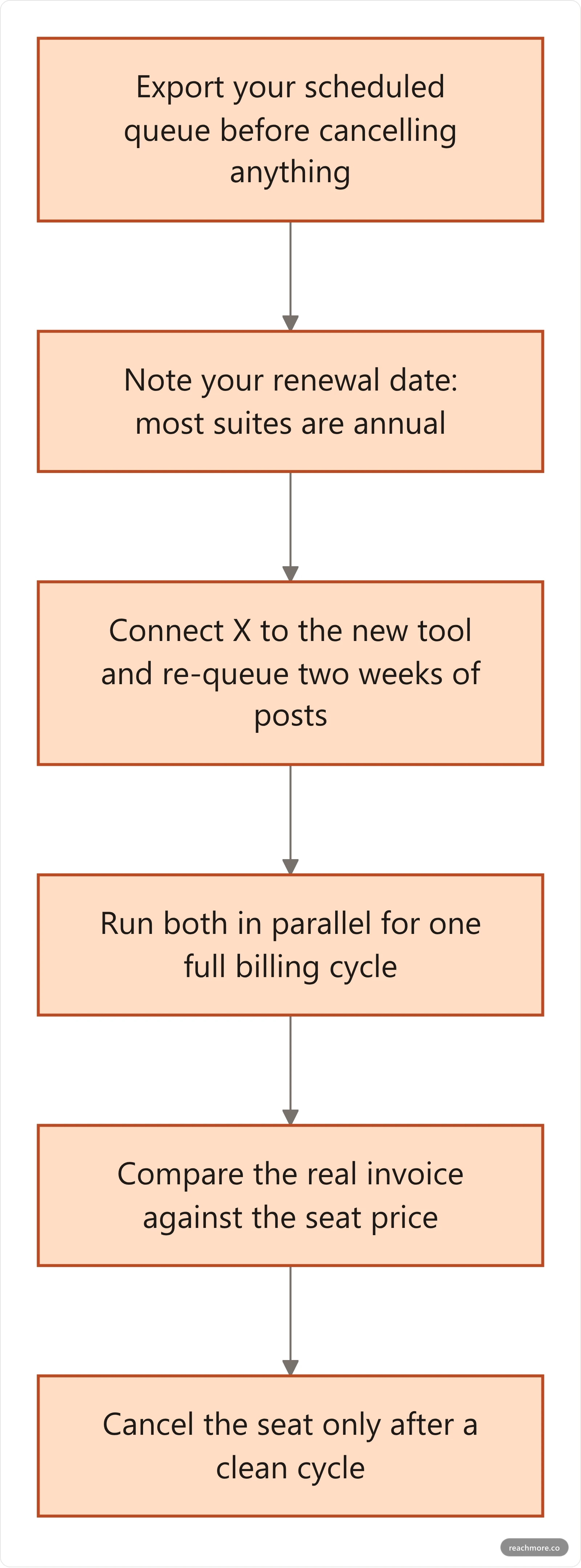
The step people skip is the parallel cycle. One month of overlap costs a fraction of a mistaken annual commitment, and it's the only way to see your genuine action volume rather than your estimate of it.
Two details specific to X worth checking before you commit: whether the new tool re-authorizes cleanly against your existing X app, and whether it can drive your account programmatically. If your workflow is agent-shaped, ReachMore exposes a native MCP server so Claude or any MCP client can post, schedule, approve replies and read insights directly — how that works is documented here.
For a wider look at what the whole category actually delivers versus what it markets, see what you're really buying in a Twitter management tool.
Frequently Asked Questions#
Is there a free Sprout Social alternative?#
Several tools publish a free tier — Buffer's pricing page is the usual starting point — though free tiers cap connected channels and scheduled posts. A prepaid credit wallet behaves differently: there's no free plan, but there's also no floor, so a month with no activity costs nothing at all.
Why do links cost so much more to post?#
Because X's pay-per-use API prices content containing a URL far above plain content — roughly forty times more per request. Any tool billing you per action passes that through; tools billing per seat absorb it into the subscription and hide it. Neither is free, but only one shows you the number.
Can I replace Sprout Social with an X-only tool?#
Only if X is genuinely where your audience is. If you publish to two or more networks regularly, an X-only tool is a supplement rather than a replacement. The realistic comparison is one suite seat versus a cheaper multi-network scheduler plus a specialist X tool — often still less than a seat, but count both.
Does scheduling posts cost credits?#
No. Queueing a post charges nothing; credits are deducted when the post actually publishes. Cancelling a scheduled post before it sends costs nothing, which is the practical difference between paying for output and paying for access.
How many accounts can one wallet cover?#
As many as you connect — credits are drawn per action, not per seat or per profile. Three accounts running the same workload cost roughly three times one account, with no per-seat step change. Each account carries its own daily and burst rate caps.
What happens to unused credits?#
They stay in the wallet. Top-ups are one-time purchases, credits don't expire, and charges only land on a successful action — a failed publish isn't billed.
Key takeaways#
Compare Sprout Social alternatives on billing model first and features second. A seat license bundles network breadth, collaboration and enterprise reporting into one monthly floor, which is excellent value for a multi-network team with several publishers and poor value for a founder running two X accounts.
For X-first work, per-action pricing converts a fixed subscription into a variable cost that tracks output — and makes the expensive actions visible, which is how you actually change a bill. Price your own month before you switch, run one parallel billing cycle, and cancel only after you've seen a real invoice.
Start with a credit wallet instead of a seat — no subscription, and a quiet month costs nothing.


