

Almost every page ranking for this term is a list of fifteen tools with a feature grid. None of them mentions the change that decides whether any of those tools can do what the grid claims: on X's self-serve API tier in 2026, liking, following, unfollowing and quote-posting are not available at all.
A Twitter management tool is software that holds an OAuth token for your X account and calls the X API for you — scheduling posts, pulling analytics, and routing mentions and DMs into a queue. It is the layer you use to manage Twitter account activity without living inside the app, and every product in the category is a client over the same API. So the differences that matter aren't features. They're which endpoints the tool can still reach, what it will run without asking you, and how it bills you per call.
Every tool is the same three layers#
Strip the branding off any X management tool and you find an identical stack. Twitter management tools differ in polish, pricing and support — not in shape. A UI where you write and schedule. A job runner that fires at the scheduled time. And an API client that turns your click into an HTTP request X either accepts, refuses, or bills you for.
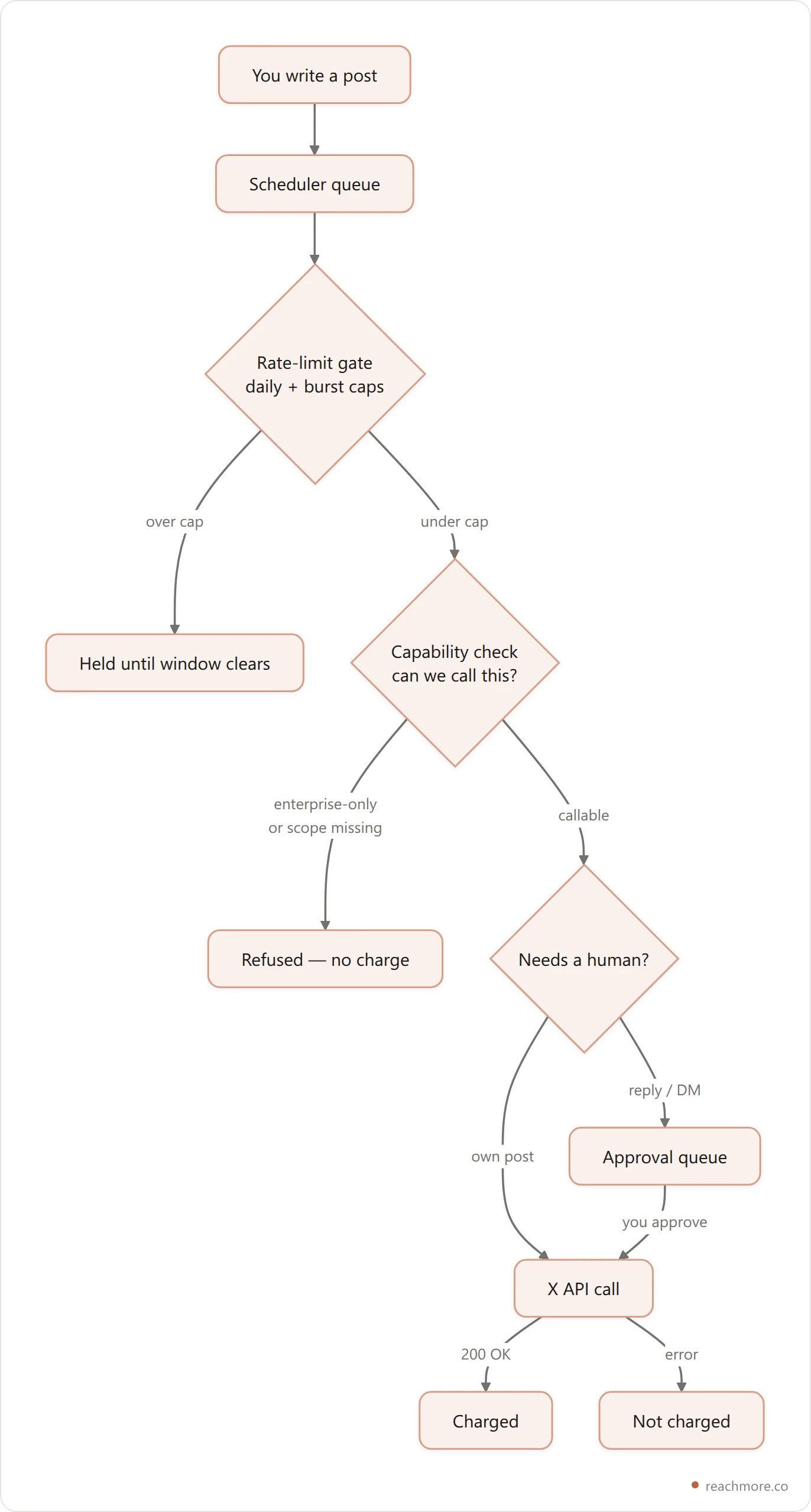
That third layer is where tools genuinely diverge, and it is invisible in a feature grid. Two products can both print "schedule posts" on the pricing page while one queues locally and retries on failure and the other fires and forgets.
What X's API still allows in 2026#
This is the part the listicles skip. X's pay-per-use tier does not expose everything the platform can do. Some endpoints moved to enterprise contracts; others need OAuth scopes that self-serve apps generally don't hold.
Here is how the surface actually splits, taken from a live capability registry rather than a marketing page:
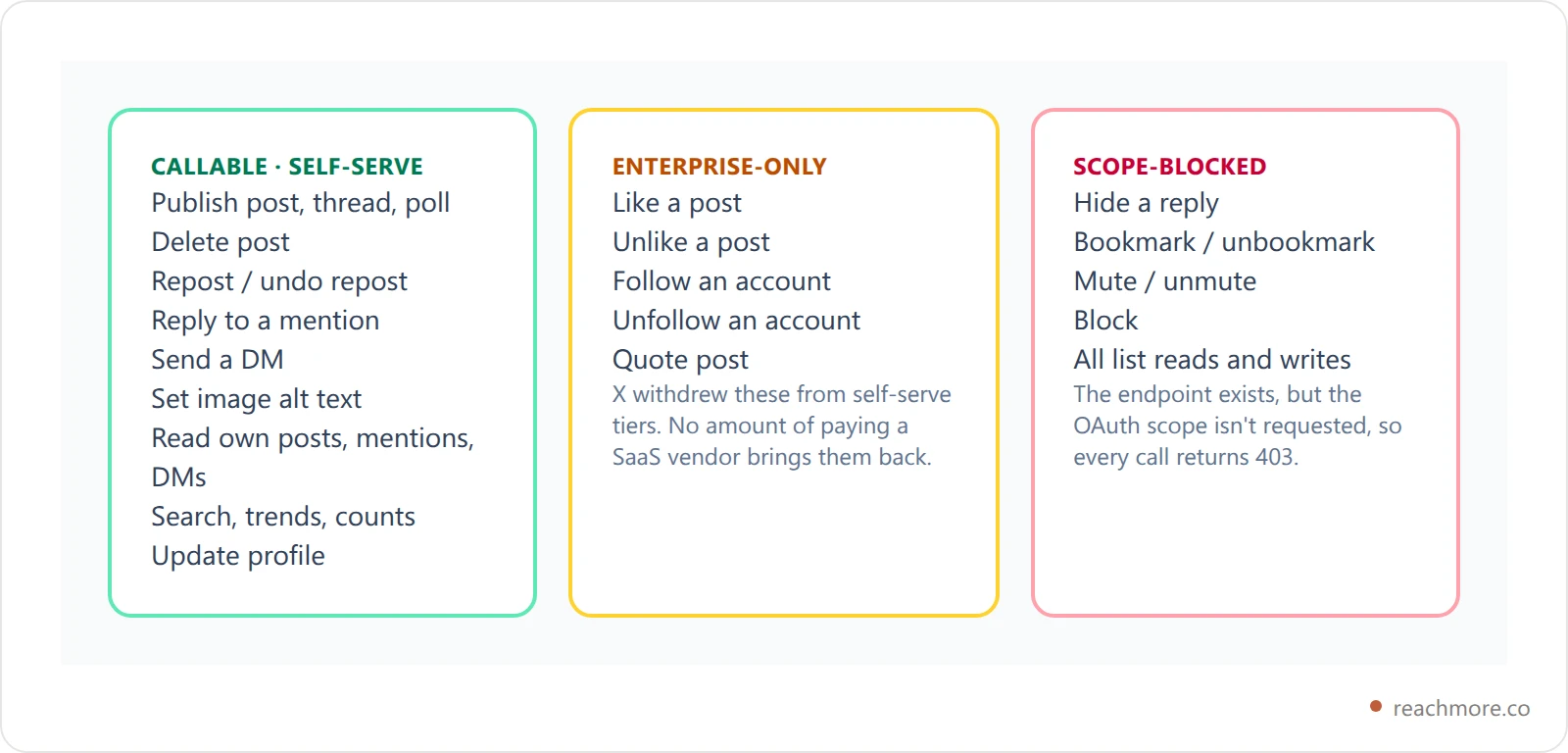
Read the middle column again. Like, follow and unfollow are the three features most "growth" tools are sold on, and they are not reachable on a self-serve API key. If a tool still offers them, it is doing one of three things: holding an enterprise contract, driving a logged-in browser session instead of the API, or simply not doing it.
The third column matters too, in a quieter way. A tool that can't read your lists can't build list-based monitoring, no matter how good the UI looks. Our own take on that trade-off is in push vs poll vs search monitoring.
Why browser automation is the wrong escape hatch#
The obvious workaround for an enterprise-only endpoint is to skip the API and drive x.com in a headless browser. Plenty of tools do. It is also the single fastest way to lose the account.
X's automation rules treat scripted interaction with the web app differently from sanctioned API use, and bulk following or liking is explicitly called out. The API refusing you isn't a bug to route around — it's the platform telling you where the line is. A tool that routes around it has moved the risk onto your account while keeping the subscription revenue on theirs.
Want the API-only version?
ReachMore runs entirely on X's official API. Anything X doesn't expose, we don't pretend to offer — and you can see exactly which actions are callable before you spend a credit.
See what's callableWhat each action costs#
The second thing a feature grid hides is unit economics. X charges per call on pay-per-use, and those charges vary by more than two orders of magnitude. Any tool on a flat monthly fee is either absorbing that spread or capping you somewhere in the fine print.
Prices below are in ReachMore credits, where one credit mirrors X's cheapest metered action:
Action | Credits | Note |
|---|---|---|
Read one of your own posts | 1 | The cheapest call there is |
AI-drafted post (no publish) | 2 | Model inference only |
Read a post, delete a post, set alt text | 5 | |
Reply to a mention | 10 | Only to people who mentioned you |
Read a user, a follower, a trend | 10 | Follower scans add up fast |
Publish a post | 15 | Plain text or media |
Send a DM, repost | 15 | |
Publish a post containing a link | 200 | X prices any URL content at 13x |

That 200-credit line is the one to internalise. A post with a URL in it costs more than thirteen plain posts. If your strategy is link-out promotion, your bill is dominated by a single decision, and no management tool can negotiate it away. We wrote up the reach side of that trade-off in posting links on X without killing reach.
Charges should also be on success only. If X returns an error, you should not pay for the attempt. Ask any vendor this directly; the answer is revealing.
Approval queues are a compliance feature, not a nicety#
X's rules bound replies and DMs to people who contacted you first. Mentions must be summoned; DMs require the other person to open the conversation, and X's direct message rules are unambiguous about unsolicited bulk messaging.
No classifier reliably decides whether a given reply is welcome. So the honest engineering answer is to put a human in front of the two action types that carry the risk.
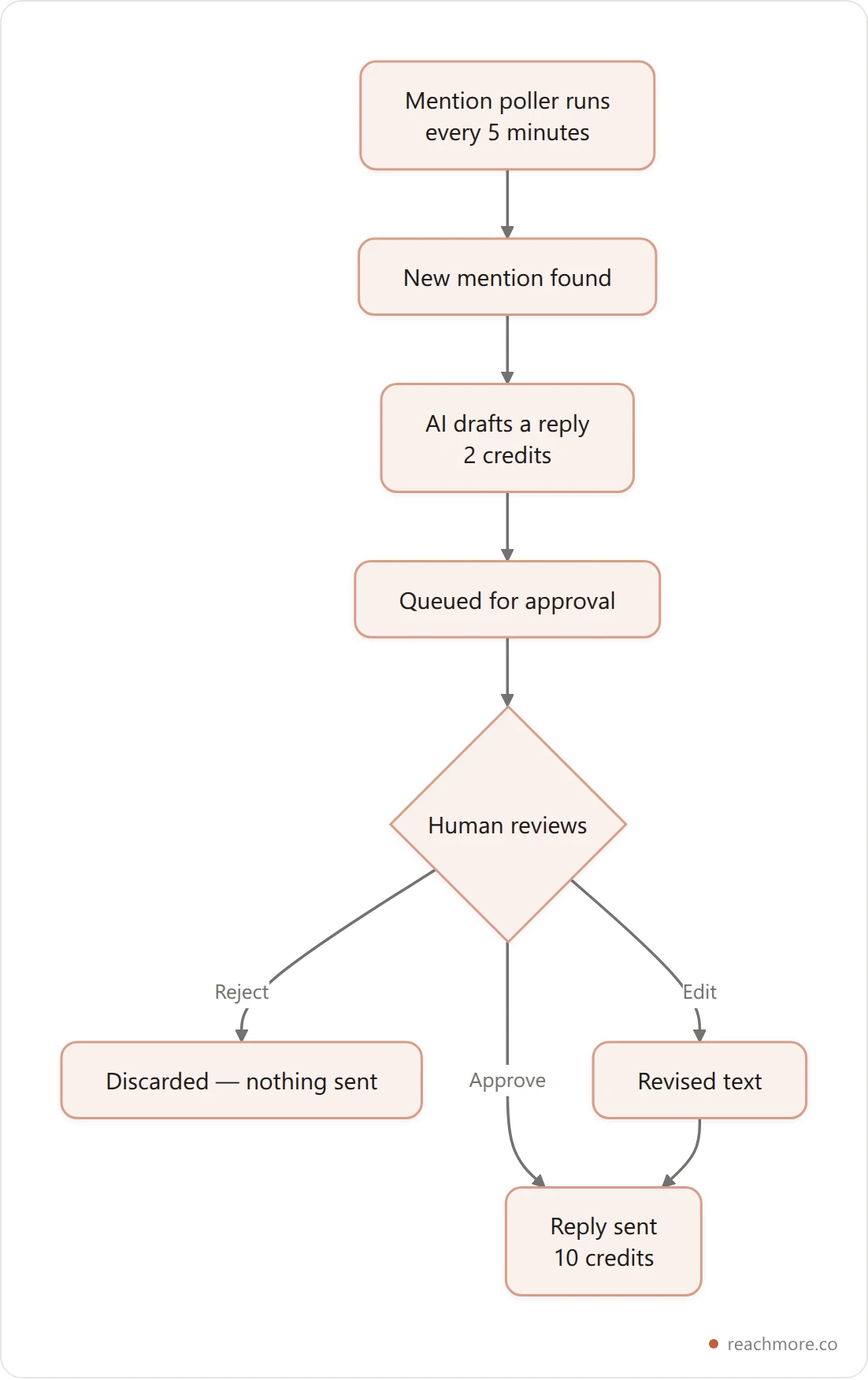
A tool that sends replies unattended to accounts that never mentioned you isn't more capable than one with an approval queue. It has just moved a policy decision from its engineers to your account standing. The same logic governs DMs — an inbound-only autoresponder that honours a STOP opt-out permanently is the compliant shape, and we broke that down in what auto DM on Twitter actually allows.
Where teams actually break: rate limits#
The failure nobody demos is the one that bites at scale. X enforces limits per 15-minute window, not per day, so a tool that dumps a day's queue in one burst trips them even when the daily total looks modest.
Sane caps look roughly like this, deliberately well under X's own ceilings:
Limit | Value |
|---|---|
Posts, replies, or DMs per day | 50 each |
Profile edits per day | 24 |
Posts or replies per 15 minutes | 15 |
DMs per 15 minutes | 12 |
Minimum gap between two actions | 5 seconds |
Two questions separate a serious tool here. Does it pace actions with a minimum spacing, or fire them as fast as the queue drains? And are the caps enforced per account, so one busy account in a multi-account workspace can't starve the others?
If you run several handles, that second question is the whole ballgame — see managing multiple X accounts without bans. The deeper mechanics of X's own buckets are in Twitter API rate limits.
Workflows: useful, and easy to oversell#
"Automation" on a pricing page can mean a scheduled post or a full event-driven graph. The useful middle ground is a small, bounded workflow engine: a trigger, a handful of steps, hard ceilings on both.
Bounds worth insisting on are a step limit in the single digits, a cap on how many workflows one account can run, a short HTTP timeout on any webhook step, and — this one is subtle — a ceiling on delay steps. A long delay holds an account's execution slot for its whole duration. A fifteen-minute cap forces "post this tomorrow" to be a schedule trigger instead of a workflow that quietly blocks the account for a day.
Anything beyond that is usually better served by driving the tool from outside. If your stack already speaks MCP, an agent calling the tool's own endpoints beats a visual builder trying to be a programming language.
A six-question buying checklist#
Skip the feature grid. When you compare Twitter account management software, ask these instead — and treat hesitation as the answer:
Which of like, follow, unfollow and quote-post do you support, and through what? If the answer is "the API", it's wrong on the self-serve tier.
Do you charge on failure? A failed API call should cost nothing.
What happens to a reply to someone who never mentioned me? The right answer is that it doesn't happen.
Are rate limits enforced per account or per workspace?
What's the price difference between a post and a post with a link? If they don't know, they aren't metering X properly.
Can I export my scheduled queue and my data? Lock-in is cheapest to discover on day one.
For the brand-by-brand view, our Twitter marketing tools comparison ranks nine by what you actually pay, and Twitter analytics tools covers the reporting side. If scheduling is your only real need, how scheduling works between queue and post is the shorter read.
Or skip the comparison entirely and check the callable-action list yourself — every endpoint, its credit price, and whether it needs your approval, before you connect an account.
Frequently Asked Questions#
What is a Twitter management tool?#
It's software that holds an OAuth token for your X account and calls X's API on your behalf — scheduling posts, reading analytics, and routing mentions and DMs into a reviewable queue. Every tool in the category is a client over the same public API, so capability differences come from tier and scopes, not cleverness.
Can a Twitter management tool like or follow for me in 2026?#
Not on X's self-serve API tier. Liking, unliking, following, unfollowing and quote-posting are enterprise-only. A tool offering them on a standard plan is either driving a browser session or holding an enterprise contract, and the first of those puts your account at risk.
Why do some posts cost so much more to publish?#
X prices any content containing a URL far above plain content — roughly thirteen times a normal post. That applies to replies and quote posts too, not just top-level posts. It's a platform pricing decision, so it shows up in every tool that meters honestly.
Do I need an X Premium subscription to use one?#
No. API access and X Premium are separate. Premium changes what your account gets in the product; API tier and OAuth scopes decide what a third-party tool can call. You can read our honest math on X Premium separately.
Is a free Twitter management tool worth using?#
Free tiers now mostly mean someone is absorbing per-call costs, capping you hard, or monetising your data. Since X retired most free API access, "free" is a business-model claim rather than a technical one — check what happens when you exceed the cap.
What should I check before connecting my account?#
Which OAuth scopes it requests, whether it charges on failed calls, whether replies and DMs go through human approval, and whether you can export your queue. Scope creep is the one that's hardest to reverse later.
Key takeaways#
Every Twitter management tool is a client over the same X API. Reachable endpoints, automation policy and billing are the real differentiators.
Like, follow, unfollow and quote-post are enterprise-only in 2026. Anything offering them on a self-serve plan is working around X, not with it.
A post containing a link costs roughly 13x a plain post. That single fact will shape your bill more than any subscription tier.
Replies and DMs belong behind a human approval step, because X binds both to people who contacted you first.
Rate limits bite per 15-minute window and should be enforced per account, with minimum spacing between actions.
Ask the six questions above. A vendor that can't answer the pricing and scope ones is not metering X carefully.
Sources: X API documentation · X rate limit fundamentals · X automation rules · X direct message rules


