

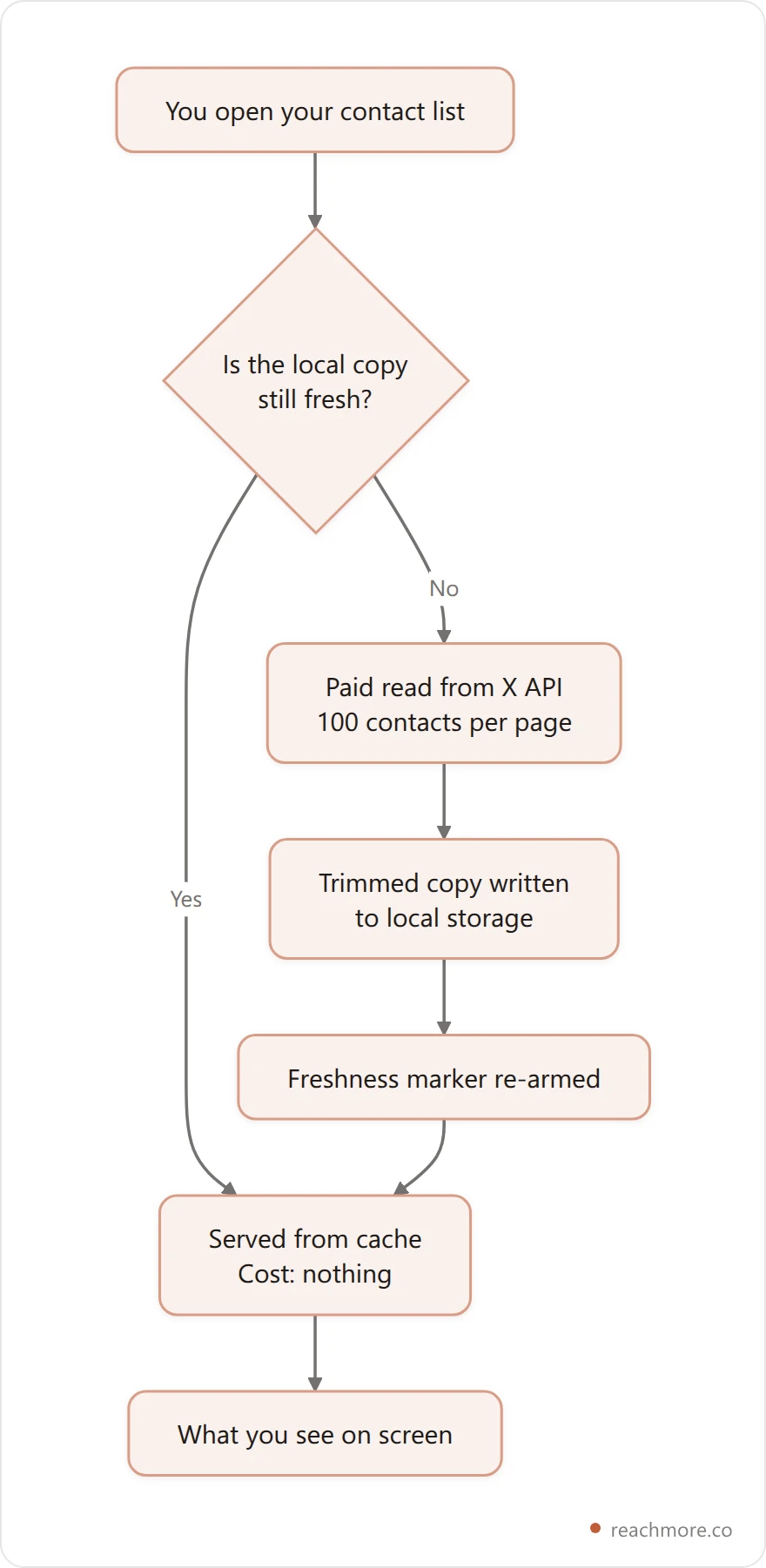
Open any CRM and the first thing it shows you is a contact list you own. Open X and there is no such list. There is no endpoint that returns "everyone who has ever talked to me," no export of your repliers, and no way to sync a follower table the way Salesforce syncs an email list. Every row you see was paid for, one page at a time.
A Twitter CRM is not a database — it's a cache with an expiry date. Because X meters every read of anyone who isn't you, no tool can hold a live, complete picture of your audience. The useful way to compare them is not by feature list but by two questions: what can this thing actually see, and how stale is it allowed to get before you notice?
What a Twitter CRM actually is#
Whatever it's branded — Twitter CRM, X CRM, or Twitter relationship manager — the thing behaves unlike any CRM you've used before, and the difference is ownership.
A traditional CRM owns its data. You import contacts once, they sit in your database, and reading them costs nothing forever. Enrichment is the expensive part; storage and retrieval are free.
X inverts that. The X API charges per resource fetched, and the rate for reading other people is ten times the rate for reading yourself. So the contact table — the thing a CRM is supposedly built around — is the single most expensive object you can ask X for.
Every tool in this category resolves that the same way: it fetches once, stores a trimmed copy, and serves you the copy. That copy is the product. When people say a Twitter CRM "isn't syncing," what they usually mean is that the cache behind it has gone cold and nobody told them.
The 7 options, ranked by what they can see#
Most Twitter CRM tools fall into one of seven shapes, and the label on the box matters far less than the plumbing behind it. Here's what each kind of X CRM can hold, and where its picture of your audience goes wrong first.
Option | Holds your own notes? | Where the X data comes from | What goes stale first |
|---|---|---|---|
X Lists (native) | No | Live, inside X | Nothing — but you get no fields |
A spreadsheet | Yes | You, by hand | Everything, immediately |
General CRM + X integration | Yes | Handle attached to a contact record | Follower counts, bio, handle changes |
Relationship CRM | Yes | Bulk handle import | Whether they still follow you |
Social inbox / engagement tool | Partly | Mentions and DM events | Anyone who hasn't messaged lately |
Build-your-own on the API | Yes | Your own paid calls | Whatever you forget to refresh |
Metered tool (e.g. ReachMore) | Yes | Cache-first, paid on miss | Shown to you, per read |
1. X Lists. The only genuinely live option, because it runs inside X. Lists cost nothing, never go stale, and let you segment people into buckets you can read as a timeline. They also hold zero information — no notes, no "met at a conference," no last-contacted date. For a lot of people this is honestly enough.
2. A spreadsheet. Unlimited fields, total control, and every number in it is wrong the moment you paste it. Works well as a deal tracker where the X handle is just an identifier, badly as an audience picture.
3. A general CRM with an X integration. Zoho, Nutshell and Agile all ship one. The contact record is the center of gravity and the X handle is a field hanging off it. This is the right shape if X is one channel among several and the actual relationship lives in email.
4. A relationship CRM. Tools like folk are built around people rather than deals, and will bulk-import handles. Better fit for founders and investors working a network than for a sales team working a pipeline.
5. A social inbox. Mentions and DMs arrive as a queue. Excellent for responding, structurally weak as a CRM: it only knows about people who have recently made noise, so your quietest important contact is invisible. How that queue gets filled — push, poll or search — decides which noise it hears at all.
6. Build your own. You call the API and pay per read directly. Total flexibility, and you inherit the entire staleness problem, rate limits included.
7. A metered tool. The distinguishing feature is honesty about cost: reads are cache-first, and when a read does hit X you're told what it cost. ReachMore works this way — more on the mechanics below, because they're the clearest illustration of what every tool in this list is quietly doing.
What a follower list actually costs to read#
Here's the part most comparisons skip. X prices reads by whose data it is, and the gap is steep. We build a tool in this category, so the figures below come from our own pricing config — mapped from X's pay-per-use table — rather than a vendor's marketing page.

Reading one of your own posts is the cheapest thing the API does — it's the anchor the whole price list is built around. Reading a stranger's profile costs ten times that. And follower data is billed by the page, not the person: one page carries up to 100 followers.
That page structure is what makes audience features affordable at all. In ReachMore, a workflow that tracks unfollowers reads ceil(followers ÷ 100) pages and charges 10 credits per page — and only for pages it actually fetched, so a small account pays less than the estimate. Tracking 1,000 followers is 10 pages, or 100 credits. Tracking the maximum 5,000 is 50 pages, or 500 credits.
Two things follow from that. First, "scan my whole audience" is a bounded, priceable operation rather than an impossible one. Second, it is never free, which is why no tool does it continuously in the background — and why any tool promising an always-live follower list is either capping it quietly or charging you for it somewhere.
If you want the deeper version of how these limits shape what tools can offer, we broke it down in what actually breaks at X's rate limits.
See what a read costs before you spend it
ReachMore charges per action from a credit wallet — one-time top-ups, no subscription, and credits that never expire. Every read shows its price, and a cache hit costs nothing.
Explore ReachMoreWhy your CRM's data has an expiry date#
Caches need an expiry policy, and a good one follows the physics of the data rather than a round number.
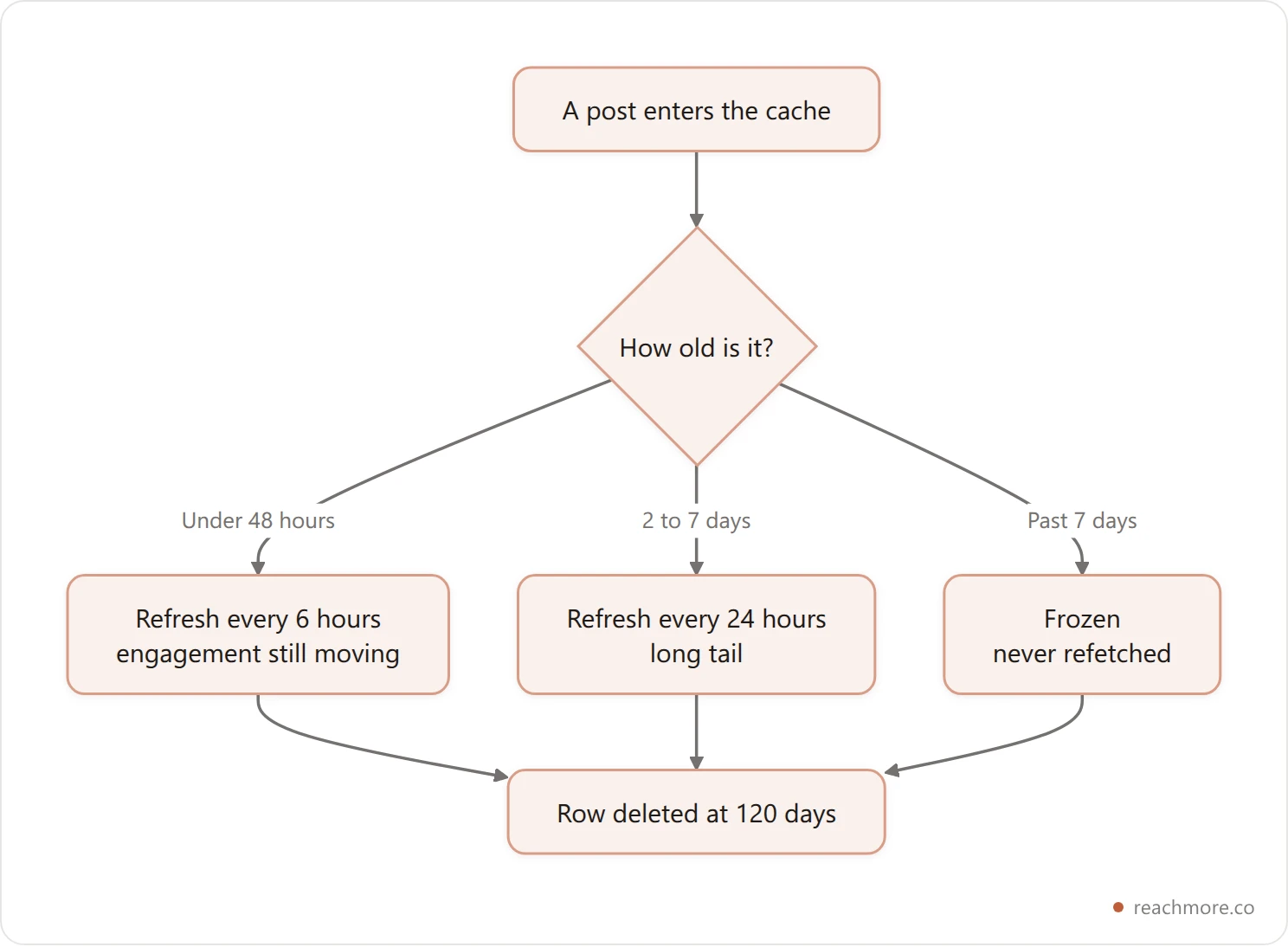
Engagement on a post is a decaying curve. Almost all movement happens in the first 48 hours, a long tail runs through day seven, and after that the numbers are effectively frozen. So refresh windows should stretch as a post ages and stop entirely once nothing can change — otherwise you're paying X twice for a number that will come back identical.
ReachMore implements exactly that: posts under 48 hours old refresh at most every 6 hours, posts from two to seven days old every 24 hours, and anything past seven days is never refetched. Stored rows die 120 days after the post was created, and there's a per-account cap of 800 posts, so the cache can't grow without bound.
Contact data has no such curve, which is the awkward part. A follower can unfollow at any moment, and nothing about their age makes that less likely. So follower lists get the crudest possible treatment everywhere: a snapshot, taken when you ask.
Worth knowing about snapshots — in ReachMore's unfollower check, the stored snapshot is overwritten in place on each run. It answers "who left since last time," not "who has ever left." That's a diff, not a history. If you need a timeline of your audience, you need to be exporting it yourself, and the same caveat applies to checking who unfollowed you in any tool.
What no Twitter CRM can do#
This is where expectations imported from sales CRMs break, and it's better to know before you pay.
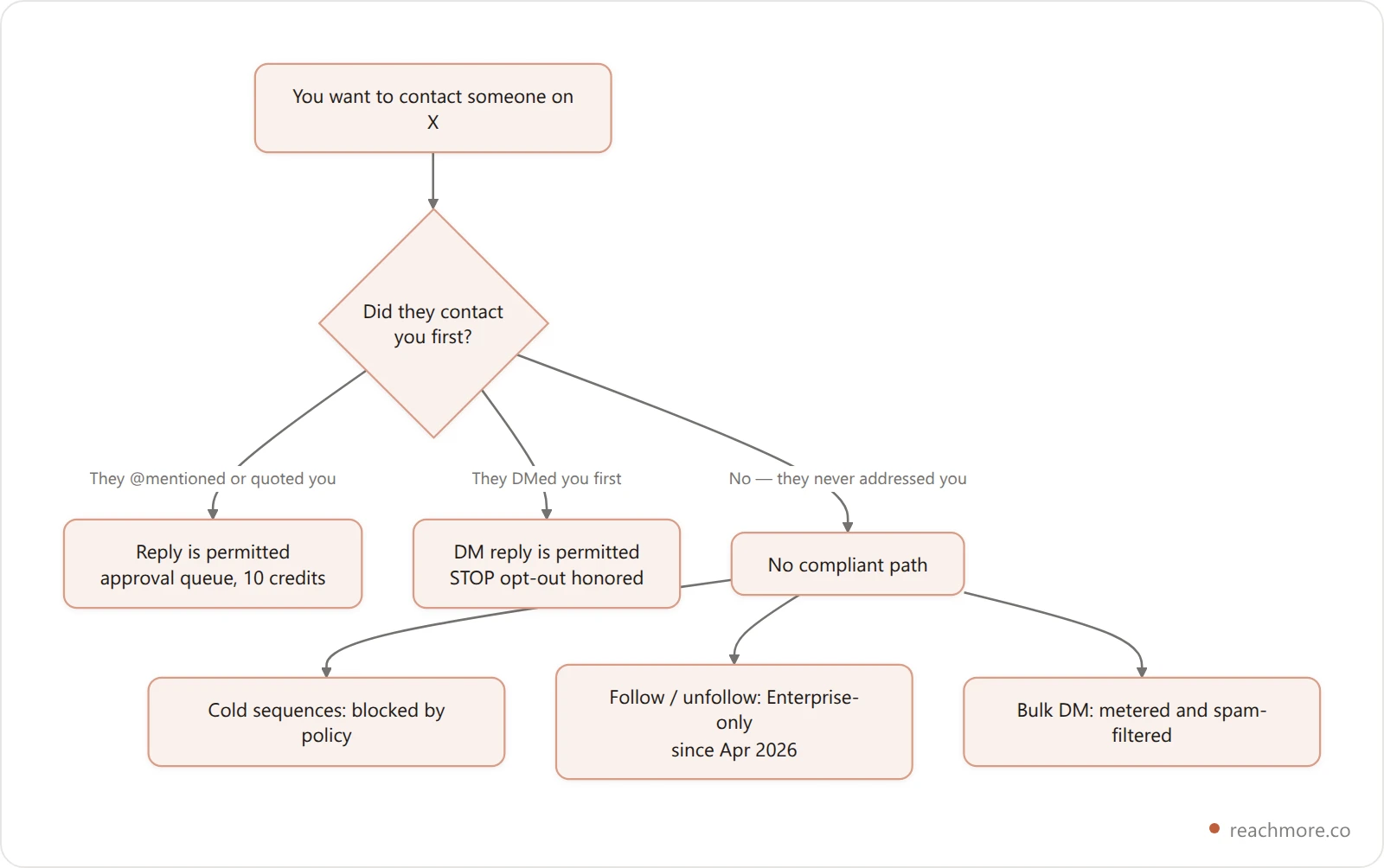
Outbound sequences. A sales CRM's whole point is contacting people who haven't contacted you. On X that is the one thing the rules are built to prevent. ReachMore only replies to people who have @mentioned or quoted you, and only DMs people who have DMed you first — with a STOP opt-out honored on the inbound side. That's a deliberate design constraint, not a missing feature; the economics and the policy around automated DMs both point the same way.
Auto-follow and auto-unfollow. Programmatic follow/unfollow went Enterprise-only in April 2026. ReachMore's OAuth scopes deliberately omit follows.write entirely — the app requests read access to your follower graph for the audience report and unfollower detector, and nothing that could follow or unfollow on your behalf. Any tool still advertising follow/unfollow churn is either on an enterprise contract or breaking X's automation rules.
Bulk DM. Same reason. The endpoint exists; the inbox settings, spam rules and per-send pricing are what make it a bad idea.
A complete contact list. There is no "everyone who replied to me in 2025" endpoint. You can reconstruct something like it from mentions you've captured since you started capturing, which means every Twitter CRM's history begins the day you connected it. Connect early, even if you don't use it yet.
How to choose: five questions#
Twitter contact management mostly comes down to matching the tool to where the relationship really lives. Five questions settle it.
Where does the relationship actually live? If the real conversation moves to email, use a general CRM and treat the handle as a field. If it lives on X, a general CRM will feel like a filing cabinet in another building.
Do you need notes, or just segments? Segments alone means X Lists, free, today.
How will you know the data is stale? A tool that shows you a "last synced" timestamp is telling you the truth. One that shows a confident number with no timestamp is showing you a cache and hoping.
What does a full audience scan cost, and is it capped? Make the vendor answer in numbers. If they can't, they haven't thought about it.
Are you being sold something X doesn't permit? Follow/unfollow automation and cold bulk DMs are the two reliable tells.
See a tool that answers question 4 in numbers →
For the broader landscape of what's worth paying for on X, our ranking of marketing tools by what you pay covers pricing models across the category, and analytics tools ranked by what they can see applies the same visibility test to reporting.
If you'd rather drive all of this from a terminal than a dashboard, ReachMore also exposes 17 MCP tools — including pending-approval review and follower-growth reads — so an AI assistant can work your queue with the same metering and the same approval gate.
Key takeaways#
It's a cache, not a database. Every contact row was fetched and paid for; none of it syncs itself.
Reads are priced by whose data it is. Your own post costs 1 credit, a stranger's profile 10 — a 10x gap that shapes every feature in this category.
Follower data is billed by the page, 100 accounts at a time, so full-audience features are always bounded and capped.
Snapshots are diffs, not history. An unfollower check overwrites its snapshot each run; if you want a timeline, export it yourself.
Outbound is the hard limit. No compliant tool does cold sequences, bulk DM, or follow/unfollow churn.
Frequently Asked Questions#
Is there an official Twitter CRM?#
No. X doesn't ship a CRM product. The closest native feature is Lists, which segments accounts into readable timelines but stores no notes, fields or contact history. Everything marketed as a "Twitter CRM" is a third-party tool holding its own copy of data it fetched from the X API.
Can a Twitter CRM import all my followers?#
Only in pages, and only up to whatever cap the tool sets. Follower data is read 100 accounts per page and billed per page, so tools bound the scan — ReachMore's unfollower tracking caps at 5,000 followers, which is 50 pages. There's no free bulk export of your follower list.
Why does my Twitter CRM show outdated follower counts?#
Because you're looking at a cached copy. Live reads cost money on every fetch, so every tool serves stored data and refreshes on a schedule. Good tools stretch that schedule as data ages and freeze it once numbers can't change. Look for a "last synced" timestamp.
Can I use a Twitter CRM for cold outreach?#
You shouldn't, and the good ones won't let you. X's automation rules restrict unsolicited automated contact, and DM delivery depends on the recipient's inbox settings regardless. Tools built for compliance reply only to people who mentioned you and DM only people who messaged first.
Do general CRMs like Zoho or Nutshell work for X?#
They work well when X is one channel and the relationship really lives elsewhere. The handle becomes a field on a contact record you already own. They're weaker at audience-shaped questions — who unfollowed, who engages most — because those need continuous paid reads of the follower graph.
What's the cheapest way to track relationships on X?#
X Lists, free and live, plus a spreadsheet for notes. You give up automation and freshness warnings, but you pay nothing and nothing silently goes stale behind a cache. Move to a paid tool when the manual upkeep costs more than the subscription — or, on a metered tool, more than the credits.


