
You refresh your profile and the number dropped. Ten followers gone overnight — and now you're searching how to see who unfollowed you on X. Here's the frustrating catch: X point-blank refuses to tell you.
The short answer: As of July 2026, X still does not show you who unfollowed you. It only shows your total follower count. To see specific unfollowers on X in 2026, you need a browser extension or a tracking tool that saves a snapshot of your followers and compares it day to day. This guide shows you every method, why unfollows happen, and how to keep the followers who actually matter.
Here's the part most guides skip. Chasing unfollows is usually a waste of energy. In October 2025, X wiped out roughly 1.7 million bot accounts in a single purge — and thousands of real creators watched their counts fall through no fault of their own. Most of what you lose is noise. This post gives you the tools to see the churn, a simple framework to diagnose it, and the fixes that actually move net followers up. Let's get into it.
Can You See Who Unfollowed You on X?#
No. X does not natively show who unfollowed you. The platform displays your follower total and some post analytics, but it never surfaces a list of accounts that left. This is by design — X treats the follow graph as private-ish data and offers no "recent unfollowers" screen anywhere in the app or on the web.
That's why an entire category of tools exists. To track unfollowers on X at all you need something outside the app: since X hides the who, third-party trackers reconstruct it. They store a copy of your current follower list, then re-check it later and show you the difference: who's new, and who's gone. No tool can show you a historical unfollow you didn't track — you can only catch churn from the moment you start watching. Start today, not "someday." That snapshot-and-diff pattern is exactly what every Twitter CRM runs on, and it's why none of them can hand you a complete contact history either.
How to See Who Unfollowed You on X: 4 Methods#
There are four realistic methods, and they trade off privacy, cost, and how much history you get. Here's the honest comparison before we go deep.
Method | Shows named unfollowers? | Needs account access? | Cost | Best for |
|---|---|---|---|---|
X native app | No | — | Free | Nothing — it can't do this |
Data archive download | Partial, manual | No (own data) | Free | One-off deep dives |
Browser extension | Yes | Reads on-page only | Free–low | Daily, private tracking |
Tracking dashboard | Yes, with dates | OAuth login | Paid | Alerts + team reporting |
1. The X native app. Included only to rule it out. You can see your follower count fall, but never the names. Do not waste time hunting for a hidden setting — there isn't one.
2. The data archive. Go to Settings → Your account → Download an archive of your data. X emails you a file with your follower IDs. Download two archives weeks apart and diff them, and you can spot who left. It works, but it's slow, manual, and clunky for anything but a one-time audit.
3. A browser extension. The fastest, most private route for most people. A follower-tracking extension reads your follower list right in the browser, stores a snapshot, and flags unfollowers directly on X — usually free, often without a login. If you already run a Chrome extension for your X workflow, this fits the same habit.
4. A tracking dashboard. Tools like Circleboom or Fedica connect via OAuth and give you dated unfollow logs plus alerts. More power, more setup, and you're granting account access — fine for agencies, overkill for a solo creator who just wants a nudge.
Why You Lose Followers on X: The 4-Bucket Unfollow Audit#
Wondering why you lose followers on X — or typing why did I lose followers on Twitter into search, if you still call it that? Before you react to a single unfollow, sort it. Every follower you lose falls into one of four buckets, and only two of them deserve a response. I call this the 4-Bucket Unfollow Audit — a way to turn a scary number into a decision.
Bucket | Typical cause | Rough share of churn | Your move |
|---|---|---|---|
Bots | Platform purges, spam removal | 30–50% on drop days | Ignore — this is cleanup |
Ghosts | Deleted/inactive/dormant accounts | 20–35% | Ignore — they were dead weight |
Drifters | You changed topic, tone, or cadence | 15–30% | Investigate your recent posts |
Reversers | Follow-back games, then unfollow | 10–20% | Ignore — never chase these |
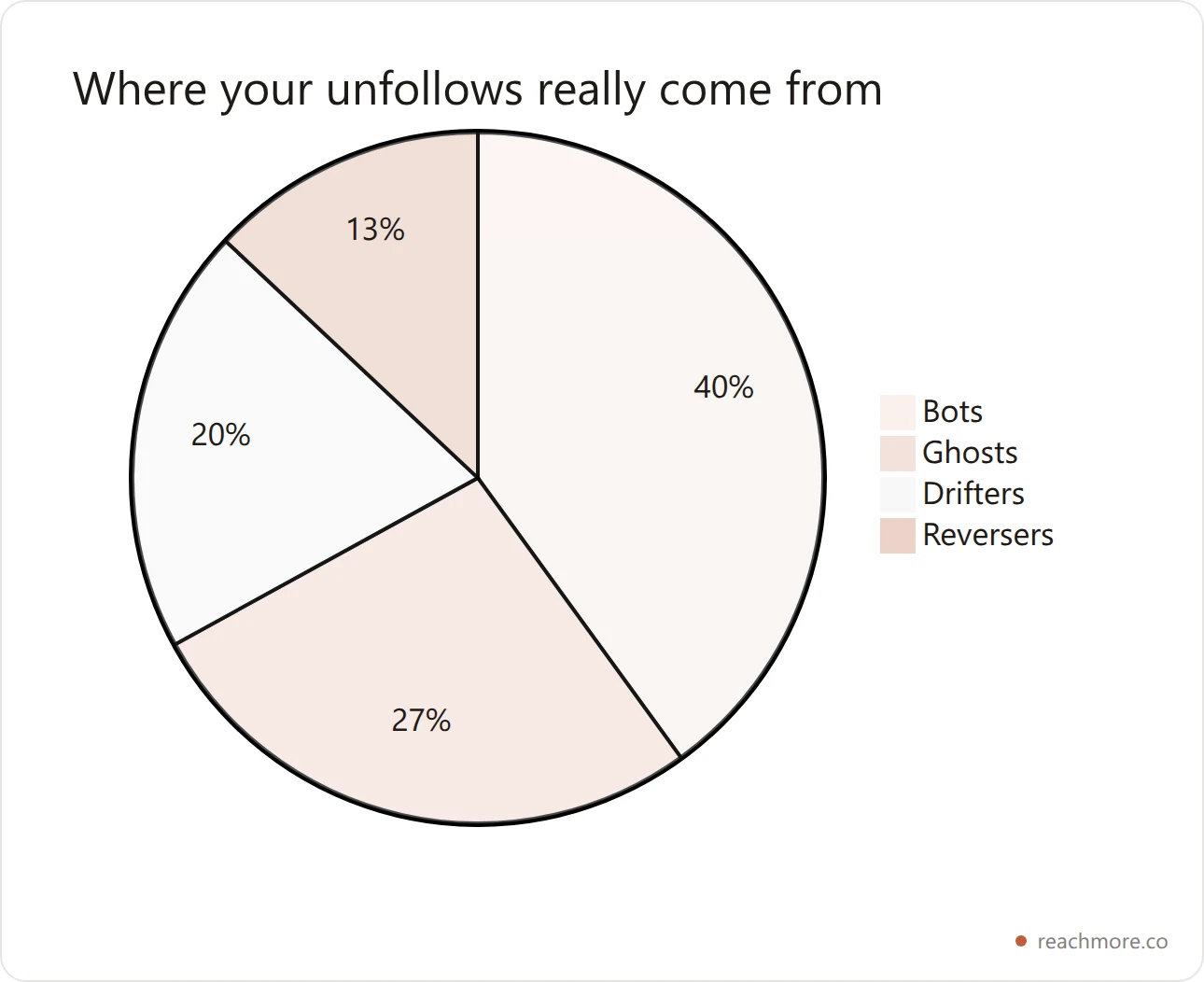
Bots and Ghosts are noise. A SparkToro and Followerwonk study found that 19.42% of active X accounts fit a conservative definition of fake or spam — roughly one in five. When X purges them, your count drops without a single real person leaving. The same goes for dormant profiles: people delete accounts, go quiet, or abandon X entirely.
Drifters are the only signal worth acting on. These are real, relevant people who followed you for one thing and got another. If you pivoted from indie-hacking tips to political hot takes, expect drift. This is the bucket to study — and usually the only one.
Reversers played you. They followed hoping you'd follow back, then dropped you days later to pad their own ratio. X now flags aggressive follow/unfollow behavior, so these accounts are increasingly short-lived anyway.
The takeaway: on a normal drop day, 60–80% of your unfollows are Bots, Ghosts, and Reversers — none of which you can or should fix.

The Contrarian Truth: Unfollows Are Mostly Noise#
Here's the take that runs against every "track your unfollowers!" tool: watching who unfollowed you is a trap for most creators. Reacting to X follower churn is how good accounts talk themselves into worse content.
The number that matters is not unfollows. It's net active followers — real humans who see and engage with your posts. You can lose 40 followers and gain reach in the same week if the 40 were bots and the new arrivals are engaged. Follower count is a vanity metric; the follow graph is noisy by nature.
Consider the platform data. X's "Following" feed is now algorithmically sorted rather than chronological, so even people who follow you may rarely see your posts. Add the periodic purges — 1.7 million bots in October 2025 alone — and raw follower count becomes a shaky signal. A dashboard that pings you every time a bot evaporates just trains you to panic.
The healthy use of unfollow data is diagnostic, not emotional. Check it monthly. Look only for the Drifter pattern — a real audience leaving after a specific change. Ignore the daily jitter. As you track which X metrics actually predict growth, you'll notice reach and reply engagement tell you far more than a follower counter ever will.
"We removed 1.7 million bots that were spamming replies." — Nikita Bier, Head of Product at X, announcing the October 2025 purge. When the platform itself is deleting accounts by the million, your overnight dip is often their cleanup, not your failure.
How to Track Unfollowers Without Getting Flagged or Banned#
Tracking is safe. Acting on it carelessly is what gets accounts limited. The danger isn't watching unfollowers — it's the mass follow/unfollow behavior people do in response.
X's anti-spam systems watch for follow churn. The widely cited safe ceiling is 50–100 follow or unfollow actions per day; blow past it and you risk a soft flag or temporary limit. So if you're tempted to "unfollow everyone who unfollowed me," don't automate it into a purge — that's the exact pattern the platform penalizes.
Reading your own follower list is a different, low-risk activity. This is where ReachMore's Unfollower tracker fits: it runs a simple Schedule → Check unfollowers → Notify automation that reads your own followers on a schedule, stores only the changes, and emails you only on the days someone actually leaves. It's opt-in, it shows its per-run cost before it runs, and it never touches anyone else's account. That's the compliant way to stay informed.
Set up an unfollower check that emails you only on real churn →
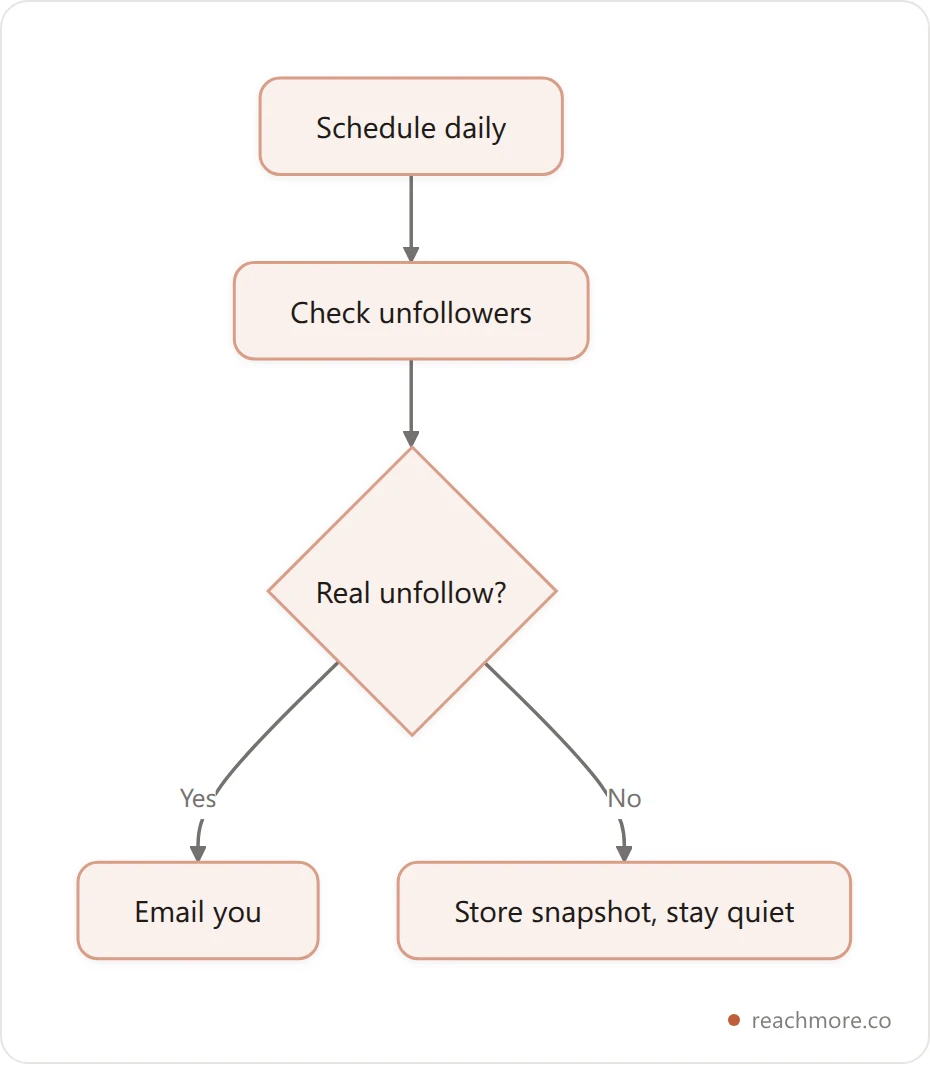
Three rules keep you safe:
Read, don't retaliate. Tracking who left is fine. Mass-unfollowing in response is what triggers limits.
Never buy your way out of churn. Purchased followers evaporate in the next purge — see the real cost of buying X followers.
Stay under the daily action cap. Keep manual follows and unfollows combined under ~100 a day.
How to Actually Stop Losing Followers on X#
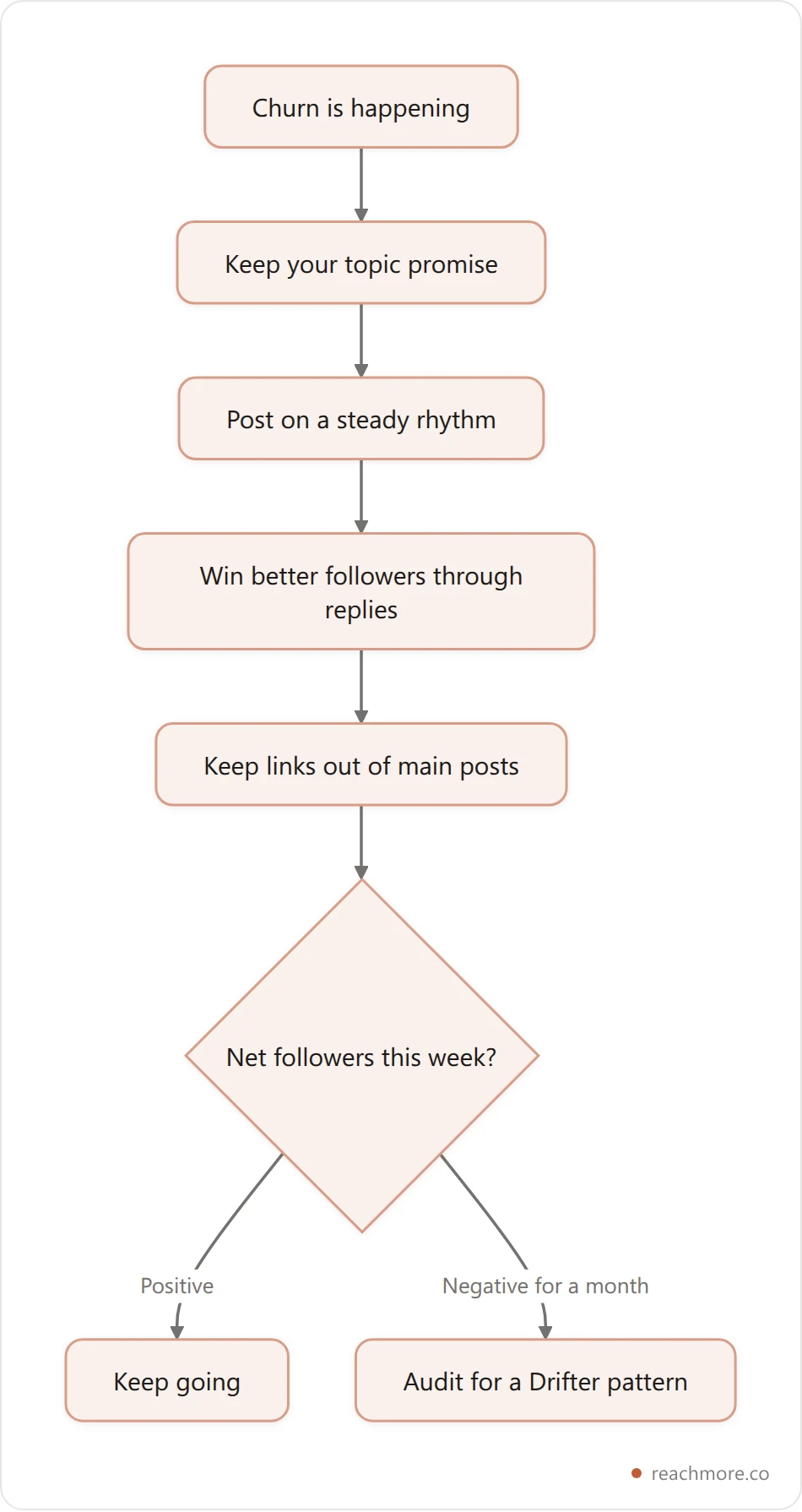
The honest answer to how to stop losing followers on X is that you can't stop churn entirely — even accounts with millions lose followers daily. But you can shrink the avoidable losses (the Drifters) and out-earn the rest with better followers coming in. Here's the playbook.
Keep your topic promise#
People followed a specific flavor of you. Wild pivots break the promise. If you must evolve, bridge it — explain the shift in a post, thread the old topic into the new one, and give your audience a reason to stay. Sudden, unexplained topic swings are the #1 driver of real unfollows.
Post with a steady rhythm#
Vanishing for three weeks, then posting 20 times in a day, reads as erratic and costs you followers. A predictable posting cadence keeps you in feeds and in mind. If consistency is your weak point, learning to warm up and sustain an account matters more than any single viral post.
Win better followers through replies#
This is the highest-leverage move. Replies put you in front of engaged audiences who chose to follow you because of a specific take — the opposite of a Reverser. Followers earned through thoughtful replies stick, because they self-selected into your niche. This is the entire premise behind turning replies into reach: quality of follower beats quantity every time.
Cut the link-in-post reflex#
X heavily suppresses reach on posts with external links for non-Premium accounts. Fewer impressions means fewer new follows to offset your natural churn. Put links in a reply or your bio instead of the main post.
Measure net, not gross#
Track followers gained minus followers lost each week. If net is positive and your reply engagement is climbing, you're winning — even on weeks the raw counter dips. If you're stuck, dig into why you might not be growing on X.
Before and After: A 40-Follower Overnight Drop, Decoded#
Here's a composite example built from the patterns above, with concrete numbers, so you can see the audit in action.
Before. A solopreneur — call the account @buildinpublic_dev, ~2,300 followers — wakes up to 2,260. Forty gone overnight. They panic, fire up a dashboard, and spend an hour planning to unfollow everyone who left. Their next three posts get worse, hedged and reactive, chasing whoever might come back.
The audit. Running the 4-Bucket pass on the 40:
28 Bots — flagged accounts removed in a platform sweep.
7 Ghosts — profiles with no avatar, zero recent posts, dormant for months.
3 Drifters — real, active accounts in their niche.
2 Reversers — follow/unfollow ratio-padders.
After. Only the 3 Drifters mattered — and reviewing recent posts, all three had followed for build-in-public updates but got a week of unrelated reposts. Lesson logged: keep the topic promise. They stopped the reactive unfollowing, went back to shipping useful replies in their niche, and over the next 14 days added 90 net new followers. The scary "-40" was 92% noise. The 8% that was signal took ten minutes to fix.
That's the whole point of tracking: not to grieve every departure, but to isolate the 8% you can learn from.
Track churn without watching it all day
ReachMore's unfollower workflow reads only your own follower list on a schedule, stores just the changes, and emails you on the days someone actually leaves — showing its per-run cost before it runs.
Try ReachMoreYour Monthly Follower-Retention Checklist#
Save this. Run it once a month — not daily — to catch real problems without feeding the panic loop. Copy and paste it into your notes:
MONTHLY X RETENTION CHECK
[ ] Note this month's net followers (gained − lost)
[ ] Open your unfollower list; sort into 4 buckets
[ ] Count the Drifters (real, relevant accounts)
[ ] If Drifters > 20% of churn: review last month's posts for a topic/tone shift
[ ] Confirm you stayed under ~100 follow/unfollow actions per day
[ ] Check reply engagement trend (up = healthy, even if count dipped)
[ ] Did you post external links in main posts? Move them to replies/bio
[ ] Set ONE retention goal for next month (e.g. "3 niche replies/day")
If the only thing that changed is Bots and Ghosts, do nothing and get back to work. Retention is won by earning better followers, not by mourning fake ones.
How Often Should You Check for Unfollowers?#
Monthly is the sweet spot for most creators. Daily checking trains you to react to noise — the bot purges and dormant drop-offs that mean nothing. A once-a-month pass is frequent enough to catch a real Drifter pattern while it's still fresh, but rare enough that you never get emotionally tied to the counter.
There's one exception. If you just made a big change — a topic pivot, a spicy post, a new posting schedule — check about a week later. That's exactly when avoidable churn surfaces, and catching it early lets you course-correct before the pattern hardens into a habit your audience learns to tune out.
The smart setup is to automate the watching and manualize the thinking. Let a tracker ping you only on the days a real follower actually leaves, then run your reflective 4-Bucket audit once a month. That way you stay informed without refreshing your profile like a stock ticker — which is the fastest route to worse, more reactive content.
Automate the watching, keep the thinking manual →
Frequently Asked Questions#
Can you see who unfollowed you on X for free?#
Yes. A browser extension is the free route — it reads your follower list on-page, stores a snapshot, and flags who left, usually without a login. X's own data-archive download is also free but manual. What you can't do is see unfollows retroactively; tracking only works from the day you start.
Why did I lose so many followers on X overnight?#
Almost always a platform purge. X removed roughly 1.7 million bot accounts in October 2025 and periodically clears inactive and spam profiles. When those accounts were following you, your count drops even though no real person left. Overnight drops are usually cleanup, not rejection.
Does X notify you when someone unfollows you?#
No. X sends no unfollow notification and shows no unfollower list. You only see your total count change. To get alerted when someone unfollows, you need a third-party tracker — like an extension or an automation that emails you only when a real follower diff is detected.
Is it safe to use an unfollower tracker on X?#
Reading your own follower list is low-risk and allowed. The risk comes from acting on it — mass follow/unfollow behavior can trigger anti-spam limits. Stay under about 100 follow/unfollow actions per day, and prefer tools that only read your own account rather than automating retaliatory unfollows.
Should I unfollow people who unfollowed me?#
Usually not. Most unfollowers are bots, dormant ghosts, or follow-back gamers who were never engaged anyway. Retaliating burns your daily action budget and risks a spam flag for little gain. Spend that energy earning engaged followers through replies instead of policing your ratio.
How many followers is it normal to lose on X?#
Losing a small percentage regularly is completely normal — even huge accounts lose followers daily. A steady trickle from purges and natural churn is healthy background noise. Worry only when a real, relevant audience (the Drifters) leaves after a specific change you made, or when your net weekly count trends down for a month or more.
What's the difference between followers and reach on X?#
Followers are the accounts subscribed to you; reach is how many real people actually see your posts. Because the Following feed is algorithmically sorted and many followers are bots or dormant, reach is the truer growth signal. You can grow reach while your follower count holds flat — and that's often the healthier trajectory.
Can I track unfollowers automatically?#
Yes. Automations like ReachMore's Unfollower tracker run on a schedule, diff your current followers against the last snapshot, and email you only when someone actually unfollows — so you're informed without checking obsessively. It reads only your own account and shows its cost before each run.
The Bottom Line#
Learning how to see who unfollowed you on X in 2026 comes down to three things. First, X will never show you natively — you need an extension or tracker that snapshots your followers and diffs them over time. Second, most of what you lose is noise: with roughly 19.42% of active accounts fake or spam and purges wiping out 1.7 million bots in a single October 2025 sweep, the majority of drops are cleanup, not rejection. Third, the only unfollows worth acting on are Drifters — real people who left after a real change.
Run the 4-Bucket Unfollow Audit monthly, watch net active followers instead of the raw count, and pour your energy into earning engaged followers through replies. That's the loop that compounds.
Want to turn every reply into reach — and earn followers who actually stick? Get started with ReachMore →