You get mentioned by someone with 40,000 followers, and 30 replies land in the thread within the hour. You can't answer all of them without either ignoring most of the thread or pasting the same three sentences into every box — which is the fastest way to look like a bot, even when a human is typing.
A twitter reply generator — sometimes called an X reply generator or just a twitter reply bot — is software that drafts a reply to a tweet with an LLM, usually trained on a sample of your own posts so the wording sounds like you instead of a generic assistant. The decent ones only fire on tweets that already mention or quote you, put every draft in front of you before it sends, and bill per reply instead of a flat monthly fee. Here's exactly how that pipeline works, what it costs, and what to check before you trust one with your account.
What a Twitter Reply Generator Actually Does#
Strip away the marketing page and a reply generator is three parts wired together: a trigger (something happened on X worth responding to), a model call (turn that event plus context about your voice into 280 characters), and a send step (post the reply through X's API).
The trigger is what separates a useful tool from a spam bot. A generator that scans the whole timeline for tweets to jump into is doing the thing that gets accounts suspended. A generator that only wakes up when someone actually mentions or quotes you is doing customer service, not cold outreach — and that distinction is exactly what X's own rules on automated accounts are built around (help.x.com).
How It Learns to Sound Like You#
A reply generator learns your voice by reading your own best-performing posts, ranking them by engagement, and feeding 6-8 of them to the model as few-shot examples alongside a short style summary — tone, sentence length, punctuation habits, how often you use emoji. That's it; no manual tone selector.
Generic AI replies read generic because they're generated with no idea who "you" are. Pulling from real sentences you've actually posted — not one-word replies or bare links — is what breaks that pattern.
That profile gets prepended to every draft prompt after that, so the first AI reply you ever see already sounds closer to you than a blank "write something professional" prompt would. It's the same few-shot technique used across modern LLM tooling generally (Anthropic's prompt engineering docs cover the underlying idea well if you want the mechanics). No voice profile yet — brand-new account — and the tool falls back to a plain "sound like a real person, no corporate filler" instruction until it has samples to learn from.
Why the Good Ones Only Reply to Mentions#
The good ones only reply to mentions because that's the line between customer service and spam. A generator that can respond to any tweet is one setting away from mass-replying to strangers — exactly the behavior X's automation and spam policies exist to catch.
This is the part most comparisons skip, and it's the part that actually matters for your account's health.
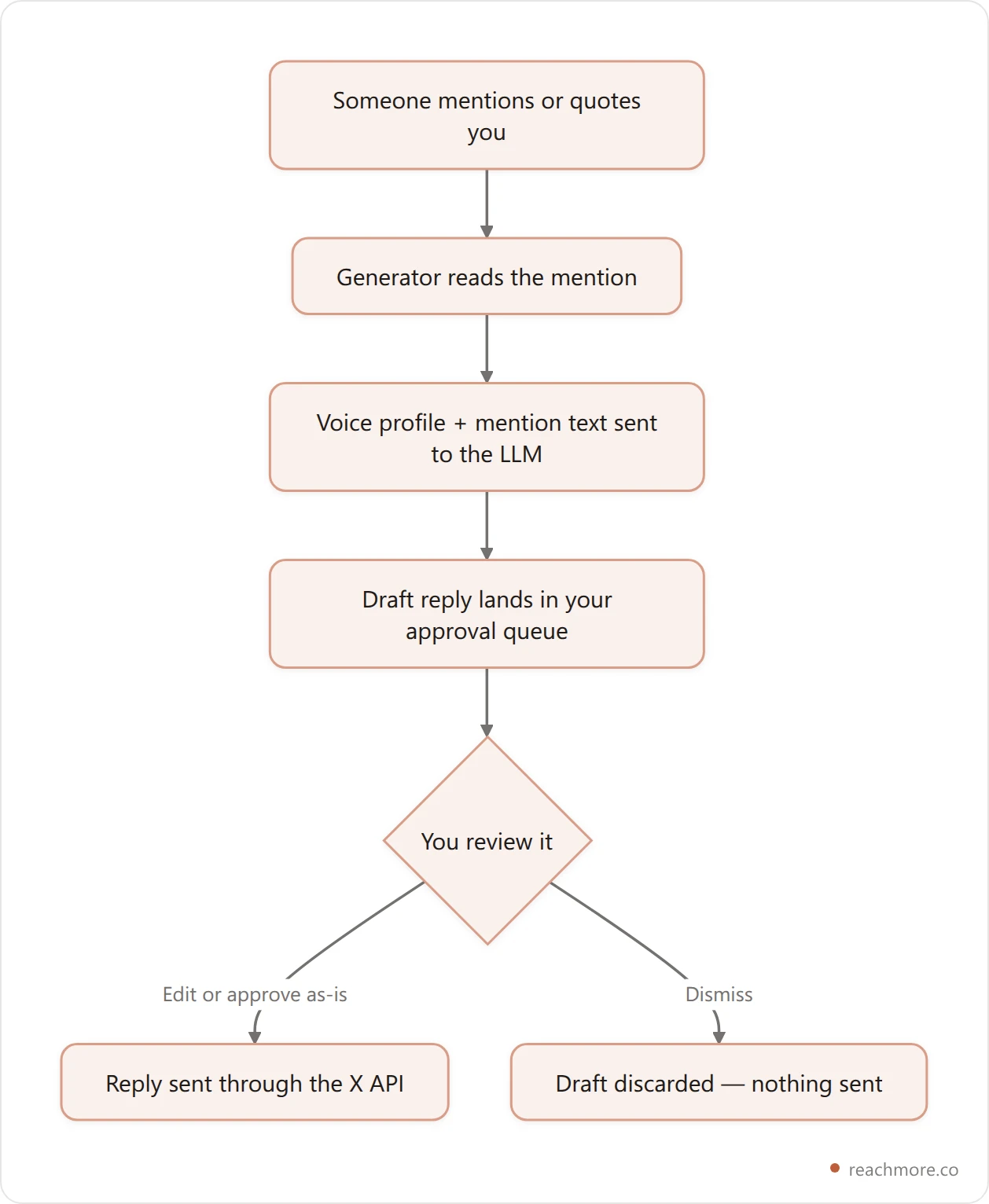
The compliant design draws a hard line in the code, not just the UI: the reply executor only accepts a mention ID it already has a record of polling, so there's no path to "reply to this random tweet I found." Every mention gets read once, a draft gets generated if you've turned that on, and the draft goes nowhere until a human clicks approve. If you want the deeper version of this argument — and the account-safety numbers behind it — see why AI replies on X can get accounts banned.
The Approval Queue: Nothing Sends Without You#
Every draft sits in a queue with the original mention attached — who wrote it, what they said, and the AI's suggested reply — until you approve, edit, or dismiss it. Nothing posts on a timer and nothing posts because a confidence score cleared some threshold. That queue is also where the tool earns its keep on volume: instead of writing 30 replies from scratch, you're skimming 30 drafts and editing the handful that need it, which is a very different amount of work.
Dismissing a draft costs nothing — it's a read-only discard. Sending one is the only step that touches X's write API and your credits, which is exactly where per-action pricing beats a subscription: a slow week costs you almost nothing.
See what a mention reply actually costs, credit by credit
What a Single AI Reply Actually Costs#
One AI reply costs two things: X's API write fee for posting it (the cheaper "summoned reply" tier, since someone mentioned you first) and a fraction-of-a-cent LLM call to draft the text. Modeled on published pay-per-use rates, the platform fee is the overwhelming majority of that cost — not the AI.

That ratio is why pay-per-action pricing makes sense for this category: the AI drafting step is cheap enough to give away, and the real cost driver is the platform write you'd be paying for anyway if you typed the reply yourself.
Reply Generator vs. Prompt Templates vs. Writing It Yourself#
If a full generator feels like overkill, you've got two lighter options, and each trades speed for control differently.
Approach | Speed | Sounds like you | Scales past 10 replies/day | Cost |
|---|---|---|---|---|
AI reply generator | Fastest — draft is waiting for you | High, once a voice profile exists | Yes | Per reply, usually cents |
Copy-paste prompt templates | Medium — you run the prompt yourself | Medium — depends how much you edit | Awkward past a handful | Your LLM subscription |
Writing every reply by hand | Slowest | Highest by default | No — this is the bottleneck | Your time |
Templates are a real middle ground worth knowing well — our full library of 30 copy-paste formulas works even if you never touch an AI tool. And if you're specifically comparing named products rather than the category, our honest comparison of AI reply tools breaks down pricing and features side by side.
6 Things to Check Before You Pick One#
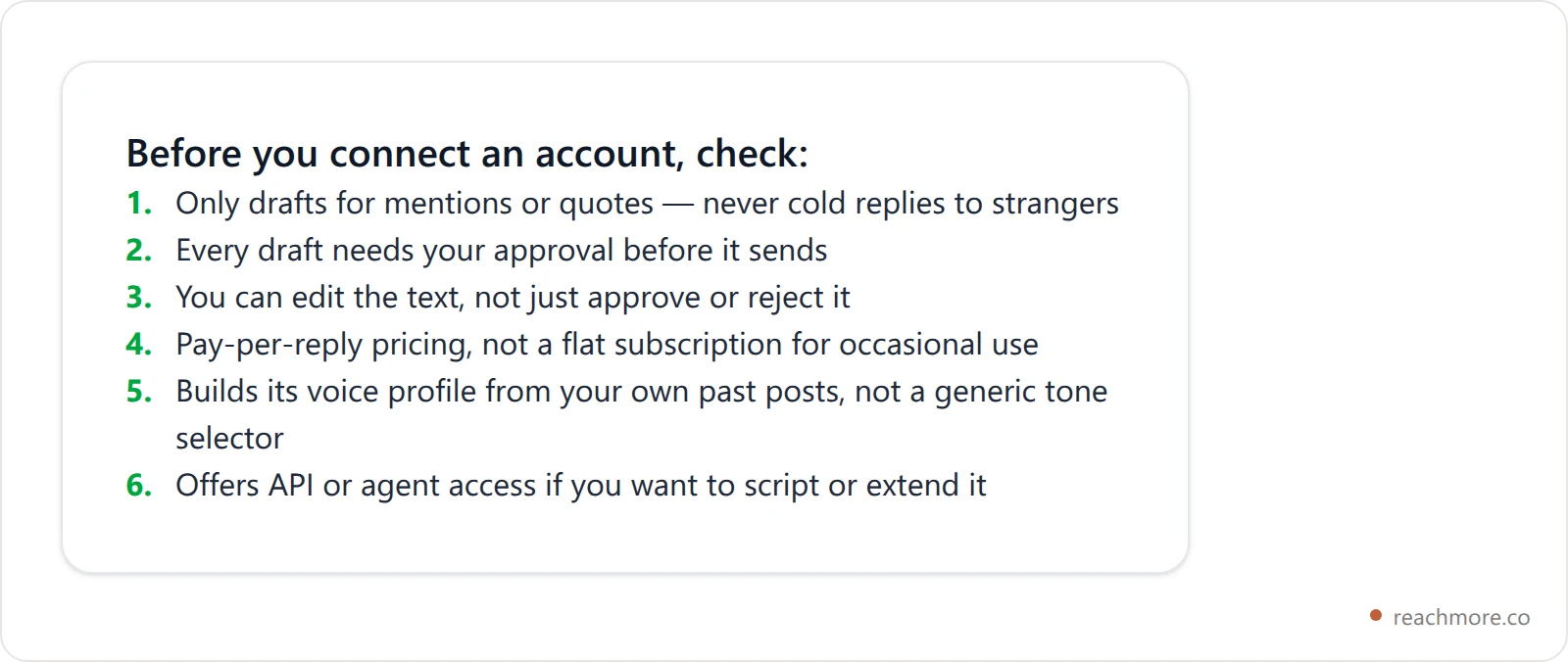
Numbers 1 and 2 are non-negotiable — they're the difference between a tool that keeps your account in good standing and one that gets it suspended. The rest are about fit: if you reply five times a week, a flat subscription is a bad deal no matter how good the drafts are.
Can You Run One From Your Own AI Agent?#
If you already work inside Claude, Cursor, or another MCP-capable agent, the dashboard shouldn't be the only way in. A reply generator built with an MCP server exposes the same actions as tool calls: list the mentions waiting for a reply, read the AI's draft, then approve it — with edits, if you want — or dismiss it. You do all of that from a chat window instead of a web app, with the same per-action credit charges either way. That matters more than it sounds: it means your reply queue can live inside whatever workflow you already run your day from, instead of being one more tab.
Connect your X account and generate an API key
Key Takeaways#
Building ReachMore's own reply-drafting pipeline taught us more about this category than any spec sheet could — here's what actually matters in 2026:
Mention-only triggers are the real safety feature, not a footnote — anything that can reply to strangers is one setting away from spam.
Human approval turns a reply generator from a risk into a time-saver: you're editing drafts, not trusting an autopilot.
Voice profiles built from your own top posts beat generic tone selectors every time.
Per-action pricing fits reply volume better than a subscription — most of the real cost is X's API fee, not the AI.
Agent access (MCP or API) matters if you already work from Claude or Cursor instead of a dashboard.
Frequently Asked Questions#
Is a twitter reply generator different from a general AI chatbot?#
Yes. A chatbot answers whatever you type. A reply generator is wired specifically to X's mention data and your posting history, and the output is constrained to a 280-character reply meant to post back into a real thread — not open-ended conversation.
Will X flag AI-written replies as spam?#
Generic, repeated, or unsolicited replies get flagged regardless of who wrote them. A generator that only responds to genuine mentions, varies its output per conversation, and routes through human approval behaves like a person replying — the AI origin isn't what triggers spam detection.
Can it reply to people who haven't mentioned me?#
On a compliant tool, no — that path doesn't exist in the product, not just in the settings. Cold replies to strangers are the behavior most likely to get an account restricted, so it's worth confirming this before you connect anything.
Do I have to pay a monthly subscription to use one?#
Not with pay-per-action pricing. You load a wallet once and each drafted-and-sent reply deducts a small credit amount — a quiet week costs close to nothing, and there's no plan to "waste" if you don't hit some reply quota.
Can I edit a draft before it sends?#
Yes, on any tool built around an approval queue. The draft is a starting point, not a final answer — you can rewrite the whole thing and it still only costs the same one send action.
How does it learn to sound like me instead of generic AI?#
By reading your own past posts — the ones with real engagement — and using them as style examples for the model, plus a short written summary of your tone. The more genuine posts it has to learn from, the less "AI" the output reads.
Stop drafting mention replies from scratch
ReachMore learns your voice from your own posts, drafts a reply only when someone actually mentions you, and never sends anything until you approve it.
Try ReachMore freeWant your AI agent to generate and send these replies itself, without a dashboard? Our Twitter MCP server guide covers the tool surface, the auth model, and what each action costs.