

Search "how to pin a tweet" and you'll get a dozen identical three-step guides. None of them mention the part that actually matters once you run an account seriously: pinning is the one profile action on X that no scheduler, bot, or AI agent can do for you.
To pin a tweet on X, open the post you want to pin, tap the three-dot menu in its top-right corner, and choose "Pin to your profile." It moves to the top of your profile immediately. You get one pinned post at a time — pinning a new one replaces the old. That's the whole mechanic, on web and mobile alike.
The interesting part is what happens after. Pinning is a client-side action with no public API behind it, which means every "auto-pin" feature you've seen advertised is doing something other than what it says. Here's the full picture: the steps, what the pin actually changes, why automation stops at this exact line, and what you can automate right up against it.
In this guide: the three-tap steps · what pinning changes · why no tool can pin for you · what "pin any tweet" tools really do · what you can automate · how often to change it · FAQ
How to Pin a Tweet on X in Three Taps#
The flow is identical on x.com, iOS, and Android. X renamed tweets to posts a while back, so how to pin a post on X and how to pin a tweet are the same question — same menu, same result. The only rule is that the post has to be yours.
Go to the post. Open it from your profile, your timeline, or the post's own page. It must be an account you're logged into — you can't pin from someone else's profile.
Tap the three-dot menu. It sits in the top-right corner of the post itself, not the page. On web it's the same kebab icon.
Choose "Pin to your profile." X asks you to confirm, then the post jumps to the top of your profile with a small "Pinned" label above it.
To unpin a tweet, open that same menu on the pinned post and choose "Unpin from profile." The post returns to its normal chronological place. Nothing is deleted, and the post keeps every like, repost, and reply it already earned.
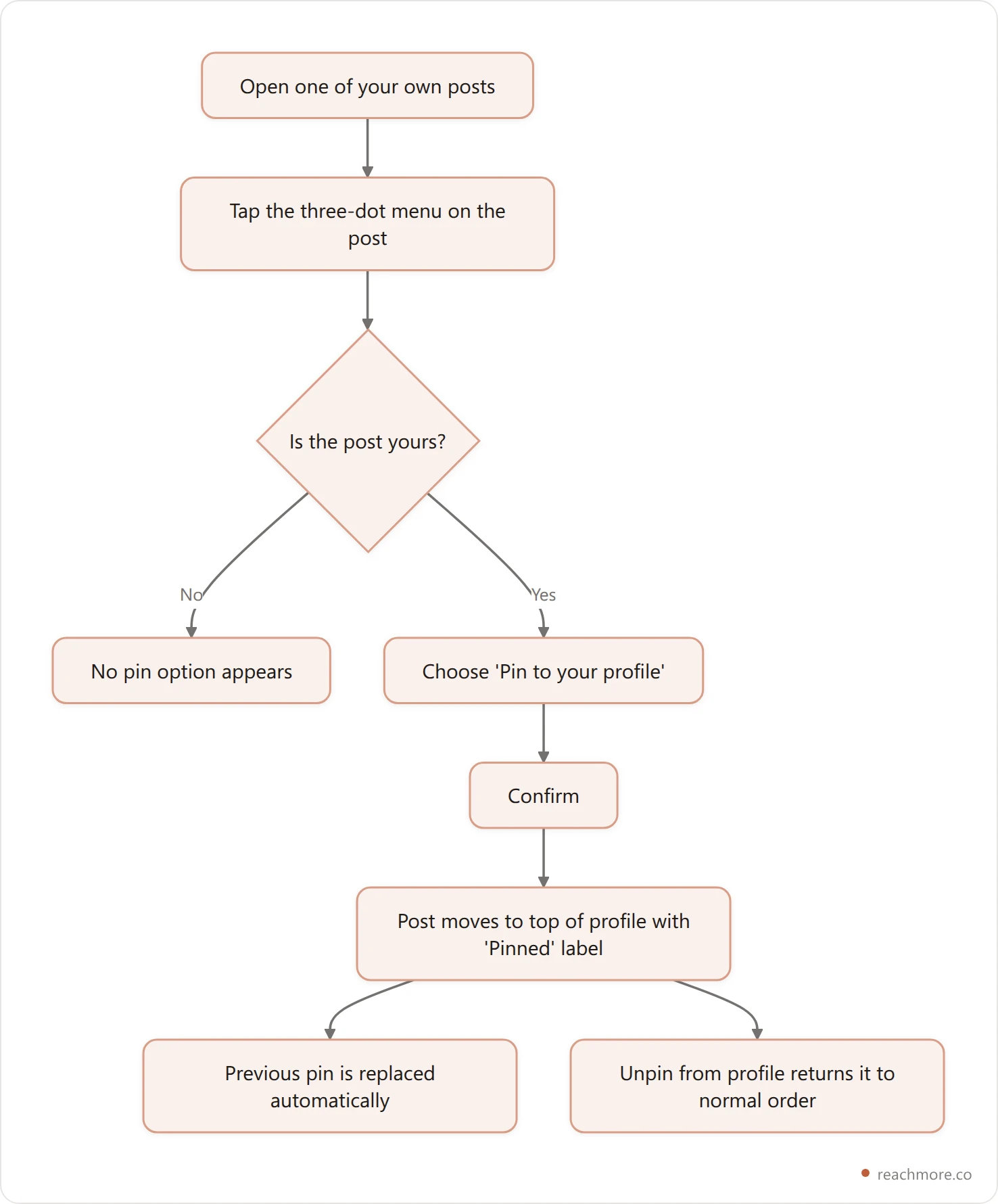
Two limits catch people out. You can pin a reply or a quote post, not just an original — but only your own. And you get exactly one pin per profile, so there's no way to feature two posts at once.
What Actually Changes When You Pin a Post#
Pinning does less than most people assume, and that's worth understanding before you build a strategy on it.
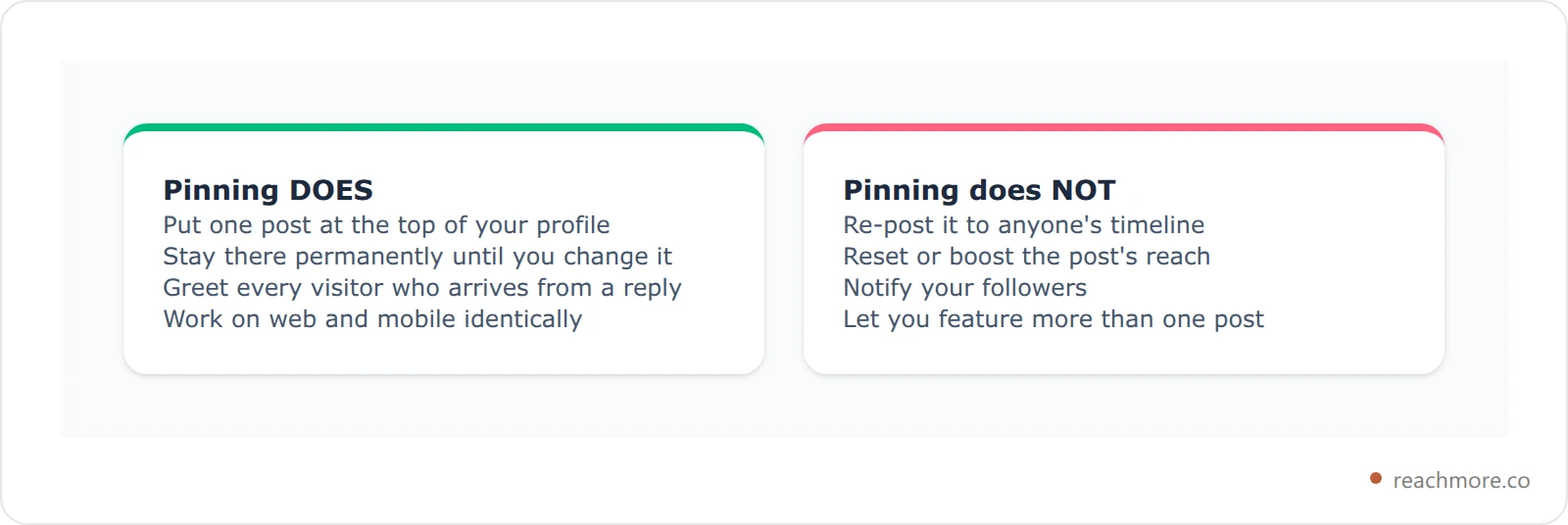
A pinned post is a duplicate placement, not a republish. The post stays exactly where it was in your followers' timelines and in the For You feed, ageing at its normal rate. Pinning doesn't re-inject it, doesn't notify anyone, and doesn't reset its reach. All it does is add a second, permanent copy at the top of your profile page.
That means the pin only works on one specific audience: people who visit your profile. For most accounts under about 50,000 followers, those visitors arrive from replies — someone sees your name on a reply, taps through, and lands on your profile. The pin is what greets them. If you want the full mechanics of that traffic source, Buffer's creator research covers how reply surface area drives profile clicks.
So pinning is a conversion lever, not a distribution lever. It can't get you more visitors. It decides what happens to the ones you already get. If the replies feeding that traffic are the bottleneck, ReachMore drafts them in your own voice and holds each one for your approval.
Why No Tool Can Pin a Tweet for You#
This is the part the other guides skip, and it's the one that saves you money.
X's public API is a fixed menu of endpoints. A tool can only do what there's an endpoint for. To build the scheduling and reply features you see in products like ours, an X integration touches a specific, short list: publish a post, delete a post, read your own posts, read your mentions, read your followers, read and send direct messages, and update your profile fields.
There is no pin endpoint on that list. Pinning lives entirely in X's own apps — it's a client action, the same way muting a word or reordering your bookmarks is. So no scheduler can pin your post when it goes live, no agent can rotate your pin weekly, and no dashboard can pin on a timer. Not because nobody built it, but because there's nothing to call.
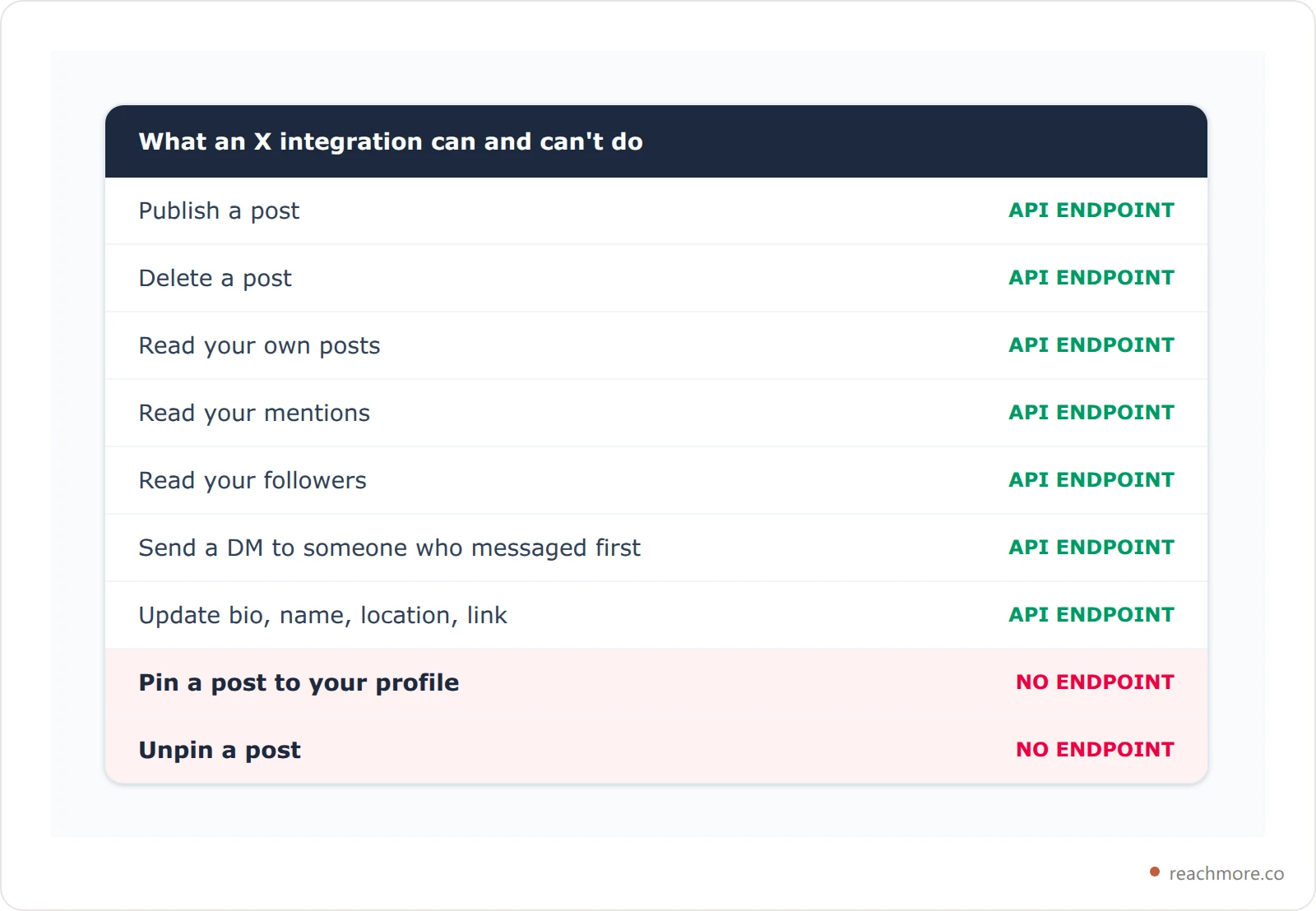
This is the same structural reason X's API can't reply to strangers either — the endpoint simply doesn't exist, so the feature is impossible rather than unshipped. It's a useful test to carry around: when a tool advertises something X's own API doesn't expose, it's either driving a headless browser against your logged-in session or it's not doing what it claims.
Automate the part that actually can be automated
ReachMore drafts posts in your own voice, schedules them for real audience windows, and routes mention replies through an approval queue you clear yourself. No headless browsers, no features X's API can't support.
See how it worksWhat "Pin Any Tweet" Tools Actually Do#
Search results for pinning are full of tools promising to pin someone else's post. X has no such feature, so it's worth knowing what you're actually being offered.
Most of them do one of three things. Some generate a screenshot or embed of another person's post that you then post yourself and pin — you're pinning your own post that contains their content, which is a different thing entirely. Some are bookmark managers that keep a private list, visible only to you and not on your profile. And some drive a headless browser logged in as you, clicking the same menu you would.
That third category is the one to avoid. Handing your session to an automated browser is exactly the pattern X's automation rules are written against, and it puts your account at risk to save you three taps. If you're weighing that trade-off more broadly, we've covered what actually gets accounts flagged in detail.
The honest answer to "can I pin someone else's tweet" is no — and the useful version is to quote-post it with your own commentary, then pin your quote post. That's fully supported, it credits the original, and it puts your framing at the top of your profile instead of someone else's.
What You Can Automate Right Next to the Pin#
Pinning stops at manual, but almost everything around it doesn't. Three things are worth wiring up.
Write and schedule the post you intend to pin. The pin is one tap; getting a genuinely good post written is the actual work. Drafting it, queueing it for a decent time slot, and letting it publish on schedule are all API-supported. Then you pin it once it's live. Our guide to what happens between queue and post covers the timing mechanics if you want your pin to land during a window that's actually awake.
Keep the bio under the pin current. Profile fields — display name, bio, location, and the link — are API-editable, unlike the pin. In ReachMore this runs through a separate profile permission you grant per account, with the bio capped at X's 160 characters. The pin and the bio are read together by every visitor, so updating one without the other is where most profiles go inconsistent.
Watch what the pin is converting. You can read your own posts' performance through the API, so the pin's engagement over time is trackable even though the pin action isn't.
One cost detail matters here more than people expect. X bills posting through the API by action, and posts containing a link are billed at a dramatically higher rate than plain-text posts. In ReachMore's credit pricing, which mirrors X's own tiers, a plain post costs 15 credits and the same post with a URL in it costs 200.

That 13x gap is a real argument for keeping links out of the post you plan to pin. It also lines up with how X's feed treats external links, which get less organic distribution than plain posts. Put the link in your bio — that field is free to change — and keep the pinned post itself clean.
Draft and schedule your next pin with ReachMore
The Workflow That Actually Works#
Because the pin is manual, the sane pattern is to batch it: automate the writing and publishing, then spend ten seconds pinning.
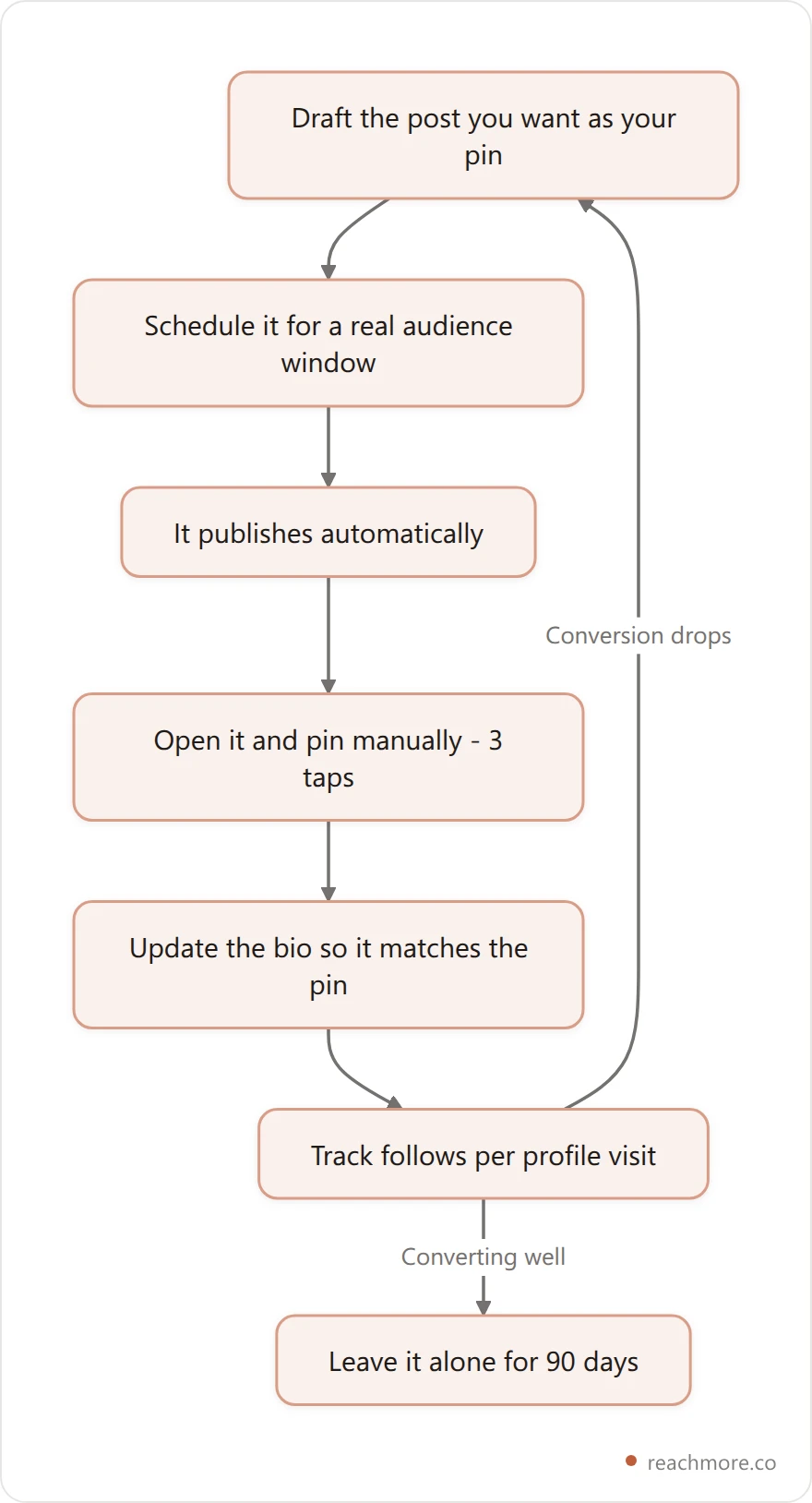
The last step is the one people get wrong in both directions. Some accounts never touch the pin for two years; others swap it weekly and never learn whether any version works.
How Often to Change Your Pinned Post#
Change it when something real changes — not on a schedule. That means new proof that genuinely beats the old proof, a shift in who you're talking to, or a measurable drop in how many visitors follow you.
Otherwise leave it. A pin that converts has been pressure-tested by hundreds of real visitors; a fresh one hasn't. Rotating weekly means you're always running an untested pin, and you never accumulate enough data on any single version to know what worked.
If you're deciding what to put there in the first place, we've collected nine pinned tweet formats and the template behind each — the formats that convert cold profile traffic differ sharply from the ones that work on warm traffic. And because visitors read the bio and the pin as one unit, it's worth pairing that with 25 X bio examples that convert.
For the traffic side of the equation — actually getting people to your profile so the pin has something to convert — see how to get more profile visits on X.
Frequently Asked Questions#
Can you pin more than one tweet on X?#
No. X allows exactly one pinned post per profile. Pinning a new post automatically unpins the current one — there's no confirmation step warning you, and no way to feature two posts side by side. If you need to surface several things at once, the common workaround is to pin a thread whose first post links onward, or to use your bio link for the second destination.
Can you pin someone else's tweet to your profile?#
No. The pin option only appears on posts from the account you're logged into. Tools advertising this are either screenshotting the post, saving it to a private list, or automating a browser session on your behalf. The supported approach is to quote-post the original with your own commentary and pin your quote post, which credits the author and puts your framing on your profile.
Does pinning a tweet boost its reach?#
No. Pinning is a duplicate placement on your profile, not a republish. The original post stays where it was in timelines and the For You feed and continues ageing normally. Nobody is notified. The only extra views a pin earns are from people who visit your profile directly, which is why it's a conversion tool rather than a distribution one.
Why can't schedulers or bots pin a post automatically?#
Because X's public API has no pin endpoint. Tools can publish, delete, read posts, read mentions, read followers, handle DMs, and edit profile fields — pinning isn't among them. It's a client-side action inside X's own apps. Any product claiming automatic pinning is driving a logged-in browser session, which carries real account risk for a task that takes three taps.
Can you pin a reply or a quote post?#
Yes. Any post you authored can be pinned, including replies and quote posts. Quote posts are especially useful because they're the supported way to feature someone else's content on your profile — you pin your quote, not their original. Replies work too, though most accounts pin originals because they read more cleanly as a profile headline.
Should my pinned post contain a link?#
Usually not. X's feed gives posts with external links less organic distribution, and if you publish through the API, a post containing a URL is billed at a much higher rate — 200 credits versus 15 in ReachMore's pricing. Since your bio link is free to change and sits directly above the pin, put the destination there and keep the pinned post itself link-free.
Key Takeaways: The Short Version#
Pinning a tweet takes three taps: three-dot menu, "Pin to your profile," confirm. One pin per account, your own posts only, and unpinning is the same menu in reverse.
What's worth remembering past that is the boundary. Everything approaching the pin — writing the post, scheduling it, keeping the bio beneath it accurate, tracking whether it converts — is automatable. The pin itself isn't, and won't be until X ships an endpoint for it. Any tool telling you otherwise is either doing something different or doing something risky.
So build the workflow around that line instead of fighting it. Automate the writing and the timing, then keep ten seconds a month for the tap that no API can make.


