

A great reply gets you the profile click. A great pinned tweet decides whether that click turns into a follower — or a bounce. The nine pinned tweet examples in this guide are the ones that reliably do the second job.
Most accounts treat the pinned tweet as a vanity slot. They pin their best-performing tweet from six months ago and forget it. That tweet got engagement because it hit the timeline at the right moment, not because it converts cold visitors. Those are two different jobs.
Your pinned tweet has one job: turn a 4-second profile visit into a follow. Visitors who land on your profile have already decided they're mildly interested. The pinned tweet is the headline of your entire account — the one piece of content that answers "what's in it for me if I follow this person?" within three seconds. Get this wrong and the bio, header, and timeline do nothing.
This guide breaks down the X pinned tweet strategy for 2026: what the format does at the funnel level, 9 pinned tweet examples that convert, a 7-step audit you can run on your current pin in under five minutes, and the reply-to-pin loop that compounds growth without forcing you to post original content every day.
What a Pinned Tweet Actually Does on X in 2026#
A pinned tweet is a single post you anchor to the top of your X profile so it stays above your most recent tweet, regardless of when you posted it. Visitors see it first — before your bio scrolls into view on mobile, before any timeline content, before they decide whether to follow.
In 2026, that position matters more than ever. Industry trackers like eMarketer still count X's audience in the hundreds of millions, but the average profile visit lasts seconds. Most visitors arrive from one of three places: a reply that caught their eye, a quote tweet, or a search result.
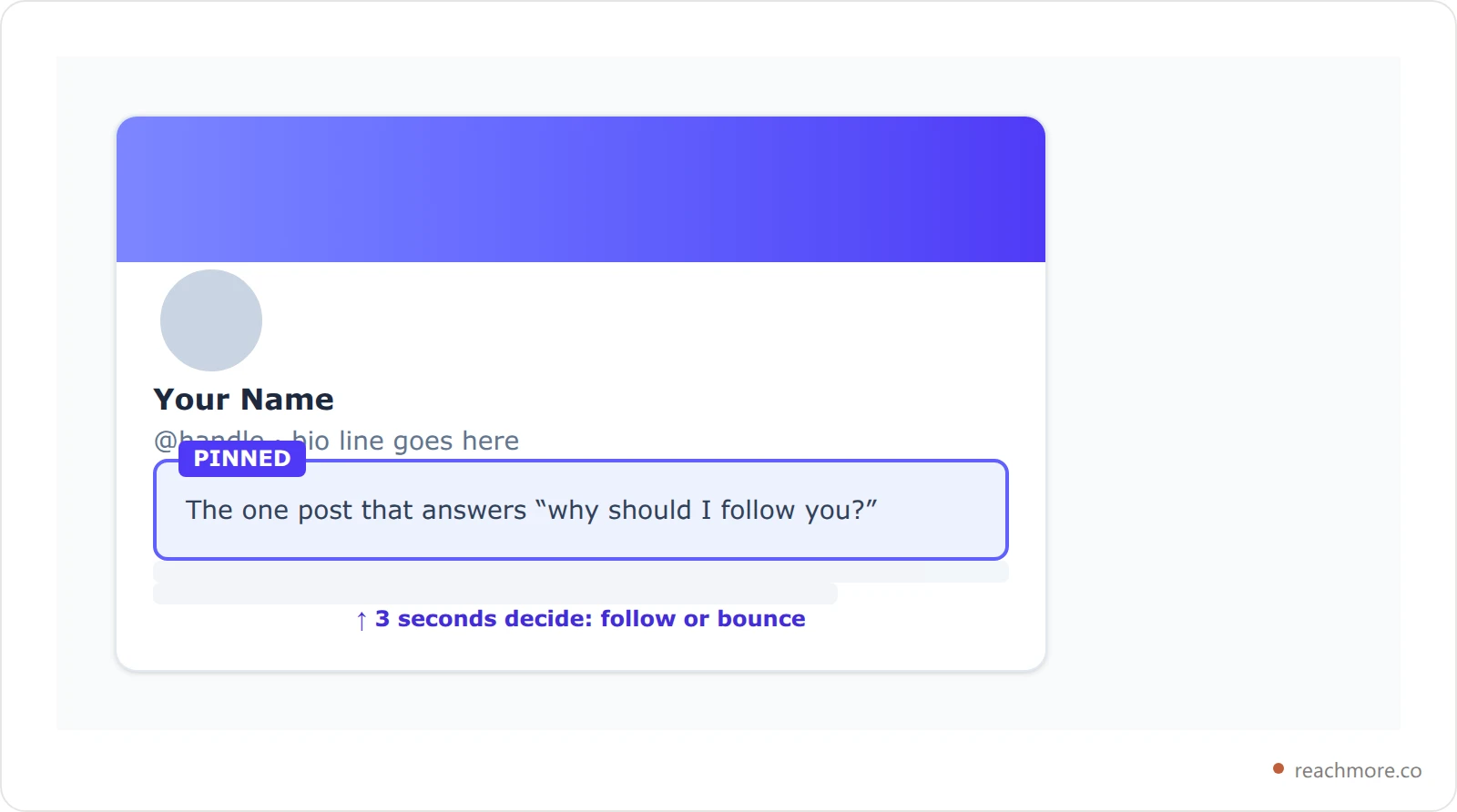
That arrival pattern has shifted since the For You feed took over. For small accounts, replies are one of the most common ways strangers find a profile at all — a pattern creator-marketing publishers like Buffer write about often. Posting frequency matters less than getting surfaced. When replies surface your profile to thousands of new strangers per week, the pinned tweet has to do the conversion work alone.
The 3-Second Pin Test: The Heart of Any X Pinned Tweet Strategy#
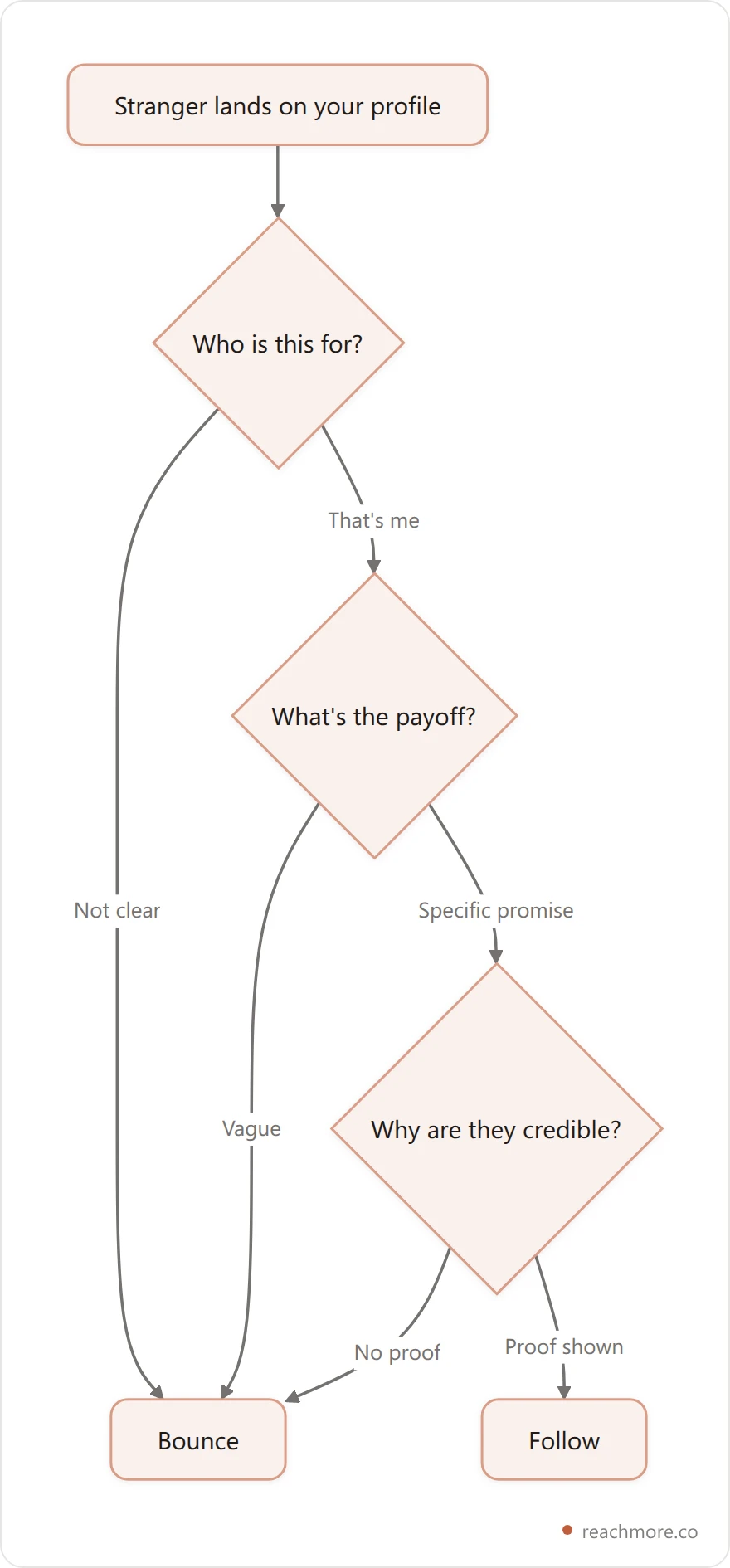
Here's the framework: every pinned tweet has to pass the 3-Second Pin Test. A stranger lands on your profile, reads the pinned tweet for three seconds, and either knows exactly who you are and what you offer — or doesn't. There is no middle ground.
The 3-Second Pin Test asks three questions:
Who is this for? A visitor should identify themselves as the target audience in the first line.
What's the payoff for following? A specific, concrete promise — not "I share thoughts on building".
Why is this person credible? Proof, results, or a clear voice. Something only this account would say.
Most pinned tweets fail because they were written for a different audience: their existing followers. A tweet that resonates with people who already know you doesn't convert strangers. Inside-joke pins, "I just hit 5k followers" celebration pins, and pure quote-card pins all flunk the test because none of them answer "what's in it for me?"
A useful mental model, common among one-person-business creators like Justin Welsh: treat the profile as your homepage and the pinned tweet as its hero section. The best pin is rarely your most-viral tweet — it's the one that filters for the exact audience you want.
9 Pinned Tweet Examples That Convert in 2026#
These nine formats each answer the 3-Second Pin Test in a different way, which is why they tend to beat a random "best tweet" pin. Match the format to your goal — growth, lead capture, authority, or community.
1. The Origin Story Hook#
A two-paragraph story that opens with the "before" state and ends with the "after". Works because humans pattern-match to narratives in less than a second. Best for indie hackers and creators building in public.
Example structure: "3 years ago I quit a job I hated to build SaaS solo. I had $4k saved and zero audience. Today, [product] pays my rent. Here's what I post about: solo founder workflows, AI tools that actually save time, and replies that drive 90% of my growth. Follow if that helps."
2. The Free Asset Magnet#
A genuinely useful resource — a Notion template, a Figma file, a checklist — gated by a comment or DM. Converts profile visits into both follows and email subscribers. Pin to lock the asset in.
The mechanic: "Reply 'send' and I'll DM you the [asset]." This produces visible reply counts on the pin, which acts as social proof to the next visitor.
3. The Receipts Case Study#
A single tweet that shows a concrete before/after with screenshots. Numbers do the persuasion. Best for service providers, agencies, and tool creators.
Example structure: "My client went from 12k impressions/month to 480k in 90 days on X. We didn't post more — we replied more. Here's the exact workflow: [link]." The screenshot of the analytics dashboard is the conversion engine.
4. The Niche Manifesto#
A confident, almost contrarian statement of belief. Filters hard. Repels the wrong audience, magnetizes the right one.
Example: "Most 'X growth' advice is written by people with 8k followers and zero revenue. I've built three accounts past 30k using one tactic: replying with intent. Everything else is noise. Follow for the unvarnished version."
5. The Mini-Thread Anchor#
Pin a thread, not just a tweet. X displays the entire thread when a visitor clicks the pin, which dramatically increases time-on-profile. Threads pinned for evergreen content (a guide, framework, or lesson series) earn passive followers indefinitely.
Best when the thread is genuinely a flagship piece — your single best 8-tweet explainer of the thing you're known for.
6. The Resource Index#
A pinned tweet that links to a curated list of your best work — a blog post, a Notion page, or a roundup tweet. Works well for writers and educators because it lets visitors self-select what they want.
Example: "Everything I've written about getting your first 100 customers on X, indexed and updated monthly: [link]. New here? Start with #1."
7. The Customer Testimonial Stack (Showcasing User Stories)#
Three to five short customer quotes condensed into a single tweet or image. Highest-converting format for SaaS founders. Real names + real screenshots beat any claim you can make about yourself.
Rotate testimonials quarterly so returning visitors see fresh proof. Make sure faces and account handles are visible — pixelated mystery testimonials hurt trust.
8. The "Currently Building" Update#
A live status snapshot — what you're working on this month, the metric you're tracking, the next milestone. Updates monthly. Build-in-public audiences reward this format with consistent engagement.
Example: "Currently: shipping [feature] v2. Goal: [number] paid users by [month]. This week's win: [one metric you're proud of]. Following along? Subscribe."
9. The Reply-Driven Lead Magnet#
Pin a tweet that explicitly invites replies, then turn the reply into a DM conversation. Converts the highest percentage of profile visitors into qualified leads.
Example: "I review one founder's X profile every Friday — for free. Reply with your handle and the one metric you want to grow. I'll pick five." This format combines social proof (visible replies) with a clear CTA and a time-bound scarcity hook.
Pinned Tweet Format vs Goal: Follows, Leads, or Brand Awareness#
Pick the format that matches your actual conversion goal, not the one that feels most ambitious. Choosing a pinned tweet for brand awareness is a different call than choosing one for lead capture, and the table sorts that out.
Format | Primary Goal | Best For | Conversion Strength | Update Cadence |
|---|---|---|---|---|
Origin Story Hook | Follow | Indie hackers, creators | High for cold traffic | Quarterly |
Free Asset Magnet | Email + Follow | Educators, agencies | Highest for list building | When asset improves |
Receipts Case Study | Trust | Service providers, SaaS | High for warm traffic | Monthly |
Niche Manifesto | Filter audience | Opinionated creators | Polarizing, sticky | Rarely (6+ months) |
Mini-Thread Anchor | Time-on-profile | Long-form writers | Strong evergreen | When better thread exists |
Resource Index | Authority | Writers, educators | Compounding | Monthly |
Customer Testimonial Stack | Trust + Follow | SaaS, agencies | Highest for B2B | Quarterly |
"Currently Building" | Community | Builders, founders | Strong for build-in-public | Monthly |
Reply-Driven Lead Magnet | Inbound leads | Coaches, consultants | Highest for DM pipeline | Weekly |

Two patterns to notice. The highest-converting formats for cold strangers (origin story, free asset, testimonial stack) all use proof — narrative proof, asset proof, or social proof. The highest-converting formats for warm traffic (case study, mini-thread, currently building) all use depth. If your replies are bringing in mostly strangers, lean cold. If you're sending people from a podcast or newsletter, lean warm.
Pinned Tweets for Brands: Announcements, Milestones, and User Stories#
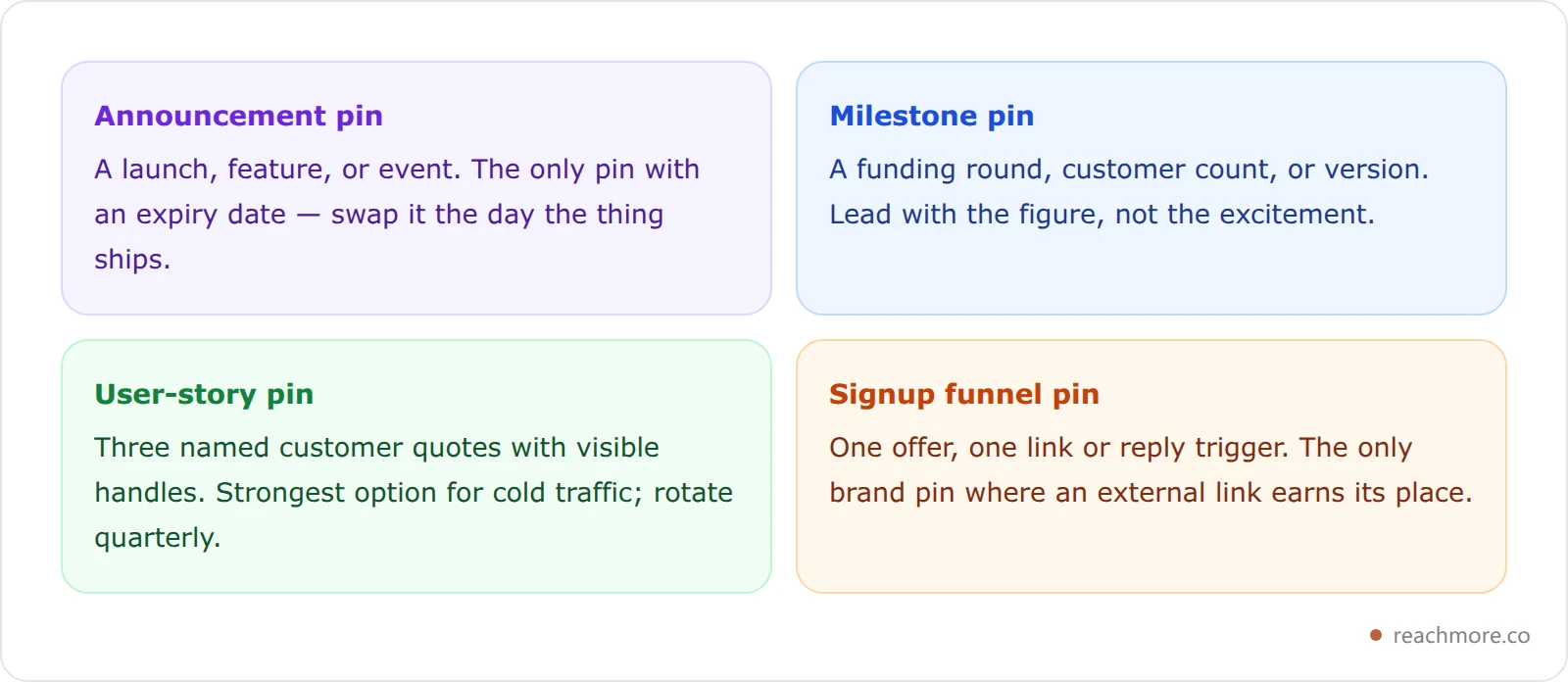
Company accounts use the pin differently from creators, and mixing the jobs is why most pinned tweets for business accounts underperform. A creator's pin answers "why follow me?" A brand's pin is usually doing one of four narrower jobs — and it should only ever do one at a time.
Announcement pins carry a launch, a feature, or an event. The trap is leaving one up past the event: a pin announcing a webinar that happened in March is worse than no pin at all, because it tells every visitor the account is unattended. Announcement pins are the one format with a real expiry date, so set the reminder to swap it the day the thing ships.
Milestone pins mark a number worth marking — a funding round, a customer count, a version. They read as credibility on a cold visit, but only with the specific figure in the first line. "We just crossed 10,000 teams" earns a follow; "big news!" does not.
User-story pins — the testimonial stack from format 7 above — are the strongest brand option for cold traffic, because a stranger discounts everything you say about yourself and discounts nothing a named customer says. Showcasing user stories in a pinned tweet works best as three short quotes with real handles and visible faces, rotated quarterly so returning visitors meet new proof.
Signup funnel pins treat the pin as the top of a funnel: one offer, one link or one reply trigger, and nothing else competing for the click. This is the only brand pin where an external link clearly belongs, because the link is the conversion.
The cadence differs from a creator's, too. Creators should leave a working pin alone for months. Brands ship things, so the announcement slot turns over — which means keeping a default pin (user stories, or a milestone) ready to restore the moment a launch window closes, rather than leaving a stale announcement up because nothing replaced it.
The Pinned Tweet Template (Copy This)#
Every format above collapses into the same four-line skeleton. Fill it in and you have a pinned post that works whether your goal is follows, brand awareness, or signups.
LINE 1 — AUDIENCE:  "[Specific person] who [specific situation]"
LINE 2 — PROOF:     "[Concrete number or result], [timeframe]"
LINE 3 — PAYOFF:    "I post about [topic 1], [topic 2], [topic 3]"
LINE 4 — ONE CTA:   "Follow for [X]" OR "Reply [word] and I'll send it"
A worked example for a SaaS founder:
Solo founders shipping B2B SaaS: I took one client from 12k to 480k monthly impressions in 90 days without posting more — just replying with intent. I write about reply workflows, AI tools that save real time, and what actually converts profile visits. Follow for the unvarnished version.
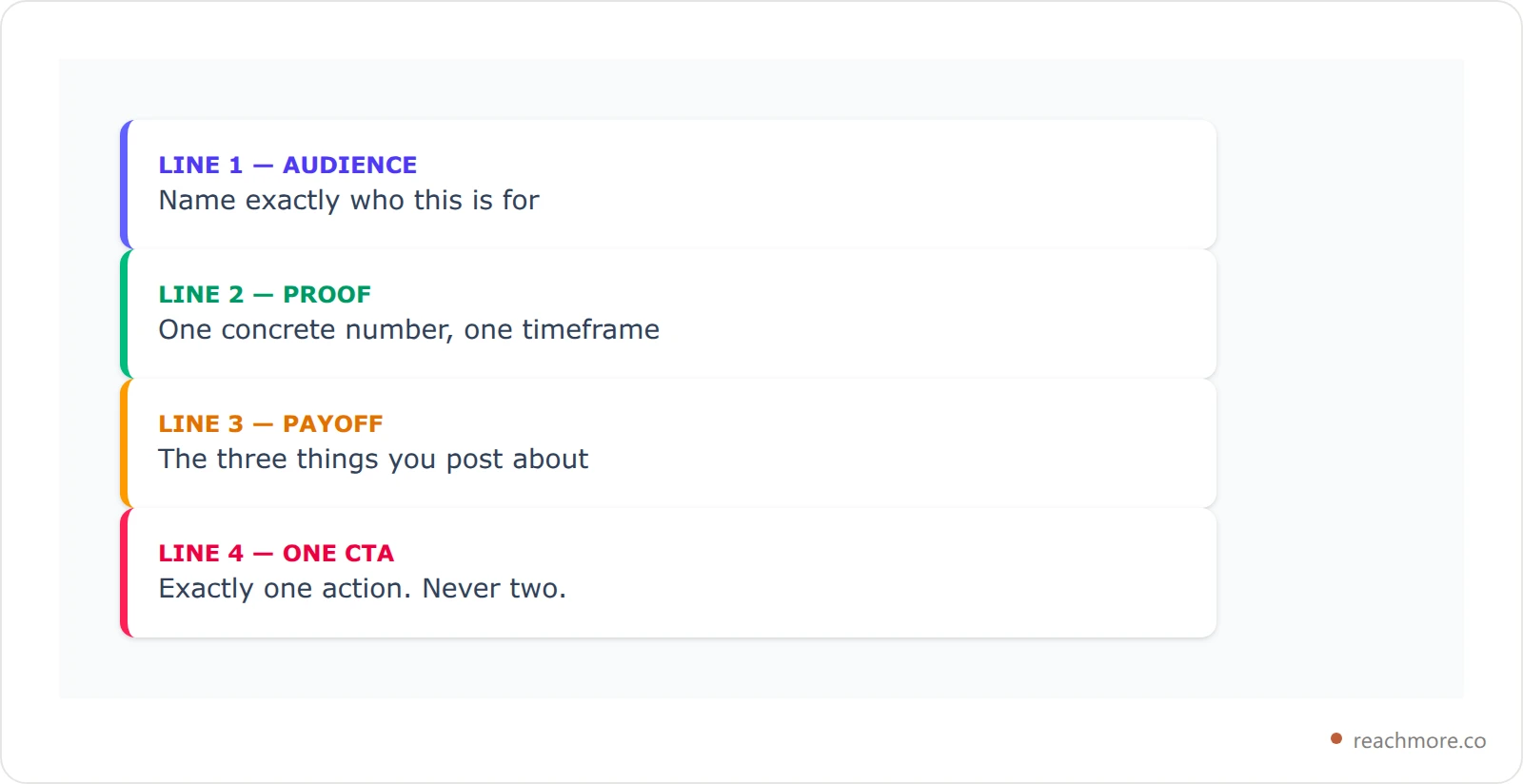
Four lines, one audience, one number, one CTA. If your pin can't be reduced to this skeleton, it's doing more than one job — and a pin that does two jobs does neither. Draft yours in your own voice with ReachMore.
The 7-Step Pinned Tweet Audit (Copy This Checklist)#
Save this. Run it on your current pin in under five minutes.
Specificity check. Does the first sentence name a specific audience or problem? "Solo founders building B2B SaaS" beats "entrepreneurs". Cut general language.
Numbers check. Is there at least one concrete number? Revenue, follower count, time saved, conversion rate — anything quantitative. Specific numbers are a staple of conversion advice from social teams like Hootsuite's for a reason: they're the fastest proof a stranger can read.
Proof check. Is there a screenshot, a name-dropped customer, a public metric, or a link to receipts? Claims without proof read as marketing.
CTA check. Is there one clear action — follow, reply, click, subscribe? A pin with two CTAs converts worse than a pin with one. Pick.
Recency check. Has the pin been updated in the last 90 days? Stale pins ("just hit 1k followers!" from 2024) destroy credibility. Update the proof or change the format.
Media check. Does it include an image, video, or screenshot? X's business guidance consistently pushes visuals, and a pinned post gets seen for months, so any lift from media compounds.
Mobile check. Open your profile on a phone. Does the pin display fully without truncation? Anything that requires "show more" loses the cold visitor.
Score yourself out of 7. Anything under 5 means rewrite, not edit. If drafting the rewrite in your own voice is the bottleneck, ReachMore drafts from your existing posts.
How to Pin a Tweet on X (Web and Mobile, 2026 UI)#
The mechanic is fast. On any of your own tweets, tap the three-dot menu in the top right corner of the post and select "Pin to your profile". On web, the option lives under the same kebab menu. X allows one pinned tweet at a time per profile, so pinning a new tweet automatically unpins the old one. If the mechanic is all you came for, the step-by-step guide to pinning a tweet on X walks the web and mobile flows in full — including why no third-party tool can pin one for you.
A pinned tweet still counts as a regular tweet in your timeline — it just gets duplicated at the top of your profile. Quote tweets and replies can be pinned too, though most accounts pin original posts because they read cleaner as a "hero" piece.
How to Leverage Pinned Tweets: The Reply-to-Pin Loop#
Here's the loop most accounts miss. Your pinned tweet does conversion. Your replies do distribution. They're a system, not separate tactics.
Every reply you send is a billboard that links back to your profile. When a reply lands well, X surfaces your name and avatar to that tweet's audience. Some of them click through, adding to your overall profile impressions on X. The pinned tweet is the first thing they see. If the pin matches the angle of the reply that drew them in, conversion rate jumps. If the pin contradicts the reply's vibe, they bounce.
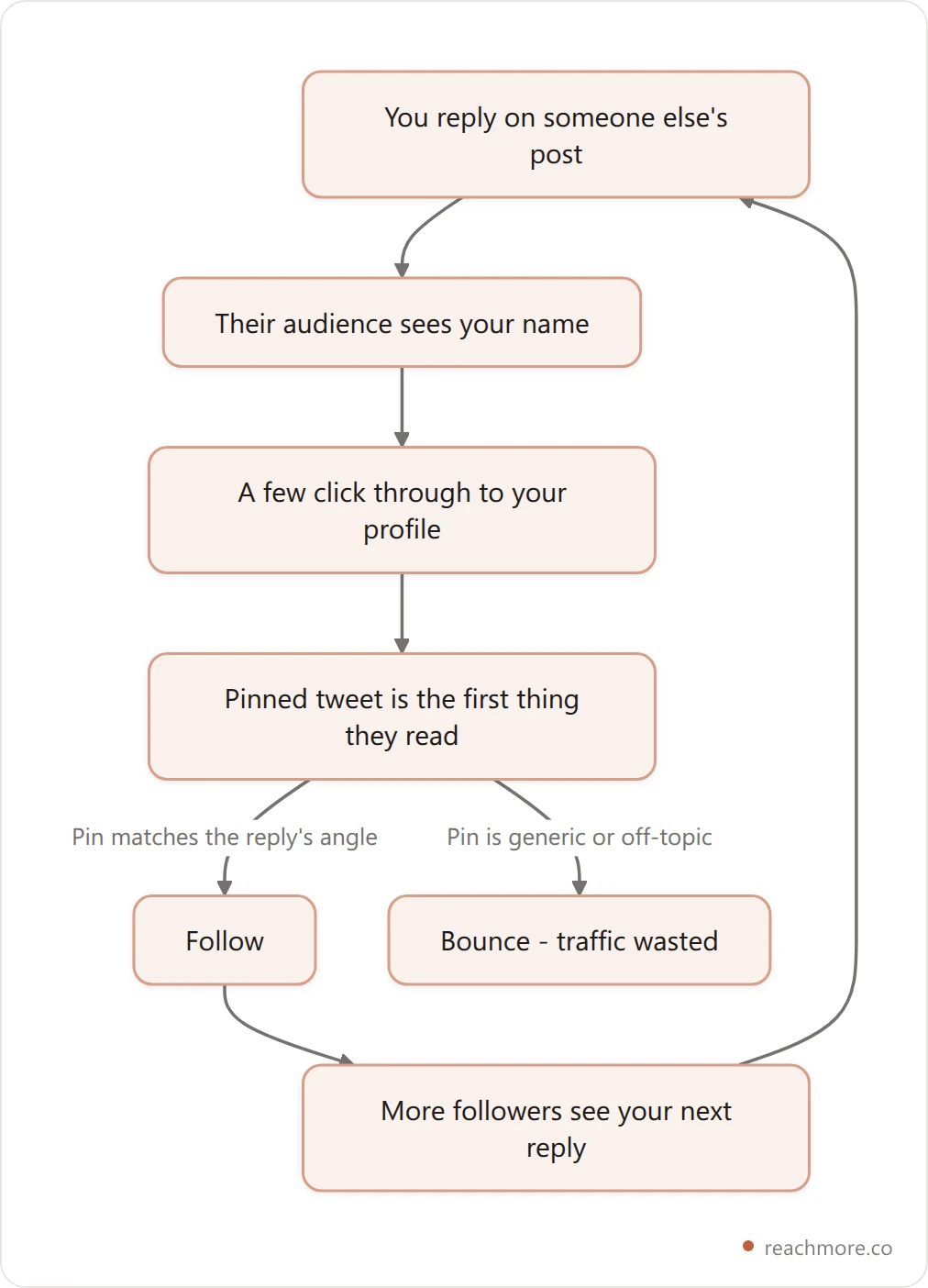
An illustrative scenario (hypothetical numbers, to show the math): a founder replies daily to threads from B2B SaaS founders, but their pin is a generic "Building [product]. Follow for updates." Say 1.4% of profile visitors follow. They swap the pin to a Receipts Case Study that matches the reply workflow people just saw in action. If that lifts the rate to 6.8%, the same traffic now produces nearly five times the follows. You can measure your own before-and-after the same way — see the FAQ below.

The pin didn't get more traffic. It just stopped wasting the traffic the replies were already producing.
This is where ReachMore plugs in. It builds a voice profile from your own posts and drafts in that voice, and it routes replies to your mentions through an approval queue you clear yourself. It deliberately won't reply to strangers on your behalf — that volume stays your call — but it removes the blank-page time around each one. Once replies are producing steady profile clicks, your pinned tweet's conversion rate becomes the math that matters most. If you want the broader context, here's the underlying reply formula that converts profile visits to followers on its own.
6 Pinned Tweet Mistakes That Quietly Kill Conversion#
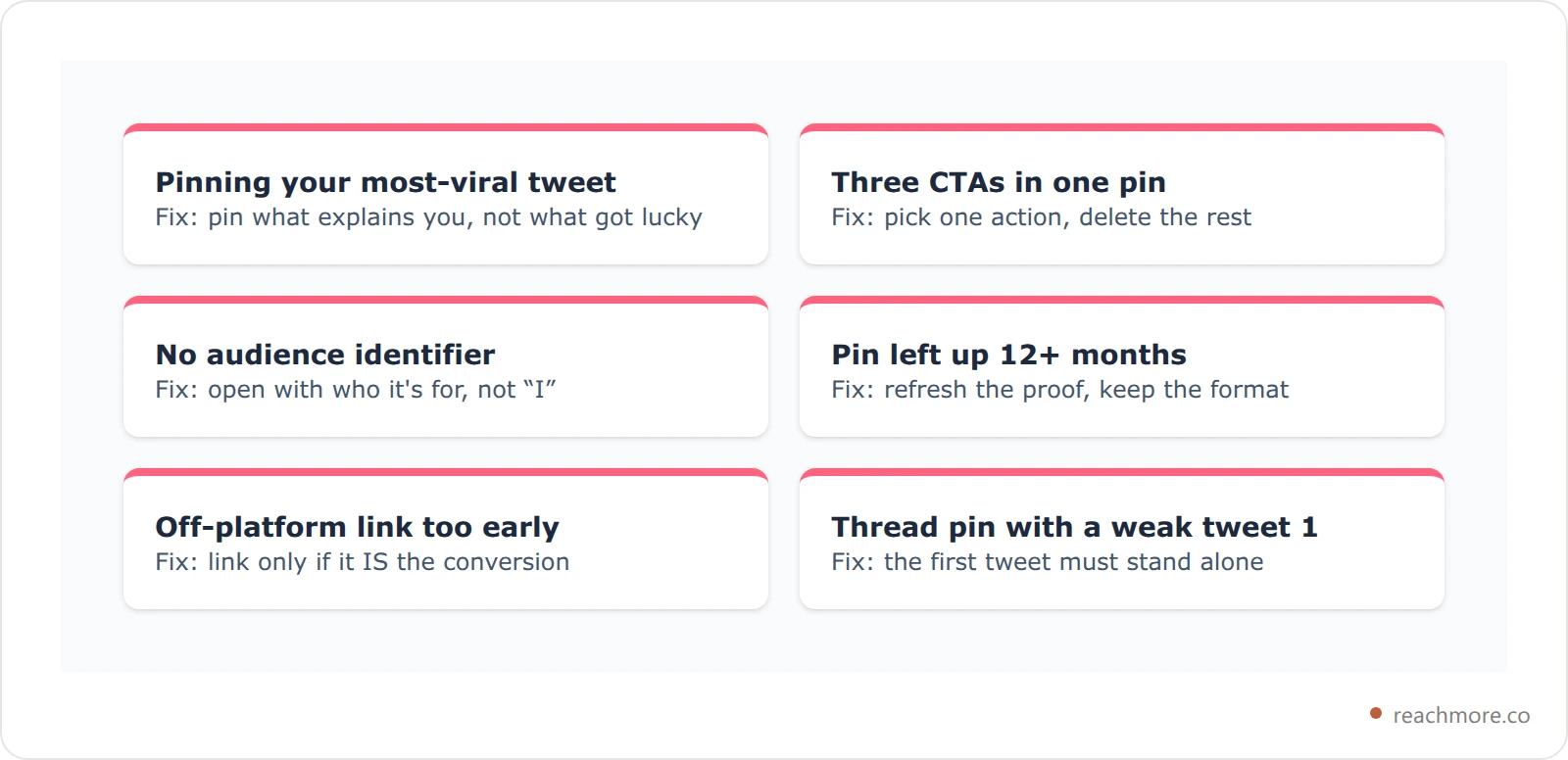
Each of these fails the 3-Second Pin Test in a predictable way.
Pinning your most-viral tweet by default. Virality is timeline-driven; conversion is profile-driven. They're different jobs. A tweet that hit 2M impressions because it was relatable doesn't necessarily explain what you do.
Three different CTAs in one pin. "Follow me, subscribe to my newsletter, and check out my course." The visitor does none. Pick one action.
No specific audience identifier. Pins that start with "I" instead of naming who the content is for. The strongest first words are the audience: "Solo founders…", "Ghostwriters scaling client work…", "Designers shipping side projects…"
Leaving the pin for 12+ months. The default decay rate. X surfaces newer accounts more aggressively, and a stale pin signals an inactive profile to the algorithm and the human eye.
Pinning a tweet that links off-platform too early. Posts with external links tend to get less distribution in X's For You feed, a pattern covered in our guide to posting links on X. For a pin, use an external link only if it's the conversion mechanic (lead magnet, course, free tool).
Using a thread pin when the first tweet doesn't stand alone. If a visitor reads only the first tweet of a pinned thread and bounces, the thread might as well not exist. The first tweet has to work solo.
The blunt framing that helps most: your pinned tweet answers exactly one question — why follow you instead of the hundreds of millions of other accounts on X? If it can't answer that inside three seconds, nothing else on the profile gets a turn.
The Contrarian Take: Stop Updating Your Pin Every Week#
Conventional X-growth advice says rotate your pinned tweet often to keep it fresh. The logic of conversion says the opposite. A pin that converts strangers has earned its place; swapping it for a slightly newer version usually drops conversion because the new pin hasn't been pressure-tested.
The right cadence: update only when one of three things happens. You have new proof that materially beats the old proof (a bigger result, a better testimonial, a more relevant case study). Your audience has changed (you shifted niches or product). Or the pin has been live for 90+ days and conversion is measurably dropping based on follower-growth-per-impression.
Otherwise, leave it. The pin should be the most permanent piece of content on your profile, not the most rotated.
Pair this with your profile optimization checklist for 2026 — the pin sits inside the broader hierarchy of header image, name, handle, bio, then pin. Each layer has to make the next layer's job easier.
How Your Pinned Tweet Connects to Bio, Header, and First Five Tweets#
A pinned tweet doesn't operate alone. The visitor reads in a Z-pattern: header image (peripheral), name and bio (top), pinned tweet (anchor), then a glance at the most recent three to five tweets. Inconsistency between these layers breaks trust faster than any single weak piece.
Practical check: read your bio out loud, then read your pin out loud, then read your latest three tweets. Do they sound like the same person, talking about the same things, to the same audience? If a stranger would be confused about who you are after that 30-second read, the problem isn't usually the pin alone — it's the seams between the layers.
If the bio promises "AI-powered growth tips for solo founders" and the pin shows your dog, the visitor leaves. If the pin promises a SaaS case study and the latest tweets are all political takes, the visitor leaves. Stack the layers so each one reinforces the next — that consistency is the foundation of a personal brand on X that actually grows. For more on dialing in the bio specifically, see these 25 X bio examples that actually convert.
Frequently Asked Questions#
How often should I change my pinned tweet on X?#
Update only when you have materially better proof, a shifted audience, or the pin has been live 90+ days with measurably declining conversion. Weekly rotations usually hurt — fresh pins haven't been pressure-tested, and conversion rate drops while you "test" something the old pin already did well. A strong pin can stay live for 6 to 12 months if it keeps performing.
Can you pin a thread on X, or only a single tweet?#
You can pin any of your own posts — a single tweet, a quote tweet, or the first tweet of a thread. When you pin a thread, X displays the thread's first tweet at the top of your profile, and clicking it expands the full chain. Threads work well for evergreen explainer content but only if the first tweet stands alone — most visitors won't click through if the hook doesn't land.
Does a pinned tweet still get impressions in the timeline?#
Yes. Pinning a tweet doesn't remove it from your followers' timelines or from the For You feed. It's a duplicate placement, not a replacement. The pin lives at the top of your profile permanently while the original tweet still ages normally. That means a great pinned tweet can keep generating timeline impressions for months as people re-engage.
What's the best length for a pinned tweet in 2026?#
Two to four short paragraphs that fit on a mobile screen without truncation tends to perform best. Pins that require the "show more" tap ask a cold visitor for one more action, and many won't take it. If you need depth, pin a thread instead — the visitor opts in by clicking. For a one-tweet pin, write tight: hook, payoff, proof, CTA. That's the structure that converts.
Should my pinned tweet include a link?#
Only if the link is the conversion mechanic — a free asset, a course, a lead magnet, or a flagship blog post. X's algorithm gives external-link tweets reduced organic distribution, but that matters less for a pinned tweet since most of its views come from profile visits, not the feed. If you don't need an external link, skip it: simpler pins convert higher on cold traffic.
How do I know if my pinned tweet is actually converting?#
Track follower growth against profile-visit count weekly. X Analytics shows profile visits in the engagement breakdown. Divide new followers by profile visits to get your conversion rate. Anything above 5% is strong, 2 to 5% is normal, and under 2% means the pin is the most likely culprit — assuming your replies are bringing in qualified traffic.
Can a pinned tweet hurt my X account?#
Yes, if it's polarizing in a way that contradicts your stated niche, links to a broken page, or features stale proof from years ago. Pins that promote off-platform content too aggressively can also reduce profile dwell time. The fix is rarely "no pin" — empty profiles convert worse than mediocre pins — it's a better pin that matches your current audience and proof.
Should I pin a tweet about my product if I'm trying to grow?#
Only if you have proof that turns the product tweet into a case study. A pin that just says "I built X, check it out" reads as marketing and gets ignored. A pin that says "I built X — here's how the first 100 customers used it, and what they paid" converts both followers and leads. Always lead with the audience's outcome, not the product's features.
Key Takeaways: Make Every Profile Visit Count#
Three takeaways to act on this week. First, every pin has to pass the 3-Second Pin Test — who is this for, what's the payoff, why are you credible. If it doesn't, rewrite. Second, the highest-converting formats use proof: an origin story with a specific number, a case study screenshot, a testimonial stack with real names. Pick the format that matches your goal, then run the 7-step audit before you publish. Third, your pinned tweet is the conversion engine for the traffic your replies are already producing — pinning a great tweet is only half the system.
The lift in the illustrative example above isn't magic. It's what happens when distribution (replies) and conversion (the pin) finally point in the same direction.
Want to turn every reply into reach? Start with ReachMore →