

Every AI Chrome extension for social media works the same way underneath: it reads the page you're looking at and injects a suggestion next to it. That single design choice explains everything these tools are brilliant at — and everything they simply cannot do.
An AI Chrome extension for social media is a browser overlay that reads the post on your screen and drafts a response beside it. It's fast, contextual, and needs no setup. It also can't schedule, can't run while your browser is closed, and can't act through a platform's official API — which is where the limits, permissions, and audit trail live.
Understanding that split is the whole buying decision. Here's what browser extensions genuinely do better, what needs a different kind of tool, and how to tell a safe one from an account-suspension risk.
What AI Chrome Extension Social Media Tools Actually Do#
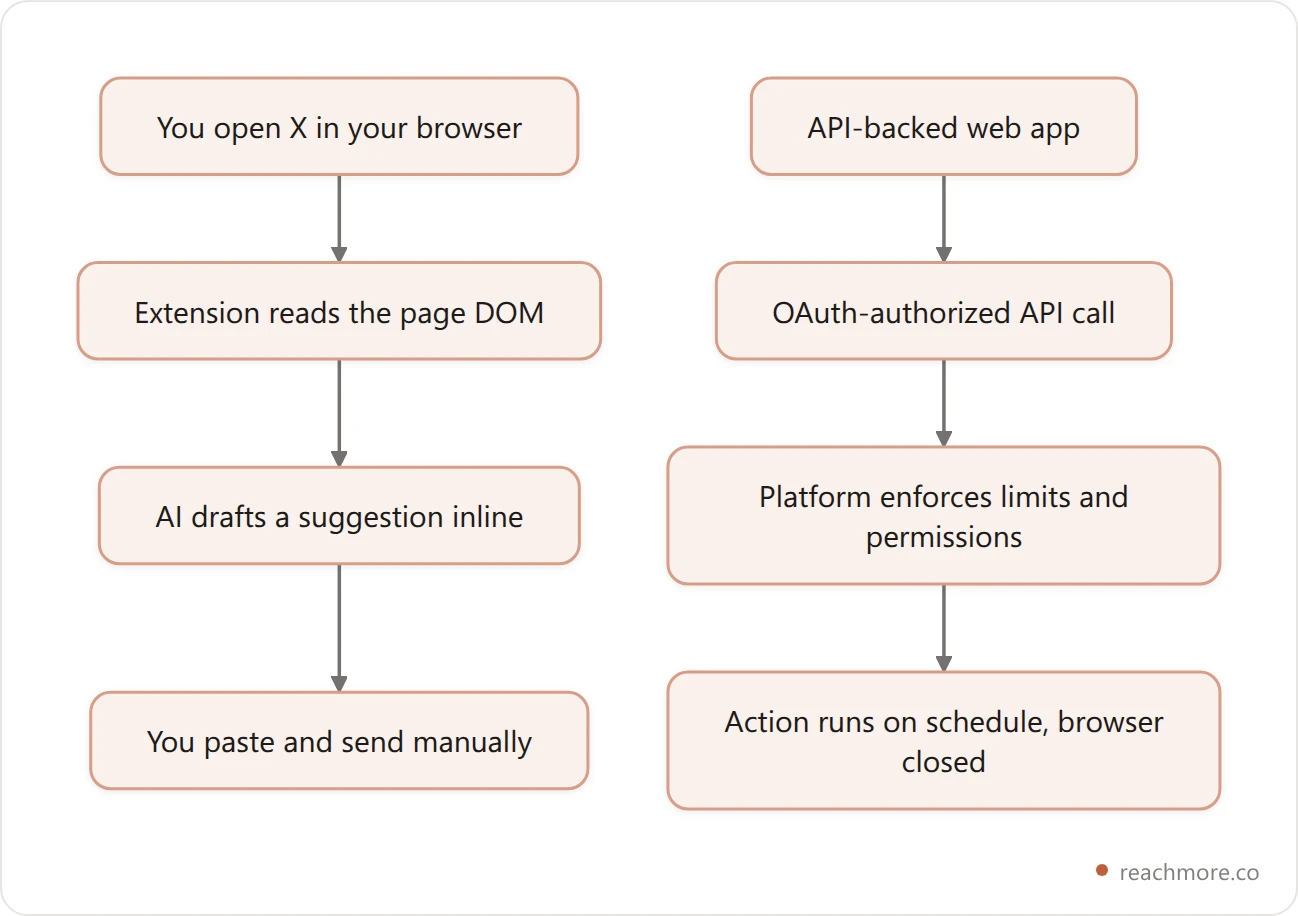
Extensions operate at the browser level. They detect when you're on a social platform, read the DOM of the page, and overlay features onto the interface you're already using.
That yields four common capabilities:
Reply drafting. The extension reads the post in front of you and generates responses tailored to that conversation.
Draft critique. It evaluates your composed text before you send and suggests edits.
Inline analytics. It surfaces engagement numbers next to posts without a separate dashboard.
Timing hints. It annotates the composer with a suggested posting hour.
Among AI social media tools, the appeal here is real: zero setup, no API keys, no OAuth screen. You install it and it's there. For the specific job of "help me write this one reply better, right now," nothing beats an overlay.
The Ceiling Every Browser Extension Hits#
An extension can only act while a human has the page open. That's not a product gap somebody forgot to fill — it's the architecture.
So four things are structurally out of reach:
Scheduling. Nothing fires at 9 a.m. if your laptop is shut. Real scheduling needs a server holding a queue, which is a different kind of product entirely — we broke down what happens between queue and post if you want the mechanics.
Event-driven automation. An extension can't wake up because someone mentioned you. That requires a poller running server-side against the platform's API.
Enforced rate limits. Platform APIs meter every call and return a clear error when you're over. A DOM-driven tool has no meter — which is exactly why aggressive extensions get accounts suspended.
An audit trail. API actions are attributable to an authorized app. Browser-driven actions look like you, typing very fast, at 3 a.m.
That last one matters more than most buyers realize. When a platform investigates unusual activity, "an authorized app made this call within its rate limit" and "this account produced 400 replies in an hour with no app attached" lead to very different outcomes.
Where ReachMore Actually Sits#
This is worth stating plainly, because this article has previously described it wrongly: ReachMore is a web app, not a Chrome extension. There's nothing to install. You connect your X account over OAuth and everything runs server-side against X's official API.
That's a deliberate choice, and it costs us the one thing extensions are best at — the inline overlay while you browse. In exchange it buys the four things above:
A composer and scheduler that publishes whether or not your browser is open.
A workflow builder where a schedule, a webhook, or an X event triggers a chain of steps.
An inbound-only DM autoresponder that answers people who messaged you first, with a STOP opt-out.
A mention-reply approval queue where AI drafts the reply and a human presses send.
A native MCP server exposing the same actions as tools to an AI assistant.
Pricing works differently too. There's no subscription and no monthly tier — it's a credit wallet you top up once, credits never expire, and you're charged only when an action succeeds. Reading one of your own posts costs 1 credit, an AI draft 2, a reply to a mention 10, publishing a post 15. Scheduling itself is free until the post actually goes out.
For the full inventory of what's buildable on the API, see the 9 Twitter automation workflows X's API actually allows.
Browser Extension vs Web App: What Each Is Better At#
Neither shape wins outright. They're good at different halves of the job.
Job | Browser extension | API-backed web app |
|---|---|---|
Draft a reply to the post on screen | Excellent | Good (via approval queue) |
Publish at 9 a.m. tomorrow | Impossible | Yes |
React to a mention within 5 minutes | Impossible | Yes |
Work with the browser closed | No | Yes |
Setup required | None | OAuth connection |
Rate limits enforced by the platform | No | Yes |
Survives a platform crackdown | Depends entirely on behavior | Yes, if it stays in-policy |
The honest read: if your entire workflow is "I browse X for 30 minutes and want better replies while I'm there," an extension is the right tool and you don't need anything server-side. If you want anything to happen while you're not looking, you need an API-backed app. Plenty of people use both.
The Compliance Line That Decides Everything#
Any tool — extension or otherwise — that drives behavior the platform prohibits is a liability regardless of how good its AI is.
X's automation rules prohibit bulk, aggressive, and unsolicited activity. In practice, three specific features are the tell:
Replies to strangers. X's API permits summoned replies — someone mentioned or quoted you. There is no endpoint for replying to an account that never addressed you. A tool offering keyword-triggered replies to strangers isn't using the API.
Follow/unfollow loops. The classic churn tactic, and one of the oldest suspension triggers there is.
Cold DMs. DM automation that opens conversations with people who never messaged you is unsolicited by definition.
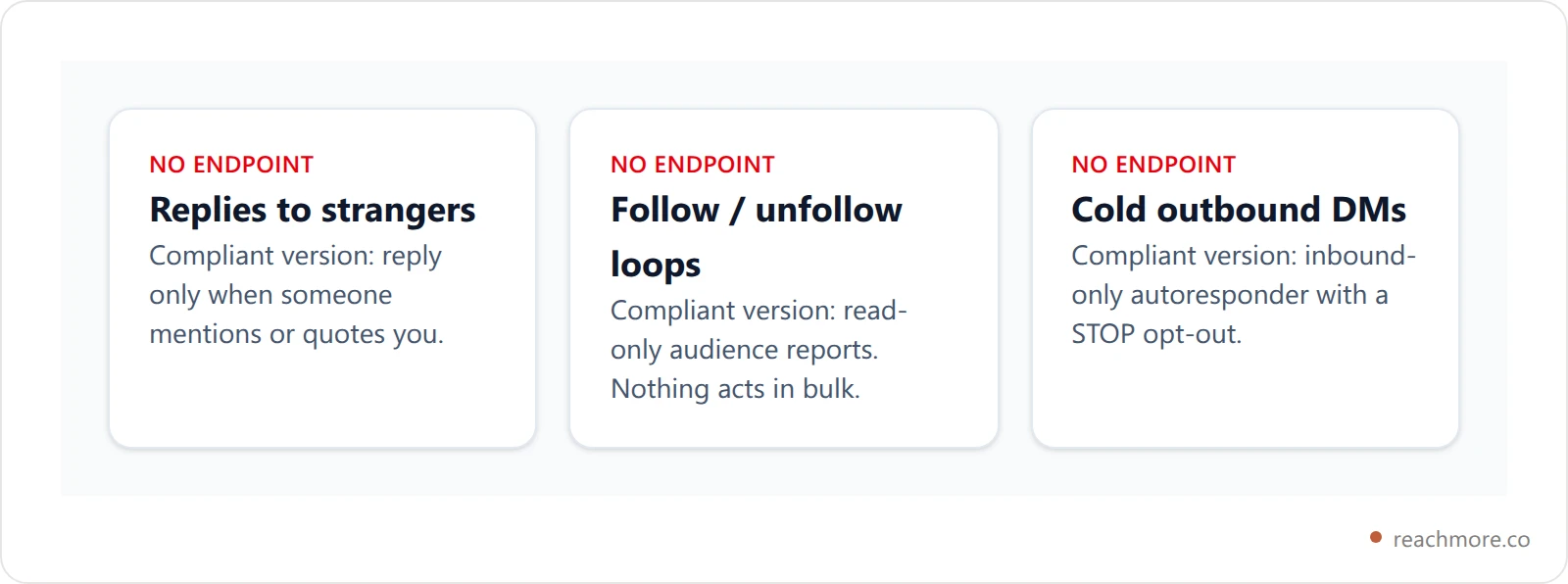
If a tool advertises any of the three, it is driving a browser session against the platform's terms. That's the question worth asking a vendor: which endpoint does this feature call? Teams who built on the official API answer instantly.
Our comparison of X automation tools applies that test vendor by vendor, and whether AI replies can get you banned covers the risk side in more depth.
How to Evaluate an AI Chrome Extension#
Four things separate a useful extension from a gimmick:
Contextual generation, not templates. Template tools pick from a library of canned responses. Contextual tools read the actual post and generate something specific to it. The difference is obvious to your audience within one reply.
Voice adaptation. A tool whose output still sounds generic after a month of use isn't learning anything. Making AI replies sound human covers what to look for.
Narrow, honest permissions. An extension that requests access to every site you visit, when it only operates on one platform, deserves scrutiny. Check what it reads and where that data goes.
No prohibited features. Per the section above — if it offers bulk actions, walk away regardless of how good the writing is.
Connect your X account and see what runs server-side
Choosing Between Them#
A simple decision path:
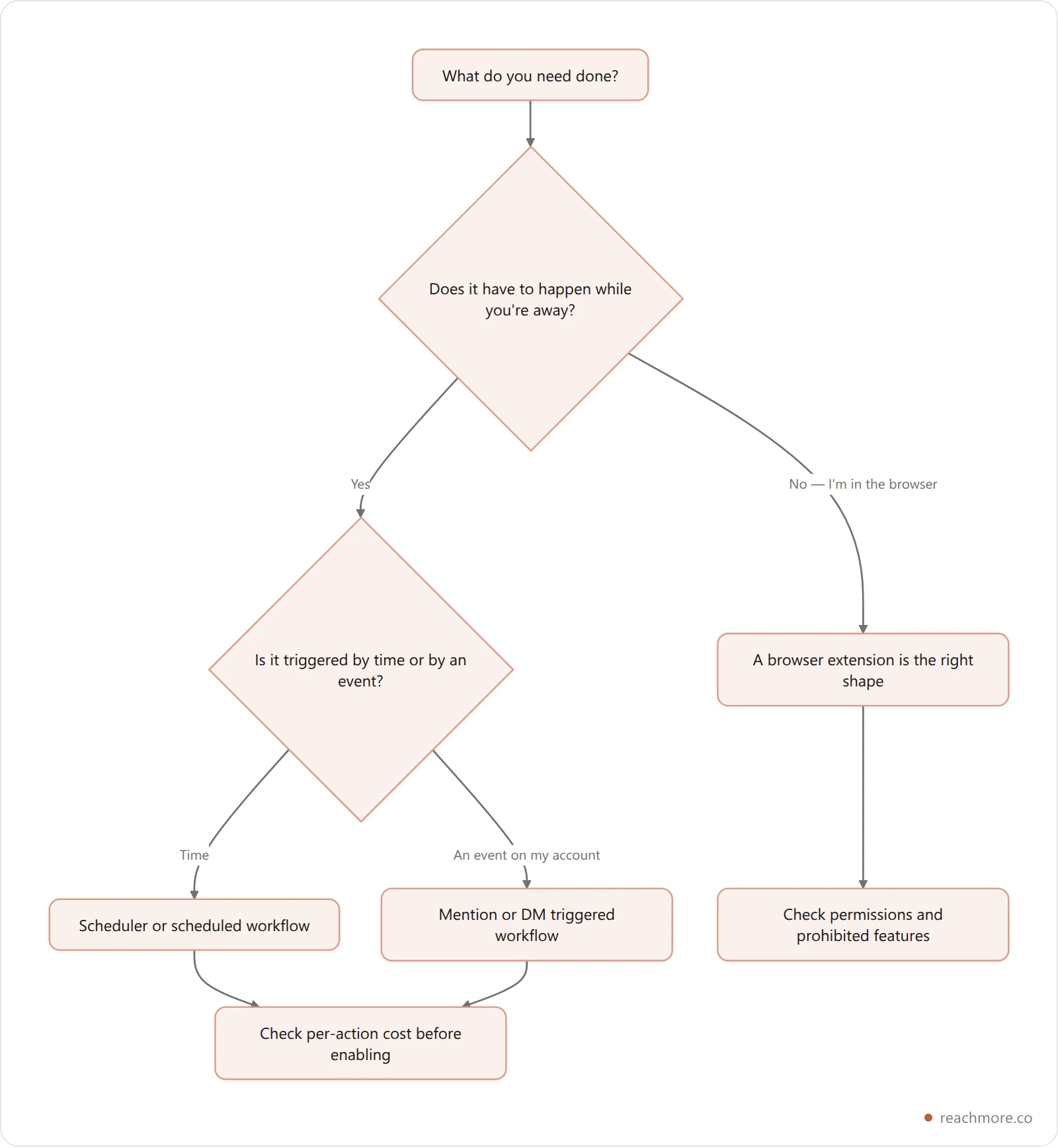
Most people over-index on AI quality and under-index on shape. Both run comparable social media engagement AI under the hood; what differs is when they're able to act. Pick for the job first, then evaluate the writing.
If you're mapping a broader stack, what a Twitter growth tool can actually automate grades vendors by the same endpoint test, and our browser extensions for X roundup covers the extension side of the category specifically.
Key Takeaways#
An AI Chrome extension for social media reads the page you're on. That's its strength and its hard ceiling.
Scheduling, event-driven replies, enforced rate limits, and an audit trail all require server-side API access. No extension can provide them.
ReachMore is a web app, not an extension — OAuth-connected, running against X's official API, priced as a credit wallet with no subscription.
Any tool offering stranger replies, follow loops, or cold DMs is not using the official API, because those endpoints don't exist.
Ask vendors which endpoint a feature calls. It's the fastest way to separate the compliant tools from the risky ones.
See what runs when your browser is closed
Composer, scheduler, workflow builder, and an approval queue for mention replies — all on X's official API. Credits top up once and never expire, and you're only charged when an action succeeds.
Try ReachMoreFrequently Asked Questions#
Is ReachMore a Chrome extension?#
No. ReachMore is a web app you connect to your X account over OAuth — there's nothing to install in your browser. Everything runs server-side against X's official API, which is what makes scheduling, mention-triggered workflows, and the DM autoresponder possible in the first place.
Are AI Chrome extensions for social media safe to use?#
The architecture is safe; specific behavior may not be. An extension that drafts replies for you to send manually is fine. One that performs bulk actions — mass follows, automated replies to strangers, DM blasts — is driving your browser against platform rules and puts your account at risk.
Can a Chrome extension schedule posts for me?#
Not on its own. Scheduling requires something running while your browser is closed, which means a server holding a queue and calling the platform's API at the right moment. Extensions that appear to schedule are either bundling a hosted backend or only queueing posts for when you next open the tab.
What can an extension do that a web app can't?#
Read the exact page you're looking at, in real time, and inject a suggestion right next to it. That inline context is genuinely hard to replicate in a separate tab, and it's why plenty of people run an extension alongside an API-backed tool rather than choosing one.
How do I check whether a tool uses the official API?#
Ask which endpoint a given feature calls. Tools built on the API can name it. Tools that can't — particularly for features like replying to strangers or bulk following, where no endpoint exists — are automating a browser session, whatever the marketing says.