

The short answer: AI reply prompts for X work when each one it carries four things the model can't guess: what the tweet really means, the angle you're taking, how you write, and one fact only you have. Leave out that last one and the model invents it, which is where most X reply prompts go wrong. That's the failure most prompt lists never mention, and it's why every prompt below has a {your fact} slot instead of "add a specific number."
What's different about this list:
40 prompts, sorted by goal, each built on one four-part framework (C.A.V.E.) you can reuse.
Every prompt forces you to supply the facts. A prompt that says "share a result from your journey" gets you a confident, made-up result.
A look inside a production reply pipeline. How ReachMore assembles the voice half of a draft, read from its source, so you can copy the structure by hand.
Why a reply is worth writing well#
X published its ranking code in 2023, and the heavy ranker's README lists the weight each predicted action gets in a tweet's score. A like is worth 0.5. A reply is worth 13.5. A reply that the original author then engages with is worth 75, which is 150 times a like. Those are the published weights in X's open-sourced ranker. X says the weights can change at any time, so read them as the shape of the incentive, not today's exact numbers.

Two things follow for prompting. First, the target is a reply the author wants to answer, which rules out agreement and flattery. Second, look at the bottom of that chart: "show less often", mutes and blocks cost -74, and a report costs -369. A generic AI reply doesn't just fail to earn reach. If it annoys people, it can cost you. A sharp prompt is how you stay on the right side of that chart.
The C.A.V.E. framework: four parts the model can't guess#
Every prompt in this guide has the same four layers. Once you see them, you can write your own for any tweet.
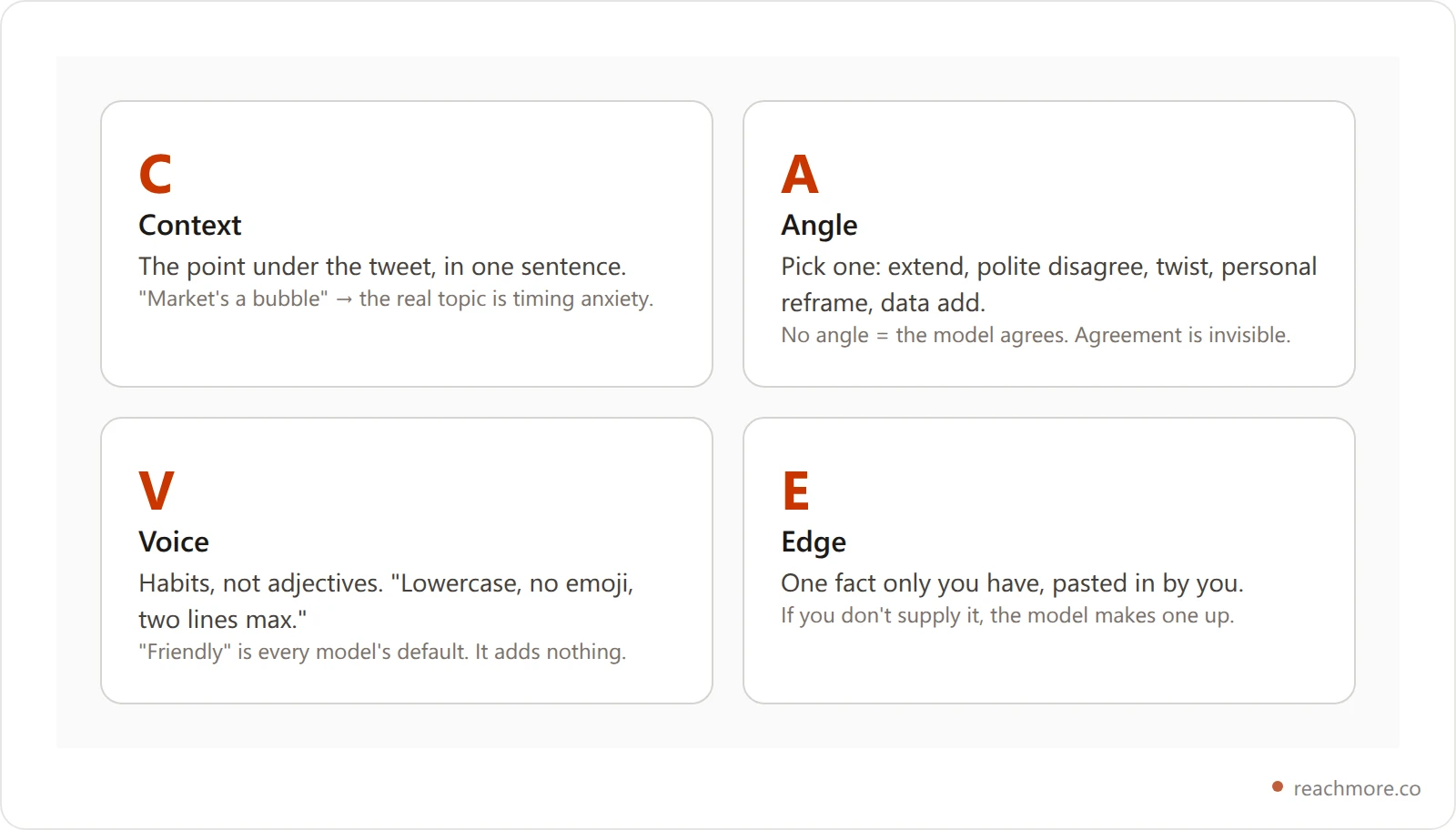
C for Context. Say what the tweet is really about. "The market is in a bubble" isn't about markets; it's about fear of bad timing. Give the model that reading so it answers the person, not the words.
A for Angle. Pick one: agree-and-extend, polite disagree, counterintuitive twist, personal reframe, or data add. Without one, models agree by default, and agreement is the reply nobody answers.
V for Voice. Describe how you write as habits a ghostwriter could copy: "writes in lowercase", "never more than two lines", "opens with the number", "no emoji". Adjectives like "authentic" or "friendly" don't change a draft; habits do. That's also the rule ReachMore's own voice builder follows (more on that below).
E for Edge. This is the one fact only you have: a number from your work, a thing you tried, a customer's words. You paste it in. If the prompt says "include a specific number" without giving one, you'll get a plausible, invented number, and a reply with a fake stat is worse than a bland one.
The base template:
Reply to this tweet:
"{paste tweet}"

Context: the underlying point is {one-sentence reading}.
Angle: {extend / polite-disagree / twist / personal / data-add}
Voice: {3 habits, e.g. lowercase, no emoji, max two sentences}
Edge: use this fact and no other: {your number, result or quote}

Rules: max 220 characters. No emoji, no hashtags, no "great point".
Do not invent numbers, names or results. If the fact above is empty, don't use one.
Return 3 options.
The "do not invent" line is the cheapest improvement you can make to any reply prompt you already use.
40 AI reply prompts for X, sorted by goal#
These AI reply prompts work in ChatGPT, Claude or Grok. Replace everything in {curly braces}, and keep the "don't invent" rule from the template at the end of each. Aim for 180–220 characters; our reply length guide explains the tiers. If you'd rather start from fixed structures than prompts, see the 30 X reply templates.
8 prompts for founders and indie hackers#
1. The build-in-public credibility add.
Reply to: "{tweet}"
You're a solo founder. Add this number from your own product: {metric + value}. Say whether it supports or complicates the tweet. Matter-of-fact, no humble brag. 180 chars max. 3 options.
2. The "I tried that" reframe.
Reply to: "{tweet}"
I tried what the tweet recommends. What happened: {your result}. Write it as one sentence of result + one sentence of lesson. Builder tone, no jargon. 200 chars max.
3. The polite counter for advice tweets.
Reply to: "{tweet}"
Disagree politely. Grant the part that's true, then name the missing variable (timing, scale, ICP or capital). End with a question the author would want to answer. 220 chars max.
4. The shipping-update piggyback.
Reply to: "{tweet}"
Last week I shipped {feature}, and {result}. Connect it to the author's point in one line. No link. Dry founder tone. 200 chars.
5. The "ICP truth" prompt.
Reply to: "{tweet}"
The author is generalizing. Add the exception for {segment} (e.g. "true for B2C, breaks for B2B over $5k ACV"). Precise, not pedantic. 180 chars.
6. The first-100-customers angle.
Reply to: "{tweet}"
Frame the reply around getting first customers. The tactic that worked for me: {tactic}. Link it to the author's point. Practical tone. 200 chars.
7. The pricing-truth prompt.
Reply to: "{tweet}"
The author is talking about growth. Add the pricing angle they're skipping, using my real price point: {price and what changed}. 200 chars.
8. The hidden-cost prompt.
Reply to: "{tweet}"
Name the cost the author isn't naming (time, focus, hiring, support load, churn risk) in one sentence, and one way to reduce it in another. Candid. 220 chars.
8 prompts for creators and ghostwriters#
9. The hook-tightener.
Reply to: "{tweet}"
You write hooks for a living. Rewrite the tweet's core idea as an opening line of 9 words or fewer, then one sentence on why it pulls harder. Editor's tone. 220 chars.
10. The "show your work" prompt.
Reply to: "{tweet}"
Share my workflow for this: {your steps}. One line of setup, then the steps in 3 short parts. No preamble. 220 chars.
11. The audience-mirror prompt.
Reply to: "{tweet}"
I write for {audience}. What they actually want is {your observation}. Say it in one specific sentence without sounding superior. 200 chars.
12. The contrarian creator angle.
Reply to: "{tweet}"
Disagree with the standard advice in the tweet. Format: "Actually, [counter]. What worked for me instead: {your tactic}." 220 chars max.
13. The story-compression prompt.
Reply to: "{tweet}"
Compress this experience into one sentence: {what happened, with the real number}. Format: moment → result → lesson. 200 chars.
14. The format-flip prompt.
Reply to: "{tweet}"
The author shared a tactic for single posts. Say how it changes for a {thread / reply / DM}, in one sentence. 200 chars.
15. The before/after stat.
Reply to: "{tweet}"
My before/after: {metric, before, after, timeframe}. Frame it as evidence for or against the author's claim. 180 chars.
16. The unpopular-opinion add.
Reply to: "{tweet}"
State an unpopular opinion next to the author's point. Specific and defensible, not edgy for its own sake. Confident, not bratty. 180 chars.
8 prompts for B2B and SaaS replies#
17. The customer-quote prompt.
Reply to: "{tweet}"
A customer told me: "{their words}". Use it to support or complicate the author's point. Keep the quote exact, no name. 220 chars.
18. The "what we tested" prompt.
Reply to: "{tweet}"
We tested this: variant {A vs B}, metric {metric}, result {number}. Format: variant → metric → result → why. 220 chars.
19. The pricing-experiment prompt.
Reply to: "{tweet}"
Our pricing change: {change}. Result: {result}. Add one caveat about when it wouldn't hold. PMM tone. 220 chars.
20. The "missing segment" prompt.
Reply to: "{tweet}"
The author's advice works for one segment and breaks for another. Name the segment it breaks for and why. GTM-specific. 200 chars.
21. The onboarding angle.
Reply to: "{tweet}"
Reframe the tweet as an onboarding problem. Suggest one concrete onboarding change that moves the metric the author cares about. 200 chars.
22. The churn-truth prompt.
Reply to: "{tweet}"
Connect the author's point to a churn lever I've seen move: {lever and what happened}. Name the direction plainly. 200 chars.
23. The sales-cycle angle.
Reply to: "{tweet}"
Say what the author's advice does to sales-cycle length or close rate. Use my figure if given ({your figure}); otherwise describe the effect without numbers. 200 chars.
24. The PLG/SLG split.
Reply to: "{tweet}"
Split the claim into "works for PLG / works for SLG / breaks for both". Pick one and defend it in one sentence. 220 chars.
8 prompts for adding value to big accounts#
25. The signal-boost question.
Reply to: "{tweet}"
Ask the author a question whose answer would help thousands of readers. Make it specific enough that the answer can't be generic. 180 chars.
26. The missing-example prompt.
Reply to: "{tweet}"
The author made a strong claim with no example. Here's one I know is real: {example}. Add it, skip the agreement. 200 chars.
27. The data-add prompt.
Reply to: "{tweet}"
Add this statistic, with its source in parentheses: {stat} ({source}). Use only this figure. If it doesn't fit the tweet, say so instead of writing a reply. 220 chars.
28. The next-step prompt.
Reply to: "{tweet}"
The author described a problem. Don't restate it. Give the most useful next step a reader could take this week. 180 chars.
29. The respectful disagree.
Reply to: "{tweet}"
Quote the one part I disagree with, name the disagreement in one sentence, and offer an alternative in one sentence. Respectful. 220 chars.
30. The synthesis prompt.
Reply to: "{tweet}"
Connect this tweet to {other idea or thread I'm pointing at}. Name the link in one sentence. Sound like a curator, not a fan. 200 chars.
31. The "what they meant" prompt.
Reply to: "{tweet}"
Restate the author's point in plainer words and add the implication most readers will miss. Thoughtful, not condescending. 200 chars.
32. The "ask me how" hook.
Reply to: "{tweet}"
Mention my result in this area: {result}. End with one short line that invites a follow-up question, without begging. 180 chars.
8 prompts for niching down and finding customers#
33. The "where do you struggle" prompt.
Reply to: "{tweet}"
I serve {ICP}, and the author is one. Ask the most specific question about their current pain, the one whose answer shows whether I could help. 200 chars.
34. The diagnostic prompt.
Reply to: "{tweet}"
Treat the tweet as a diagnosis. Reply with 3 short questions whose answers tell the author whether they need a tool, a process or a hire. 220 chars.
35. The "we build this" prompt.
Reply to: "{tweet}"
Mention lightly that I build for exactly this pain: {what you build}. No link. One sentence on the pain, one on how I think about it. 220 chars.
36. The case-study tease.
Reply to: "{tweet}"
A customer of mine had this exact problem. Outcome: {real outcome}. No name, no link. End with the takeaway. 200 chars.
37. The community call.
Reply to: "{tweet}"
Invite the author and readers to share their version of this problem. Frame it as curiosity, not lead-gen. One question. 180 chars.
38. The wrong-tool prompt.
Reply to: "{tweet}"
The author is solving the right problem with the wrong kind of tool. Name what they're using, the category to consider, and why, one sentence each. 220 chars.
39. The DM set-up.
Reply to: "{tweet}"
Give a useful one-liner and mention there's a longer answer, so a DM feels natural. No "DMs open" cliché. 200 chars.
40. The free-resource mention.
Reply to: "{tweet}"
I made {free tool/template/doc} that solves this. Describe what it does in one line. No link in the reply. 220 chars.
How a production reply pipeline assembles "your voice"#
Pasting a long prompt for every reply stops working by day two. The fix is to write the voice part once and reuse it. Here's how ReachMore does that, read from its source code, because the structure transfers to any tool.
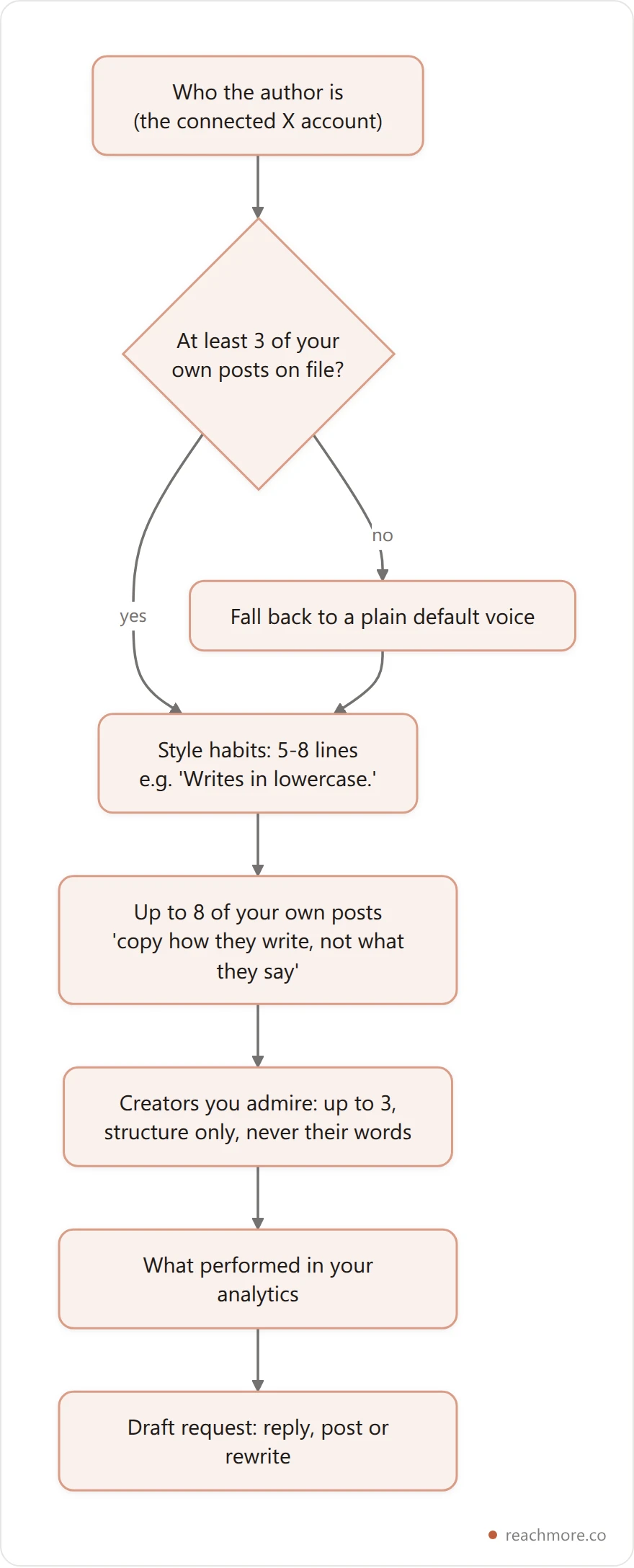
What it does, step by step:
It picks your best posts, not your latest. The builder ranks your own posts by total engagement, drops anything under 20 characters or that's only a link, removes near-duplicates, and keeps six.
It turns them into habits. One model call writes 5–8 short instructions like "Rarely more than two lines" or "Never uses emoji": capitals, length, openings, endings, slang, tone. It's told to skip praise and adjectives.
It shows the model your real posts too. Up to eight go into the prompt under the instruction to copy how you write, not what you say.
Admired creators add structure only. You can name up to three; ReachMore reads 25 of their posts, keeps 8, and borrows their shape, never their wording.
The lesson for hand-written prompts: put the habits and three of your real posts in a saved note, and paste that block as your V. Then each reply prompt only has to carry the context, the angle and the edge.
In ReachMore, building the voice profile when you connect is free, an AI draft costs 2 credits, and nothing posts on its own. Drafted replies to people who mention you wait in an approval queue where you edit, approve or dismiss each one. The reply generator breakdown walks through that pipeline end to end.
Keep five presets one paste away#
The best X reply prompts are the ones you actually reuse. A setup that takes about five minutes:
Write your voice block once: 5–8 habits plus three of your real posts.
Name five presets after goals: Builder Edge, Polite Disagree, Data Add, ICP Diagnostic, Hook Tightener.
Paste the matching prompt from above under each name in a pinned note.
Before each reply, fill in the context line and the one fact, and nothing else.
Once a week, check which preset's replies earned profile clicks in X analytics.
After about 100 replies, drop the two weakest presets and write variations of the best two.
7 prompt mistakes that flatten replies#
Asking for "a friendly reply". Every model defaults to friendly, so the instruction adds nothing. Replace it with three writing habits.
No angle. Without one, the model agrees, and a reply that only agrees gives the author nothing to answer. Remember the 75: you want the author to engage.
Asking for numbers you didn't give. "Include a specific stat" produces a fabricated stat. Supply the fact or tell the model to go without one.
One prompt for every tweet. A data-add on a personal, emotional tweet reads as tone-deaf. Match the preset to the tweet; our reply mistakes guide covers the rest.
No length cap. Without one, models drift toward the 280-character limit. Cap at 180–220.
No ban list. "Great point", "totally agree", "this is gold" and emoji strings are the fingerprints of automated replies. Ban them by name in the prompt.
Posting the first option. Ask for three and pick one. Then edit it, even if it's only one word, so it's yours.
ChatGPT vs Claude vs Grok vs ReachMore for reply prompts#
Tool | Good for | Watch out for |
|---|---|---|
ChatGPT | Long prompt engineering; saved instructions carry your voice block | Switching tabs for every reply; its default voice leaks through |
Claude | Subtle tone control and following "don't invent" rules closely | No X integration; you copy the tweet in yourself |
Grok | Lives inside X and can see the post it's replying to | Less control over voice; drafts drift generic |
ReachMore | Voice profile built from your posts, composer and scheduler, a mention approval queue, an MCP server for AI agents | A web app, not an in-feed overlay: you draft in the dashboard. Pay-per-action credits, 2 per AI draft |
A split that works for many people: a chat model for the occasional long, context-heavy reply, and a tool with a stored voice for the everyday drafts. For more on the tool choice, see our comparison of AI reply tools.
Measure prompts by what they earn#
A prompt library without feedback turns into superstition. Track four numbers per preset:
Reply impressions, weekly, against your own reply baseline.
Profile visits from replies. This is the step between a reply and a follow.
Follows per 100 replies. If visits are fine but follows are low, the problem is your bio or pinned post, not the prompt.
Author responses. Count how often the original poster answers you. By the published weights, that's the action that counts most.
Tag each reply with its preset name in a spreadsheet, or in ReachMore's insights if you draft there.
Frequently Asked Questions#
What's the best AI reply prompt for X?#
One with four parts: the tweet's underlying point, a named angle, your writing habits, and one fact you supply. The C.A.V.E. template above has all four, plus a "don't invent" rule so the model can't fill gaps with made-up numbers.
Can ChatGPT write replies that don't sound like AI?#
Closer, with constraints. Describe your voice as habits rather than adjectives, paste three of your real posts, ban clichés and emoji by name, cap the length, and edit the option you pick. The guide to making AI replies sound human goes deeper.
Is using AI reply prompts on X against the rules?#
X's rules target spam and platform manipulation: automated replies to people who didn't ask, identical replies at volume, fake accounts. Drafting a reply with AI and then reading, editing and posting it yourself is writing help. The risk comes from volume and sameness, and from software that sends replies without you.
How many AI-assisted replies a day is too many?#
There's no published threshold, so be wary of anyone quoting one. The better limit is quality: if you can't read and edit each reply before it goes out, you're sending too many. See the discussion of reply volume and growth.
What's a saved reply preset?#
A reusable prompt that fixes the angle and tone for one kind of tweet, so you only fill in the context and your one fact. Keep four to six. In ReachMore, the voice part comes from your stored voice profile, so a preset only needs the angle and the edge.
Should I use the same prompt for every reply?#
No. Keep presets for the kinds of tweets you answer most (advice, build-in-public, contrarian takes, founder stories, customer pain) and pick one per tweet.
Can replies replace original posting?#
For small accounts they can carry most of the growth, because a good reply borrows a bigger account's audience. You still need a profile and pinned post that convert the visits. See growing on X without posting.
Key takeaways#
The prompt is four parts: Context, Angle, Voice, Edge. Skip the angle and the model agrees; skip the edge and it invents one.
Describe your voice as habits and paste real posts. "Writes in lowercase" changes a draft; "authentic" doesn't. That's how production voice builders work too.
Aim for the reply the author answers. In X's published 2023 weights, that's worth 75 against 0.5 for a like, while reports and mutes cost you.
Want the voice half stored so each prompt stays short? ReachMore builds a voice profile from your posts when you connect, drafts for 2 credits each, and holds every mention reply for your approval. Credits are one-time top-ups that never expire, charged only when an action succeeds. Try ReachMore →