
The fastest way to grow on X in 2026 isn't posting more. It's replying to the people who reply to you. When you respond to a comment on your own post, X's ranking code fires a +75 "author-replies-back" signal — 150 times the weight of a single like. Answer every commenter in the first 30 minutes and you can double a post's reach before a stranger ever sees it.
Most creators treat their reply notifications like a to-do list they'll "get to later." They post, they wait, they refresh their likes. Meanwhile the one lever that actually compounds — replying to comments on X — sits untouched.
Here's the shift. In January 2026, X re-released its recommendation algorithm as open source, and the engagement weights are no longer a mystery. Likes barely move the needle. Conversations move everything. A post with four replies you answer beats a post with 100 silent likes.
This guide breaks down the exact system — the Reply-Back Loop — for turning your own comment section into a reach engine. You'll get the algorithm math, copy-paste openers, a real before-and-after, and a way to keep up when the replies pile in.
Why replying to comments on X beats posting more#
Replying to comments on X is the highest-leverage growth move you have, because the 2026 algorithm rewards conversation depth above every other signal. When X open-sourced its ranking code, creators finally saw the raw numbers instead of guessing.
A like is worth about 0.5. A repost is worth roughly 1. A reply is worth about 13.5 — 27 times a like. And when you, the author, reply back to a commenter, the system adds a +75 signal, which is 150 times a like.
That last number is the whole game. Every reply-back tells X "this post is sparking real conversation," which extends how long the post stays in circulation and how far it travels into the For You feed.

Action on your post | Approx. algorithm weight | vs. a like |
|---|---|---|
Like | 0.5 | 1× |
Repost | 1 | 2× |
Reply | 13.5 | 27× |
You reply back to a commenter | 75 | 150× |
Source: X's open-sourced recommendation algorithm (2023 release, confirmed in the January 2026 update).
The takeaway is blunt: chasing likes is the slowest way to grow on X. One reply chain you actually finish outweighs hundreds of hearts — and in most cases beats a quote tweet, too.
The Reply-Back Loop: your comment section as a reach engine#
The Reply-Back Loop is a four-step system that turns each comment into more reach, which brings more comments — a cycle that keeps your post alive for hours instead of minutes. It's the opposite of "post and pray."
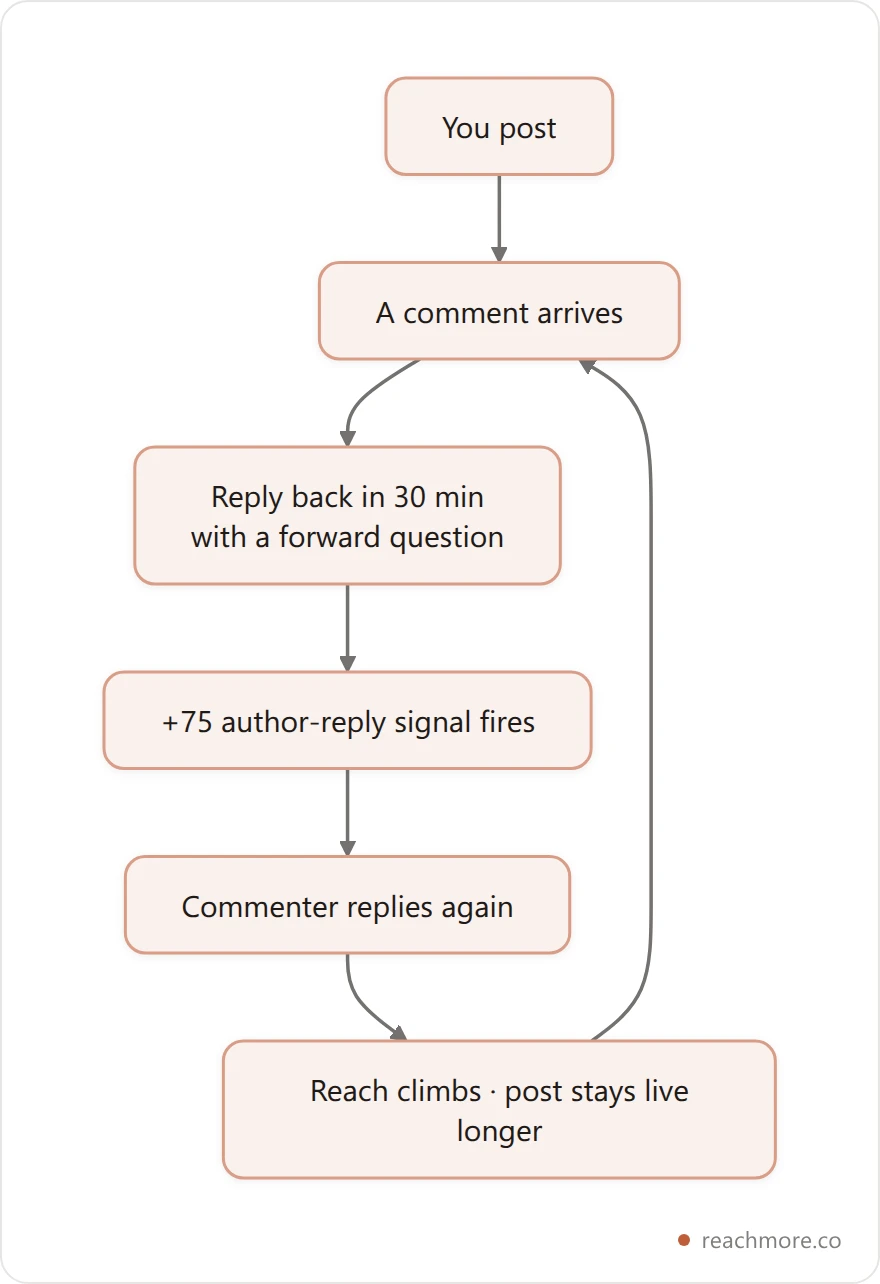
Read the loop out loud: a comment lands, you reply back within 30 minutes with a question that invites another reply, the +75 signal fires, and the commenter answers again. The post's reach climbs and stays live longer, pulling in new commenters — who you also reply to.
Miss the loop and your post peaks in an hour. Run it well and a single post feeds you profile visits and follows for a full day. Everything below is how to run each step — and it pairs with a wider X reply strategy for the replies you leave on other people's posts.
Step 1: Catch every comment in the first 30 minutes#
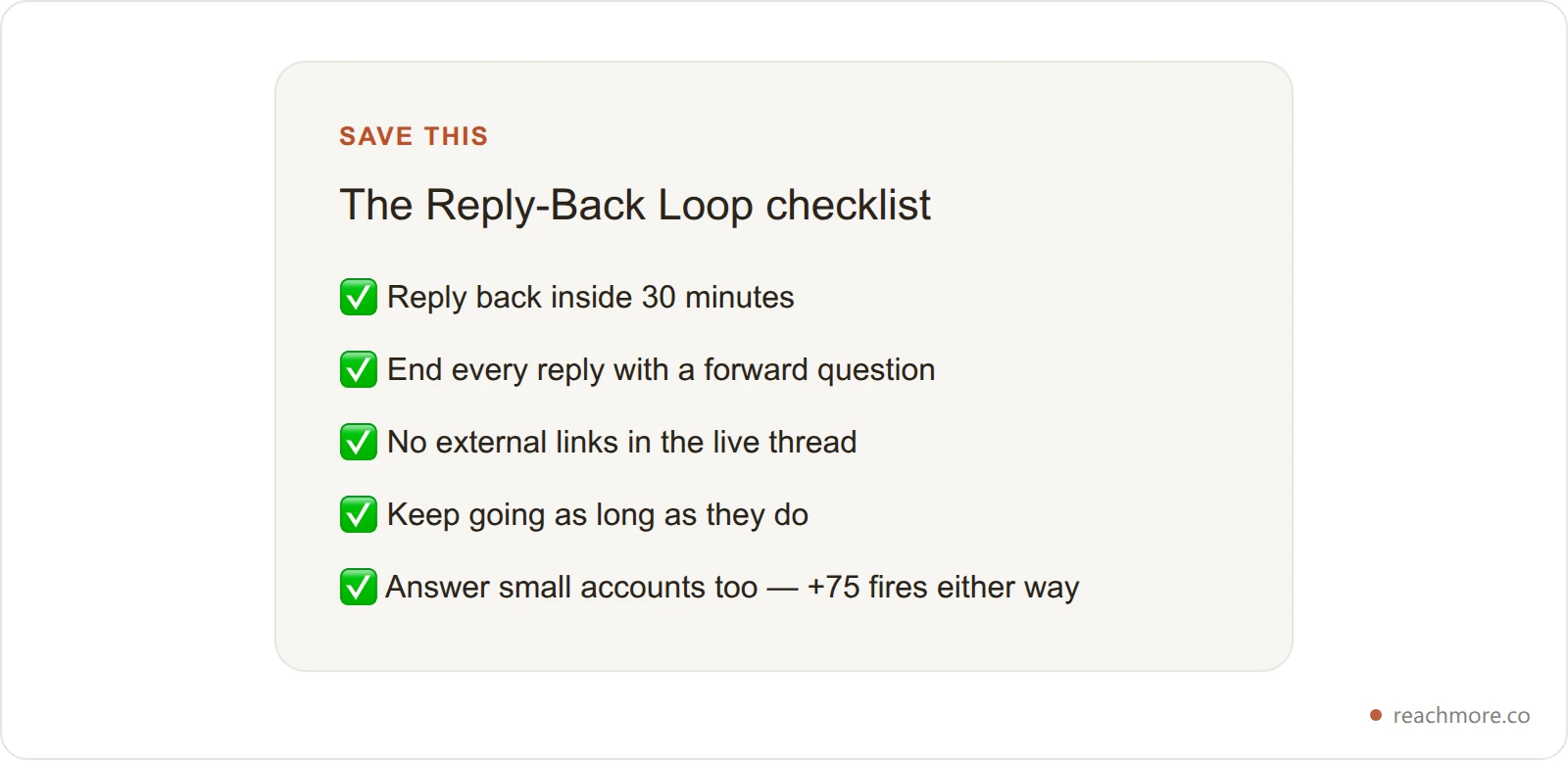
Speed is the whole loop — reply to comments within 30 minutes of posting, because early engagement velocity is X's strongest ranking signal. The platform watches the first 30 to 60 minutes of a post closely. Replies that land in that window carry the most weight; the same reply three hours later barely registers.
So the moment you post, stay at your desk. Two habits make this automatic:
Post when you can sit with it. Don't publish and walk away. The best posting windows on X — Tuesday to Thursday, roughly 9–11 a.m. — pull the most eyes, but only if you're there to answer. Sprout Social's dataset of 2.7 billion engagements and Hootsuite's analysis of over 1 million posts both land on that mid-morning weekday window.
Filter your notifications to replies and mentions. A comment can't slip past you in the crucial first half hour if it's the only thing lighting up your phone.
If comments aren't landing at all yet, the fix is earlier in the funnel — start with getting more replies in the first place, then run the loop on the ones you earn.
Step 2: Reply back with a forward question, not "thanks"#
A reply-back only fires the loop if it earns another reply — so end with a forward question instead of a dead-end "thank you." "Thanks!" and a like feel polite, but they stop the thread cold. The commenter has nothing to answer, and the +75 signal never repeats.
Compare the two:
Dead end: "Great point, thanks for reading!"
Forward: "Great point — did that work better for you on short posts or on threads?"
The second one almost forces a reply, and every reply resets the loop. The move is simple: add something first — a detail, an example, a mild disagreement — then hand back a question.
Reply-back type | What it does | Use when |
|---|---|---|
The follow-up question | Restarts the loop | Almost always |
The "yes, and" add | Shows expertise, invites more | A commenter agrees with you |
The friendly challenge | Sparks debate and more replies | You spot a gap in their take |
The specific compliment + question | Builds a real relationship | A bigger account replies |
Pick the type that fits the comment, but always leave a door open. A thread that ends is a loop that died.
Step 3: Keep the thread alive without killing your reach#
Keep replying as long as commenters do — but don't drop external links into the thread, because off-platform links can cut a post's reach by 50–90%. The loop rewards depth. If a commenter replies three times, reply back three times. Each round re-fires the signal, and the accounts that grow are the ones still answering an hour after everyone else quit.
One trap swallows this whole strategy: links. Elon Musk has publicly confirmed that posts sending people off X often see reach cut by half or more, and that penalty reaches into replies too. Drop your Substack link mid-conversation and you can throttle the exact post you just worked to lift.
If you must share a link, wait until the conversation has peaked, then put it in a reply to your own post — a tactic covered in replying to your own tweets. Keep the live thread link-free and let the conversation do the ranking.

8 reply-back openers you can copy#
Steal these openers to reply to comments on X in seconds — each one is built to earn another reply. Paste one, tailor the specifics to the comment, and you've turned a 5-second "thanks" into a loop that ranks.
"Totally — and the part most people miss is ___. Have you run into that?"
"Good push-back. What would change your mind here?"
"Yes, and I'd go one further: ___. Does that match what you've seen?"
"Curious how you're handling ___ on your side?"
"That's the exact thing I wrestled with. What did you try first?"
"Fair point. Where do you think the line actually is?"
"Love this. What made you start doing it that way?"
"100%. What's the one thing you'd add?"
If typing eight tailored replies inside a 30-minute window sounds like a lot, that's exactly where a tool earns its keep. ReachMore's Chrome extension drafts a reply-back in your voice right inside X, so you can clear a full comment section before the window closes and still sound like you — you approve and send every one. Install ReachMore for Chrome →
The Reply-Back Loop in action: a 320-follower example#
Here's the loop turning a small post into a full day of reach — with the numbers. Picture a 320-follower indie hacker, call her Maya, posting a build-in-public update at 9:10 a.m. on a Wednesday. Six comments land in the first 20 minutes.
Before — what most people do: She likes all six, replies "thanks!" to two of them, and closes the app. The post peaks around 1,800 impressions and three profile visits by lunch, then flatlines.
After — the Reply-Back Loop: She replies back to all six inside the window, each with a forward question. Four commenters answer again; she answers those too. The +75 author-reply signal fires nine times across the morning. By evening the post has roughly 9,400 impressions, 11 profile visits, and three new follows — from the same six comments.
Same post. Same follower count. The only variable was finishing the conversations instead of ending them. Now scale that across a week of posts and the compounding is the growth curve — the same compounding reach loop that turns small accounts into mid-size ones. The numbers above are illustrative, but the mechanics are straight from the weights: nine reply-backs at +75 simply outrank a fistful of likes.
How to reply to comments at scale without becoming a bot#
You scale the Reply-Back Loop by speeding up drafting and keeping a human on every send — never by automating stranger replies. The wrong way is a bot that auto-replies to everyone. X's 2026 systems are tuned to detect and deboost that, and it torches the trust that makes replies work in the first place.
Justin Welsh, who grew from zero to 200,000 X followers in a year, credits plain relationship-building — replying to comments and engaging with similar-sized accounts — over any automation. As he puts it in his growth breakdown, consistent engagement with real people is the engine.
So the goal isn't to remove yourself — it's to cut the seconds each thoughtful reply takes. ReachMore is built around that line: its mention approval queue drafts a reply-back to each commenter and waits for you to approve or edit before anything sends. No cold outreach, no stranger auto-replies — just your own comment section, handled faster. That's the difference between reply-guy spam and a real conversation you happened to run at speed.
The creators who win in 2026 aren't the ones automating the most. They're the ones finishing the most conversations. Turn your comments into reach →
Reply-back mistakes that quietly cap your reach#
Most stalled comment sections come down to a handful of fixable mistakes. Clear these and the loop starts running on its own:
Waiting hours to reply. The 30-minute window is where the weight lives. Late replies barely count.
Ending with "thanks." No question means no next reply, which means no loop.
Only liking replies. A like is worth 0.5; a reply-back is worth 75. Type the reply.
Dropping links mid-thread. That's a reach penalty of up to 90% on the post you're trying to lift.
Copy-pasting the identical reply. X flags repetition, and commenters feel the copy-paste instantly.
Ignoring small accounts. A 40-follower commenter still fires the +75 signal — and often becomes your most loyal follower.
If your replies are stalling out no matter what you do, the distribution problem may sit deeper. Start with why your X replies get no views, then bring the fixed replies back into the loop.
Frequently Asked Questions#
Does replying to comments on X actually help you grow?#
Yes. Replying to your commenters is one of the highest-weighted actions in X's 2026 algorithm. When you reply back to a comment, the system adds a +75 signal — 150 times the weight of a like. That tells X your post is driving real conversation, so it extends the post's reach and keeps it live longer, which brings more profile visits and follows.
How fast should I reply to comments on X?#
Reply within 30 minutes of posting whenever possible. X weighs early engagement velocity more than any other signal, so a reply-back in the first half hour counts far more than the same reply three hours later. The practical rule: don't publish a post unless you can sit with it and answer comments as they come in during that opening window.
Should I reply to every comment or just some?#
Reply to every comment you genuinely can, including from small accounts. Each reply-back fires the +75 signal regardless of the commenter's follower count, so a 40-follower reply is worth just as much algorithmically as one from a big name. Prioritize by speed and by which comments give you a natural forward question to keep the thread alive.
Do replies really count more than likes on X?#
By a wide margin. In X's open-sourced ranking code, a like is worth roughly 0.5, a reply about 13.5 (27 times a like), and an author replying back to a commenter about 75. A post with four replies you answer can outrank a post with 100 silent likes. Likes are a vanity number; replies are the ranking number.
Will replying to my own commenters look desperate?#
No — it reads as attentive, not needy. People feel seen when a creator answers them, and that goodwill is how followers and relationships form. The only version that looks desperate is copy-pasted, generic, or clearly automated replies. Add a real detail and a genuine question, and replying to your comment section looks like exactly what it is: good manners that also happen to rank.
Can I automate replying to comments on X?#
You can speed up drafting, but you should keep a human approving every send. Fully automated replies to everyone get detected and deboosted in 2026, and they break the trust replies depend on. Tools like ReachMore draft a reply-back in your voice and hold it in an approval queue until you send it, so you move faster without slipping into bot territory or breaking X's rules.
What should I say when I reply to a comment?#
Add something, then ask something. Lead with a detail, example, or mild disagreement so your reply carries value, then close with a forward question that invites another reply. Skip dead-end phrases like "thanks for reading." A line as simple as "Good point — did that work better for you on short posts or threads?" restarts the loop and re-fires the +75 signal.
The bottom line#
Growing on X in 2026 rewards the person who finishes conversations, not the one who posts the most. Three things to take with you:
Replies outrank everything. A reply-back is worth about 75 to the algorithm versus 0.5 for a like — 150 times the weight. One finished conversation beats a hundred hearts.
Speed is the loop. Reply to comments within 30 minutes, end each one with a forward question, and keep the live thread link-free to protect your reach.
Scale with a human in the loop. Draft faster, approve every send, and never hand your comment section to a bot.
Run the Reply-Back Loop on every post for two weeks and watch your profile visits climb from the same posts you were already making. Want to turn every reply into reach? Install ReachMore for Chrome →