

Every "best time to post on Twitter" article you've read is a chart of somebody else's audience. Sprout analyzed millions of posts. Buffer analyzed a million more. Both are real research, and neither one has ever seen your followers.
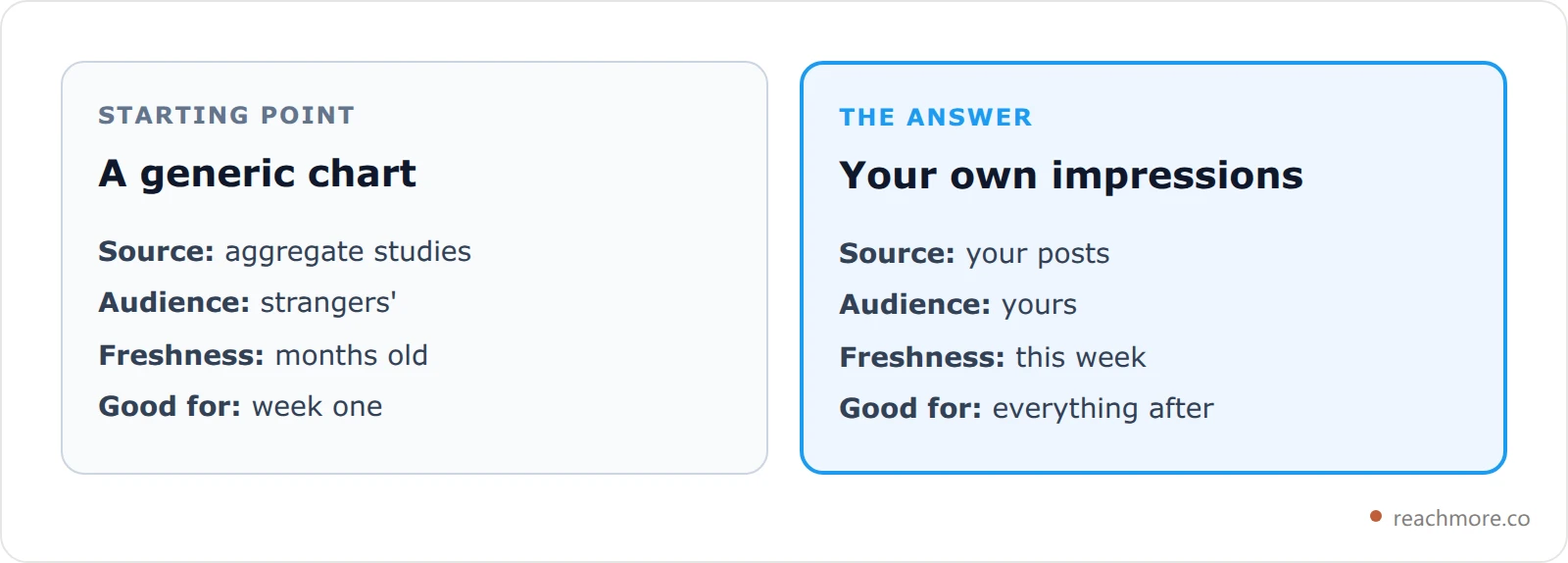
The short version: for most English-speaking audiences, the strongest windows are weekday mornings around 8–10 AM, a lunch spike at 12–1 PM, and an evening shoulder near 5–8 PM in your audience's local time — with Tuesday through Thursday beating Monday, Friday, and weekends. That's the starting point. Your own data replaces it within about two weeks.
Most advice on when to post on Twitter stops right there. This post does something the other guides don't: it shows you the actual numbers behind a posting heatmap, explains the timezone math that makes those numbers move, and names the one situation where "best time" advice stops working entirely.
One naming note before the numbers: Twitter is X now, so "best time to post on X" and "best time to post on Twitter" are the same question. The activity curves below don't care what the app is called.
What's in this guide
The 9 windows that actually work
Where the numbers come from
Why Tuesday and Wednesday win
The global-audience trap
Weekends are flatter, not dead
Finding your real best time in two weeks
Making sure the window actually fires
The 9 Windows That Actually Work#
These are the nine highest-scoring hours in ReachMore's free Best Time to Post planner, for a single-region audience. The score is relative: 1.00 is the strongest hour of the week, and everything else is a fraction of it.
# | Window (audience local time) | Score | Band |
|---|---|---|---|
1 | Tuesday 9–10 AM | 1.00 | Prime |
2 | Wednesday 9–10 AM | 1.00 | Prime |
3 | Thursday 9–10 AM | 0.96 | Prime |
4 | Monday 9–10 AM | 0.92 | Prime |
5 | Tuesday 12–1 PM | 0.92 | Prime |
6 | Wednesday 12–1 PM | 0.92 | Prime |
7 | Tuesday 8–9 AM | 0.90 | Prime |
8 | Thursday 12–1 PM | 0.88 | Prime |
9 | Friday 9–10 AM | 0.85 | Prime |
Two things to notice. First, the top of the list is almost entirely 9 AM — the morning peak dominates so completely that a mid-tier day at 9 AM still beats a great day at 6 PM. Second, the whole table lives inside a four-day stretch. Friday barely makes it, and no weekend hour appears at all.
The planner itself only ever shows you three windows, and it deliberately spreads them: a maximum of two per day, and at least three hours apart. Nine consecutive suggestions in the same morning would be useless advice.
Where the Numbers Come From#
Most timing guides hand you a conclusion. Here's the actual curve.
Activity is modeled hour by hour in the audience's local time, on a 0–1 scale. Weekdays look like this:

Read it as a day in a life. Nothing happens until about 5 AM. The commute lifts it hard from 0.35 at 6 AM to a full 1.0 by 9. There's a dip while people actually work (0.72 at 11 AM), a sharp lunch recovery to 0.92, an afternoon trough at 3 PM (0.52), then an evening shoulder that tops out at 0.78 around 6 PM before falling off a cliff after 9.
The dead zone is genuinely dead: between 1 AM and 3 AM the value is 0.02, roughly a fiftieth of the 9 AM peak. If you're posting at 2 AM because that's when you finish work, you are giving away almost the entire post.
Tuesday and Wednesday Win by Design#
Hour-of-day is only half the score. Each day carries a multiplier that scales the whole curve:

Tuesday and Wednesday are the reference at 1.0. Thursday gives up 4%. Monday costs you 8% — people are digging out of the weekend. Friday drops to 0.85 as attention drifts toward the evening.
Then the interesting one: Saturday (0.70) is worse than Sunday (0.76). That runs against the instinct that the weekend is one undifferentiated slump. Saturday is the day people are genuinely out; Sunday evening is when they come back to the timeline and start bracing for Monday.
A final score is just the two multiplied together. Wednesday at 9 AM is 1.0 × 1.0 = 1.00. Saturday at 9 AM is 0.70 × 0.68 = 0.48 on the weekend curve — under half. Same hour, less than half the opportunity.
The Trap: A Global Audience Has No Prime Time#
This is the part no timing guide tells you, and it's the one that matters most if you're growing internationally.
When you select multiple audience regions, the planner converts each region's local curve into your clock and then averages them — it doesn't add them up. That single design choice has a consequence most people get backwards.
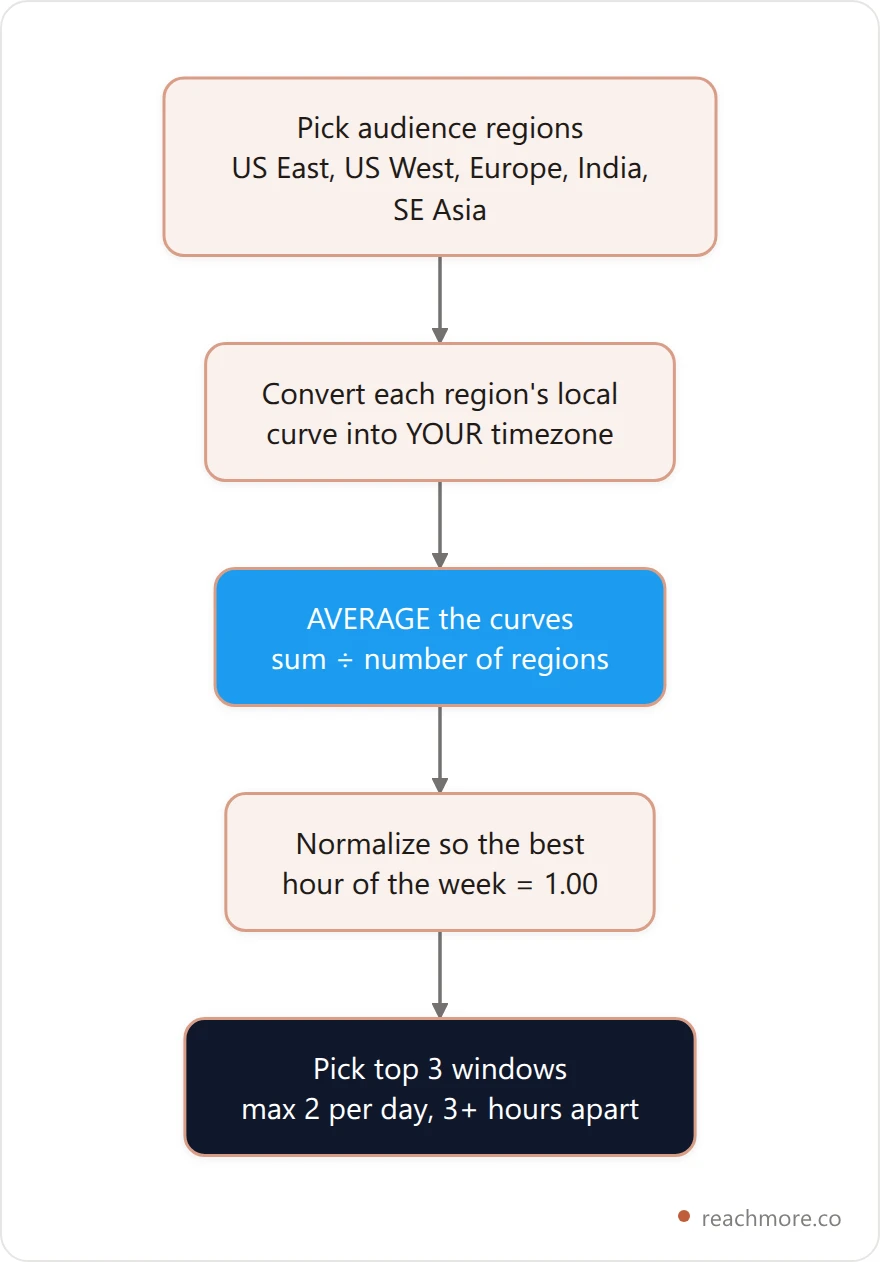
Averaging means a second region can only pull an hour's score toward the middle. When New York is at its 9 AM peak of 1.0, Singapore is asleep at roughly 0.02. Average them and that hour scores about 0.51 — it falls from Prime all the way to Fair.
Add enough regions and every hour converges on the same lukewarm number. The heatmap goes flat. That isn't a bug in the tool; it's an honest picture of reality. A truly global audience has no best time to post, because there is no hour when most of them are awake at once.
So the practical rule is the opposite of what it feels like. If your followers are spread across continents, don't hunt for the one magic slot — there isn't one. Either pick your single most valuable region and optimize hard for it, or accept flat timing and compete on frequency and quality instead. The posting cadence that actually works on X matters far more than clock precision once your audience is scattered.
Weekends Are Flatter, Not Dead#
Compare the two curves directly and the difference isn't what most people assume:

The weekend peak is 0.72 at 10 AM — later and lower than the weekday's 1.0 at 9 AM. But look at the afternoon. At 3 PM the weekday sags to 0.52 while the weekend holds 0.42, and by 4 PM the weekend has actually caught up (0.46 each). The weekend curve is a broad plateau, not a spike.
That changes what weekends are for. You won't win a weekend with one perfectly timed post, because there's no peak to hit. You can win one with presence — replying across a wide window while everyone else has queued up and walked away. It's the same logic behind when to reply on X: being early to a conversation beats being loud in it.
How to Find Your Real Best Time in Two Weeks#
Heuristics are a starting point, not an answer. Here's how to replace them with your own numbers:
Post at a fixed time for one week. Same hour daily. This is your baseline — without it you can't attribute anything.
Shift by four hours the next week. Not one hour. The noise between individual posts is larger than a one-hour difference, so a small shift tells you nothing.
Compare medians, not averages. One post that took off will drag an average anywhere. The median is what your typical post actually does.
Discard your top and bottom result. Two weeks is 14 data points. One viral hit and one dud will otherwise decide your entire schedule.
Check impressions, not likes. Likes measure whether people enjoyed the post. Impressions measure whether the timing put it in front of anyone — which is the only thing you're testing.
Give it two weeks and the answer is usually blunt: either one window clearly wins, or nothing separates them and timing simply isn't your bottleneck. Both outcomes are worth knowing. If you want the full metric set, these 14 X metrics predict growth better than raw follower count does.
Try the free Best Time to Post planner — pick your audience regions and it converts the whole heatmap into your local clock. No signup.
Timing Is Worthless If the Post Can't Fire#
Here's the failure mode nobody plans for: you identify a perfect 9 AM Tuesday window, and then you're in a meeting at 9 AM Tuesday. Timing research is only as good as the queue that executes it.
A few mechanics worth knowing about ReachMore's scheduler specifically:
Scheduling is free. You're only charged when a post actually publishes — 15 credits for a normal post. Queue a month, delete half of it, pay nothing for the half you deleted.
A post with a link costs 200 credits, because it maps to a different X API tier. Link posts are expensive and generally reach less, which is why how you post links on X is worth getting right.
Batch-scheduling has a floor. Outbound actions are paced at a minimum of 5 seconds apart, capped at 15 posts per 15-minute window and 50 per day. You cannot dump 40 posts into one 9 AM slot, and you shouldn't want to — that's what bot detection looks for.
The caps are the real lesson. If your research says 9 AM Tuesday is worth 1.00 and 6 PM Tuesday is worth 0.78, the answer isn't to cram both full. It's to put your best single post in the peak and let the shoulder carry the rest. For the mechanics of what happens between queue and publish, see what actually happens when you schedule tweets.
What the Big Studies Actually Agree On#
Three independent datasets, three slightly different answers — and that disagreement is the useful part:
Sprout Social lands on weekday mornings, roughly 9 AM to noon, with midweek strongest.
Buffer reports a similar morning concentration across a large sample of posts.
SocialPilot points at weekday mid-mornings from a separate 50K+ post dataset.
Published Twitter posting times converge on "weekday mornings, midweek" and diverge on the details. That's exactly what you'd expect from three different mixes of accounts — and it's the strongest possible argument for treating any published chart as a hypothesis rather than a schedule. The convergence is real signal. The precision is not.
One mechanical note if you're building your own timing tool: browsers convert between zones with Intl.DateTimeFormat, which handles daylight saving transitions for you. Hard-coding a UTC offset will silently break your schedule twice a year.
Frequently Asked Questions#
What is the single best time to post on Twitter?#
For a US or European audience, Tuesday or Wednesday between 9 and 10 AM in your audience's local time scores highest. Noon is a close second. But this is a heuristic starting point — once you have two weeks of your own impressions data, your account's real peak beats any published chart.
Should I post in my timezone or my audience's?#
Your audience's, always. Activity curves are driven by when people commute, eat lunch, and finish work — all local behavior. If you're in London writing for Americans, your 2 PM is their 9 AM peak. Convert first, then schedule.
Is it bad to post on weekends?#
No, it's just different. Weekend activity peaks at roughly 0.72 versus a weekday 1.0, and it peaks an hour later at 10 AM. The curve is a flat plateau rather than a spike, so weekends reward sustained presence and replies over one perfectly timed post. Sunday slightly outperforms Saturday.
Does posting time still matter if my followers are global?#
Much less, and that's the honest answer. Averaging activity across distant regions flattens every hour toward the middle, so no window stands out. With a genuinely global audience, either optimize for your single most valuable region or stop optimizing timing and compete on frequency and quality instead.
How many posts should I schedule in one window?#
One good one. Outbound posting is paced at a minimum of 5 seconds between actions, capped at 15 per 15-minute window and 50 per day — but the practical limit is lower. Stacking posts into a single peak splits your own audience's attention and reads as automated behavior.
How long until I can trust my own timing data?#
About two weeks of consistent posting, comparing medians rather than averages and discarding your best and worst result. Fewer than 10 data points per window and you're reading noise.
The Takeaway#
Start at weekday mornings, 8–10 AM, Tuesday through Thursday, in your audience's local time. That's the best available guess and it will not embarrass you.
We pulled the curve numbers in this guide straight out of the planner we ship rather than citing a chart we can't inspect — as of September 2026, those are the exact values it scores against.
Then stop guessing. Two weeks of consistent posting and your own impressions will tell you something no aggregate study can: whether timing is actually your bottleneck, or whether you've been optimizing the clock while the real problem was the post.
Stop guessing at the clock
Plan your week against a real activity heatmap, then queue the posts so the window never passes you by. Scheduling is free — you only spend credits when a post actually publishes.
Start with ReachMore

